“What’s the use of writing a great blog post that never makes it to page one of Google?”
This was the question Ruth asked me around 2022 and this question shaped how I approach every piece of content I write. It is this same question that is behind this post.
Bloggers who grow without paid ads aren’t getting lucky. They’re following repeatable SEO writing tips and process and they haven’t gotten less important just because AI now summarizes answers directly in search results. If anything, it matters more.
This is because, when a searcher already has a quick answer from an AI Overview before they’ve scrolled past the fold, your content has to earn the click, not just rank for it.
I’ve used some version of this process on every post I’ve written since I started with SARMLife, and I’ve adjusted it every time Google’s algorithm or reader behaviour has shifted under it.
What you’re reading now is the SEO tips I use and teach for writing blog content that ranks and gets clicked, updated for how search actually works in 2026.
What is a blog post?
A blog post is a single piece of published content on a blog site accessible via the World Wide Web. The content is majorly written content that may or may not be supported with images (images are a MUST for optimization, though)
For instance, what you are currently reading is referred to as a blog post.
Simply put, SEO (Search Engine Optimization) writing is creating and writing content that’s structured and worded so search engines can understand it and people actually want to click on it.
It’s a balancing act between the algorithm and the human reader and the posts that rank highest are the ones that satisfy both at once instead of favoring one over the other
Hubspot defines SEO writing as writing content to rank on the first page of search engines such as Google.
Optimizing starts with the content creation process, from the topic ideas to the writing and the images; the content is deliberately created and organized to ensure it fits the baseline requirements of search engine optimization and even goes beyond it.
It’s worth separating SEO writing from SEO strategy. Strategy is the bigger picture and includes site architecture, backlinks, technical health, among others.
SEO writing happens at the page level: the words, structure, and formatting decisions that determine whether a piece of content earns a place on page one.
A technically flawless site can still lose to a weaker-authority competitor with a better-written post, because Google rewards content that answers the query better.
Another important fact to note is that SEO writing starts before you type a single sentence. It starts with your topic selection, your audience research, and your keyword research and it doesn’t end until you’ve added alt text to your last image and double-checked your internal links.
This is what ultimately differentiates SEO writing from the basic content/blog writing.
Features of an optimized blog post
The features of an optimized blog post are pretty direct but also easy to miss, especially when you are batch-creating content. We created an SEO blog post guideline to ensure you don’t miss anything while creating optimized content for your website or clients.
For you to write what counts as an optimized blog post, it needs to have these features:
Some writers can be a little lax about what they put in their introductions.
After deciding to click, your introduction is the first impression a reader will have of your post and writing style. They decide whether to keep reading within the first few lines, even before they’ve consciously registered the decision.
Tell them plainly and sincerely what they’ll get from the post. Think of it as the abstract of a research paper (a concise summary of the main work).
There are different types of introductions you can use for your blog posts, as explained in one of our Instagram posts.
· An organized, paragraphed layout
Did you know that long paragraphs reduce readability?
Research has discovered that most readers scan the whole post before deciding if it is read-worthy or not.
Long, unbroken paragraphs are one of the fastest ways to lose a scanning reader. Break your ideas into 2–3 sentence chunks, and use subheadings generously enough that someone could understand your post’s structure and flow from the headers alone.
If your blog posts contain long paragraphs, more than half of your readers will bounce out and not likely return.
· Genuinely useful and well-researched content
Length has stopped being a reliable advantage years ago.
What matters most now is whether your content actually answers the reader’s question more completely, more clearly, or more usefully than what’s already ranking.
This is where good research comes in.
You need to identify the pain points of your target audience and give them content that is beneficial to them. Your content should also contain verified facts and visual engagements.
· Links to authority websites
You might think that having an external link in your blog post will make you lose originality, but this couldn’t be more wrong.
Citing credible sources when you reference data, statistics, or claims builds trust with readers and signals credibility to search engines. If readers are able to trust your sources, they will also be able to trust your advice when it comes.
This not only makes your content rankable, it is also good for your overall SEO?
Not sure your current content hits all five? Our SEO consulting service includes a full content audit against this checklist.
Many writers have been stuck with SEO writing, or as some people call it, SEO blog writing and the frustration can make you question your writing skills. Maybe you own a website, or you hope to take your SEO content writing game to the next level as a freelancer to land high-paying clients.
Whichever class you belong to, I’m here to guide you step by step and show you how to write a compelling, fully optimized blog post.
These SEO writing tips might seem like a lot, but it is achievable and gets easier to implement with consistent practice.
The SEO writing tips for higher ranking:
Identify your audience
Know your content bucket
Come up with topic ideas
Optimize the topic ideas
Research the topic ideas
Research keywords
Research content around the keywords
Create your headline
Create your SEO outline
Write your content
Insert visual content
Since SEO writing skills go beyond just blog writing, most of what makes your blog posts optimized is the research you put into it before typing away at your keypads, just like I’m doing right now.
If you check out our blog post on 12 Ways to make money blogging, I wrote there that one of the most significant milestones that any blogger can cross is the ability to recognize and know their target audience.
Why is this important?
Your target audience is the one interested in your content and will want to click open that blog post because it addresses either their curiosity, fears, or pains. If you don’t know your target audience, you cannot create content relevant to a specific group of people.
You end up with no niche and no audience.
Here’s what to do:
Map their pain points, fears, and curiosities — what they’re trying to solve.
Read what competitors are already publishing to see which angles are saturated and which are underserved.
Check commonly searched terms using free tools like Google’s “People also ask” boxes and autocomplete.
Talk to real people in that niche directly — DMs, surveys, and comments surface language you’ll want later for keyword research.
· Know your content bucket.
A content bucket is a segment of the entire content you want to relay to your audience. Each content bucket should address various aspects of your business while also reflecting your overall message as a brand/business.
Content buckets are vital because they help you narrow down your ideas and distribute content across your audience.
List 3–5 buckets that together represent your full brand message (for an SEO agency, that might be content writing, keyword strategy, technical SEO, and local SEO).
Make sure each bucket maps to a stage of your reader’s journey — some buckets should target beginners, others should target people ready to hire help.
Avoid overlapping buckets that will compete with each other for the same keywords once you start publishing.
When you want to write a blog post, you select a content bucket and find topic ideas around it.
For example, if you are a fashion blogger, your content bucket might include accessories, dresses, color combinations, or even make-up. If you want to write a blog post, you can find out pain point around accessories for beginners, and experts alike.
This particular process might not need you to go online because you can develop topic ideas based on your experience, expertise, and interactions with people. Otherwise, you can check other similar websites and get inspiration from their content; it is entirely legal.
I recently wrote some ideas for a friend in a different niche from mine. At first, I had no idea what topics were good and not-so-good, but I ended up checking other blogs in the same niche as hers. The summary is that the content was created while also maintaining originality.
If your content bucket of choice as a relationship expert is breakups, you might think of topic ideas like:
Why new couples breakup
How to avoid a breakup
How to maintain long-distance relationships
What ladies/men do after a terrible breakup
Mind you, these are JUST ideas and have not been verified yet.
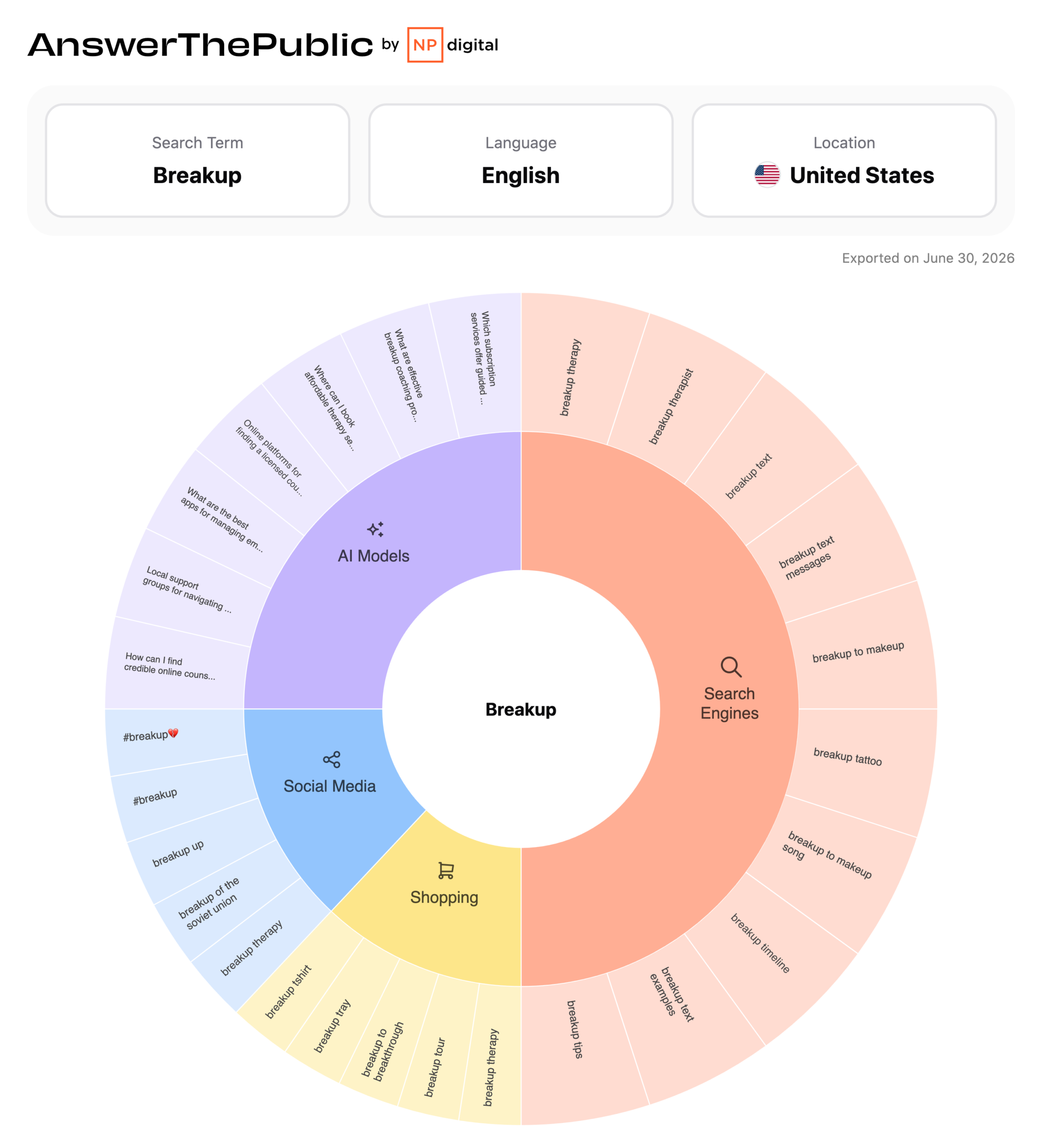
For search engine optimization, you want to ensure your topic ideas are relevant to people’s interests. This is where you can use tools like answerthepublic.
This tool gives you a compilation of all the questions people are asking about a particular keyword.
Now that you have a topic idea, log on to the site, type in your keyword of choice (1-3 words), and watch the magic!
Take, for instance, that your keyword of choice is simply ‘breakup,’ you’ll see a screen similar to this:
Now, you have dozens of options, and all you have to do is pick one.
The above image is just a part of the result page. You don’t have to be worried about coming up with relevant topic ideas anymore. You have over a hundred ideas in a single content bucket.
Imagine having up to five content buckets! Mind-blowing!
· Research the topic ideas.
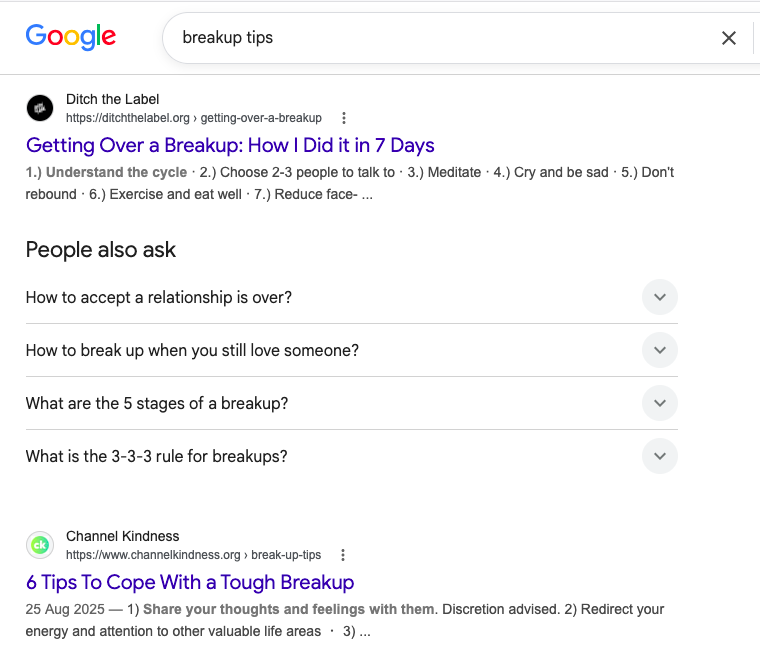
You now have a verified idea you can use. The next step is to run that idea through Google.
From answerthepublic.com, your verified idea might be ‘breakup tips’ – this is what you type in Google search.
Why?
You want to compare them with existing blog posts, and you do this by checking the similar keywords used by the top-ranking websites.
In addition to the keywords, you also check the headline structures and the meta description.
Let me share a tip with you.
One of the points in my SEO checklists is that your focus keyword should be part of your headline and URL. To fully confirm what focus keyword others use, you can check their headlines and URL and then research that keyword.
Any website with its focus keyword in both places is knowledgeable in SEO writing, and you should visit these websites for content inspiration.
Now, you have a keyword to verify.
· Research keyword(s).
This part is so exciting! Ubersuggest is the best keyword research website out there, in my opinion.
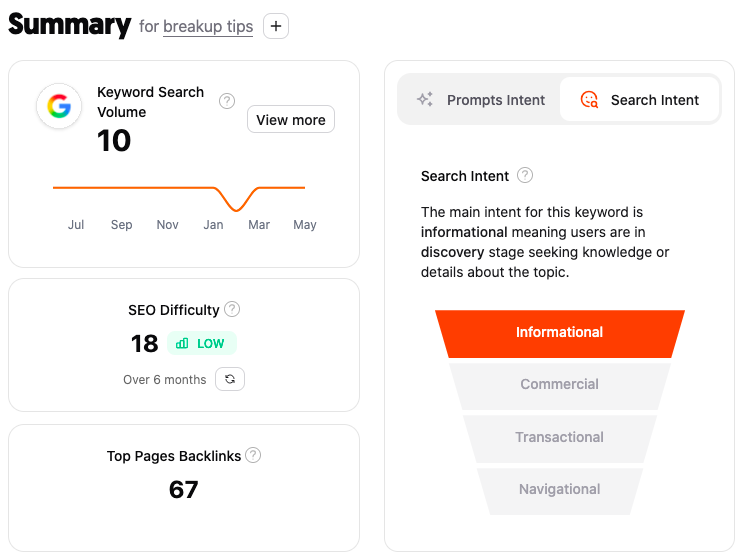
When you upload your keyword on Ubersuggest, it analyzes that word. It gives you real-time data, including search volume, cost per click, SEO difficulty, other keyword ideas, and content ideas you can use along with the keyword you entered.
From the above example, you’ll notice the keyword overview, which consists of:
Search volume
SEO difficulty
Top pages backlinks
Search & prompt intent
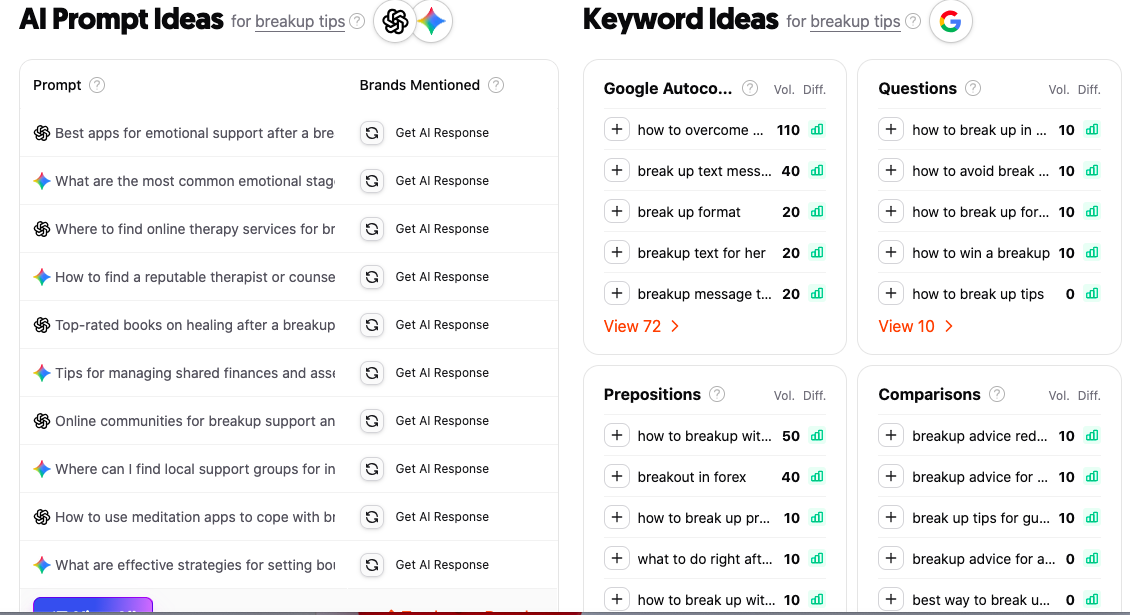
Scrolling down, you see the AI prompt ideas and keyword ideas, which give you statistics on other keywords you can use.
It shows the trend for each keyword and the top-ranking websites for it, alongside the keyword overview statistics for each keyword idea.
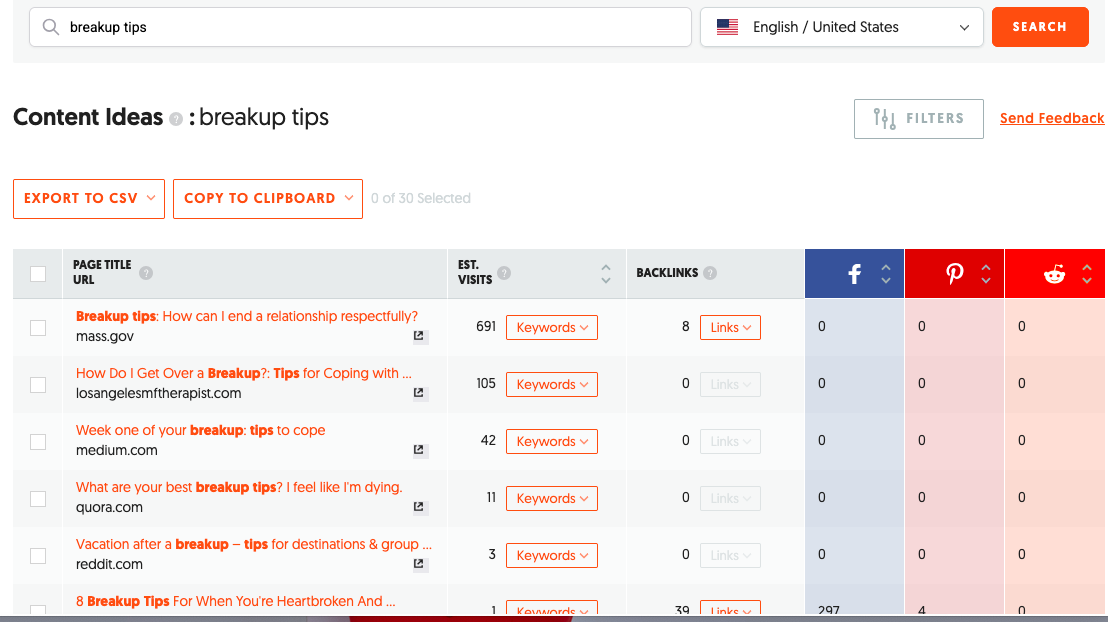
You can also check out the ‘content ideas’ segment under ‘competitive research’, where you see existing content with that keyword; in this case, the keyword is ‘breakup tips.’
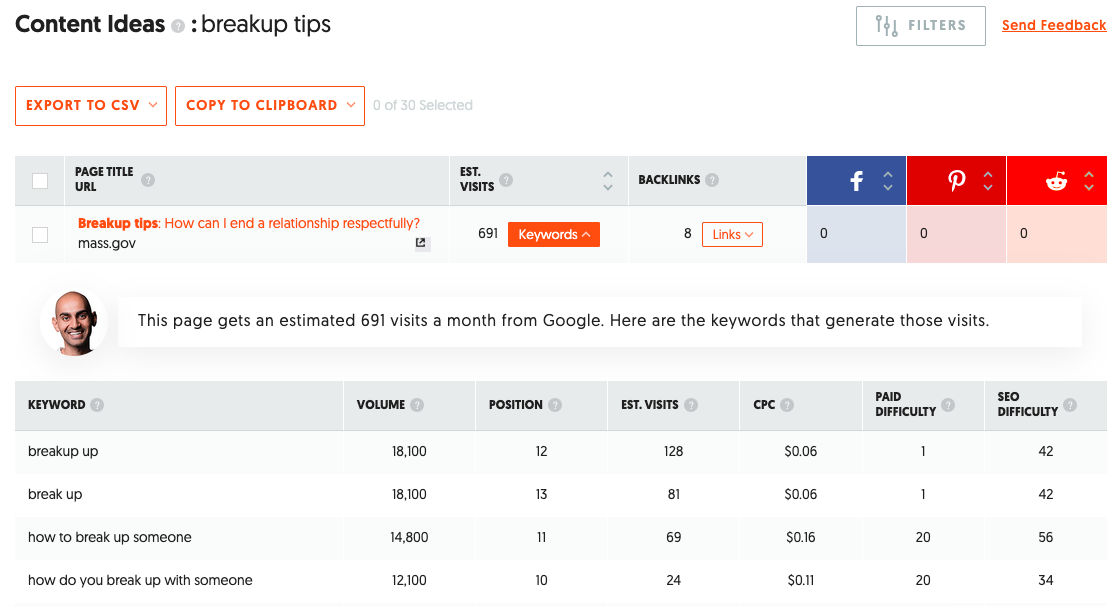
The fantastic thing about this content idea segment is that it shows you the monthly estimated visits to that website and the keywords that bring this organic traffic. It also shows the number of backlinks, so you know if the website is really credible, and the number of social media links (Facebook).
You know what? You get this much information for free and even more information when you subscribe to the paid version.
The paid version, among other features, provides breakdown statistics on which device generates the highest search volume (mobile or desktop).
· Research content around the keywords.
This is the same step as researching the topic ideas from AnswerthePublic. The only difference is that you have several related keywords to type in Google search.
In this case, your keywords of choice can be ‘when to break up with someone’ or ‘break up with him’ which are related to your current focus keyword. Also, you can still go with the focus keyword ‘breakup tips’. The goal is to decide on which keywords will offer you the best possible advantage.
For example, I can decide to go with ‘when to break up with someone’ and make the others my secondary keyword if I have an advantageous position in terms of SEO difficulty and search volume.
Note: One of the best SEO writing tips to hold on to is using a medium tail keyword as your focus keyword and long tail keywords as your other keyword ideas. All your keywords should not be more than five (5) or less than three (3).
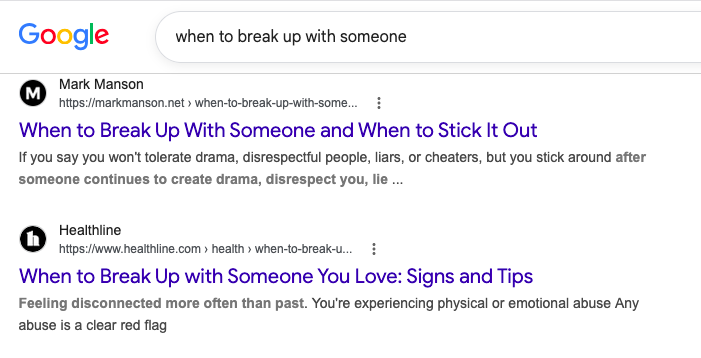
If your focus keyword becomes ‘when to break up with someone,’ you use Google search query to find content related to that query, noting the headline and content structures.
· Create your headline.
From the above SERP of the focus keyword ‘when to break up with someone,’ you can see several headline structures around the keyword.
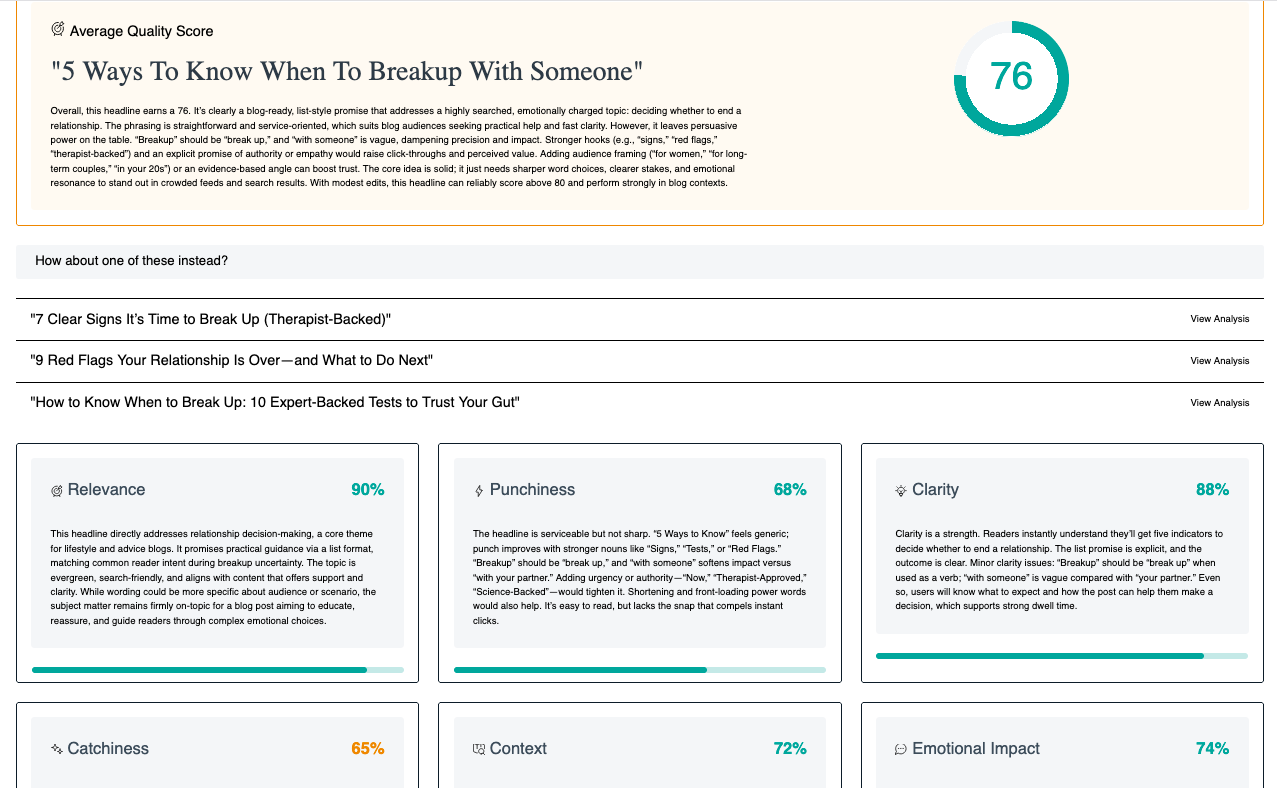
As earlier stated, you need to have a compelling headline that will make the reader want to click on your page. Sharethrough Headline Analyzer is a good, free, and accessible platform for writing a compelling headline, and you can also use it to verify the viability of your headline.
The platform analyzes your headline, gives you a score, and suggests ways you can make it better.
Before you write out a headline, note these points for SEO:
Your focus keyword must be in your headline with no added word(s) in between. Use any of the formats below:
Prefix, (focus keyword), suffix.
(Focus keyword), suffix.
Prefix, (focus keyword).
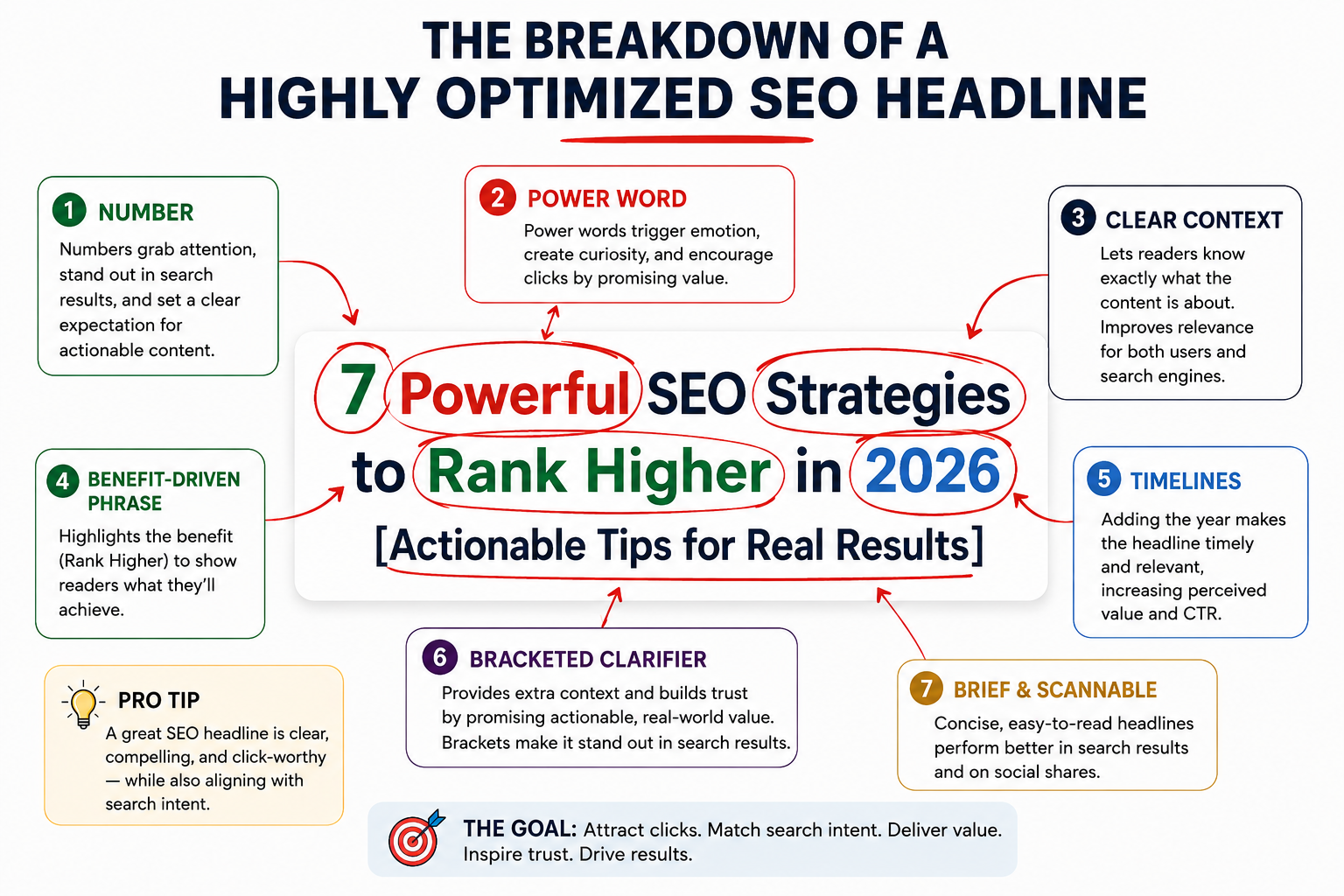
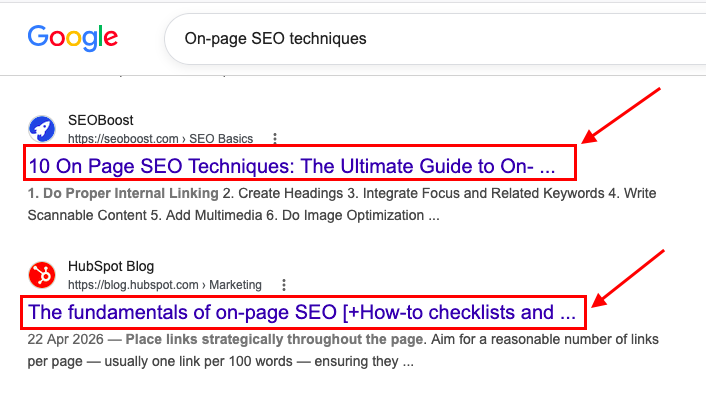
Your headline should not be too long to avoid being cut off like the ones below.
Use context words.
Use numbers, preferably odd numbers.
Run any headlines you come up with through the headline analyzer, follow these rules, and ensure your scores are above average.
· Create your SEO outline.
To create your outline, check out the top-ranking websites from the Google search query you carried out.
Compare at least five (5) different websites and note their content structure.
Afterward, create your outline and include a new point that is relevant to your content. OR
You can elaborate on a point mentioned briefly in other posts.
The goal throughout is to give reader value your competitors didn’t provide. That’s the actual reason a post outranks pages with more domain authority.
· Write your content.
You have your keywords, outline, and content inspiration. All you have to do is write.
However, it is important to know that writing isn’t just writing. When it comes to an optimized post, you have to be intentional and a little bit technical, especially when it comes to the placement of your keywords, links, images, and even your subheadings.
Here are my favorite SEO content writing tips to keep in mind when writing your optimized blog posts:
Does SEO writing still matter with AI Overviews summarizing search results?
Yes, even more than before. AI Overviews handle the basic “what is this” answer, which means your content’s job has shifted from informing to earning the click after the answer is already visible.
How long should an SEO blog post be?
Long enough to answer the question completely and out-deliver what’s currently ranking. There’s no fixed word count that guarantees ranking anymore; depth and usefulness matter more than length alone.
What’s the single highest-impact tip in this list?
Keyword research (tip 6). Every other tips including your headline, your outline, your content itself, depends on having the right keyword foundation first.
Can I do all these myself, or should I outsource it?
Plenty of bloggers run this whole process solo, and it’s entirely learnable. If you’re managing it alongside running a business, our SEO writing service and SEO consulting service cover different parts of this depending on how hands-on you want to stay.
What’s the easiest mistake to make in this process?
Skipping tip 1 (identifying your audience) and jumping straight to keywords. Keywords tell you what people are searching; only audience research tells you why.
If you follow these SEO writing tips, your blog posts will be sure to make the front pages.
If you need me to assist you with your SEO writing, or you need more detailed and vocal coaching, you can set up a meeting with me HERE or check out our SEO writing services.
Have you ever questioned why certain pages from specific websites consistently rank high on Google?
They understand the importance of implementing off-page and on-page SEO techniques.
These SEO experts acknowledge that creating appealing content is not all there is. The ability to match Google requirements and searcher’s query using specific on-page SEO techniques explodes the traffic of any website and increases its rank.
As a beginner, navigating the world of SEO (on-page and off-page) can be overwhelming, just like when I started in 2019. I’ve learned from industry experts, tried many things, and kept updated on SEO changes and updates.
In this blog post, I’ll walk you through a practical but simplified on-page SEO guide, organized into chapters, explaining the fundamentals and creating a build-up to the more technical aspects of on-page SEO.
What Is On-page SEO?
Search Engine Optimization (SEO) is perfecting your website and its content to improve its visibility and traffic through various activities such as keyword research, linking building, auditing, etc.
SEO includes steps taken to make your website appealing to users and search engines, such as Google.
When search engine crawlers navigate your website, they audit it to determine if it matches user intent and accessibility.
If your website appears perfect, they relay this information back to the server, and you stand a chance of increasing your rank on the search engine results pages (SERPs).
Therefore, it concerns all the activities to improve your website traffic and ranks.
There are three types of SEO. They are:
On-page SEO
Off-page SEO
Technical SEO
On-page SEO, or on-site SEO, refers to any activity you carry out on your webpage to help increase its rank and traffic.
Let us relate this to a typical life scenario for a better understanding.
Congratulations! You just purchased an apartment, but you noticed the decorations don’t suit your taste, and you need to make it appealing to those who might visit.
You will carry out certain activities, such as painting, curtain fixing, positioning of furniture, and so much more, to make your home beautiful and appealing to visitors, known as interior decoration.
With this analogy, I won’t be wrong in saying on-site SEO is the interior decoration of webpages. It is the activities performed to make your webpage more appealing to search bots and users, which in turn helps boost your rank.
Difference Between On-page SEO and Off-page SEO
Both SEO strategies focus on achieving the same objective, but their work is slightly different.
Their focus:
On-page SEO focuses on researching and optimizing your content to rank for organic searches, focusing more on the web pages than the website.
Off-page SEO focuses on increasing the power of your website; it also focuses on how Google and viewers accept your content. This strategy is often not within your control; it is concerned with how powerful and famous your site is, and this is achieved by earning backlinks when appealing content is made.
It determines how high you will rank on search results.
Their factors:
On-page SEO factors include:
Title tags
Meta description
Header tags
Alt text Image
Page experience
URL structures
Internal linking
Page load speed
Quality of content
Mobile-friendliness
Off-page SEO factors include:
Number of backlinks
Quality of backlinks
Link relevancy
Social shares
Reviews
Brand mentions
Why Is On-page SEO Important?
The center of attention of on-page SEO is helping search engines (Google) and users to understand and relate to the content on your website better.
Therefore, it is crucial because it helps create a better understanding of your webpage. For example, the meta description and title tags—these tags are displayed on the browsers; it is the first text the user comes in contact with. When written well, it gives the users an idea of what your content is all about.
Here are some benefits of on-page SEO for your website:
1. Reduces clickbait
No one will want to visit a shop that doesn’t provide what they need. To make your customers stay, you will have to provide solutions to their problems.
When certain factors, such as expertise and relevant content, are met, click baits will be reduced because you offer appropriate answers to your audience’s needs.
2. Increases searcher’s time spent on your content
This importance is interrelated to the reduction of clickbait.
Users who see what they are looking for tend to stay and spend more time digesting your created content.
3. Increases relevance
It helps improve the quality of your webpage by satisfying users and gaining users’ loyalty by providing a positive page experience.
4. Assists search engines in determining what your page is about
On-page SEO is not only concerned with improving user understanding but also with search engines. Factors such as HTML codes tell Google what your page is about. Experience, Expertise, Authoritativeness, and Trustworthiness (E-E-A-T) enable Google to weigh the value of your content to prevent the spread of false information.
Google’s E-E-A-T stands for Experience, Expertise, Authoritativeness, and Trustworthiness. It was coined to evaluate the quality of content displayed on websites.
The E-E-A-T concept is not a ranking factor but a vital quality evaluator factor.
In recent times, there has been an increase in the demand for validated information. Google uses this principle to probe every content upload to determine if they are from reliable sources.
Hence, website developers are expected to display relevant and reliable information that can be vouched for.
Experience
Google is keen on matching users’ intent precisely and expects each website to display a level of experience in content creation irrespective of their niche.
To create effective content, Google expects you to have exposure to events that improve your knowledge of that particular niche.
This factor is related to the expertise factor.
Expertise
Continuous exposure to activities specific to a particular niche improves your knowledge, and through experience, you are informed about different problems and topics surrounding your niche.
Over time you become an expert in your field, having a high skill level and knowledge to solve those problems effectively.
For example, a brand known for SEO content creation will rank lower when they create health-related content because Google identifies that brand under the SEO expert niche and can’t trust their content to be one of value in comparison to various medical websites.
Authoritativeness
The authoritative factor concerns your website’s fame, influence, and power.
Your website should be famous for constantly providing truthful content that various websites in your niche attest to and link back to.
This factor helps in boosting backlinks which automatically increases ranks.
Trustworthiness
Earning users’ trust can be difficult but possible; it is easier to gain the trust of someone physically, but in this field, there isn’t a familiar relationship between you and your viewers aside from the content you create to match their specific intent.
This is why Google emphasizes creating truthful content; it beckons users’ trust and keeps them loyal to you.
How to optimize for E-E-A-T
Showcase your authors in your bio to establish expertise.
It is no hidden secret that many individuals patronize brands with names. Adding your author’s name to a blog post ensures users trust you.
Create a bio page stating your qualifications in the niche of your choice by writing about the duration of your service or your accomplishments and area of study in your bio.
A bio helps Google to be aware of your content creator and their expertise.
The factors below are essential for an impressive bio:
Name
A picture
Credentials
Position
Contact email or number
Work with trusted sources.
In carrying out your research, every data collected must be from a reputable source with high authorities. Avoid backlinking to websites that are known for spreading false information. Google can pick on tabs of such linking, which can respectfully hurt your website’s reputation.
Design beneficiary content.
The backbone of major ranking factors—every optimization strategy is null and void if the content is useless to users. Create a post that captures the users’ interest and provides a solution to their needs.
2. Title tags
a. What are title tags?
Title tags, or website page titles, are valuable factors you should consider; they are a HyperText Markup Language that describes the title of a webpage.
It is not visible on the website page but on the browser tabs and Google’s search result page.
b. Why are title tags important?
i. They promote understanding.
All optimization processes aim to achieve search engines’ and users’ understanding.
It is of vitality that your page and its content should be easy to grab fully and not in bits.
Title tags aid in achieving this by capturing the words that best describe your content briefly with your focus keyword inclusive.
ii. They influence users’ clicks.
Because title tags are visible on the browser tab, they will likely be the first thing users see about your content.
They play a massive role in determining how users perceive your page.
For example, when a title meets the exact query by capturing the relevant keywords and other related factors, the user is of the impression that your content is the perfect match to that specific query and will waste no time clicking.
iii. They improve page rank.
Click-through rates influence SERP ranking.
Suppose eight results match a specific intent, and Google notices many users clicking on the fifth result and staying for a long time. This automatically tells Google that the page with more traffic matches the user intent better than the rest, and in a couple of minutes, that page ranks higher above the rest.
c. Tips to write a perfect title tag
i. Match search intent by including a question form.
Title tags in question form often get a higher click-through rate. For example, “What are SEO black hats?” This title notifies the user that your page provides the answer they seek.
ii. Write in sentence case or title case.
Your titles should be written in a sentence case or a title case.
In a sentence case, only the first letter of the title is in the upper case, while the title case has the first letter of each word capitalized, except for the articles.
Example of a title in a sentence case: “Where are the search engines?”
Example of a title in a title case: “What Are Search Engines?”
iii. Keep the title between 40-50 characters.
It is ideal to keep the title within 40-50 characters. A shorter title may not provide room to add the relevant keyword, and a more extended title of 70-80 characters may not capture the user’s interest. Hence, it is advisable to keep the title at a moderate length.
iv. Include numbers or years.
People are attracted to unique title tags. Talking about uniqueness, adding a year or number to a title creates curiosity in the users to discover what your page offers.
For example, this title, “11 Unique SEO Trends in the Year 2023,” tells users that my content is about recent SEO trends, and I have unveiled 11 new practices to boost their SEO strategies.
Educational titles also have a higher chance of getting clicks.
v. Include keywords.
Top-ranking pages, when analyzed, often rank for some keywords. You must include the relevant keywords that match the specific intent in your title.
vi. Make use of power words.
Power words are words that increase the strength of your title. These words are capable of captivating the interest of internet users, and they can trigger emotional responses.
Examples of power words are ultimate, monetize, effortless, etc.
The more powerful words you use that converge emotional response, the more clicks you get.
vii. Make sure they align with your content to prevent clickbait.
This tip is crucial; the amount of time a user spends on your page is analyzed by Google, which tells search engines that your content was beneficiary to the user.
It is useless to optimize your title tags when your content is different from the title. Google sees this as deceptive; every title tag should reflect your content.
3. Meta descriptions
a. What are meta descriptions?
Meta descriptions are the sentences below the titles; they help to describe what your page is about.
Meta descriptions can influence your websites. Search engines often display these descriptions as a summary of your page. A well-detailed meta description can impact your click-through rates and increase website traffic.
Most times, web developers fail to add a meta description, and search engines automatically pick a sentence from their content and use it as a meta description. I highly advise against this, as the text search engines might choose may not be an accurate summary of your content.
A short description does not give room for a well-detailed explanation of your page’s content, and users might not know what to expect from such a page. I definitely will not click on a page that does not give me an insight into its content; it can be risky.
ii. Make it appealing.
Your meta description should communicate the benefits of your content. Make it compelling by initiating emotional response through the insertion of content values.
iii. Include keywords.
Keywords are a critical factor, and they cannot be overrated. Including the appropriate keywords in your meta description is vital. Emphasis should be made on keyword stuffing; avoid using numerous keywords that are not relevant to your description.
iv. Match search intent.
This factor is essential; your meta description should align with the user query.
v. Avoid using the same meta descriptions for different pages.
For each page, provide a different meta description; this will help tell search engines the uniqueness of each page and its content.
When you use the same descriptions, search engines assume your content pages provide solutions to the same query.
4. Header tags
a. What are header tags?
Header tags are also referred to as heading tags. These tags arrange content based on priority or importance and differentiate the various subheadings in content.
The header tags concept establishes informational ranks in your content creation, and HyperText Markup Language accepts up to six header tags in page structuring.
Here is a specification of header tags and their uses.
H1 Tag
The H1 tag is the title tag; it captures the context of your content and is used to attract users’ attention. This tag describes the page’s primary purpose and is usually infused with the focus keyword.
H2 Tag
The H2 tags are subheadings used to break the content into subsets of various sections. It is ideal for inserting your focus and secondary keywords in this header.
H3 Tag
The H3 tags are a division of the H2 tags; they can be used to explain the H2 concept. The H3 tag describes in detail the concept of header tags.
H4 Tag
The H4 tags are also subsets of H3 tags used to explain the listed points in an H3 tag. Most often, these tags are arranged in bullet points.
H5 Tag
They are used to broaden the points made in header 4.
H6 Tag
They are also used to explain some micro points in header 5.
b. Importance of headers tags
It helps search engines understand your content.
Adding appropriate headers to your content makes it easier for readers to interact with your created content. It makes the journey smooth and easy, readers will easily digest your content, and the time spent on your page by your visitors increases.
Additionally, header tags influence the time spent on your page, decreasing the bounce rate.
Users who find your webpage appealing and easy to understand will stay and absorb your content in a stretch.
c. Optimizing your header tags
To optimize your header tags to increase your rank chance, you will have to do the following:
Use one H1 title per page:
Using multiple header tags for a page will confuse search engines and reduce your rank drastically.
Google will not understand what your content is about and will not know what to rank you for.
Make it unique:
Use keywords, questions, or power words to make every heading appealing to users.
Reflect your content in it:
All header tags should correlate with the post title. Only write a subheading that captures the accurate picture of your content.
Keep it short:
They should be kept brief, with 50-60 characters. Ensure at least one of your header tags from the H1 includes your focus keyword.
5. URLs and URL structure optimization
a. What are URLs?
URLs means Uniform Resource Locator; it is a specific web page address that helps people locate you.
It is seen in the address bar at the top of a web browser.
b. What are URL structures?
URL structures are the various elements that make up a URL.
A URL structure can include the following:
HTTP (Hypertext Transfer Protocol)
www (subdomain)
Domain name
Path or page
c. How to create a perfect URL
Keep it short and readable.
Add a keyword.
Your domain name should be easy to spell and attractive.
Domain main should be easy to pronounce.
Name the page in a way that explains the content of the page.
6. Image alt texts
a. What are image alt texts?
Image alt texts are text descriptions of your images; they work by adding a text tag to the HTML codes of the image placed on your website.
These texts are not visible to users, but search engines see them and use them to match your image to what users are searching for.
b. The usefulness of image alt texts
They are beneficial in SEO. When a user inputs a query of an image, a search engine crawler looks at the text on the back end of the website to select the best images that match such intent. When done right, it can help your image to rank above the others on Google.
c. Tips for writing a fantastic image alt text
Don’t stuff keywords:
Don’t add multiple keywords to your image text; it makes it difficult for Google to know how the image relates to your content.
Don’t repeat yourself:
Don’t use the same words or keywords for different images on your website.
Don’t tag non-essential images:
Every text used should be an accurate description of the image.
Be specific:
Be detailed as possible, and avoid using irrelevant words to describe the image. Don’t write “a picture of” or “an image of” at the beginning of your descriptions.
7. Internal links
a. What are internal links?
These are links from a page on your website to another page on your website.
For example, here’s an internal link to another page on the SARMLife website.
READ MORE: HOW TO MAKE MONEY BLOGGING (Coming soon)
Internal links link a page to another page where their content is interrelated.
b. Why is internal linking important?
It helps increase page authority, boosting organic ranking.
When a specific page on your website generates higher traffic than other pages, you can introduce an internal link to drive traffic from that page to the less-ranking pages.
c. Quick tips for internal linking
Determine your page rank:
Tools such as Ahrefs can help you track your page and determine the exact page that needs to be featured in an internal link.
Add internal links from relevant pages:
Every page you internally link to should be related to the content topic.
Always link a page that gives more insight into your topic.
8. External links
a. What are external links?
These are hyperlinks on a page that references an external domain; it means linking to a domain outside your site as a reference or additional source.
b. Why are external links important?
Linking to other websites is a good SEO strategy, and Google states that linking to authoritative websites provides value for your users.
So, link to websites that follow the E-E-A-T principle, and it is also best to link to websites in your niche.
9. Use keywords
a. What are keywords?
Keywords, as the name implies, are words and phrases internet users type in search engines to find results.
They are vital as they link searchers’ queries and your content.
b. Types of keywords by length
i. Long-tail keywords:
Long tail keywords are made by combining more than four words.
A long tail keyword is usually longer than the other types of keywords.
For example, “red apple shops in Manchester.”
These keywords are particular and leave you no doubt of what the searcher wants.
ii. Medium-tail keywords:
They are less specific than long-tail keywords and less competitive than short-tailed ones.
It usually consists of 3-4 words.
For example: “red apple shops.”
This keyword shows what the user wants (looking for an apple shop) but does not specify the location.
iii. Short-tail keywords:
These keywords are very competitive, with 1-2 words. They are not specific, attract high search volumes irrespective of the niche, and don’t accurately describe your content.
For example, “apple” and “red apple” are short-tail keywords that contain only the subject matter.
c. How to use keywords
Specific rules are applied to keyword usage, and you must consider them to optimize your content.
i. Place keywords in the right place.
The proper placement of keywords is vital for SEO.
There are specific places where your focus keyword must appear on your page. They are:
Title tags
Meta description
Header tag(s)
Alt image text
Conclusion
Body of your post
ii. Include long tail keywords.
Long tail keywords have a specification function and are best used to attract users to your site.
iii. Avoid keyword stuffing.
Avoid using the same keyword multiple times without a natural occurrence.
10. Sitemaps
What are sitemaps?
Sitemaps are records of your website’s important pages or URLs. They assist search engines and users in finding your website’s different pages.
Importance of sitemaps
i. For easy website navigation:
Sitemaps make it easy for internet users to find their specific intent on your page in less time.
ii. Enables web spiders to understand your website:
They help search engines understand your content and your page.
Types of sitemaps
There are two types of sitemaps:
HTML sitemaps (for users)
XML sitemaps (for search engines)
i. HTML sitemaps:
The hypertext markup language sitemaps are solely for users, making it easy for users to find what they require on different pages on your website.
HTML sitemaps reduce the time spent by users searching for answers on your website.
ii. XML sitemaps:
The extensible markup language sitemaps are the most common.
They are created for search engines as they provide a hierarchy of your pages’ information to the search engines, which makes it easier for web crawlers to understand and reduce the time spent indexing your website.
This sitemap also tells the search engines the last time a page was updated.
11. Featured snippet optimization
a. What are featured snippets?
According to Google, featured snippets are special boxes where the format of a typical search result is reversed, showing the descriptive snippet first.
They are short, brief answers to users’ questions at the top of SERPs and help answer them immediately.
The paragraph snippet amounts to seventy percent of the total features, ranging from 40-42 words and 250 characters.
They mostly occur in question-form searches and have post titles that start with “How,” “What,” or “Why.” These suggest that they give educational and beneficiary information.
ii. List:
It amounts to an average of 19% of total featured snippets. They consist of about 44 words.
iii. Tables:
They are 6.3% of total featured snippets. They consist of 40 to 45 words.
c. How to get featured snippets position for your posts
Identify the opportunities on Google using Ahrefs.
Discover content ideas by using Answerthepublic.
Carry out keyword research.
Use a header when answering questions.
Match user intent by providing valuable information.
Add relevant graphics that match your content.
Organize your content ideally and attractively.
Validate your content by ensuring each piece of information is accurate and trustworthy.
Analyze your competitors to know what they do better to get more featured snippets.
Update your outline to fit recent trends and queries.
12. Get a rich snippet with structured data
a. What are rich snippets?
Rich snippets are search results that draw your attention to structured data on web pages.
They are used to provide relevant information to users immediately and provide solutions to urgent searches.
They are Google search results that provide additional information, add visual interest, and make it easier for users to digest content.
b. Types of rich snippets
i. Movie Markup
This markup displays information about a specific movie and shows the movie’s release date, cast, run time, and genre.
ii. Product Markup
This displays specific information about a product; such information includes price, availability, and product ratings.
iii. Music Markup
This markup gives relevant information about an artist’s music and displays album names and specific release dates.
iv. Reviews Markup
The reviews markup will show the star ratings below a description in the search results.
v. Events Markup
Events markup provides information on specific events, such as where they occurred and the time and date of the event.
vi. Recipes Markup
The recipe markup allows you to show certain cooking elements such as ingredients, diets, and calorie contents of the meal.
c. How to optimize for rich snippet
i. Build up your data.
Organize your data structure. Although structured data may not be a ranking factor, it assists Google in understanding your website and makes it more attractive.
There are rules to everything in life; in most areas, when rules are broken, inevitable consequences are faced. This is the same for Google.
Google has specified specific rules which have to be followed no matter what. Google needs you to follow such rules because it is more concerned with increasing a positive user and page experience.
We have uncovered how you can perform on-page optimization. Now we will look at the “don’ts of on-page SEO,” also known as the black hat SEO techniques.
You should avoid these when optimizing your webpage.
1. Keyword stuffing
What is keyword stuffing?
Keyword stuffing is inserting important keywords in written content, meta descriptions, and title tags.
Keyword stuffing is a search engine optimization (SEO) technique once considered a ranking strategy used in previous times.
It is also known as spamdexing. Here, keywords are added to meta descriptions, content, and anchor text, aiming to increase the website’s ranking unfairly.
Keyword stuffing may result in a temporal or permanent website ban on search engines.
Why keyword stuffing doesn’t work?
There are various reasons keyword stuffing does not work.
I don’t want to read content that repeats the same word multiple times without a proper natural occurrence.
Multiple insertions of a particular word tend to disrupt a user’s journey. Because you are more concentrated on writing for search engines, you neglect the most crucial factor of the user experience.
When users search and don’t find what they need on your site, they will leave to search somewhere else.
There will be a reduction in your website’s reputation.
In recent times, search engines are focused on relevant and helpful content.
Hence, keyword stuffing won’t work. Major search engines use algorithms that can find and eliminate such unfair practices.
This old spamming technique focused on writing content exclusively for search engines. The writer inserts keywords in large amounts and colors the font to sort the color of the background, making the multiple occurrences of keywords invisible to users unless highlighted.
Why hidden text doesn’t work
Although you can use this technique to cover spoilers and conceal specific data from unenlightened users, search engines note it as a punishable crime.
These texts are not hidden from search engines. Google reads the hypertext markup language (HTML), a programming language webpages are written in.
HTML has color code instructions, which help search engines discover these texts. When found, your website can get penalized.
3. Repetitive text
What is repetitive text?
In repetitive texting, certain words and sentences are usually used multiple times.
The writer inserts unnecessary links into these words, interrupting the understanding of the content, hoping to increase website rank.
Google’s algorithm has made it possible to recognize unnecessary linking and texts that are not naturally occurring.
Cloaking, as the word entails, means to hide, disguise, or mask up.
It is when content presented to search engines is entirely different from that presented to the human user.
This technique screams deception as the search engine and users are on different pages.
A user inputs a query, and search engines select the best pages based on the information presented to meet the user intent. If a user clicks on a page presented by a search engine and the content doesn’t fit in any way to this query, users can get frustrated.
Search engines prioritize the user experience above all ranking factors, and cloaking doesn’t comply with Google’s standards.
Getting caught by search engines will result in penalties.
On-page SEO Analyzers
What are on-page SEO analyzers?
These are software application tools that assist in search engine optimization. They are created with the sole aim of making the optimization process easy and faster.
Google constantly releases updates, and it can be challenging to keep up with all of Google’s changes. These automated tools use a certain level of artificial intelligence to reduce stress and help you rank.
How can on-page SEO analyzers increase your rank?
There are various ways these analyzers can help increase your rank; these are but a few.
Content idea guides
These analyzers are assistants that help make search engine optimization easy and less stressful.
Tools like AnswerThePublic help you discover what users are searching for.
This tool gives you an idea of your niche, and you can map your content to fit users’ recent searches.
Website audit
With the discovery of these tools, it is now easy to run a site analysis any time, any day. Tools like Screaming Frog help identify missing pages, meta descriptions, and keywords.
It also discovers errors you may not have noticed in URLs and codes.
Keyword research
These tools help discover keywords relevant to the particular content you want to create. It provides proven words that will assist in optimizing your content better.
Track progress
SEO users track their progress based on their ranks.
When content created doesn’t rank, we take it to mean we should improve our SEO strategies.
It is often difficult to track your content’s performance, especially when they are numerous. These analyzers help you track your progress and notify you when ranks fluctuate.
Best on-page SEO analyzers
1. Ahrefs
Ahrefs is a fantastic advanced SEO tool with a vast database and a large crawler.
Although quite expensive, it is one of the best tools for keyword research, SEO analysis, and reports.
The website audit by Ahref is effective and efficient; it also suggests solutions to lapses on your website.
It checks the properties on your website and generates relevant keywords and links.
It can explore the competition in your niche and run a competitive analysis on your competitor’s website to discover their SEO strategies.
Ahrefs helps monitor your ranking profiles and gives you updates on rank fluctuations. It assists you in giving your best and enables you to modify your SEO strategies to create better content.
It grants you free access to products to help you manage your website’s SEO.
It gives you an insight into customers’ behavior across different platforms to help you understand your customer’s journey and how they interact with your sites.
The access it grants you is expected to help you optimize your marketing ROI (return on investment).
Furthermore, Google Analytics generates a detailed explanation of your data analysis and manages your data efficiently.
Features of Google Analytics
Built-in automation
Reporting
Advertising workspace
Exploration
Data collection and management
Integration
Pricing
Free
3. AnswerThePublic
AnswerThePublic is a search discovery listener and keyword tool that listens to data from search engines like Google and provides you with a list of questions that people are searching for around your chosen keyword.
It allows you to structure your content to appeal to your audience and increase traffic and conversions.
Features of answerthepublic
Keyword research
PAA (People also ask) insight
Keyword visualization
Pricing
Individual plan- $9/month
Pro plan-$99/month
Expert plan- $199/month
4. Screaming Frog SEO Spider
Google’sfamoussite crawlers are not the only ones capable of crawling websites.
Screaming Frog SEO Spider is an excellent and powerful site crawler capable of crawling large and small websites.
The tool performs a wide range of activities.
It can be used to find broken links and server errors; it discovers errors in URLs and fixes them.
It can generate perfectly modified XML sitemaps and images, track your SEO success and identify lapses in your SEO strategies.
Features of Screaming Frog
Broken link finder
Duplicate contact finder
Title page and meta descriptions analyzers
XML sitemaps generator
Integration
Site audit
Grammar checks
Pricing
Free plan– comes with limited features.
Paid version– $199 yearly.
5. SEOmator
SEOmator is an SEO audit software application and web crawler that grades different SEO factors on your website, such as internal and external links, page speed, and rank tracking.
It assists with on-page and technical SEO optimization and monitors and analyzes competitors’ metrics. It’s a fantastic tool for website optimization.
Features of SEOmator
Keyword research
Rank tracker
Backlink checker
Reporting
YouTube rank tracker
Pricing
Lite – $49/month
Standard – $99/month
Advanced – $279/month
Google’s Ranking Factors
What are ranking factors?
Growing up, maintaining a specific grade and position in school was a great obsession of mine.
Constantly getting my desired position came with a feeling of satisfaction, and when I missed it, I was furious with myself and determined to do whatever it took to regain it.
Ranking in SEO can be related to our schooling experience; it refers to the position of your content on the search engine results pages (SERPs).
The worst place to be is the second page of SERPs because people hardly go there.
I cannot remember the last time I looked at the second page. You and other internet users can probably relate to this experience.
A popular SEO joke suggests the second page as the best place to hide a dead body because the chance of finding it is low.
Ranking factors are the criteria and signals used by search engines to evaluate a web page to determine its rank.
Having a page that ranks first means when users insert their query, your page is the first webpage that pops up and matches their intent.
These factors determine how high and low you rank on a search engine.
To be part of the first page of SERPs, you must meet these criteria.
Types of ranking factors
There are various ranking factors, and it is often difficult to know what area a factor falls under.
With this in mind, I have differentiated various ranking factors into their specific types.
More so, this differentiation will help you identify the particular ranking factors you need to optimize.
There are four types of ranking factors:
1. On-page Google ranking factors:
This is also known as the on-page SEO checklist, the criteria that must be met on a website and are within the control of the web developer.
On-page ranking factors list includes the following:
i. Relevant/High-quality content:
Beneficiary content is still a chief determiner of rank, and every content published should provide a positive user experience.
ii. Optimization of keywords:
Choose keywords that have a high traffic potential. The keyword chosen should blend naturally with search intent.
2. Off-page Google ranking factors:
These external factors are not much within your control and can be challenging to manipulate.
Backlinks are chains between one webpage to another, creating a relationship between two or more websites. The number of backlinks you get can boost your rank.
ii. The number of relevant domains linking to you:
The website content linking to you is crucial; Google considers this factor and checks the website content to determine if they fall under your niche.
For example, as an SEO writer, linking to a hair growth website is irrelevant. It assumes my content is created for people in my niche, so an external link of such will be highly useless to my users.
iii. The number of unique domain linking:
Getting a large number of backlinks seems good, but guess what! Getting backlinks from unique, trustworthy, efficient domains is top-notch.
Google sees a backlink as a voucher, and when it comes from a page known for providing quality, helpful content, it increases your influence in your niche.
To get such quality links, you must create quality content that matches user intent perfectly.
iv. Total relevant anchor text:
Anchor text is a word where links to other websites are inserted in.
Google’s policy states that anchor texting should be done cautiously, and the words used should give the users and search engines an idea of the link.
3. Technical ranking factors
This SEO strategy concerns a site’s technology regarding its content and structure.
You might have excellent content, but it will be challenging to rank if your site has technical issues.
Technical Google ranking factors list includes:
i. Page speed:
This is the amount of time taken for your website to load.
Every aspect of SEO is essential. If you create content that fits user intent but has a slow website, you risk facing penalties from Google, and your content might not be visible on the first page of SERPs.
ii. Mobile-friendliness
An increase in mobile users simultaneously led to the rise of internet users.
On April 21, Google updated its algorithm to increase the ranks of pages that are friendly to mobile users.
This algorithm is specific to mobile users and doesn’t consider the whole website but single web pages.
iii. Architecture of website
It can also be called a website blueprint, and it is the plan used in creating the website design, specifying different makeup and function of a website.
The structure of a website makes it easy for users to navigate and find helpful information. It also helps search engine crawlers better understand what your content is about.
Site security refers to the protocols to prevent scams, hacking, and errors (cyber attacks). Google is adamant about users’ safety.
Having a secure site is crucial. If your website is attacked, it can be blocklisted, resulting in traffic loss.
4. Performance and Behavior ranking factors
These factors relate to site exhibitions and users’ behavior when interacting with your site.
Performance and behavioral ranking factors include:
i. History and age of domain:
The age of your domain can affect its rank.
When search engines notice an old domain with a history of constantly delivering relevant content, it automatically ups your rank.
ii. User experience:
This is an important ranking factor.
Google monitors how users relate to your content by analyzing the time spent on your website. If the time is short, Google tags it as your content unable to satisfy users’ needs. Still, when users spend quality time on your web page and keep coming back to your content, Google suggests user satisfaction was achieved and increases the rank of your website.
On-page SEO Optimization Using AI
Ways AI can be used in on-page optimization
There are various ways AI can improve a website, and it is not specific to some functions but cuts across different SEO strategies and technical search engine optimization.
They can be used to:
Choose your topic.
Get your topic analyzed.
Run data analysis.
Develop your content.
Website audits.
Competitors analysis.
Broken link building.
Keyword research.
Benefits of using AI for on-page SEO optimization
i. Performs site audit:
The principal aim of artificial intelligence is to perform cognitive tasks better and faster than humans.
AI is a brilliant tool for data analysis and discovering content gaps.
On-page SEO optimization with AI can help mount your content by examining top-ranking content and discovering certain areas you need to improve on.
ii. Speeds up the research process
A common issue writers face is creating relevant content on a subject they are not experts on.
To overcome this issue, writers conduct intensive research and study to understand better and create beneficiary content.
AI can help speed up the research process and overcome this issue by providing content topics and well-constructed content outlines.
iii. Provides a solution to writer’s block:
Some AI tools that help in content writing also solve writer’s block and make writing efficient, saving time and preventing you from overworking.
Cons of using AI for SEO
Artificial intelligence is considered an effective tool to improve SEO strategies but isn’t short of disadvantages.
They are dependent on data analysis. When used in writing content, there may be some disadvantages.
Here are the disadvantages of using AI for SEO.
i. Provides content that sounds robotic:
Content generated with artificial intelligence is often presented with this problem.
Some applications can’t understand users’ feelings and how humans will react to written content, so it creates content based on data analyzed and the algorithm it uses. Hence, you will have to read and edit AI-generated content.
Technological advancement has created AI in SEO tools to understand human needs and interact with web pages like a human will.
ii. Plagiarism and lack of originality:
Most AI tools steal pieces of information from different websites and paraphrase them. AI-generated content may include parts of different content on a website; this technique is against Google’s already-set guidelines and can lead to penalties when discovered.
Because artificial intelligence relies on collecting data from available sources, it cannot generate its text, doesn’t understand human emotions, and cannot write a text to relate to the predicted feelings of the users who may visit the website.
iii. Contents are below the E-E-A-T protocol:
Experience, Expertise, Authoritativeness, and Trustworthiness is a principle Google uses to score and evaluate content.
Google tries to promote trustworthy websites that provide valuable content to users and reduce misinformation and the creation of harmful and useless content.
Artificial intelligence does not have expertise in various aspects of life, so its delivery will be less accurate than that of a human expert in such a field.
This reduces users’ trust in your website because the content made cannot provide needed solutions.
FAQs on On-page SEO
What is the difference between on-page SEO and technical SEO?
On-page SEO is concerned with your elements such as content, meta tags, title tags, image Alt text, and headers that are visible to the users.
Technical SEO mainly concerns search engine crawlers; they include page speed, website architecture, HTML, and more.
What does on-page SEO include?
It includes optimizing factors such as title tags, meta descriptions, featured snippets, image optimization, headers, and more.
How to rank on Google’s first page?
To rank on Google’s first page, you must optimize your content and website while focusing on user experience.
Conclusion
On-page SEO is one of the only things within your control in SEO, and it increases the chance of your page ranking higher on Google if all ranking factors are met.
It is a flavoring technique that adds more taste to your content.
To be an expert, you will need to take note of all optimization points listed in this practical guide, as being an expert requires constant practice.
How helpful was the practical guide to you? Let’s know by leaving a comment below.
Like you, the first time SARMLife published a blog post, we thought we had everything figured out: research, keywords, structure, and even backlinks.
But guess what? The result we got after launching the post was underwhelming.
Days passed, and we barely received any traffic. We refreshed the analytics, tweaked the meta description, and even shared the post multiple times, but nothing changed.
A few months later, another blog post went live—same SEO, same efforts, no drastic changes. But something different happened. This post took off. Comments poured in. Shares multiplied. Traffic skyrocketed. Engagement increased.
What happened? Storytelling happened. Instead of just writing, we started telling stories.
Did you see that?
What if I told you that what you just read was a story?
And whether you realized it or not, it pulled you in. That’s the power of SEO storytelling.
Storytelling has existed for as long as humans have, and despite all the changes in today’s world and the evolution of technology, stories haven’t lost their relevance. They remain as powerful as ever.
However, storytelling and SEO seem like two worlds that can never meet. This article will prove this wrong. Beyond just being an art, storytelling is a powerful tool for SEO. Let’s discuss why it makes all the difference in your SEO journey.
SEO storytelling is the process of blending search engine optimization strategies with the elements of compelling narratives.
It is a deliberate combination of SEO concepts and storytelling techniques to produce captivating, search engine-optimized content that emotionally engages readers and ranks highly on search engines. This is beyond just a “story” to existing content, but about thinking narratively from the beginning.
Search engines favor content that keeps users engaged. Creating stories that resonate with users encourages them to stay longer, read more, and interact with your content. These factors contribute to more visits, a lower bounce rate, and an improved click-through rate (CTR), helping you meet the engagement metrics that search engines like Google prioritize.
SEO storytelling simplifies complex data from SEO campaigns into relatable and understandable content. Instead of bombarding users with metrics and graphs, a well-told story makes the message more digestible and impactful.
Here is how SEO storytelling combines SEO principles with human psychology to create high-ranking and engaging content.
The intersection of SEO and storytelling
The combination of SEO and storytelling delivers attractive content to algorithms and audiences. While SEO ensures the visibility of your content, incorporating storytelling ensures audience engagement, which is an important factor in ranking on Google.
SEO focuses on technical elements like keywords, meta descriptions, and backlinks; storytelling brings these elements to life by converting them into a narrative that users find interesting and relatable.
It’s a mutually beneficial relationship where SEO drives traffic, and storytelling ensures traffic stays engaged.
Scientific studies show that narratives activate multiple areas of the brain, making content more memorable and engaging. When presented as narratives, the human brain is wired to process information more quickly and deeply. This is why a thousand events can happen in a day, and the only thing you will remember might be a story you read on social media.
When readers encounter a well-told story, their brains undergo a process of neural coupling with the information and narratives. The information in a story activates several parts of the brain, triggering the release of a bonding hormone called oxytocin.
This emotional connection leads readers to share, comment, or return for more. For SEO, this emotional engagement translates into better metrics, such as a lower bounce rate, more social shares, and higher chances of conversion.
The role of emotional connection in SEO success
SEO content writers worry so much about keywords, ranking, etc., that they end up writing for algorithms rather than humans. Some have claimed that SEO content bores clients due to its ambiguity, lack of flow, and lack of emotion.
You can do all the keyword research, optimize meta descriptions, improve backlinks, and have the best internal links, but you still won’t reach the audience.
SEO has gone beyond traditional keyword stuffing in content and is now more focused on user engagement. Content that evokes emotions makes the audience feel connected, which leads them to engage with it or take desired actions.
This emotional engagement will signal to search engines, bringing them to mark your content as valuable, relevant, and deserving of a higher ranking. This is what leads to SEO success.
Have you ever visited a page or blog for information and, on the first scroll, encountered data you couldn’t understand?
You scroll again, hoping to get some clarity, but nothing makes sense.
What do you do? You leave.
The same applies to everyone else. No user or reader will engage with content they don’t understand or find boring. This is where SEO storytelling changes everything.
Storytelling makes your content engaging and enjoyable to read, which is all the audience needs to engage and remain on your website, increasing their dwell time.
Reduces bounce rate and improves ranking
Bounce rates and ranking are crucial aspects of SEO, and with good storytelling, you can achieve a reduced bounce rate and higher ranking.
The major cue search engines need to make your content rank is audience engagement. Improved engagement reduces bounce rate, which eventually helps with ranking.
High conversions through emotional connection
Suppose you want to buy a product and find it on two websites with a slight price difference.
Website A offers a smooth and engaging experience with clear descriptions, an appealing design, a fast loading speed, and even a relatable brand story. Meanwhile, Website B barely responds to inquiries, making the shopping process frustrating.
Which one are you more likely to buy from? Website A, of course.
Humans buy based on emotions. Customers can stay loyal to a brand simply because they feel an emotional connection when purchasing from it.
Storytelling isn’t just for blogs or articles; you can also use it on product pages.
Brands like Nike provide a real-life example. They use storytelling in their product pages and ads to evoke positive emotions. Their “Just Do It” campaign is not only about shoes; it also tells stories about perseverance. This inspires customers to do more and connects them to the brand.
Make buying from you an unforgettable experience, something your audience will never forget and talk about. That’s how you drive high conversions.
Establishes brand authority and trust
Create an environment and an experience around your brand.
Storytelling in SEO helps brands maintain a connection that exists beyond the search. It helps you stand out.
When your audience gets to know who you are on a deeper level, it creates authority and builds trust. Emotions drive loyalty and build long-lasting bonds between brands and users.
Key Elements of SEO Storytelling
SEO storytelling goes beyond ranking higher on search engines. It is more audience-focused. The purpose of storytelling in SEO is to keep your audience engaged, making them feel something that will ultimately drive them to action.
However, there are fundamental elements that make storytelling effective for SEO, including:
However, unlike in contemporary stories, where the character can be a non-existent person or an animal, in SEO stories, the main character is your audience.
What do I mean?
When telling stories on a blog or product page, businesses and writers often make the mistake of making the story solely about their brand or products, with the audience trying to figure out how they fit into the picture.
In SEO storytelling, you do not position yourself as the hero or endlessly talk about how great your product is, how long you’ve been in business, or why you are the best. The real magic happens when your content makes your audience feel seen, understood, and empowered.
The secret is to portray your audience as the hero while pitching your products or services as the best.
Remember the introduction? We shared SARMLife’s experience with ranking struggles, which are similar to those of our audience. This shows that we understand their pain and challenges.
How can you apply this to storytelling?
Write in a second-person pronoun (you) to address your audience directly.
Understand your audience’s pain points, challenges, and desires, and create your content around them. Content that solves a problem is more effective.
Make your audience see themselves in your content. For example, instead of saying, “Our app/software makes project management easier,” say, “You have a million tasks on your plates with deadlines creeping up. What if there was a way to streamline everything effortlessly?”
2. Conflict
Another vital element of a story is a challenge that needs to be solved. In SEO storytelling, conflict is about addressing your audience’s pain points.
When writing content, don’t jump to the solution; you have to make the audience see why they need it. Otherwise, the content will not resonate deeply.
Sometimes, people are unaware of their problem; they just know something isn’t working. Effective storytelling helps them realize their struggles and why they need a solution.
How can you apply this to storytelling?
Start your content by highlighting the problem your audience faces. Use storytelling techniques to paint a picture illustrating the problem.
Acknowledge the frustration and confusion that come with the problem. Relate to your audience’s struggles.
For example, instead of saying “SEO is difficult,” you could write
You’ve spent hours creating the perfect blog post. You optimized it for keywords, added backlinks, and even shared it on social media. However, weeks later, it’s still buried on page 10 of Google. Frustrating, right?”
Starting a blog post with an introduction like this would draw readers in.
3. Resolution
After establishing the conflict, your content should provide a resolution—this is where you offer solutions that the audience finds valuable.
However, businesses make the mistake of selling their products or services as the only resolution. This approach is ineffective.
There are thousands of businesses selling the same product or service as you. The key to standing out is to make your audience feel like they are gaining value rather than being sold to.
You want to build trust with your audience and convince them that acquiring your product or service is the right decision.
Your resolution should be centered on educating, guiding, and empowering your audience. Offer your audience actionable steps that can be applied immediately and create a smooth transition from the conflict to the main resolution.
When your audience feels that they’re getting real value from your content, they’re more likely to trust you, engage with you, and convert.
4. Authenticity
There are fiction stories, but authenticity stands out in SEO stories. Avoid writing clickbait headlines or AI-generated content; people often connect with real experiences, emotions, and honesty.
The Google E-E-A-T framework (Experience, Expertise, Authoritativeness, and Trustworthiness) values authentic and reliable content.
In SEO storytelling, you’re writing to your audience first, not algorithms; therefore, avoid robotic and overly optimized writing.
Share your mistakes, lessons, real experiences, etc. Being open and relatable builds credibility and trust with your audience.
5. SEO data and storytelling
Storytelling adds a human touch to your content, but without SEO data, your content will not be found.
Factors like keywords, optimized headlines, search intent research, etc., are important in SEO stories.
Google’s E-E-A-T framework (Experience, Expertise, Authoritativeness, and Trustworthiness) is one of the most critical factors in how Google evaluates whether your content deserves to rank.
What most content creators miss is that storytelling is one of the most natural and effective ways to demonstrate all four signals at once.
Think about it.
When you open an article and the writer shares a real struggle they faced, a result they achieved, or a mistake they learned from, you trust them immediately. That is not an accident. That is E-E-A-T working through narrative and Google’s quality raters are trained to recognize exactly that.
Experience is demonstrated through firsthand accounts. When your content includes real situations you or your clients have lived through, it signals to both readers and search engines that the writer has been in the trenches, not just reading about them from the outside. The introduction to this very article – the story of the blog post that flopped before the one that skyrocketed, is a textbook example of experience embedded in storytelling.
Expertise comes through in how you explain things. A story that walks a reader through a complex concept using a clear, relatable analogy does not just entertain, it proves that the writer understands the subject deeply enough to simplify it. Surface-level writers cannot do this convincingly. Expertise shows in the details.
Authoritativeness is built over time through consistency and citation. When your storytelling content earns backlinks because other websites reference it as a source, your authority grows. Narrative-driven content, especially case studies, original data, and unique insights wrapped in a compelling story gets cited far more often than generic, listicle-style content because it is more memorable and more quotable.
Trustworthiness is perhaps the most story-dependent of all four signals. Readers extend trust to writers who are honest about what they do not know, transparent about their methods, and willing to share outcomes, either good or bad. A brand that only tells success stories feels polished but distant. A brand that shares the messy middle feels real, and real earns trust.
The practical takeaway is this: every piece of content you create is an opportunity to demonstrate E-E-A-T through storytelling.
How to Create an Optimized Storytelling Framework
SEO storytelling is not only about keywords and ranking on Google; it is about connecting with your audience while making your content easy to find.
Here’s a step-by-step process of blending storytelling with SEO best practices to increase engagement and reduce bounce rate.
1. Define your target audience.
One fundamental rule of content marketing is that your content should never be about you and your brand; it should be about your audience.
In this regard, the first step of storytelling is understanding your target audience, knowing who your audience is and what they need. To effectively create content that solves a problem or meets a need, ask yourself these questions:
Who is my main audience?
What are their main challenges?
What questions are they searching for on Google?
How can my content provide solutions?
Another crucial factor is understanding search intent. Know what content your audience is searching for; is it informational, navigational, commercial, or transactional?
Aligning your storytelling content with the right search intent ensures higher engagement and better rankings.
For example, if someone searches “How to write engaging SEO content,” they want a step-by-step guide, not a sales pitch.
2. Conduct keyword research.
No matter how great your story is, it won’t rank if no one searches for it. Using the right keyword is crucial in SEO. Research keywords that align with the user intent.
Use tools like Ubersuggest, Semrush, Google Keyword Planner, etc., to find high-volume, low-competition keywords, assess competition level, and find trending topics in your niche.
In SEO storytelling, prioritize the use of longer and specific long-tail keywords. These keywords often have low competition, are easy to rank, and can attract audiences with specific search intent.
When incorporating keywords, ensure that your content maintains its natural flow. Overstuffing content with keywords can make it unreadable to users and cause search engines to penalize it.
Consider semantic SEO to avoid keyword overload. Search engines now prioritize context over exact-match keywords. Use related terms and synonyms naturally in the content.
For example, if your primary keyword is “SEO storytelling,” use related terms like “SEO in storytelling,” “search-optimized narratives,” and “storytelling for SEO.”
3. Optimize content structure for SEO.
The structure of the content plays a vital role in SEO and audience engagement. A well-organized story with clear sections will improve the audience’s likelihood of staying longer on a page.
Here are some tips:
Include the primary keyword in headings and subheadings to help readers and search engines navigate your content easily.
The introduction should immediately engage the audience by presenting a relatable problem. This will build an emotional connection with readers.
Effective storytelling involves using narratives and real-life examples that allow the audience to see themselves in the story. Genuine stories help build authenticity and trust.
Your content should be structured to acknowledge the reader’s experiences, challenges, and aspirations.
4. Incorporate on-page SEO best practices.
While storytelling is critical to engaging content, search engine algorithms must also be considered. Proper use of headings, meta tags, and multimedia enhances readability and SEO performance.
Here are some tips:
Headings should follow a logical hierarchy, with the main title being H1 and other subheadings H2 and H3. This structure improves clarity for search engines and readers.
Compelling meta descriptions increase clicks. It should include relevant keywords and state the value of the content.
Compressing image sizes ensures that pages load quickly, reducing bounce rates and improving the user experience.
5. Improve SEO with internal and external linking.
An effective SEO story should include external and internal linking techniques. A website’s internal links connect related content and direct visitors to more pertinent information. This method keeps users interested for longer and enhances the website’s structure.
External links to reliable external sources increase trustworthiness and provide readers with more information. Linking to reliable websites when referencing data, research, or professional opinions reinforces trustworthiness. Nevertheless, external links should always open in a separate tab to prevent people from exiting the page.
6. Structure Your Story to Win Featured Snippets and People Also Ask
Ranking number one is the goal, but the featured snippet box and the People Also Ask section sit above position one and they are where a significant share of clicks now go.
The key is what you can call the “hook and answer” structure. Open each major section of your SEO storytelling content with a narrative hook; a question, a scenario, or a surprising fact.
Then, within the next two sentences, deliver a clear and direct answer. Google extracts standalone answers for snippets, so every key section of your story needs a crisp, quotable statement it can pull cleanly.
For People Also Ask, check the PAA questions that appear for your target keyword before you write. Work those answers naturally into the body of your content rather than saving them all for a bolt-on FAQ.
This signals to Google that your SEO storytelling comprehensively covers the full conversation around a topic not just the headline question.
Best Types of Content for SEO Storytelling
While storytelling can be applied to various forms of content, some formats work exceptionally well for SEO storytelling. These include blog posts, case studies, social media content, email marketing, and video storytelling. Adapting each narrative to fit various marketing channels for maximum impact is important.
1. Long-form SEO storytelling
Blog Post
Blog posts are among the most effective types of content for SEO storytelling. They provide businesses, brands, and individuals with ample space to develop a detailed narrative that educates, entertains, and engages readers while using strategic keywords to improve search visibility.
Longer dwell time: A blog post keeps users engaged on the page longer, signaling to search engines that the content is valuable.
Keyword integration: Blog posts provide the opportunity to use primary and secondary keywords naturally in the narrative.
Link-buildingpotential: SEO-storytelling content is more likely to earn backlinks from other websites, which builds website authority.
Case studies
Case studies take storytelling a little further by showcasing real-life examples, such as success stories, making them one of the most persuasive types of content for SEO storytelling.
Benefits of case studies include:
Content that is backed by data builds trust and authority.
Businesses and professionals often reference case studies, leading to more backlinks.
Showing how a product or service solved a real problem showcases industry expertise.
For instance, a digital marketing agency might publish a case study titled “How We Increased Organic Traffic by 250% in 6 Months” to showcase the effectiveness of its SEO strategies.
Social media platforms offer a great way to deliver compelling stories interestingly and precisely. Unlike long-form content, social media storytelling needs to be captivating and immediately relatable.
Social media is all about short, powerful, and user-generated content. Use concise writing, eye-catching images, and captivating videos to quickly capture your audience’s attention.
The best social media platforms for SEO storytelling include:
Instagram & Facebook Stories: Behind-the-scenes content, personal experiences, and time-sensitive updates work well here.
LinkedIn: Professional storytelling, career journeys, and case studies perform best on LinkedIn.
X (Twitter): Short, engaging threads that tell a story in multiple tweets can be highly effective.
TikTok & Reels: Short-form videos with storytelling elements can go viral, increasing brand awareness.
Personalized story: This involves addressing your audience by their first name while creating content that acknowledges and addresses their struggles and pain points. It makes emails feel more relevant and likely to be opened and read.
Sequential storytelling: Emails can also be used to tell longer stories in a series. Each email builds on the previous one, keeping the audience hooked and anticipating what happens next.
Welcoming emails: Share the brand’s origin story or mission to create an emotional connection.
Share customer testimonials in a story format to build credibility.
Clear CTA: Every good email marketing story should encourage the audience to take action. Use a clear and compelling call to action that guides the audience to take the next step.
4. Video and visual storytelling
Visual storytelling through videos and graphics is one of the most engaging ways to communicate a message. They break down complex information and grab attention quickly, making your storytelling more effective and memorable.
Images help to highlight key points, evoke emotions, and make the content relatable and engaging.
Video content brings the story to life through emotions and sound. Search engines and social media algorithms favor video content, making it essential to SEO storytelling.
The best types of videos for storytelling include:
Interactive content such as quizzes, polls, assessments, and user-driven topics increases engagement by allowing users to actively participate in the storytelling experience.
Infographics are another form of visual content that combines data and visuals to convey information concisely and impactfully. They are very shareable and can increase traffic to your website. Properly created and shared infographics can enhance the dynamic and interest of your narrative.
Measuring the Impact of Storytelling on SEO
Once you’ve integrated storytelling into your SEO strategy, it’s crucial to measure its impact. This involves using various metrics to understand audience engagement with your content.
The key performance indicators include dwell time, bounce rate, audience engagement and social shares, backlinks, and conversion rate.
Dwell time
This measures the time users spend on a page before navigating elsewhere. A longer dwell time shows that the audience finds the content engaging enough to hold their attention.
Bounce rate
This tracks the percentage of visitors who leave immediately after viewing a single page.
A high bounce rate on Google Analytics shows that the content is not engaging and does not match the user intent.
Engagement and social shares
The number of likes, comments, and shares on social media platforms determines how users view the content.
Increased engagement often leads to greater visibility and backlink opportunities.
Conversation rate
This shows how storytelling drives the audience to take action, such as signing up, making purchases, subscribing, or downloading a resource.
Storytelling content that leads to higher conversions proves its effectiveness in driving business goals.
Backlinks
Backlinks are an important indicator of SEO success. Backlinks from reputable sites signal to search engines that your content is high-quality and valuable.
More backlinks contribute to improved domain authority, which boosts search rankings.
Future of SEO Storytelling: Trends to Watch
As digital marketing develops, the SEO narrative needs to change to accommodate new user habits and technological advancements.
Key trends influencing the future of SEO storytelling include the following:
ChatGPT, Jasper, and Copy.ai are examples of AI-powered solutions that assist marketers in creating compelling narratives on a scale based on data-driven insights.
A significant advancement of AI in digital storytelling is its ability to enable truly personalized experiences. AI algorithms analyze user preferences, past interactions, and even emotional responses to customize stories for each individual.
This means that AI-generated storytelling allows every person to experience a narrative differently.
AI can also improve SEO by suggesting keywords, enhancing readability, and optimizing content structure, making it easier to rank on search engines.
However, while AI-driven storytelling enhances efficiency, human creativity remains essential for authenticity and emotional connection.
incorporate more long-tail keywords in your content.
use conversational language and words.
structure the content to provide direct answers to voice search queries concisely while maintaining a storytelling element.
Include pertinent and localized keywords in your storytelling content. Voice searches, such as “Where can I find a digital marketing expert near me?” make up a significant percentage of local queries. These keywords will make your content easily discoverable.
3. GEO and SEO Storytelling – Writing SEO Stories That Get Cited by AI
Here is something that is changing the game right now, and most content creators have not caught up with it yet.
When someone asks ChatGPT, Google AI Overviews, or Perplexity a question, the AI pulls from content it deems clear, authoritative, and well-structured and it cites its sources.
That citation is a new kind of ranking. It is called Generative Engine Optimization (GEO), and it is becoming just as critical as traditional SEO storytelling for staying visible online.
A growing number of users now get answers directly from AI without clicking through to any website. If your SEO storytelling content is not structured for AI extraction, you are invisible in that interaction even if you rank number one on Google.
So what makes AI cite one piece of content over another?
Clarity comes first. AI models favor content that states its key points early and directly. SEO storytelling that buries insights under paragraphs of buildup is harder for AI to extract from than content that leads with the point and develops it afterwards.
Original data, real examples, and firsthand experience are also powerful citation triggers.
AI tools prioritize authoritative sources, and a real story with a real outcome is inherently more citable than a list of generic tips. This is where SEO storytelling has a natural structural advantage because authenticity is exactly what AI is trained to look for.
Linking to credible external sources within your content also matters. When you reference research or expert opinions inside your SEO storytelling, you signal to AI models that your content exists within a trustworthy information network, not in isolation.
The mindset shift GEO requires is simple: write for the reader who reads every word and for the AI that scans for the most quotable passage.
Your SEO storytelling needs to work at both scales. The brands that get this right will not just rank, they will become the sources AI trusts.
Common Mistakes to Avoid in SEO Storytelling
Despite the effectiveness of SEO storytelling, certain pitfalls can hinder SEO success, reducing visibility and user engagement.
These mistakes include:
Writing for algorithms instead of human
One major issue with SEO content writing is prioritizing search engines over the readers’ experience. While SEO techniques are important for ranking, they should never be at the expense of quality content in storytelling.
When writing SEO stories, avoid:
overusing technical terms. When content is full of robotic writing and rigid keyword placement, it loses its authenticity, which is unhealthy for search engines and users.
stories that focus only on SEO data or ranking factors. Focus on engaging narratives to build emotional connection.
Just because it is SEO writing doesn’t mean it can’t be engaging and easy to understand.
unnatural formatting of headings and subheadings. Content with excessive keywords ends up looking artificial or AI-generated.
Neglecting mobile optimization
Most of the web traffic has been linked to mobile devices, and you’ll make a costly mistake when you fail to optimize storytelling content for mobile users.
Here are some important facts:
One of Google’s ranking factors is mobile-first indexing. This means Google will evaluate your website’s mobile version before ranking it.
Mobile optimization is important for the best user experience. If content is not responsive, users might find it difficult to read, leading to a high bounce rate.
A slow-loading page discourages mobile users, which can reduce engagement.
Getting to number one is one thing. Staying there is a different challenge entirely.
SEO storytelling gives you a durability advantage that keyword-heavy content does not. Stories built around human experience and universal challenges stay relevant far longer than posts built around statistics or tool comparisons, which go stale the moment the data changes.
That said, even the best SEO storytelling needs deliberate maintenance. Refresh the details that age including statistics, examples, tool references, but preserve the narrative arc that earned you the ranking. Do not rewrite. Refine.
Building a content cluster around your top-ranking story is another long-term protection strategy. Supporting articles on related subtopics, all linking back to your main SEO storytelling piece, reinforce its topical authority and make it progressively harder for a competitor to displace with a single new post.
Finally, check your SERP landscape quarterly. If the featured snippet format or the People Also Ask questions have shifted for your keyword, update your SEO storytelling to match, not by abandoning what works, but by adding what is now missing. A story that evolves holds its ground. A story that stands still eventually gets passed.
Final Thoughts
SEO storytelling is a powerful strategy that combines the science of search engine optimization with the craft of storytelling. The main goal is to create captivating narratives that engage, educate, and convert audiences.
Engagement and user experience will become even more critical to SEO success as search engines change. This means that businesses and bloggers need to focus on telling relatable, valuable, and easy-to-share stories. The secret is to blend SEO best practices with compelling narratives through blog posts, case studies, social media, email marketing, or video storytelling.
You can increase the impact of SEO storytelling in your content by avoiding typical blunders, such as writing for algorithms rather than humans, ignoring mobile optimization, or forcing keywords unnaturally.
Measuring key metrics like dwell time, bounce rate, social shares, backlinks, and conversion rates ensures the effectiveness of your storytelling efforts.
In the end, great storytelling is what keeps people coming back. When done right, SEO storytelling boosts rankings, builds trust, strengthens brand authority, and creates a lasting connection with your audience.
FAQs on SEO Storytelling
What is SEO storytelling?
SEO storytelling is the practice of integrating engaging narratives into content while optimizing for search engines to improve rankings and audience engagement.
How does storytelling improve SEO?
It increases dwell time, reduces bounce rates, and improves user engagement, which tells search engines that your content is valuable.
What types of content work best for SEO storytelling?
Blog posts, case studies, social media content, email marketing, and video storytelling are highly effective.
How do I balance SEO and storytelling?
Write content that speaks to your audience first, then naturally incorporate keywords, optimize structure, and follow on-page SEO best practices.
What are common mistakes in SEO storytelling?
Keyword stuffing, writing for algorithms instead of humans, neglecting mobile optimization, and ignoring user experience.
How does SEO storytelling help content rank long-term?
Stories built around real experience decay slower than data-heavy posts. Refresh the details over time, but protect the narrative structure that earned the ranking.
Can SEO storytelling work for technical or data-heavy content?
Yes. Data without narrative is forgettable. SEO storytelling gives statistics context, making them easier to remember, reference, and rank for.
How does E-E-A-T connect to SEO storytelling?
SEO storytelling demonstrates all four E-E-A-T signals at once: experience through firsthand accounts, expertise through clear explanation, authoritativeness through citations, and trustworthiness through transparency.
Will you implement these storytelling tips in your next blog post? Tag us on Instagram when you do!
Internal linking for SEO is one of the most underrated strategies used for improving a website’s visibility today.
While many SEO conversations focus on backlinks, keywords, and content creation, the way your pages connect internally can significantly influence how search engines and AI models discover, understand, and rank your website.
A well-structured internal linking system can help search engines navigate your content, distribute ranking authority across your pages, and establish topical relationships between related topics.
At the same time, it improves user experience by guiding visitors to relevant information throughout your website.
In today’s new era o search, internal linking has become even more important.
Search engines are no longer the only systems interpreting websites. AI-powered search systems and generative engines now analyze how pages connect to understand context, expertise, and topic depth.
Internal linking for SEO is the practice of linking to other pages on your website. It assists users in navigating your website and locating the information they seek.
Example:
blog → blog
blog → service page
product → category page
Unlike external links that point to other websites, internal links help users and search engines move through your own website.
These links also serve several important purposes:
helping search engines discover new pages
showing relationships between topics
guiding visitors toward relevant content
distributing authority across your website
Without internal links, search engines may struggle to discover deeper pages on your website. In fact, pages that are not linked anywhere else on your site (orphan pages), may never be crawled or indexed.
Internal linking affects multiple aspects of website performance, from crawlability to rankings. Here are some benefits of internal linking for SEO:
a. Improved SEO Rankings
Every page on your website carries a certain amount of ranking authority. Internal links allow this authority to flow from stronger pages to weaker pages.
For example:
a high-ranking blog post can pass authority to a newer article
a homepage can strengthen important service pages
When you link to important pages on your website from other pages, you tell search engines these pages are important, which can help to improve the rankings of these pages in SERPs.
Internal linking also contributes to a better user experience on your website.
Imagine being able to read related posts or be guided to a similar post with a single click.
With this, the dwell time for users will likely increase because they will spend more time engaging with your content if they can easily navigate to the pages they want.
c. Decreased Bounce Rate
The bounce rate for a website is the number of users who leave the site immediately after loading or viewing a single page.
If your bounce rate is high, it can mean that users are not finding what they are looking for on your website.
Internal linking can decrease the bounce rate by making it easier for users to find the additional information they seek and navigate to other pages on your website.
d. Establish Topical Authority
Topical authority is one of the most important ranking factors for generative engines.
Search engines analyze how pages on your website relate to each other. When multiple articles about a specific subject link to each other, it signals that your website has deep expertise in that topic.
and these pages are all interconnected, search engines recognize that your site demonstrates strong topical coverage in SEO.
e. Better Crawling and Indexing of Content
Bots, or web crawlers, are automated robotic systems search engines use to crawl and index web pages.
These bots rely on links to discover new content. Internal links guide website crawlers from one page to another, ensuring your important pages are found and indexed.
A strong internal linking structure ensures that search engines can easily access your entire website.
Best Practices for Internal Linking for SEO
Here are some practices I utilize when doing internal linking for SEO:
1. Choosing the Right Anchor Text
Anchor text is the visible text or word to which a hyperlink is attached.
Your choice of anchor text is important because it helps search engines understand the context of the linked page and the relationship between the referring and linked pages.
Instead of generic text like:
“click here”, “here”, “this link”, “60%”, e.t.c.,
use descriptive phrases such as:
“internal linking strategy” “internal linking best practices” “SARMLife 2026 internal link research”
Here are some tips for choosing the right anchor text:
Use relevant and descriptive anchor text. Your anchor text should be relevant to the link page.
Avoid generic anchor texts like “click here” or “learn more.”
Use a variety of anchor texts. Avoid using the exact anchor text for multiple links.
Use long-tail anchor text: Long-tail anchor text is more specific and descriptive than short-tail anchor text.
2. Correct Placement of Internal Links
You can place internal links anywhere on a page, but they are most effective when placed in the body of the text because search engines give more weight to links placed in the body than links placed in the header, footer, or sidebar.
Here are some excellent places to place internal links:
In the body of the text, where they are relevant and contextual.
In the introduction and conclusion of a post or article.
In the image’s alt text.
In the captions of images and videos.
In the related posts section.
In the author’s bio.
Placing your internal links in the body of your texts indicates they are contextually relevant to your content and not just a random link.
3. Link to important pages
You should link to the relevant pages on your website. Linking to irrelevant pages can confuse search engines and users.
When linking to internal pages, consider the following:
Link to pages that are relevant to the current page.
For example, if you are writing a blog post about “best practices for internal linking,” you could link to other blog posts on your website about topics related to linking, SEO best practices, and other points mentioned in your content (if you have a blog post relevant to them).
You could also link to your homepage and your contact page.
4. Linking from High-Traffic Pages
Linking from high-traffic pages can pass SEO authority to other pages on your website. This practice can improve the rankings of these pages in search results.
To identify your high-traffic pages, you can use Google Analytics. Once you have identified them, you can start linking from them to other pages on your website and even create sections in your high-traffic posts that deliberately link to other posts you want.
Here are some tips for linking from high-traffic pages:
Link to relevant pages.
Link to pages you want to promote.
Use a variety of anchor texts.
Avoid overlinking.
Remember to maintain a balance between internal and external links in each of your posts.
5. Avoiding Overuse
While internal links are beneficial, too many links on a single page can dilute their impact and search engines might tag them as spammy.
A good rule of thumb is to focus on linking to pages only if it they are relevant to the page and valuable to users.
Nofollow links tell the search engines not to follow or pass SEO authority to the linked page, while dofollow links tell search engines which linked page they should pass SEO authority to.
Use nofollow links for links you do not want search engines to follow, such as paid advertising or social media pages. Use dofollow links to direct visitors to important pages you want to index and rank.
7. Being Mobile-Friendly
When creating internal links, you should ensure the links are mobile-friendly.
The links should be easy to click on and navigate on mobile devices. You should also avoid using pop-ups or overlays for internal links, as these can be disruptive to users.
An XML sitemap is a file that lists all of your website’s pages. XML sitemaps can assist search engines in discovering and indexing the pages on your website.
You can use a plugin or an online tool to create an XML sitemap for the pages on your site. Once you have created your XML sitemap, submit it to Google Search Console.
The sitemaps help in validating your internal links.
9. Regular Auditing and Maintenance
It is important to regularly audit your internal linking structure to ensure it is still effective. This includes checking for broken links, orphan pages, and duplicate content.
Several link checker tools can help you audit your internal linking structure. Link checker tools can identify broken links, orphan pages, and duplicate content.
Internal Linking Strategy: Practical Framework
Here is a practical framework you can use to create your internal linking strategy:
Step 1: Identify Pillar Pages
Pillar pages are comprehensive resources that cover a major topic in depth.
For example:
SEO Guide
Digital Marketing Guide
Content Marketing Strategy
These pages serve as the foundation of your content structure.
Step 2: Build Topic Clusters
Topic clusters consist of supporting articles that expand on subtopics related to the pillar page.
Example structure:
SEO Guide (Pillar Page)
Supporting cluster pages:
keyword research guide
internal linking guide
technical SEO checklist
SEO audit tutorial
Each cluster page links back to the pillar page.
Step 3: Create Contextual Links
Contextual links are links placed within the main body of your content.
These links are particularly valuable because they provide contextual signals about the relationship between topics.
For example:
An article about keyword research may naturally link to an article about internal linking strategy.
Step 4: Link High Authority Pages to New Pages
If a page already receives strong traffic or backlinks, linking from that page can help boost newer pages.
This distributes authority across your site more effectively.
Step 5: Maintain Logical Content Hierarchy
A clear hierarchy improves both usability and search engine understanding.
There is no fixed number, but most pages naturally include between three and ten internal links depending on the length and depth of the content.
Do internal links improve rankings?
Yes. Internal links help distribute ranking authority, improve crawlability, and signal the importance of specific pages within your website.
What is an orphan page?
An orphan page is a page that does not receive any internal links from other pages on your website. These pages are difficult for search engines to discover.
Should internal links be dofollow?
Yes. Internal links are typically dofollow so that authority can flow between pages.
Are internal links important for AI search?
Yes. Internal links help AI models understand the relationships between topics on your website, which improves contextual understanding and authority signals.
FINAL THOUGHTS
Internal linking for SEO is a powerful yet often underestimated strategy that can give your website the competitive edge it needs. When you link your pages, you optimize your website for search engines and enhance the overall user experience.
Regularly audit and update your internal linking strategy to adapt to new SEO updates and user preferences.
With the right approach to internal linking, you’ll see improvements in your website’s rankings and provide valuable, engaging content to your audience.
For years, people have focused on other SEO strategies like keywords, backlinks, or site speed while barely paying attention to one of the most crucial factors: how to write SEO headlines. But here’s a shocking truth: 6 out of 10 people share an article after just glancing at the headline, while less than half read the post.
This is because from the title, they are able to determine if the content will match their search purpose, and most times, they do. This is why writing an optimized headline is crucial for SEO.
If this post had been written last year, I might have ended this introduction right around here. However, search has changed and while headlines are still an important aspect to ranking, the game has changed.
A great headline no longer guarantees traffic, clicks or shares. Your page can appear on page one, show up in AI Overviews, and still record zero clicks.
And it’s not because the headline or content is bad.
Search has changed. AI now summarizes answers directly on the results page regardless of your title. In fact, the only place your title will appear (if you are being cited by AI overviews) is when a searcher decides to check the web pages that are being cited.
This means that users often decide whether to click after they’ve already seen the explanation.
“In this search era, your headline isn’t just competing with other blue links, it’s competing with AI-generated summaries”.
The question now is: “how to write SEO headlines that ranks and brings clicks even after the user already got an answer to their queries”
The answer is simple and is the difference between being visible and being chosen.
Structure your headlines in a way that signals relevance to search engines, set expectations for readers, and most importantly, create the gap that makes someone choose your page over an AI summary.
I will be showing you exactly how to write SEO headlines that rank and attract clicks in this blog post.
SEO headlines are titles shown to searchers when a page appears on the search engine results page (SERP). A well-crafted SEO headline can be optimized with important keywords to rank higher in search results, increasing visibility and the chances of clicks (organic traffic).
SEO headlines help search engines understand what a page is about and determine the likelihood of a searcher visiting it.
Why Headlines Matter for SEO
An SEO-friendly headline has a significant function: drawing in users and search engines to your blog. More than just a title, a compelling headline is your first chance to engage readers, improve search engine visibility, and drive traffic by highlighting the importance of your content.
Here’s why you need to learn how to write SEO headlines:
Google uses various characteristics, such as headlines, to determine a page’s position in the search results list.
A well-optimized headline improves rankings and helps search engines understand your content. When your headline aligns with the user’s intent, your chances of ranking on the first page of the search results are higher.
Impact on click-through rate (CTR)
Learning how to write SEO headlines and implementing strategic keyword placement is more than getting search engines to recognize your content; it’s about connecting with users actively searching for specific information.
When users find their search term in a headline, they are compelled to click, knowing that the content meets their needs and intent. This increases the organic click-through rate, a metric used to measure how often people click on a search result.
A compelling headline ensures your content is listed naturally in search engines, leading to greater visibility, more clicks, and, ultimately, higher rankings.
Relevance to search queries
One of the most essential factors for visibility is ensuring your content aligns with what users are searching for. A well-written headline that directly matches user queries improves the chances of ranking higher on search engines. Search engines prioritize content that best aligns with user intent, and they know this by how users react to the content.
A relevant headline also signals to users that your content matches their needs, increasing engagement, reducing bounce rates, and improving dwell time.
Headlines impact a brand’s first impression and perception
Headlines communicate what a brand is about in a few words. A vague and non-factual headline will create a negative first impression and can turn users away instantly.
First impressions matter, and a compelling headline establishes credibility and trust by setting the tone for the content that follows.
Beyond engagement, headlines contribute to a brand’s overall reputation. Users subconsciously associate a headline’s clarity and relevance with the content’s authority and the brand behind it.
A well-structured, informative headline builds trust, strengthens brand identity, and ensures your content is perceived as valuable and reliable.
Writing great headlines isn’t about coming up with something you perceive to be “catchy.” It requires an accurate understanding of your audience and the strategic use of proven headline techniques that have consistently grabbed readers’ attention over the years.
The hardest part of crafting a good headline is ensuring it appeals to humans and search engines.
When you think of great SEO titles, think of something clear, not ambiguous, emotional, punchy, concise, and compelling.
Let’s break down what makes a headline click-worthy.
Clarity and accuracy
Headlines are meant to convey a clear message to readers. However, too much creativity can sometimes make the message unclear.
For example, using metaphors or figures of speech that are hard to decipher can be a significant turnoff for users who are quickly skimming through search results.
A headline like “Cracking the SEO Code: The Secret Sauce to Google’s Heart” might sound intriguing, but it’s vague and doesn’t immediately tell users what to expect. Someone looking for SEO strategies might not associate “cracking the code” or “secret sauce” with practical, actionable tips.
In an attempt to be clever, some people resort to exaggerated or misleading claims. For example, “5 Proven Ways to Increase Sales by 1074% in Just Three Days.”
This is an exciting and enticing headline. However, if the content doesn’t deliver on that promise, it destroys credibility.
Always back up your claims with proper research and ensure your title reflects the actual value of your content.
Keyword optimization
Keywords are important in telling search engines whether content matches the user’s intent. Including the target keyword in your SEO headline helps users determine whether your content meets their needs.
The SEO title should contain a primary keyword. However, using unrelated keywords or stuffing your headline with too many keywords can appear to be spamming and can be penalized by search engines.
For example, a title like “Best Weight Loss Tips: Weight Loss Diet for Fast Weight Loss and Weight Loss Exercises” is an obvious case of keyword stuffing.
The phrase “weight loss” is overused unnaturally, making the headline look forced rather than helpful.
A well-optimized title would be “Effective Weight Loss Tips: Best Diet and Exercise for Fast Results.”
This way, the keyword is included strategically without making the title look spammy.
To get the best results:
Ensure the keyword accurately reflects the page’s content
Place the keyword strategically within the title.
Search intent
Depending on your keyword and how your headline is structured, the search intent can move from informational to commercial.
For example, if your keyword is chocolate cake, and your headline is structured as “How to prepare the best chocolate cake without sugar”; the search intent is mostly informational.
Your content should reflect that intent and really teach how that kind of chocolate cake can be made, rather than focusing on the ingredients and where they can be purchased.
Learning how to write an SEO title goes beyond the title itself, and considers other elements of your content. This is because search engines evaluate content based on how users interact with it, so every piece of content (headlines included) must align with user search intent.
Every SEO headline should reflect the intent behind a search query. A headline that doesn’t match what users seek can lead to higher bounce and lower click-through rates (CTR).
Also, your SEO title should be tailored to attract the specific audience you want to reach. Two people using the same search query may have different needs or interests.
One of the things I mention when teaching students how to write SEO titles that get clicks is emotional appeal.
A great headline should evoke an emotional response. Humans are psychological beings who act based on emotions, so your headline must compel users to click.
The use of power words and numbers can help you achieve this. Power words trigger a response in searchers that can drive click-through rates and boost conversion. They are persuasive words that push users to take action, either to buy your products, click your headline, join your email list, etc.
Using numbers also clearly shows users what to anticipate. They help to break up a long title. A SearchPilot SEO experiment revealed that deleting a title’s number resulted in a 16% drop in website traffic.
Length and formatting
Did you know your SEO title has limited space on the SERPs? You can be cut off when your headline appears too long. The character count for your headlines should be between 55 and 60 to avoid being truncated in SERPs.
Practical Tips on How to Write SEO Headlines that get clicks
Here are some of my top SEO title best practices:
1. Conduct keyword research.
Creating an SEO-friendly headline starts with solid keyword research.
Whether your content idea comes from your list of content buckets or tools like AnswerThePublic, the next step is analyzing the Search Engine Results Page (SERP) to see what’s already ranking for the same topic.
Here’s how to do it effectively:
Insert your idea in the Google search box.
Search for articles covering the same concept and carefully analyze the first to third page of Google results.
Identify recurring keywords or commonly used phrases in top-ranking headlines.
Pick at least three potential keywords and analyze them using tools like Semrush or Ubersuggest to check for:
search volume (How many people are searching for it?)
SEO difficulty (How hard is it to rank for this keyword?)
paid difficulty (How competitive is it for paid ads?)
Pro Tip: If your brand has little domain authority, avoid keywords with an SEO difficulty score of 50+. Ranking with them is difficult.
2. Analyze SERPs and match search intent.
Now that you have your focus keyword, the next step is to analyze the SERP to understand what’s already ranking and what users expect when they search for this term.
To do this:
Search your focus keyword on Google and study the content of the top-ranking pages.
Check the content structure. Is it a guide, how-to post, listicle, or educational post?
Check the headline styles of the top results. What kinds of titles are attracting clicks? What words do they use?
Identify content gaps. What’s missing from existing articles that you can cover better?
Define your target audience. Beginners or advanced users? What do they already know about the topic?
This process gives you a head start on understanding the search intent of the query or term. You can also use the Keyword Overview tool in Semrush or Ubersuggest to gain deeper insights into search intent and audience behavior.
The aim is to create a headline that stands out from the competitors and corresponds with user intent. Users may not respond to a question-based headline if they anticipate a “how-to” guide. Matching search intent gives you a better chance of ranking and attracting visitors.
3. Add power words.
We already have a foundation for the keyword and a draft for the headline. Experiment with different power words to evoke emotions at this stage and ensure that your title gets the most user clicks.
4. Add numbers.
Consider adding a number if it won’t make the title useless. Numbers and statistics tend to improve SEO.
In cases where adding a number is ineffective or does not match your research on search intent, consider adding the year the content was written.
Ensure that the headline matches the content of the article. Your goal isn’t to write a clickbait headline that doesn’t pay off for the reader. Your goal is to deliver what you promise in the headline.
5. Analyze headlines.
Use tools like Sharethrough Headline Analyzer to check your headline’s relevance, clarity, catchiness, context, and emotional impact.
Opt for a percentage that is equal to or higher than 80%.
6. Optimize character count.
Optimize the length of the headline to be between 55 and 60 characters.
Come up with different ideas or tweak the initial headline to ensure it does not exceed the character count.
7. Test headlines.
You don’t have to settle for your initial headline; test different variations by evaluating their performance on social media engagement, analyzing their click-through rate (CTR), and comparing their impact on search rankings.
Refining headlines is a process, and testing ensures you’re using the best version possible.
How AI Overviews Are Changing SEO Headline Writing
AI Overviews have quietly changed how people interact with search results and headlines are feeling the heat.
In the past, a strong SEO headline only had to do three things:
Rank well
Describe your content
Get clicks
Today, that’s no longer enough.
With AI Overviews, users are often shown a summarized answer before they ever see your page. By the time they scroll to organic results, the basic question has already been answered. Even when you are being cited by AI overviews, the result is still the same.
This means your headline is no longer competing only with other blog posts. It’s competing with AI-generated summaries.
As a result, learning how to write SEO headlines has shifted from describing content to positioning value.
How to write SEO headlines that compete with AI summaries
AI Overviews haven’t made SEO headlines less important instead, they’ve made them more strategic. Here’s how you can leverage AI sumaries and write SEO titles that earn you clicks regardless.
Understand that rankings no longer guarantee clicks
Ranking on page one or even being referenced in AI Overviews does not automatically lead to traffic. When a headline simply repeats what the AI has already explained, users have no reason to click.
Avoid headlines that fully resolve the query
Clear but complete headlines often lose in AI-led SERPs. If the answer feels finished in the search results, curiosity disappears.
Create a reason to go deeper
AI Overviews are good at explaining what something is, but they struggle with:
Why something isn’t working
What people are getting wrong
How strategies change in real situations
What to do next Headlines should signal that your content fills this gap.
Signal value beyond accuracy
Instead of focusing only on being correct, headlines should hint at:
Depth
Perspective
Application
Consequences
Balance clarity for AI with curiosity for users
AI systems favor clear, relevant phrasing. Users click when something feels unresolved. High-performing headlines satisfy both by being understandable and intriguing.
Write headlines that position insight, not summaries
Headlines that only explain tend to get absorbed by AI. Headlines that suggest analysis, outcomes, or interpretation are more likely to earn the click.
Focus on headline intent, not headline length
In AI-driven search, the key question isn’t how long your headline is, but what it’s trying to accomplish. Effective headlines:
Acknowledge the underlying problem
Reflect modern search behavior
Signal usefulness beyond the AI summary
Lean into results, mistakes, and strategic shifts
Headlines that reference outcomes, errors, or changing strategies consistently outperform purely instructional ones in AI-heavy SERPs.
Headline Patterns That Improve CTR (With Examples).
Here are some headline patterns you can use to consistently improve CTR, especially for pages that already rank but struggle to attract clicks.
The “Why it’s not working” pattern:
Why Your SEO Headlines Are Ranking but Still Getting Ignored
Your Marketing Strategy Looks Right — So Why Isn’t It Working?
Why Following the Rules Still Isn’t Getting Results
The “Hidden cost” pattern
Poor SEO Headlines in 2026 are costing you clicks
The Real Cost of Ignoring Customer Feedback
What Poor Onboarding Is Actually Costing Your Business
The “Assumption breaker” pattern
Why Great SEO Headlines won’t get you clicks in 2026
Why More Traffic Doesn’t Always Mean More Sales
Productivity Isn’t the Problem — Focus Is
The “Before you do this” pattern
How to Evaluate SEO Headlines Before You Publish
Read This Before Launching Your Next Campaign
What to Fix Before Scaling Your Business
The “Clarity gap” pattern
Why SEO Headlines Don’t Perform the Way You Expect
Why This Strategy Sounds Good but Fails in Practice
What Most People Miss When Planning Long-Term Growth
The “Comparison” pattern
SEO Headlines vs Click Headlines: What’s the Real Difference?
Manual vs Automated Reporting: Which One Actually Works?
Short-Term Wins vs Long-Term Strategy: What Matters More?
What Real Progress Looks Like (And Why It Takes Longer Than You Think)
Why Fast Results Are Rare — and What to Aim for Instead
The “AI-aware” pattern
How AI Overviews Are Changing SEO Headline Writing
Making Decisions in a World of AI Summaries
How AI Is Changing the Way People Evaluate Information
The “Problem first” pattern
Your SEO Headlines Look Fine — So Why Isn’t Anyone Clicking?
When Effort Isn’t the Issue: Identifying the Real Blocker
Why Doing More Isn’t Fixing the Problem
The “Framework signal” pattern
A Practical Framework for Writing High-CTR SEO Headlines
A Simple Framework for Making Better Decisions
How to Evaluate What’s Working Without Guesswork
FAQs on How To Write SEO Headlines in 2026 That Get You Clicks
Do SEO headlines still matter if AI Overviews answer the query?
Yes. SEO headlines determine whether users click after seeing an AI summary.
Why do my SEO headlines rank but get no clicks?
This usually happens when the headline repeats what the AI Overview or featured result already explains. If the answer feels complete in the SERP, users have no reason to click.
Should SEO headlines focus on keywords or clicks?
Both, but keywords first before clicks. Keywords help search engines understand relevance, while click-driven framing helps users choose your page. A headline needs both clarity for AI and curiosity for humans.
How are AI Overviews changing headline writing?
AI Overviews summarize definitions and basics, which means headlines must now signal depth, insight, application, or outcomes instead of just explaining what something is.
What makes an SEO headline competitive in AI-driven search?
Competitive headlines acknowledge the problem behind the query and clearly signal that the page offers value beyond the AI summary.
What does it mean to utilize search engine optimization (SEO) when writing a headline?
To utilize search engine optimization (SEO) when writing a headline means crafting the headline so that search engines can clearly understand what the page is about, while still making it compelling enough for people to click.
Final Thoughts
Learning how to write SEO headlines is no longer about inserting keywords and hoping for traffic. It’s about balancing search intent, clarity, and curiosity in a way that gives users a reason to click after the answer is already visible.
The goal now is strategic headline writing: using keywords with intention, structuring headlines for clarity, and signaling depth, insight, or application rather than summarizing the page.
Apply strategic keyword placement, proper formatting, emotional triggers through power words, optimizing for second click intent and so on, to create a headline that generates clicks, shares, and engagement.
When done right, your headline becomes the bridge between AI summaries and meaningful engagement.
Share additional tips you know on how to write an SEO titlein the comments.
While Google algorithms constantly change, some pages will always maintain a high ranking.
Why?
Search engines prioritize content that delivers the most valuable and relevant results to users’ queries.
But what makes content relevant enough to be seen and loved by search engines?
It is not about targeting keywords or writing quality content alone. It’s about building topic clusters for SEO.
Google introduced the concept of topic authority in 2023, and since then, it has become a critical part of SEO. SEO has shifted from a purely keyword-based approach to a more user-focused discipline.
Building topic authority is the best trick, especially since one of the biggest struggles of blogging is generating fresh content ideas. The best way to tackle this is to organize your content into topic clusters for SEO.
A solid topic cluster strategy generates endless ideas and creates a logical site structure, improving user experience and search engine visibility.
This article will share a few tips on how you can build cluster topics.
A topic cluster in SEO is a group of pages on your website that covers a specific topic in great detail.
It consists of one or two pillar pages (detailed guide) linking to a set of related subpages (the more specific cluster pages), which, in turn, link back to the pillar page(s).
Have you ever wondered why every link you click in a blog post leads you to another page on the same site? It feels like the site has covered everything related to that specific topic.
That’s topic clustering at work!
Topic clustering is crucial in helping search engines understand your website’s structure. Organizing your content this way makes it easier for search engines like Google to recognize your site’s authority on a specific subject. This increases your chances of ranking high in the SERPs for various keywords relevant to that topic.
For example, imagine you run a website about healthy eating. Your pillar page could be a complete guide on “Healthy Eating Tips for Beginners.” From there, the page can link to several more specific cluster pages, such as:
Top 10 Superfoods to Include in Your Diet
How to Create a Balanced Meal Plan
The Benefits of Organic Eating
The Importance of Fiber in Your Diet
Meal Prep for Beginners
Each cluster page will link back to the pillar page, improving the content hierarchy and making it easier for search engines to crawl and index your related content.
What is the difference between topic clusters and pillar pages?
A pillar page is a single piece of content, while topic cluster is the entire interconnected blog posts that are built around that pillar page.
So, where a pillar page offers a general overview of the topic in view, the topic clusters (supporting blog posts) cover specific sections of the pillar page in great detail.
Here’s a real life example of this:
SARMLife has a pillar page on ‘On-Page SEO Guide‘ and we have topic clusters that cover specific aspects of local SEO including:
Topic clusters are a secret weapon for SEO success. By developing content around a core topic, supporting cluster pages, and using internal linking, websites can increase their topical authority and provide a better user experience.
Topic clusters should be your go-to strategy for grouping blog posts, organizing product or service pages, or structuring knowledge base content.
Importance of topic clusters for SEO
Using topic clusters is an effective way of structuring your website in an SEO-optimized way. Grouping and organizing topics and subtopics helps to signal your site’s credibility, authority, and expertise in a particular niche to the search engine.
Over time, this approach helps you gain traffic for long-tail keywords with lower search volume.
Additionally, by using descriptive anchor text to connect the pillar pages to the cluster pages, you’re strengthening your website’s internal linking structure, which can enhance indexing and crawlability.
Importance of topic cluster for Google
Topic clusters also help Google understand your site. The more subtopics or cluster pages on your website, the more supportive content Google sees, primarily through internal linking. This helps distribute page rank and improve positions in the SERPs.
Using topic clusters also improves Experience, Expertise, Authoritativeness, and Trustworthiness (E-E-A-T), a ranking signal to search engines like Google. It shows Google your site is credible and reliable.
By pairing topic clusters with off-page SEO tactics like backlink development, you can maximize the effectiveness of this strategy. As more external sites link to your content, Google will rank your site higher, granting you even more authority.
Importance of topic cluster for users
To users, a pillar page is like a one-stop shop for all answers related to a particular topic. Implementing topic clusters can reduce bounce rates and increase user engagement, making your site more valuable.
Users visiting your website will receive more than the answers they initially sought. They’ll be directed by your clusters to more relevant content, helping them find answers to questions they hadn’t even thought of yet. This level of comprehensive content makes you an authority and a trusted leader, especially when users are ready to take action.
How to Build Topic Clusters for SEO
Building topic clusters for SEO involves three critical factors: pillar pages, cluster pages, and internal linking.
The step-by-step process of creating a topic cluster includes the following:
1. Select the core topic.
The first step in creating topic clusters for SEO is to choose the core topic. Although this seems like the easiest part of topic clustering, don’t be deceived.
Choosing a high-level topic requires extensive brainstorming. This core topic will shape the pillar page and must be broad enough to cover many subtopics.
To choose the right topic, ask the following questions:
What is the purpose of the website?
What type of content do I regularly publish?
Are these topics relevant to what I do?
Can I create several pieces of content from this topic?
After choosing the topic, the next step is to conduct a keyword research analysis. The keywords help structure the topic clusters. Find all the possible keywords you can rank for in a core topic.
To get the best results, follow these steps:
a. Find core (short-tail) keywords:
Start with broad, high-traffic keywords related to the topic.
To get this, enter the core topic into the Google search bar and check for:
Google auto-suggestions
The People Also Ask section, and
Related searches at the bottom of the page
This is to get keywords or phrases that are ranking for that topic.
Ensure your search intent aligns with what users want to see when they search for the keyword.
Are they looking for informational, navigational, transactional, or commercial content?
Getting search intent right will ensure users take action after reading your content.
d. Select supporting keyword:
After choosing the main keyword, use tools like Ubersuggest, Semrush, Google Keyword Planner, or AnswerThePublic to find lower-competition, long-tail keywords that will serve as subtopics.
In this case, target medium- or long-tail keywords with lower search volume and SEO difficulty.
By structuring your keyword research this way, you ensure your topic cluster covers all necessary angles while improving SEO rankings.
3. Create pillar pages.
Once you’ve compiled a list of potential keywords, the next step is to determine the focus of your pillar page and the number of cluster pages that will support it. Pillar pages are comprehensive, well-researched, detailed, in-depth pages that broadly cover the main topic and serve as the foundation for implementing the topic cluster strategy.
The number of cluster pages you create per pillar page depends on the breadth of your pillar page content. You can aim for anywhere between 8 and 10 cluster pages.
Then, proceed to create your pillar page.
To create a well-optimized pillar page, you must ensure the following:
It covers the topic in detail and does not go too deep into the subtopics for the cluster pages.
It covers all aspects of the topic while strategically linking to cluster pages using descriptive anchor texts to signal its importance to search engines.
It is easily readable by users and scannable by search engines. Do this using a clear and logical structure of header tags (H1, H2, H3).
It contains strong calls to action (CTAs) to encourage engagement, whether by encouraging users to read another post or leading them to cluster pages.
For instance:
If your core keyword is “Healthy Eating,” a pillar page could be titled:
The Ultimate Guide to Healthy Eating: A Beginner’s Approach
This page briefly introduces concepts such as meal planning, food groups, portion control, and dietary choices. It links to cluster pages that discuss each subtopic in detail.
The concept of topic clustering can be very tedious, considering the number of pages you have to write.
However, while you can have as many cluster pages as your pillar page can take, ensure that each is of high quality. It is better to have fewer well-researched, authoritative pages than hundreds that are poorly researched.
Once you have the topic clusters, assign the keywords you’ve identified to each cluster. The content of each cluster page should address a specific subtopic of the pillar page, improve website structure, and help search engines understand topic relationships.
An example of a cluster page for the pillar page titled “The Ultimate Guide to Healthy Eating: A Beginner’s Approach” would be:
The Best Vegetables for a Balanced Diet
How to Create a Balanced Meal Plan
Whole Grains vs. Refined Carbs: Which Is Healthier?
Portion Control: How Much Should You Really Eat?
Each cluster page would link to the pillar page, strengthening the site’s authority on the topic.
5. Optimize existing content for cluster pages.
Good news! You don’t always have to write new content for your cluster pages. You might have content on your website that can serve as cluster pages; all you have to do is optimize them using these steps:
Add the newly researched keyword to the title, meta description, subheadings, image alt tags, and URL.
Make the content more detailed and readable.
Review the internal links and add new ones that link to your pillar page.
Use relevant images and CTA.
Tip 1: During your research, analyze competitors to identify content gaps. Use these insights to create additional cluster pages that will provide more value to your users.
Tip 2: To make the pillar and cluster pages more engaging, ensure they contain high-quality images, infographics, videos, etc.
6. Implement internal linking.
Internal linking is the engine that build topic clusters for SEO. A topic cluster cannot succeed without strong internal linking.
Importance of internal linking for topic clustering
It helps Google understands the content hierarchy because when multiple cluster pages link back to one pillar page, Google understands that “This page is the main authority on this topic.”
Users are able to navigate easily from broad topics to more specific ones increasing user experience.
It merges ranking signals, so instead of competing with each other, your pages work together.
It also helps Google find and crawl new cluster pages faster and understand the relationship between your pages.
It strengthens semantic relevance which are important for AI Overviews.
A topic cluster in SEO is a group of pages on your website that covers a specific topic in great detail.
What are the components of a topic cluster?
The components of a topic cluster includes the pillar page, the subpages/cluster pages, and the internal links.
How do you create a topic cluster strategy?
To create a topic cluster strategy, follow these steps: 1. Choose one core topic that aligns with your business and audience 2. Create a pillar page that covers the topic at a high level 3. Research long-tail and supporting subtopics around the core topic 4. Create cluster pages that each focus on one specific subtopic 5. Link every cluster page back to the pillar page 6. Link the pillar page to all cluster pages 7. Use consistent, descriptive internal anchor text 8. Avoid overlapping keywords between pillar and clusters 9. Build clusters gradually, starting with the highest-intent subtopics 10. Update and expand the cluster as new questions and queries appear
What is the difference between topic clusters and pillar pages?
A pillar page is a single piece of content, while topic cluster is the entire interconnected blog posts that are built around that pillar page.
How can I improve topic clustering with better internal links?
You can improve topic clustering with internal links by doing the following: 1. Assign one clear pillar page per topic cluster 2. Link every cluster page back to the pillar 3. Link the pillar page to all cluster pages 4. Use consistent, descriptive anchor text 5. Link ONLY topically related cluster pages to each other 6. Place internal links early in the content 7. Ensure no cluster page is orphaned 8. Fix broken or redirected internal links 9. Link weaker pages to high authority pages 10. Maintain a clear link hierarchy 11. Update internal links when new content is published
Final Thoughts
Topic clusters are a necessary addition to your content strategy in 2026 if you are aiming to increase your visibility across search engines, answer engines and generative engines.
Building topic clusters for SEO can help establish topical authority, drive traffic, and, most importantly, improve the user experience.
The best part is that you can follow these steps to make your content irresistible to search engines and users. With topic clusters, you can build a powerful, authoritative website that ranks higher and attracts engaged readers.
Don’t miss out.
Have you ever implemented the topic cluster strategy? Share your results with us in the comments.
If you’ve ever worked in a digital marketing or SEO agency, you’re likely familiar with the terms “follow links” and “nofollow links.” They refer to particular types of links you can find on a web page.
Though follow and nofollow links may look the same on a website to the average visitor, they function differently and have very different implications when it comes to a website’s performance on search engines.
Here’s a simpler explanation: links are essentially highways on the web. Some highways bring a stream of vehicles directly to your site, accompanied by endorsements (follow links), while others only display a signpost in your direction without any guarantee (nofollow links).
For a website owner, blogger, or aspiring entrepreneur, grasping the distinction is essential.
This article will unpack the definition and workings of follow links and nofollow links, explain the impact of these types of links on SEO, provide guidelines on when and where to use each type, teach you what they look like in HTML, and explain how to check them.
After reading this, you should be able to make better decisions that will enhance your website’s visibility.
When we think about links, a no-follow link instructs search engines not to transfer ranking value or ‘link juice’ to the target page. In 2005, Google introduced this feature as a response to combating link spam, particularly in blog comments.
From a technical standpoint, a no-follow link is identified by the rel=”nofollow” attribute in the HTML markup. For example:
To a user, the link looks and behaves like any other link—they can click on it and navigate to the target page.
To search engines, however, it acts as a special indicator that states, “I am linking to this page, but I neither endorse it nor wish to pass any ranking credit to it.”
This feature, of course, doesn’t imply that no-follow links do not have a purpose. Like any other links, no-follow links continue to drive referral traffic and enhance brand visibility while also improving your backlink profile.
As the two types of links function differently, we are going to analyze the no-follow links in comparison to the follow (dofollow) links.
Key Differences Between DoFollow and Nofollow Links In SEO
We begin by looking at these three key differences that set these two links apart:
Impact on SEO (Link Equity)
This factor is, by far, the most critical difference.
Follow (DoFollow) Links: Unlike others, these generate SEO value (commonly referred to as link juice) for other websites.
If an influential site links to your blog with a follow link, it acts as an “endorsement” in the eyes of the search engines. This process is particularly good for your ranking.
For example, imagine Forbes linking to your small business with a follow link. Google promotes your visibility by considering the link as “Forbes trusts this site.”
Nofollow Links: These links do not pass on link equity and therefore do not have any direct impact on your search ranking.
However, Google has changed its perspective over the years, and the “nofollow” tag is no longer a strict instruction but a “hint” to be considered.
Therefore, nofollow links may have some indirect benefits for search engine optimization, especially if they originate from authoritative websites.
Example: A nofollow link from Wikipedia may not pass SEO juice, but it can still generate enormous referral traffic and, in a way, signal relevance to the search engines.
If you want to improve search rankings, you need follow links. However, nofollow links should not be ignored—they contribute to authority-building, traffic-driving, and enhancing a website’s backlink profile.
Both follow and nofollow links are necessary. The issue is not about selecting one, but about knowing when to apply each.
When to Use a Nofollow Link
Nofollow links are suitable for use when there is no intention to pass SEO credit to another page. Some examples include:
Sponsored Content: Google requires that all paid advertisements or sponsored content include the rel=”sponsored” or nofollow attribute. These tags serve as a barrier to advertising firms buying rank through ads.
Blogs, Forum Postings, and Other UGC (User-Generated Content) Submissions: Blog comments, forum posts, and other forms of user-generated content generally acquire nofollow tags automatically to combat spam.
Low-Quality Sites: Use no-follow links to cite websites that you do not trust, thereby avoiding any association between your site and the low-quality site.
Irrelevant or Duplicate Pages: Do you have off-topic or duplicate content to link to? If so, using nofollow makes it safer.
Example: Imagine you have a fashion blog, and someone comments with a link to their unrelated cryptocurrency site. Since you make it no-follow, you do not automatically award them any SEO credit.
When to Use a Follow Link
Follow links serve as a go-ahead signal—they are to be used when authority needs to be passed. Some of the common use cases include:
Internal Links: Using follow links to link your pages to one another not only allows easier crawling of your site by search engines but also helps distribute ranking power.
Credible External Sources: Linking to and citing well-known sites (government sites, research papers, or reputable blogs) improves your own site’s trustworthiness.
Example: If you’re writing a healthcare blog and link to a CDC study, the follow link indicates that you are referencing a reliable source.
Protect your site’s SEO reputation with nofollow links. With follow links, you can share trust and authority.
Appearance: How They Look in HTML
To a regular user, follow and nofollow links look exactly the same, or at least identical. The reason is that they are both clickable, blue texts. The difference is in the HTML.
Some people assume that nofollow links are “worthless” because they don’t pass link juice. That’s not true.
Here’s the distinction:
Visit & Exposure: A nofollow link on a popular page (think Reddit or Wikipedia) can generate a surge of visitors.
Authentic Link Profile: To Google, a well-balanced backlink profile consists of a blend of follow and nofollow links. Having all follow links can raise a red flag.
Brand Awareness: Although nofollow links may not transfer authority, they still effectively showcase your brand to the target audience.
Think of follow links as your SEO currency, and nofollow links as your brand visibility and equilibrium—both matter.
In SEO, links labeled ‘follow’ and ‘nofollow’ might have a well-defined but minor difference. A simple tag in HTML is all it takes to differentiate, but the two have widely different impacts.
In SEO, follow links pass value and help you rank higher than your competitors; therefore, link-building campaigns should be focused on acquiring such links.
While nofollow links do not pass any link juice, they still offer brand visibility, traffic, and balance to your backlink profile.
Savvy SEOs understand the importance of both types of SEO links and the nuances in their application. Use follow links to improve your search engine positions and use nofollow links to maintain compliance, prevent search engine penalties, and access new markets.
FAQs on Follow and Nofollow Links
Do nofollow links have a negative impact on SEO?
NO. Nofollow links do not harm SEO. They do not contribute to link juice, but they are crucial for maintaining a credible link profile, especially for large enterprises.
Does Google crawl nofollow links?
Yes, Google can crawl nofollow links; however, the search engine may decide not to pass link authority to them.
What is the SEO difference between dofollow and nofollow links?
Follow links pass on SEO value (ranking power), but nofollow links do not.
What is the difference between a nofollow link and a nofollow meta tag?
A nofollow link is applied for a single link, a nofollow meta tag instructs search engines to ignore all outbound links on the webpage.
Want to get the most out of your website’s links? DM us on Instagram — we’ll help you grow your link profile the right way.
We’ve had over eight clients with over 140 optimized posts since SARMLife became an SEO agency and launched her do-it-for-you SEO writing services in 2021.
Using proper SEO content writing strategies, we now have several posts ranking on the first page of Google and even some making it to the featured snippet spot!
We have posts ranking for keywords like ‘Challenges of an African blogger,’ ‘Ways to Build A Christian Home,’ and ‘Woman Evolve Quotes,’ among others.
Four years ago, SEO was an alien term. So, how did I go from knowing nothing about SEO to writing blog posts that are doing well on search engines? What is my SEO content writing process? And how can you optimize old and new posts to rank well on search engines?
I’ll cover these questions and more.
First, I want to explain the difference between content writing and copywriting because most website owners are unsure if hiring a content writer or a copywriter is the next best step for their site.
SEO Content Writing Vs. SEO Copywriting
Is content writing any different from copywriting?
Yes! The main difference is the search intent and content goal, although both involve SEO and content.
SEO copywriting uses SEO techniques to convert site visits to leads and sales through targeted content.
SEO writing can also generate leads and sales, but the primary purpose is to write content that satisfies a user’s query, i.e., answer questions on a particular topic.
Both content writing and copywriting involve having a form of content; however, the endpoint of SEO copywriting is conversion, usually in the form of sales.
Why SEO Content Writing Is Important
SEO content writing is the process of writing content that is fully optimized for readers and search engines.
SEO should be a part of your content writing process because you need SEO practices to get in front of your audience.
Remember, there are billions of blog posts on the web, and even for certain queries, hundreds of specific and related posts are in the search result.
Despite this number, the average searcher only reaches the first ten search results. The competition is even fiercer for voice searches.
So, SEO content writing aims to ensure your content appears as the first ten (10) search results.
Here are my top reasons why SEO content writing is essential:
It helps to increase your ranking.
Competing against thousands and millions of blogs for a single keyword is doable only with SEO in your writing.
You can increase your rankings on search result pages for most search engines through SEO content writing, which will help you become a go-to in your niche.
It builds domain authority.
When you consistently appear in top searches for niche-specific keywords, other website owners and bloggers in your niche will start to link to your content. You will also get quality backlinks from authority websites, helping to increase your website’s domain authority.
It builds brand authority.
Talk about being your niche’s go-to for information, products, and services. Not only will your business be profitable, but you will succeed in branding what you do. The mere sighting of your name on blog posts, webinars, and so on will automatically attract people to you because you have built enough authority in your niche, and it starts from writing optimized content.
SEO Content Writing Process
My content writing process is straightforward but takes a lot of intentional effort, from the idea generation to the final draft and editing.
The SEO content writing process involves the following:
1. Idea Generation
Consistently generating blog post ideas is one of the sure ways to grow your business.
It can be challenging to develop niche-relevant ideas that can be optimized.
Sometimes, your topic idea might not be voluminous to be a blog post, but there’s always a way to ensure your ideas are relevant and optimizable for SEO.
How to get blog topic ideas
Here are the ways you can get topic ideas consistently:
(I) Customer feedback.
One of the most effective ways to develop blog post titles relevant to your target audience is to get feedback from them.
They know what they want, and what better answer than from the horse’s mouth?
This step will help you to align your content to the needs of your audience.
There are ways you can get customer feedback.
Through social media platforms
You can create polls on Instagram or keep your DM open to your audience for topics they wish you would discuss.
You will get your audience’s pain points and challenges.
It could be information they’ve searched for and not gotten answers to.
When you create a blog post in response to feedback, alert them.
Also, your comment section is a great place to get topic ideas.
Your followers will probably ask a couple of follow-up questions in the comments.
Check your comments now and then to know what your followers want.
Conducting surveys
Create short, straightforward, and fun surveys.
Usually, with surveys, you ask the questions; all you need from your audience are the answers.
However, creating a survey and providing a blank section for your audience to write freely is better because your questions might not be satisfactory.
Your target audience might have other ideas, observations, and questions you didn’t include in the survey.
You can create surveys using Zoomerang, SurveyMonkey, or online surveys, but always keep your surveys simple and short.
Direct inquiry
You can inquire from your audience directly, online or offline, from friends and family.
You may have noticed a handful of your consistent followers who engage with your content online.
Go to their DM and ask them direct questions like:
Is there something you want me to talk about?
What do you wish we do that we don’t?
What are your primary concerns when it comes to (niche)?
Do you have any topic suggestions or collaborations? And so on.
(ii) Content gap analysis.
What keywords are your competitors ranking for that you aren’t?
These are tons of blog post ideas that are relevant to your niche.
A content gap is a topic your audience needs or is searching for but isn’t on your website.
Neil Patel describes content gaps as “missed opportunities” because these are topics your audience wants but are not in your content. The next step they’ll take is to check out your competitors’ websites.
Content gaps occur due to outdated information, keyword fluctuations, ignorance, and new updates in your niche.
Content gaps can be in the form of keyword, topic, or media gaps.
Keyword gaps concern the type of keywords you use for your posts.
Are they short-tailed, medium-tailed, long-tailed, or conversational keywords?
Topic gaps have to do with your content.
Are your topics/content relevant to your users?
Do they cater to all levels of knowledge?
For example, an advanced post about image optimization that only talks about technical and advanced tips will be useless to someone just getting to know about image optimization.
Does your content structure align with search intent?
These are all content gaps.
Media gaps are the multimedia on your posts.
Are your audience interested in infographics? Do they want to see a video explanation or just read texts?
What kind of images do top-ranking posts have? What type of videos are your competitors using?
After identifying your content gaps, you want to take active steps to rectify them.
The content gaps you discover (mostly keyword and topic) are ideas you can use for your next posts.
The media gaps will show you the multimedia you’ll add to your posts.
(iii) Industry trends.
It is essential to stay updated about industry trends because new industry updates = new blog post ideas.
In my guide to Google algorithm, I mentioned that one of the best ways to stay updated is to follow industry experts. Identify your industry experts and follow them on their social media platforms. If they have official information sites, it is also good to follow them.
For example, When ChatGPT rolled out, I noticed that many SEO experts were talking about its use for SEO, and I knew this would be valuable to our audience, so I wrote a blog post on ChatGPT for SEO.
The same goes for your blog. When new updates will be valuable for your audience, be among the first to share them.
You can also stay updated on industry trends through niche-specific communities, Google Trends, and subscribing to expert newsletters.
(iv) Personal idea.
You might have some personal experiences in your business that can be useful to your audience, and you can share these ideas.
However, when sharing personal experiences or branded strategy with your audience, relate it to an existing term in your niche.
For example, the skyscraper technique, developed by Brian Dean of Backlinko, helps with link building and traffic. To share this with his audience, he related it to link building in the post’s title and wrote it as ‘Link building case study: How I increased my search traffic by 110% in 14 days.’
If he had written a blog post titled ‘My skyscraper technique,’ no one would know what he was talking about, and the CTR for that post would be low.
So, in sharing your branded solutions with your audience, include a term they are familiar with.
For example, suppose you use a technique to keep your wigs tangle-free and brand this solution by giving it a name. When you write a post on it, you want your readers to know what solution your branded technique is giving.
In Brian’s case, it was link-building.
(v) Question and answer forums.
There are different types of question-and-answer forums on the internet today. Some have even been made into apps, valuable places to get your audience’s questions.
Question forums like Quora and Reddit have groups for specific interests.
So, depending on your niche, you can search for groups or communities your audience will likely be in and read the questions being asked.
These questions are content ideas you can optimize as blog posts on your website.
The main difference between blog writing and SEO content writing is Research.
When it comes to blog writing, all the ideas generated in the first step are good to go, but with SEO writing, you need to ensure these ideas are optimizable by verifying them on search engines.
This step is optional, but I prefer to crosscheck each of my ideas against existing blog posts. It assures me my content is niche-relevant and gives me an idea of what type of content ranks in the top results.
This step is fast and easy.
Steps to optimize your topic ideas
To optimize my topic ideas, I use one or both of these tools:
(I) AnswerThePublic.
AnswerThePublic is a great SEO tool Neil Patel took over in May 2022. With AnswerThePublic, you see visualized data showing you the questions that Google Search users are asking.
To verify your content ideas, you can input the keyword in this tool’s search bar, giving you a concise list of related questions.
All you need to do is check if your topic idea is similar to any of the questions asked on Google.
The questions are organized into:
Most searched
Average searched
Least searched
The premium version will show you the search volume for each question, which is essential to know if you are optimizing your content for voice searches.
If you don’t get a question similar to your topic idea, it does not mean it is not optimizable; you can check Google to see if similar blog posts exist.
(ii) Google.
You can search on Google to check if blog posts are already written about your idea to optimize your ideas.
You will be surprised that only a few posts about your idea exist. It could mean your idea is not valuable to your audience, so it is better off as part of a post or a new topic in your niche.
If it is not something your audience wants, there is no need to write about it, except if you wish.
If it is better off as part of a post, you can create an umbrella post and add the idea as a subtopic.
If it is a new topic in your niche, ensure you understand it so you don’t post erroneous information for your readers. Or, you can wait till industry experts talk about it, read their posts, understand it, and then write yours.
If your topic idea exists, it means your audience needs it, and your competitors are talking about it—viable content.
The next thing to do is to take note of the top 5-8 ranking pages and check their content structure, title, word length, and even the keyword used (usually in the URL or introduction).
This information will help match user intent and tell you what you can do better!
3. Keyword Research
After verifying that the idea is one you can work with, the next step is to find the keywords you will use for your post.
Types of keywords
Here are the different types of keywords:
(I)Short-tail keywords.
Short tail keywords are one-word keywords that cover a wide range of topics. For example, SEO, branding, chatGPT, SEO writing, etc., are short-tail keywords.
Sometimes, short-tail keywords can also be two-worded. E.g., image optimization, voice optimization, Google algorithm, etc.
These keywords usually have a high search volume and SEO difficulty.
Short-tail keywords are inappropriate for your primary keyword, even with a high search volume, because they are too broad. Except if you are writing a guide, you may be unable to cover the entire topic.
Also, searches are now more streamlined, meaning people hardly go online to type in one or two words. They know what they want, and they are specific in their searches.
Short-tail keywords also reduce your chances of ranking because it is too competitive.
(ii) Long-tail keywords.
Long-tail keywords are more specific and streamlined. These keywords can form complete sentences and usually have a low search volume and SEO difficulty.
These keywords usually contain more than five words and can form standalone sentences that leave you no doubt about what the searcher wants.
For example, ‘$40000 a year is how much per hour’ is a long-tail keyword that tells you what the searcher wants.
SEO experts frowned at using long-tail keywords for a while because searchers usually opt for short-word queries.
However, long-tail keywords are returning with the prevalence of voice searches and their infusion into voice assistive devices.
Does this mean you should use the long-tail keyword as your primary keyword?
Not really.
However, you can use long-tail keywords in your content as FAQs or subtopics.
(iii) Medium-tail keywords.
This is the best option for your primary keyword.
Medium-tail keywords are between 3-4 words that give a bit of context to your keyword without being too streamlined.
These keywords allow you to cover a broader range than long-tail keywords while still being specific to a particular audience.
For example, if you want to talk about on-page optimization.
A short-tail keyword like ‘SEO’ or ‘SEO tips’ is too generic; a long-tail keyword like ‘on-page SEO strategies for businesses’ is too specific, but a medium-tail keyword like ‘on-page SEO strategies’ or ‘on-page SEO guide’ is just spot on.
(iv) Conversational keywords.
These keywords are similar to long-tail and are mainly used for voice searches.
They are long-tail keywords but more conversational—as if you are asking a friend a question.
SEO experts will advise you to use conversational keywords in your content so that your content can rank for voice searches.
For example, ‘How can I prepare tomato sauce’ is a conversational keyword used mostly in voice searches.
Conversational keywords should be a part of your content but shouldn’t be added as a part of your keywords.
The ideal number of keywords per post is 3-5 words. Usually, I create a balance of short, medium, and long-tail keywords. If I focus on one type of keyword, I will miss the benefits of having others.
Here’s how I structure keywords per post:
1 short tail keyword
2-3 medium tail keywords
1-2 long tail keywords
Tips for keyword research
(i) Understand search intent.
Search intent is a big deal for search engine optimization because search engines are now more focused on the searchers than the search engines themselves.
What are the searchers looking for? If your focus keyword is ‘on-page SEO tips,’ are searchers interested in listicles, images, guides, or short-form content?
When it comes to search intent, it includes what your searcher wants and how they want it.
Search intent is generally classified into four, namely:
Informational: This intent shows that the searcher needs informative pieces that give them specific answers to what they want.
Transactional: This shows the intent of people searching to buy at that exact moment. These searchers are usually specific because they know what they want to buy.
Commercial: These are more like transactional intent but usually to buy later. These types of searchers need a list of related products they can choose from instead of information on a single product.
Navigational: Navigational intent has to do with people that are searching for specific brands. With polysemic words like Apple, sometimes, Google can understand if a searcher wants the fruit or the company’s website.
(ii) Do a keyword gap analysis.
Keyword gaps imply the keywords your competitors are ranking for that you do not have on your website.
You can carry out keyword gap analysis using keyword analysis tools like Ubersuggest.
(iii) Know your keyword metrics.
Knowing and understanding your keyword metrics is essential for deciding the keywords to settle for. These metrics include:
Search volume is the number of searches made for a particular keyword. Usually, most keyword analysis tools give the average monthly search for a keyword.
CPC (cost per click) is the amount advertisers pay to get a pair of eyes on their ads. Even if you do not run ads, knowing how competitive a keyword is is crucial.
A high CPC shows that ranking organically will be more difficult.
Paid difficulty shows how difficult it will be to rank high for a particular keyword in paid searches.
SEO difficultyshows the difficulty of organically ranking for that exact keyword.
Trends show the searcher’s behavior for that keyword over time. Do searches increase during an exact period? Is it an active search?
It shows you the keyword’s relevance and if it is still relevant.
Other keyword metrics depend on the tool you use. However, these are the most important metrics to take note of. If you are focused on ads, you will want to dwell more on paid metrics like cost per click, paid difficulty, and trends.
(iv) Carefully select your primary keyword.
You should carefully select your primary or focus keyword to align with your content goals. I focus more on organic results, so my focus keyword is based on the search volume and SEO difficulty.
When writing for businesses with new websites, I go for lower SEO difficulty keywords so they can rank.
I focus more on the search volume when I write blog posts for more advanced websites.
(v) Understand keyword placements.
There are certain places you must input your focus keyword in your content:
URL: Your focus keyword must be part of your URL. URL optimization is one of the best practices for SEO; it gives web crawlers an understanding of your website and your content.
Title: Your focus keyword in your title is a must for SEO. It has to be intact with no dividing word, i.e., if your focus keyword is ‘voice search optimization,’ your title shouldn’t be ‘optimization practices for voice search;’ instead, it should be in any of these formats:
Prefix – (focus keyword) – suffix: You can insert your focus keyword between a prefix and a suffix to make your headline meaningful and provide context.
(focus keyword) – suffix: You can insert your focus keyword before a suffix to give it more meaning because some keywords cannot make meaning on their own, except support words are added.
Prefix – (focus keyword): You can put a prefix before your focus keyword so it makes sense.
(focus keyword): If you are using a conversational keyword, your entire headline can be your focus keyword.
First 100 words: Your focus keyword should appear in your introduction, preferably the first 50-100 words.
Headings: At least one of your header tags aside from your title should have your focus keyword.
Meta Description: Having your focus keyword in your meta description increases your ranking chances.
Images alt-texts: At least two of your images should include your focus keyword.
Your content should not be keyword stuffed; to do this, ensure your keywords appear as natural as possible. Also, leverage the use of semantically related keywords in your content.
Make your headlines or titles compelling to readers.
Your headline should tell a reader the content of your post in a straightforward way.
When a searcher types a query on the search engine, they get millions of results in a split second. They search through the search result and click on a web page.
They haven’t seen the post’s content yet but are deciding it seems better than the rest of the results. Why?
The headline.
The headline is your first chance to make an impression on your audience and should clearly state what the reader will learn upon clicking on your page—the more specific the benefit, the higher the chance of a clickthrough.
Best tools for headline optimization
Here are the best tools to use for headline optimization:
Usually, your headline analyzers will give suggestions to improve your headlines. However, to save time, you can use some helpful tips to develop the most compelling headlines.
Include your unique selling point in your headline.
Have a specific focus.
State the benefit of your content.
5. Content Research
This includes the content structure and information that needs to be in your content. What are the points that need to be in your post? What are searchers looking for? How should you structure your content to give you an edge?
With content research, I check existing blog posts using the same focus keyword as mine and look for ways to improve.
If they wrote a 15-list post, I would write a 20-list post or make a 15-list post that’s more detailed. If the word count is 2000, I will try to write more. The goal is to ensure your content is more valuable and up-to-date than existing posts.
You can create a detailed outline by comparing top-ranking results on Google, using the content idea section of Ubersuggest, or using an AI tool like ChatGPT.
Types of blog posts to write
How-to’s: These blog posts show how to perform a specific task.
Tutorials: These are similar to how-to posts but will mostly contain videos and graphical illustrations.
Industry studies: These are posts designed around industry research that you make. Industry studies are costly, but you can start with basic research that won’t exhaust your budget.
Award Bait: These posts are primarily about recognizing relevant businesses or blogs in your niche. Award bait posts are suitable for link building.
Guides: This post type shows the reader everything about a particular topic and guides them through everything they need.
Listicles: These are list articles; the significant part is you can create a list for anything.
Infographics: These are graphical illustrations from charts to tables and images. Infographics show important information graphically.
Ebooks: These are downloadable electronic books. You can create blog posts in the form of eBooks for users to re-read at their own pace.
Case Studies: These posts show behind-the-scenes, success stories, and even fail stories.
Expanded list posts: These detailed list posts contain carefully explained actionable steps about a particular topic.
Checklists: This post shows the reader actionable steps to take. It gives you a breakdown of what you need to do and how to do it sometimes.
Industry news: These posts talk about the recent updates in your industry. They don’t have to be lengthy but should accurately explain the new updates to readers.
Crowdsourced manual: This is a compilation of experts’ opinions about a subject in your niche.
6. Content Writing
How do you write posts that are optimized? What practices should be put into writing the content of a blog post?
The main juice of SEO content writing is in the content of your post because Google is working round the clock to ensure they deliver the best results to their users.
No matter how many updates are being rolled out, the main goal of Google is QUALITY.
From the introduction of your post to the conclusion, here’s how to create the best content:
(I) Meta description
A meta description is a summary of the content of your post displayed immediately after the headline and URL in a search result.
It is an HTML element, and you have to include it in your HTML code; however, most content management systems, like WordPress, allow you to type your desired meta description in a designated field.
They are essential to your content because they can directly impact your clickthrough rate.
Tips for writing good meta descriptions
Write short meta descriptions. They summarize your content, so it shouldn’t exceed 120 characters.
Use your focus keyword in the meta description. It tells the reader you stayed true to the context of your title.
Use a direct tone.
Include CTAs in your meta descriptions.
Make it compelling.
Align your meta description to the content of your post.
Note that Google can automatically change your meta description to match the search terms a searcher uses. Don’t be alarmed when the meta description for your posts is not the same as what you see on search results.
(ii) Introduction.
Readers first see your introduction when they click on your post.
It is not enough to have a good title and meta description; if your introduction is bad, it can cause a high bounce rate, bringing down your rankings on a search result page.
Your introduction is your chance to hook the reader on what you are talking about, raise anticipation, and keep them scrolling.
Types of introduction
The main point of every good introduction is to start with a captivating start line. There are different ways you can make your start line captivating. These include:
Statistics: Start with interesting statistics about your topic.
Story: Use a relatable story to keep readers hooked.
Question: Ask a thought-provoking question that addresses their pain point.
Quotes: Start with a famous industry or life quote relevant to your topic.
Comprehensive or long-form content is the best type of content to write.
Your content needs to be as detailed as possible so that a reader doesn’t leave your post with questions. Include FAQs to answer more questions and optimize your post to rank for voice search results.
Word length for a well-optimized post should be about 2,000-2,500 words. With this, you can be sure to cover a wide range of a topic.
However, there are power blog posts that go beyond 2,500-3,000 words; you can convert them into PDFs for easier, self-paced reading.
You should note that comprehensive content isn’t just about the word length; the content itself needs to be valuable and relevant to a query. You should also avoid stuffing your content with keywords or unnecessary words.
To get enough content for your post, you can browse related questions about the topic and answer them comprehensively in the post. You can also compare existing posts and add relevant updates to them.
(iv) Header tags.
Header tags are crucial for SEO, making your content more accessible for web crawlers to understand and easy for readers to go through.
These tags show the hierarchy of your post to both users and search engines.
There are different types of header tags from H1 to H6.
H1 tag: These tags are used for the headlines, although they are often used interchangeably with title tags.
H2 tag: These are used as the main subheading tags.
H3 tag: These are also used as subheading tags.
H4 tag: This shows a subsection of a subheading.
H5 tag: I try to stop my tags at H5 because they indicate a smaller subsection important enough to be tagged.
H6 tag: These tags draw attention to a mini point.
Header tags are like book chapters that give you an idea of the entire content.
(v) Paragraphs.
The readability of your content is also essential, and writing short paragraphs can keep readers on your page longer.
Short paragraphs are easier to read and understand, making your blog post look breezy enough to captivate your reader.
You must break down the entire content of your post into small paragraphs.
How long should a paragraph be?
I’d say 3-5 sentences long. Each paragraph should explain a single concept.
While writing paragraphs, you should ensure each of these paragraphs connects.
There should be sentence flow in your content; it increases the coherence of your content.
(vi) Reading level.
No matter your niche’s seriousness or professionalism, your content should be easy to understand.
Google does not explicitly state that this is a ranking factor, but we know that understandable contents consistently rank high in search results.
(vii) Tone.
Always try to write your content in conversational tones.
User experience is the most crucial ranking factor right now, and if your content is conversational, readers are bound to spend more time on your page and even share your content on social media pages.
Also, conversational tones are perfect for ranking in voice search results.
(viii) Links.
One of the essential SEO content writing practices is to include links in your blog posts.
There are two types of links:
External links: These are links to other websites from your web page.
External links are great for link building, but they also show professionalism and can increase trust.
It is always important to link to authority websites in your niche and include link-building strategies to help you get backlinks from credible sites.
Internal links: These are links to other web pages on your website. You should link each post on your website at least once to another post.
It shows site crawlers the relevance of that post.
With strategic internal links, you can increase the page authority of your blog posts and make it easier for web crawlers to index your posts.
When linking to other websites or posts on your site, take note of your anchor texts. With Google’s updated link practice guide, we see that Google prioritizes natural language anchor texts that make it easy to understand what the page you are linking to is about.
If you can’t use a natural language anchor text, it is best to resort to the focus keyword for that post.
Here are some best practices for linking
Only link to important pages.
Use keyword-rich anchor texts.
Use natural language anchor texts.
Avoid exact-match anchor texts.
Don’t use the same anchor text for two pages.
Avoid automating internal linking.
Link to only credible websites.
(ix) Conclusion.
Your conclusion is just as important as your introduction.
This part is where you summarize your main points so that even if a visitor does not read the entire post, they can get enough value through the conclusion.
Conclusions are usually short but can also be longer depending on how well you summarize your post.
Also, your call to action is a part of your conclusion.
Most SEO content writers should put more work into their CTA.
CTAs are necessary to lead a visitor to take a specific action on your website.
If it’s not specific to an action, it’s not a good CTA.
(x) URLs.
URLs are also helpful for search engines to understand what your web page is all about.
To create an SEO-friendly URL, here are some of the best practices to follow:
Make it short.
Include only your focus keyword.
Do not stuff keywords in your URL.
Use hyphens to separate words.
Avoid long URLs.
Do not include dates in your URL.
Avoid unnecessary words.
Use lowercase.
Include HTTPS in your URL.
Avoid using your post title as your URL.
7. Images
Your blog posts are only complete once you have added relevant pictures. Your posts need images to keep readers interested, give them information at a glance, and provide more context to your words.
Also, as popular as voice search is, Google’s image search is gaining traction among users, especially with the integration of Google Lens, which allows you to search using pictures taken on your phone.
It is a good idea to be able to rank for image searches.
Types of images in a blog post
Stock Images
Charts
Tables
Original Graphics
Screenshots
Ensure that every picture you insert in your blog post is appropriately optimized.
After adding images to your blog, you can upload them to your website.
However, don’t leave all the work to search engines after uploading your posts.
Here are some things to do:
8. Content promotion
No matter how optimized your content is, you don’t leave the fate of your post to search engines.
Ways to promote your content:
Email marketing: Big names in the industry, like Search Engine Journal and Neil Patel, among others, send newsletters with links to their blog posts.
Send strategic newsletters to your email list and add links to your blog posts.
Social media marketing: Social media is a great place to promote your content. You can include images from your post or make a shareable image summary and share it on these platforms.
You can promote your posts on:
Facebook
LinkedIn
Twitter
Instagram
Pinterest
Question forums: Answer questions on these forums and include links to a blog post that explains it in detail.
The fact that you want to link to your post does not mean you shouldn’t answer a question as detailed as possible.
It is best to give a detailed answer to a question and, afterward, offer a link to your blog post.
Users will trust you and click on your link based on how well you can answer the question.
9. Content Updating
Change is constant!
There are always new updates in every niche.
For example, on-page SEO practices three years ago are different now. There have been new updates based on Google algorithm changes, and even old techniques have experienced upgrades.
So, what will happen to the on-page SEO post you made three years ago? You have to update it.
Aside from this, search behavior also changes, so you want to ensure your content stays relevant through the years.
While updating your old content, you should also take note of the links, statistics, and industry updates.
Historical optimization is updating your old content and making it relevant in real-time.
This entire post explains the best practices for SEO writing, from getting ideas and optimizing them to performing keyword research and writing your fire post.
However, here is a summarized list of the best tips for SEO writing.
Understand buyer persona.
Match searchers’ intent.
Have a content calendar.
Invest in a human editor.
Use long-tail keywords in your headings.
Optimize your images.
Include FAQs in your posts.
Optimize for rich snippets.
Optimize for featured snippets.
Avoid keyword stuffing.
Add keywords to your meta description.
Include actionable tips.
Write what you know.
Write in conversational tones.
Update your old content regularly.
Optimize your URL.
Invest in original images, especially infographics.
SEO Content Writing Tools
These are tools that make SEO writing easy for you. Several SEO tools can make the content writing process breezy, from writing tools to writing assistants.
Here are my top picks for SEO writing tools:
1. Grammarly.
Grammarly is a writing assistant that helps to review your writing. It is one of the most used writing tools worldwide because it is easy to integrate into software and devices.
Grammarly is also AI-powered, so you quickly get real-time suggestions that will help to improve your writing.
Features of Grammarly
Grammar checker
Plagiarism checker
Citation generator
Essay checker
Tone detector
Style guides
Snippets
Analytics
Brand tones
Plans
Free Plan
This plan focuses on basic writing suggestions and tone detection.
With the Grammarly free plan, you get help with grammar, spelling, punctuation, conciseness, and tone detection.
Premium Plan
This plan is designed for individuals and focuses on helping with clarity, vocabulary, and tone improvements.
The primary focus for this plan includes everything in the free plan with full-sentence rewrites, choice of words, tone suggestions, and citations.
Pricing is $12.00 per month.
Business Plan
This plan is designed for teams, businesses, and organizations. The features include everything in the premium plan with style guides, snippets, brand tones, analytics dashboard, SAML single sign-on, account roles, and permissions.
Pricing is at $15.00 per member/month
2. Google Docs.
Google Docs is the best tool for writing, especially when collaborating with other writers. Google Docs allows you to write, edit, and collaborate on a document.
My favorite part of Google Docs is you can automatically update your changes. There is no fear of losing your content due to device breakdown or technical difficulties.
You also get to edit your document offline, and once you connect to the internet, your changes are automatically saved to the drive.
3. Hemingway Editor.
Hemingway Editor is a content writing tool that helps you to analyze your texts and revise your work.
With Hemingway Editor, you can revise your work no matter how lengthy.
Here are some of the analyses you can do with Hemingway:
Reading time
Letters
Characters
Words
Sentences
Paragraphs
Readability
This tool analyzes the text, highlighting complex sentences or phrases using color codes. Here are the color codes and their meanings:
Yellow codes show lengthy, complex sentences and common errors that should be split.
Red codes show dense and complicated sentences that need to be reworded.
Purple codes show sentences with shorter alternatives, and you can move your mouse over these highlights to get hints.
Blue codesshow weak phrases that you should replace with more powerful words.
Green codes show that the highlighted sentence has a passive voice or tone.
The online version of Hemingway is free, but the desktop version (Mac or Windows) costs $19.99.
4. NeuralText.
NeuralText is an AI-enabled SEO content optimization software that helps you to create optimized content in half the time. It can analyze top-ranking pages about a topic and create curated SEO-optimized content in record time.
It also gives you long-tail keyword suggestions, clusters semantically related keywords, and uses AI to suggest words to complete a sentence.
Features of NeuralText
Audit management
Competitive analysis
Content management
Dashboard
Editorial calendar
Keyword research tools
Machine learning
Multi-channel campaigns
SEO management
Natural language processing
Plans
Free Trial
$1 for a 5-day free trial.
Starter Plan
This plan supports only one user and allows you to generate 20,000 AI words, write and optimize five articles and get up to 2,000 keyword suggestions.
Pricing is $19 per member/month.
Basic Plan
This plan is also for a single user, and although similar to the starter plan, it can generate 20,000 AI words, write and optimize 40 articles, get 20,000 keyword suggestions, and cluster up to 5,000 keywords.
Pricing is $49 per member/month.
Pro Plan
This plan is available for three users, and it can generate up to 40,000 AI words, write and optimize unlimited articles, get 50,000 keyword suggestions, and cluster up to 15,000 keywords.
Pricing is $119 per member/month.
5. Jasper.ai
Jasper is an AI tool trained to write original and creative SEO content for users; it helps you to write optimized content ten times faster.
Jasper is probably the best AI writing tool out there because not only does it help you to write good blog posts, but it also helps with social media posts, email subject lines, and even product descriptions.
The features of Jasper.ai are so numerous that I can’t possibly list them all!
Features
Text summarizer
Paragraph Generator
AIDA framework
PAS framework
Product Description
Creative story
Content improver
Blog post topic ideas
Blog post outline
Blog post intro paragraph
Blog post conclusion paragraph
Feature to benefit
Sentence expander
Bio writing
Ad writing
Title and meta descriptions
Headline writing
Email subject lines
Text Rephrasing, and so on.
Plans
Free Trial
You get a free trial of Jasper for five days.
Boss Mode
This plan is designed for individuals and small-scale teams and can take up to five users. You get over fifty templates, a tailored brand voice, 30+ languages, browser extensions, Grammarly, a plagiarism checker, and SEO mode.
Pricing starts at $82 per month for 50,000 words/month—the more the number of words, the higher the price. Prices get as high as $500 per month for 700,000 words/per month.
Business Plan
This plan is designed for growing teams and businesses and is open to more than five users. But there is yet to be an exact plan and price for this option.
You get to contact the sales department and get personalized plans and pricing that depends on what you want for your team.