Internal linking for SEO is one of the most underrated strategies used for improving a website’s visibility today.
While many SEO conversations focus on backlinks, keywords, and content creation, the way your pages connect internally can significantly influence how search engines and AI models discover, understand, and rank your website.
A well-structured internal linking system can help search engines navigate your content, distribute ranking authority across your pages, and establish topical relationships between related topics.
At the same time, it improves user experience by guiding visitors to relevant information throughout your website.
In today’s new era o search, internal linking has become even more important.
Search engines are no longer the only systems interpreting websites. AI-powered search systems and generative engines now analyze how pages connect to understand context, expertise, and topic depth.
Internal linking for SEO is the practice of linking to other pages on your website. It assists users in navigating your website and locating the information they seek.
Example:
blog → blog
blog → service page
product → category page
Unlike external links that point to other websites, internal links help users and search engines move through your own website.
These links also serve several important purposes:
helping search engines discover new pages
showing relationships between topics
guiding visitors toward relevant content
distributing authority across your website
Without internal links, search engines may struggle to discover deeper pages on your website. In fact, pages that are not linked anywhere else on your site (orphan pages), may never be crawled or indexed.
Internal linking affects multiple aspects of website performance, from crawlability to rankings. Here are some benefits of internal linking for SEO:
a. Improved SEO Rankings
Every page on your website carries a certain amount of ranking authority. Internal links allow this authority to flow from stronger pages to weaker pages.
For example:
a high-ranking blog post can pass authority to a newer article
a homepage can strengthen important service pages
When you link to important pages on your website from other pages, you tell search engines these pages are important, which can help to improve the rankings of these pages in SERPs.
Internal linking also contributes to a better user experience on your website.
Imagine being able to read related posts or be guided to a similar post with a single click.
With this, the dwell time for users will likely increase because they will spend more time engaging with your content if they can easily navigate to the pages they want.
c. Decreased Bounce Rate
The bounce rate for a website is the number of users who leave the site immediately after loading or viewing a single page.
If your bounce rate is high, it can mean that users are not finding what they are looking for on your website.
Internal linking can decrease the bounce rate by making it easier for users to find the additional information they seek and navigate to other pages on your website.
d. Establish Topical Authority
Topical authority is one of the most important ranking factors for generative engines.
Search engines analyze how pages on your website relate to each other. When multiple articles about a specific subject link to each other, it signals that your website has deep expertise in that topic.
and these pages are all interconnected, search engines recognize that your site demonstrates strong topical coverage in SEO.
e. Better Crawling and Indexing of Content
Bots, or web crawlers, are automated robotic systems search engines use to crawl and index web pages.
These bots rely on links to discover new content. Internal links guide website crawlers from one page to another, ensuring your important pages are found and indexed.
A strong internal linking structure ensures that search engines can easily access your entire website.
Best Practices for Internal Linking for SEO
Here are some practices I utilize when doing internal linking for SEO:
1. Choosing the Right Anchor Text
Anchor text is the visible text or word to which a hyperlink is attached.
Your choice of anchor text is important because it helps search engines understand the context of the linked page and the relationship between the referring and linked pages.
Instead of generic text like:
“click here”, “here”, “this link”, “60%”, e.t.c.,
use descriptive phrases such as:
“internal linking strategy” “internal linking best practices” “SARMLife 2026 internal link research”
Here are some tips for choosing the right anchor text:
Use relevant and descriptive anchor text. Your anchor text should be relevant to the link page.
Avoid generic anchor texts like “click here” or “learn more.”
Use a variety of anchor texts. Avoid using the exact anchor text for multiple links.
Use long-tail anchor text: Long-tail anchor text is more specific and descriptive than short-tail anchor text.
2. Correct Placement of Internal Links
You can place internal links anywhere on a page, but they are most effective when placed in the body of the text because search engines give more weight to links placed in the body than links placed in the header, footer, or sidebar.
Here are some excellent places to place internal links:
In the body of the text, where they are relevant and contextual.
In the introduction and conclusion of a post or article.
In the image’s alt text.
In the captions of images and videos.
In the related posts section.
In the author’s bio.
Placing your internal links in the body of your texts indicates they are contextually relevant to your content and not just a random link.
3. Link to important pages
You should link to the relevant pages on your website. Linking to irrelevant pages can confuse search engines and users.
When linking to internal pages, consider the following:
Link to pages that are relevant to the current page.
For example, if you are writing a blog post about “best practices for internal linking,” you could link to other blog posts on your website about topics related to linking, SEO best practices, and other points mentioned in your content (if you have a blog post relevant to them).
You could also link to your homepage and your contact page.
4. Linking from High-Traffic Pages
Linking from high-traffic pages can pass SEO authority to other pages on your website. This practice can improve the rankings of these pages in search results.
To identify your high-traffic pages, you can use Google Analytics. Once you have identified them, you can start linking from them to other pages on your website and even create sections in your high-traffic posts that deliberately link to other posts you want.
Here are some tips for linking from high-traffic pages:
Link to relevant pages.
Link to pages you want to promote.
Use a variety of anchor texts.
Avoid overlinking.
Remember to maintain a balance between internal and external links in each of your posts.
5. Avoiding Overuse
While internal links are beneficial, too many links on a single page can dilute their impact and search engines might tag them as spammy.
A good rule of thumb is to focus on linking to pages only if it they are relevant to the page and valuable to users.
Nofollow links tell the search engines not to follow or pass SEO authority to the linked page, while dofollow links tell search engines which linked page they should pass SEO authority to.
Use nofollow links for links you do not want search engines to follow, such as paid advertising or social media pages. Use dofollow links to direct visitors to important pages you want to index and rank.
7. Being Mobile-Friendly
When creating internal links, you should ensure the links are mobile-friendly.
The links should be easy to click on and navigate on mobile devices. You should also avoid using pop-ups or overlays for internal links, as these can be disruptive to users.
An XML sitemap is a file that lists all of your website’s pages. XML sitemaps can assist search engines in discovering and indexing the pages on your website.
You can use a plugin or an online tool to create an XML sitemap for the pages on your site. Once you have created your XML sitemap, submit it to Google Search Console.
The sitemaps help in validating your internal links.
9. Regular Auditing and Maintenance
It is important to regularly audit your internal linking structure to ensure it is still effective. This includes checking for broken links, orphan pages, and duplicate content.
Several link checker tools can help you audit your internal linking structure. Link checker tools can identify broken links, orphan pages, and duplicate content.
Internal Linking Strategy: Practical Framework
Here is a practical framework you can use to create your internal linking strategy:
Step 1: Identify Pillar Pages
Pillar pages are comprehensive resources that cover a major topic in depth.
For example:
SEO Guide
Digital Marketing Guide
Content Marketing Strategy
These pages serve as the foundation of your content structure.
Step 2: Build Topic Clusters
Topic clusters consist of supporting articles that expand on subtopics related to the pillar page.
Example structure:
SEO Guide (Pillar Page)
Supporting cluster pages:
keyword research guide
internal linking guide
technical SEO checklist
SEO audit tutorial
Each cluster page links back to the pillar page.
Step 3: Create Contextual Links
Contextual links are links placed within the main body of your content.
These links are particularly valuable because they provide contextual signals about the relationship between topics.
For example:
An article about keyword research may naturally link to an article about internal linking strategy.
Step 4: Link High Authority Pages to New Pages
If a page already receives strong traffic or backlinks, linking from that page can help boost newer pages.
This distributes authority across your site more effectively.
Step 5: Maintain Logical Content Hierarchy
A clear hierarchy improves both usability and search engine understanding.
There is no fixed number, but most pages naturally include between three and ten internal links depending on the length and depth of the content.
Do internal links improve rankings?
Yes. Internal links help distribute ranking authority, improve crawlability, and signal the importance of specific pages within your website.
What is an orphan page?
An orphan page is a page that does not receive any internal links from other pages on your website. These pages are difficult for search engines to discover.
Should internal links be dofollow?
Yes. Internal links are typically dofollow so that authority can flow between pages.
Are internal links important for AI search?
Yes. Internal links help AI models understand the relationships between topics on your website, which improves contextual understanding and authority signals.
FINAL THOUGHTS
Internal linking for SEO is a powerful yet often underestimated strategy that can give your website the competitive edge it needs. When you link your pages, you optimize your website for search engines and enhance the overall user experience.
Regularly audit and update your internal linking strategy to adapt to new SEO updates and user preferences.
With the right approach to internal linking, you’ll see improvements in your website’s rankings and provide valuable, engaging content to your audience.
Have you noticed that more people are searching and not clicking? You’re not imagining it. Welcome to the season of zero-click searches.
With these search results, users get their answers on the search engine results page without visiting a website. As a business owner, content creator, or marketer, this can feel frustrating. You’re doing the work, but Google gets the credit.
But here’s the good news: zero-click doesn’t mean zero opportunity.
When you understand what zero click searches are, and how to optimize for them, zero click results can help you build authority, visibility, and brand recognition.
This article explores what zero-click searches are, why they matter, and how you can strategically position your content for them, starting today.
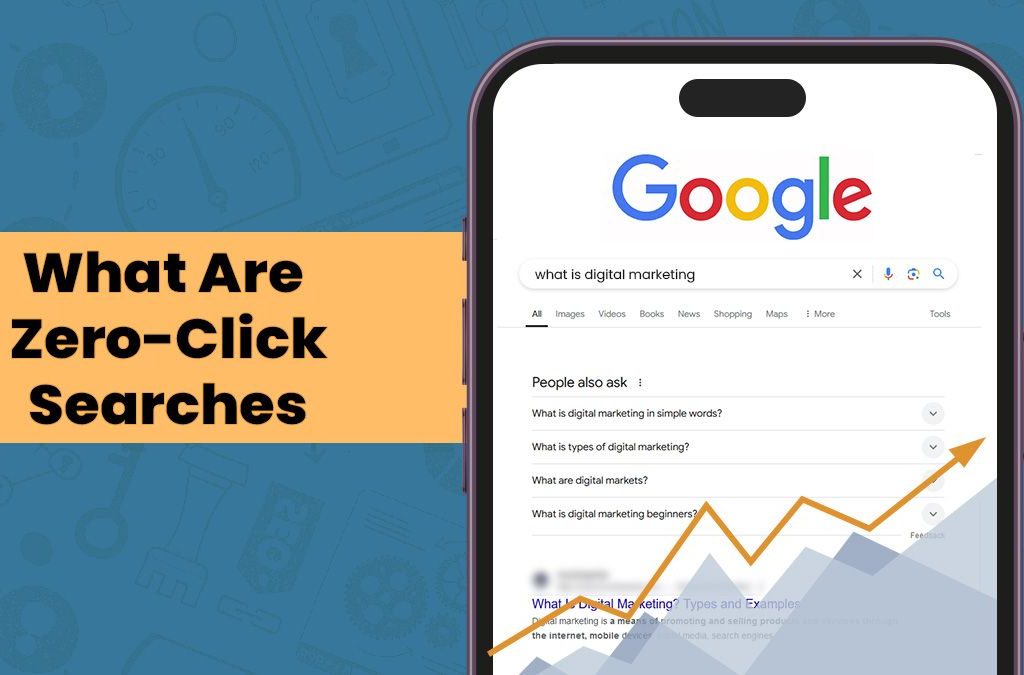
Zero-click searches are search results that provide answers directly in the search engine result page without clicking on any website.
Instead of visiting a webpage, users receive information through search features such as:
Featured Snippets
Knowledge Panels
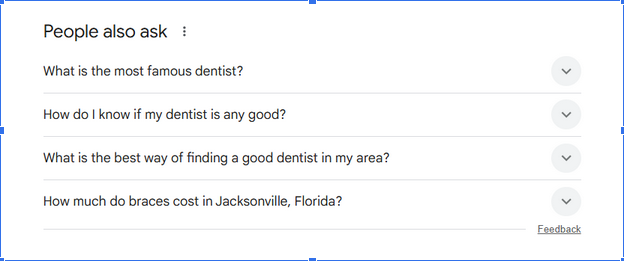
People Also Ask boxes
Local Packs
Direct Answers (like time, currency conversions, or definitions)
AI Overviews
As search engines continue prioritizing instant answers and conversational AI experiences, users increasingly rely on these built-in responses rather than navigating to individual websites.
For SEO professionals, this means the goal is evolving.
Instead of optimizing only for traffic, modern SEO is now focusing on visibility and authority within search results themselves.
Appearing in a zero-click format also builds mental availability. Even if users don’t click, your name is imprinted. And that’s powerful for brand recall, especially for businesses in saturated markets.
Moreover, zero-click appearances often get voice search traction. When Google Assistant or Alexa answers a voice query, it usually pulls from featured snippets.
As a result, your content can speak directly to users without a screen, and that kind of brand proximity is the future of ambient search.
How AI Overviews Are Accelerating Zero-Click Searches
The introduction of AI-generated summaries in search results has significantly increased the risk of zero click searches.
AI Overviews combine information from multiple sources and present it as a summarized answer at the top of the search page.
The shift toward instant answers on search engines is changing how we measure SEO success. Click-through rate (CTR) is no longer the only metric that counts.
Visibility beats visits: Even without clicks, being seen in a Featured Snippet boosts brand awareness.
Authority signaling: Getting featured means Google trusts your content.
Top-of-funnel exposure: You’re the first touchpoint in a customer’s journey.
While clicks may decrease, the value of SERP real estate has never been higher.
Here are some strategies to optimize for zero-click searches:
1. Target featured snippets.
Use concise paragraphs, tables, lists, and definitions to answer specific questions. Keep the answer within 40–60 words if possible.
Example: If someone searches “What is zero-click search?” and your content provides a brief, direct definition, you have a higher chance of being selected for a snippet.
2. Provide concise answers.
Use direct, jargon-free language. Place the most essential answer within the first 100 words of your section or article.
Example: When writing a how-to blog post, starting with a concise summary helps you grab the reader’s attention. This summary should provide a concise overview of the post’s content and what readers can expect to learn.
3. Use headers and bullet points.
Clear headings make it easier for search engines to extract answers from your content.
Organize content with H2s, H3s, and bullet points. Search engines love scannable content.
Additionally, you can turn subheadings into questions that users are searching for using long-tailed or conversational keywords.
4. Implement schema markup.
Structured data helps Google understand your content. Implement:
FAQ schema
HowTo schema
Article and BlogPosting schema
Example: A recipe page with HowTo schema is more likely to show up in voice search and smart assistant results.
5. Include FAQ sections in your content.
Google pulls questions and answers from your page into PAA (People Also Ask) boxes—format FAQs with clear, straightforward answers.
Example: Use headings like “What is…” or “How do I…” to match natural search phrasing.
6. Optimize Google Business Profile.
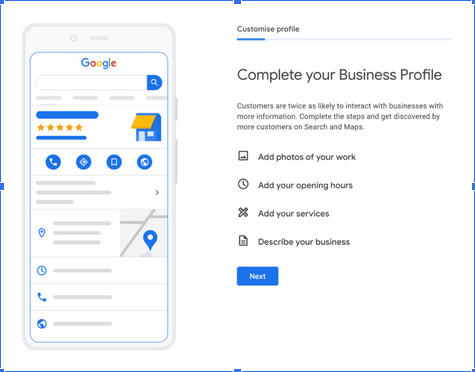
Ensure your profile is complete, with your current contact info, services, images, and reviews. This method boosts your presence in the Local Pack, a typical zero-click result for local searches.
Example: A restaurant’s GBP with updated hours, photos, and FAQs can dominate zero-click results for local food queries.
7. Use visual and video content.
Video snippets and image packs are powerful zero-click formats. Add schema to video content, create transcriptions, and optimize file names and alt text for all images.
Example: A “how to tie a tie” video with structured data can land in the top carousel without a single click-through.
8. Build and claim knowledge panels.
Establish credibility with:
Wikidata entries
Schema for your brand and people
Consistent brand mentions on authority sites
This system increases the likelihood that Google will build a knowledge panel around your entity.
Example: Authors and businesses can appear with knowledge panels by getting listed in online databases and publishing consistent, branded content.
9. Own your branded SERP.
Optimize for your name or business. Ensure meta descriptions, About pages, and social profiles are updated and appear prominently on the first page.
Example: A consultant’s Google result shows their LinkedIn, portfolio, and client reviews.
10. Optimize for AI Search Systems
AI search systems prioritize factual clarity, structured content, topical authority and trustworthy sources.
To increase the chances of being cited in AI answers:
provide original insights
reference credible sources
publish comprehensive guides
This is where Answer Engine Optimization (AEO) and Generative Engine Optimization (GEO) strategies become critical.
11. Partner with SARMLife for strategic content.
Zero-click searches can feel discouraging: your content is ranking, but users aren’t clicking through.
However, the brands that win in this new landscape are those that focus less on traffic and more on visibility, authority, and relevance. That’s where SARMLife comes in.
What Sets SARMLife Apart?
Search-intent-focused content: By understanding search intent, SARMLife crafts answers that directly respond to the questions your audience is asking.
Structured for search engines: Clear headings, bullet points, schema markup, and strategic keyword placement make it easier for Google to surface your information in zero-click formats.
Schema implementation and technical SEO: From FAQ and HowTo schemas to entity recognition, their strategies increase the possibility of being featured in rich results.
Brand authority embedded in content: SARMLife builds authority by weaving consistent branding, tone, and citations into every article, so even when your content is paraphrased or summarized, your brand remains recognizable.
Risk of Zero-Click Searches
Hand touching with search icon for Search Engine Optimisation or SEO concept to find information by internet connection.
While there are benefits, let’s not sugarcoat the challenges:
Loss of traffic: If your answer is used, users may never visit your site.
Attribution issues: Google doesn’t always credit the source.
Lower engagement: Visitors who don’t land on your site won’t engage with your calls to action.
Lack of data ownership: With traditional SEO, site visits provide metrics such as bounce rates, conversions, and time on site. Zero-click results rob you of those insights.
However, rather than seeing these challenges as a threat, it’s better to view them as a branding opportunity.
The aim is not to resist change but to embed your brand identity so deeply in your content that even when paraphrased or summarized, the essence of your voice remains recognizable.
This reason makes it crucial to combine zero-click strategies with other forms of SEO and brand nurturing.
How to Measure the Impact of Zero-Click SEO
Traditional SEO metrics focus heavily on click-through rates and website traffic.
However, zero-click searches require a broader measurement framework.
Important metrics to monitor include:
Search impressions
Featured snippet appearances
AI overview citations
Branded search volume
Engagement from returning visitors
Even when users do not click, appearing in high-visibility SERP features can increase brand recognition and trust.
This means visibility often becomes more valuable than traffic in zero-click search environments.
Utilize multi-touchpoint SEO: Zero-click searches can increase your visibility. Retarget visitors through ads, email sequences, or social platforms.
Brand your snippets: Include your brand name subtly in your content (e.g., “According to [Brand Name]…”).
Focus on long-term authority: Consistently being featured builds search engine trust.
Think of zero-click presence as a brand positioning tool. It helps shape the first impression users get about your niche authority.
Even if users don’t convert immediately, repeated zero-click appearances increase trust. Over time, users may actively seek out your brand, thereby bypassing the need for search altogether.
One underrated trick is to treat each blog post like a mini landing page. Even if it doesn’t convert directly through a click, it can act as a conversion seed.
When you eventually run retargeting campaigns on social media or YouTube, the familiarity you built through zero-click exposure accelerates the trust curve.
Zero-click searches aren’t a dead end; they’re a new beginning. By optimizing your content to appear in featured results and SERP elements, you’re positioning your brand as a top authority.
Traffic will always be significant. However, by 2025, visibility, trust, and discoverability will be the new currency of SEO success.
As zero-click searches evolve, so must your metrics. Tools like Google Search Console, BrandMentions, and Semrush’s featured snippet reports are now critical parts of a modern SEO stack.
Remember, SEO isn’t dying. It’s adapting. The focus has shifted from “ranking to be seen” to “structuring to be understood.” The brands that understand this will dominate SERPs in 2025 and beyond, not just in terms of clicks but also in terms of influence.
FAQs On Zero-Click Search
What is zero click search?
This is a search that ends on the SERP without the user clicking on any results. Standard formats include Featured Snippets, People Also Ask, and Knowledge Panels.
How do I optimize for zero-click results?
Write concise answers, use structured formatting, implement schema markup, and target FAQs and long-tail keywords.
Does zero-click search reduce traffic?
It can, but it also boosts brand visibility and authority. Many businesses find increased indirect traffic and recognition from these features.
Can I measure success in zero-click SEO?
Yes. Use tools like Google Search Console to track impressions and visibility and monitor your presence in featured SERP elements.
Is zero-click SEO relevant for small businesses?
Absolutely. Local Packs, Google Business Profiles, and FAQs are especially valuable for small brands trying to own their niche.
What tools can help identify zero-click opportunities?
Use tools like Semrush, Ahrefs, AlsoAsked, and AnswerthePublic to find featured snippet opportunities and PAA data.
Are you ready to optimize for future searches? Start by applying just three of the strategies above, and watch your visibility grow—click or no click. Send us a DM or email us: hello@sarmlife.com to aid you with these applications.
Landing page optimization (LPO) is the process of improving the content and performance of your landing page(s). The goal is to increase conversions, such as people making purchases or signing up for your newsletters.
You can follow several best practices to optimize your landing pages, and this post simplifies them.
Before delving into landing page optimization, you should understand that you can have more than one landing page on your website, you can have a landing page without a website, and you can also convert a webpage into a landing page.
The main purpose of a landing page is to drive conversion through targeted messaging. To convert traffic from multiple sources like emails and ads into tangible results.
Some people also use landing pages as a way to collect data and generate leads.
Hence, you can have a landing page focused on people signing up for your newsletter, another landing page for selling one of your courses, and another for scheduling a meeting with you.
No matter how many landing pages you have, the intent remains to have tangible results.
Now, how do you optimize your landing page to have these tangible results?
What is landing page optimization (LPO)?
Landing page optimization involves improving a landing page’s design, messaging, and user experience to achieve specific conversion goals that align with your overall marketing goals.
These conversion goals could include:
Signing up for a free trial
Downloading a lead magnet
Booking a consultation
Purchasing a product
Signing up to a newsletter
Unlike traditional website pages, landing pages are built for a single objective. Every design decision, from headlines to forms should guide visitors toward that action.
A well-optimized landing page aligns three critical elements:
User intent
Clear value proposition
Low-friction conversion path
When these elements work together, landing pages consistently outperform standard web pages in generating leads and revenue.
Landing page optimization (LPO) is crucial for driving higher conversion rates. Your website visits can become valuable leads and customers when your landing pages are optimized, ultimately increasing your overall success.
2. Improved ROI
When you optimize your landing pages for conversion, the results are directly proportional to your increased return on investment (ROI) for your marketing campaigns.
By increasing your conversion rates with landing page optimization, you get more out of the money you spend on advertising, social media, and other marketing efforts.
3. Cost-efficiency
Landing page optimization is a cost-effective way to improve your website’s performance. Compared to investing in expensive paid advertising campaigns, LPO helps you achieve better results by optimizing what you already have.
You can get better financial outcomes by focusing on your existing traffic, creating lead magnets tailored to your traffic profile, and maximizing its potential.
4. Competitive advantage
Only a few people focus on or give enough attention to landing page optimization. Therefore, improving your landing pages can give you the distinct advantage you need to stand out.
5. Enhanced user engagement
A well-optimized landing page is designed to engage users and keep them interested in your offers.
Clear messaging, enticing visuals, and relevant content can contribute to a positive and engaging experience that will encourage your visitors to explore further and take the desired actions.
6. Tracking campaigns
LPO allows you to track the performance of your marketing campaigns with greater accuracy.
By analyzing your users’ behavior on each of your landing pages, you can identify the exact campaigns driving the most conversions and optimize your efforts accordingly.
7. Specificity
Unlike your other generic website pages, landing pages are designed for a specific purpose and target audience.
This enables you to precisely tailor the messages and offers on the landing page to the needs and interests of your visitors, resulting in higher relevance and, ultimately, higher conversion rates.
Elements like headlines, visuals, value propositions, and CTAs all play key roles in converting visitors into customers.
Landing page optimization best practices
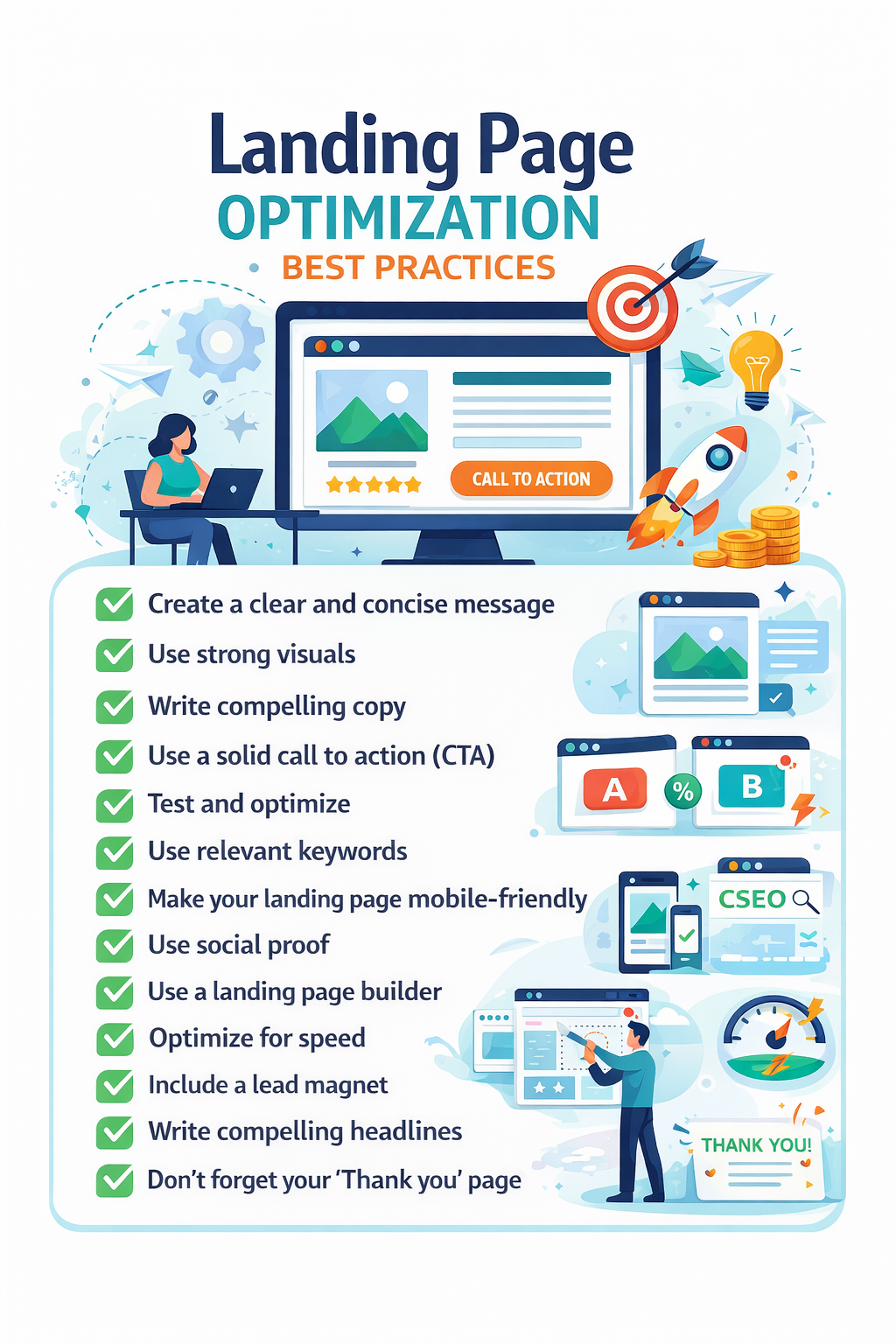
Here are some of the best practices for landing page optimization you can use:
1. Create a clear and concise message.
Your landing page must have a clear and concise message that immediately communicates the value proposition to the visitor.
Ensure your visitors know what you want them to know, see, or do. The landing page’s purpose should be clear and concise.
Photo by ChatGPT
2. Write a Clear Value Proposition Above the Fold
Visitors should understand what you offer, who it’s for, and why it’s better within the first few seconds of landing on your page.
If a visitor cannot answer those three questions immediately, the chances of them leaving the page increases.
High-performing landing pages communicate their unique value proposition within 5 – 10 seconds of arrival.
3. Use strong visuals.
Of course, we all know that the key to human attention is to captivate, and what better way to do this than with good visuals?
Visuals are practical tools for capturing attention, communicating information quickly, and increasing the emotional impact of your message.
Use high-quality images, videos, and infographics relevant to your offer and appeal to your target audience. Also, avoid using stock photos or generic visuals that lack personality.
4. Match Landing Page Messaging With Traffic Source
One of the most overlooked landing page optimization best practices is message match.
Your landing page headline should closely reflect the messaging used in:
Ads
Email campaigns
Social promotions
Search results
When the messaging is consistent, users feel confident they are in the right place, which reduces bounce rates and improves conversions.
5. Write compelling copy.
Your landing page should have compelling sales copy, mainly if the page aims to sell.
Write concise copy that speaks directly to your target audience’s needs and desires.
Use strong verbs and powerful language to highlight the value of your offer. Also, focus on your product or service’s benefits and how they can solve your audience’s problems.
6. Use a single, solid call-to-action (CTA).
Tell your visitors exactly what you want them to do next. Use clear, concise, and action-oriented language for your call-to-action buttons and avoid using multiple CTAs on a landing page.
High-converting landing pages typically focus on one primary action, such as:
“Start Free Trial”
“Book a Demo”
“Download the Guide”
Also, make your CTAs prominent and visually appealing, and place them strategically throughout your landing page.
7. Test and optimize.
Don’t assume you’ve created the perfect landing page on the first try. Test and optimize everything on your landing page.
Compare various landing page versions using A/B testing to determine which works better.
Test different headlines, images, CTAs, and copy variations to find the combination that drives the most conversions.
8. Use relevant keywords.
Use relevant keywords throughout your landing page content, including the title, headings, and body text.
This increases the amount of organic traffic and possible conversions to your page by helping search engines understand your content better and rank it higher in search results.
9. Make your landing page mobile-friendly.
The number of people using mobile devices to access the internet is increasing.
Ensuring your landing page loads quickly and displays properly across all platforms, including tablets and smartphones, is essential.
A responsive design on your landing page is vital to providing a seamless and user-friendly experience for all visitors, regardless of how they access your page.
10. Use social proof.
Visitors trust other users more than marketing claims. Use case studies, testimonials, and other social proofs to build credibility and trust with prospective customers.
Showcase positive customer experiences and highlight the benefits others have achieved by using your product or service.
Social proof can significantly increase conversion rates by promoting inclusivity and reducing doubts.
11. Limit distractions.
If your landing page has many distracting elements, the visitor might get confused about its primary purpose, or they will be distracted and forget what they came to the page to do.
If you want to create and manage landing pages, consider using a builder.
These tools offer a user-friendly interface, drag-and-drop functionality, and various pre-designed templates to help you build high-converting landing pages without extensive coding knowledge.
This is a better option, especially for a beginner, because it provides an optimized template you can customize.
When it comes to learning how to optimize landing pages, you cannot ignore page speed.
A website’s user experience and conversion rates greatly depend on its speed.
Ensure your landing page loads on all devices quickly and effectively. This will prevent visitors from getting frustrated and abandoning your page before taking action.
14. Include a lead magnet.
You can include a lead magnet on your landing page to encourage visitors to take your desired action.
For example, you can promise to give them a free ebook if they sign up for your upcoming webinar or offer a free 5-minute consultation if they make a particular sale.
15. Write compelling headlines.
Your headline is the first thing people will see, so make it count.
Create a headline that catches readers’ attention, piques their interest, and conveys your offer’s value.
16. Build links to your landing pages.
While optimizing your landing page is crucial, please pay attention to the importance of building links to it.
Building links to your page increases its visibility and conversion potential by bringing in more targeted traffic.
You can build links to your landing pages by creating high-quality content, guest blogging on relevant websites, collaborating with partners, promoting on social media, and considering targeted advertising to increase visibility and reach.
17. Don’t forget your ‘Thank you’ page.
The “Thank you” page is sometimes disregarded, but it promotes continued engagement and positive brand perception.
Express gratitude, provide confirmation, offer next steps, personalize the message, and ensure mobile-friendliness.
Optimizing your ‘Thank you’ page can turn a one-time interaction into a long-lasting business relationship.
FAQs on how to optimize a landing page
What is landing page optimization?
Landing page optimization involves improving a landing page’s design, messaging, and user experience to achieve specific conversion goals that align with your overall marketing goals.
Why is landing page optimization important?
Landing page optimization helps businesses convert more visitors into leads or customers. By improving elements like headlines, calls-to-action, page speed, and forms, businesses can increase conversion rates and maximize their ROI.
What makes a landing page high-converting?
A high-converting landing page typically includes clear value proposition, a single call-to-action, trust signals such as testimonials, fast loading speed, and a mobile-friendly design.
FINAL THOUGHTS
Any marketing strategy must include landing page optimization. You can make landing pages that are more effective and assist you in reaching your business objectives by following the best practices described in this blog post.
If you are serious about increasing your conversions, you should implement these practices on your landing pages today.
How optimized is your landing page on a scale of 1-10?
If you don’t search for ways to repurpose content for SEO in 2025, you’ll be wasting your efforts and missing opportunities to monetize your marketing.
Here’s a question: How long did your best blog post take before its generated traffic stopped?
A week? Three weeks? At most, four weeks? That’s the trend. You’d be surprised to know that most of the published content stops generating traffic within a month.
As a blogger or business owner, you find yourself in the loop of creating another blog post from scratch just to stay relevant. This is hard work! Creating optimized content takes lots of time and energy, regardless of the tools that help to speed up the process.
Imagine constantly going through an endless cycle of mapping out ideas, conducting keyword research, researching topic intent, optimizing the outline, writing the first draft, proofreading, reviewing, editing, and publishing the content, yet with no results.
To maximize your reach and maintain visibility in this fast-paced digital world, creating ways to repurpose content is no longer optional; it’s a necessity. 46% of marketers believe repurposing content is more effective than creating new content from scratch.
This blog post gives you nine failproof ways to repurpose your content for SEO in 2025.
Content repurposing is the process of converting existing content and transforming it into a different format for different platforms to reach a wider audience and maximize the content’s value.
This strategy helps revive old content, generating dozens of new posts with less effort while meeting publishing schedules and satisfying audience cravings for content.
For example, you could convert a blog post into several LinkedIn posts, a Twitter thread, a video script, a TikTok video, a webinar, a comprehensive e-book, or an infographic.
However, repurposing content for a new platform is not a copy-and-paste strategy (republishing).
Content Repurposing vs. Content Reposting
As explained earlier, repurposing content for SEO involves transforming existing content into a new format or adapting it for a different audience or platform.
However, sharing the same content again on a new platform with minimal or no changes is called content republishing or reposting. This approach is only advised when reintroducing high-performing content to new followers but is not particularly effective.
Imagine posting your 1500-2500 word blog post on LinkedIn or having your YouTube channel talk about your blog post word for word. That would be ineffective.
The secret of content repurposing lies in adapting content to a specific channel. This requires understanding each platform’s algorithm and tailoring every piece of content to that platform.
Repurposing allows you to create a dozen pieces of new and valuable content from a single blog post; however, republished content tends to fall under Google’s duplicate content rules.
Republishing or improperly repurposing content can lead to the same information being found on multiple website pages, which can cause Google to flag the content.
Refurbishing involves updating and enhancing existing content to improve its accuracy, relevance, and performance. It could include updating outdated content and improving SEO elements such as keywords, meta descriptions, and visuals.
Benefits of Repurposing Content
Unlike creating new content, strategically repurposing content has several benefits, which include:
Saves time and energy
Creating well-optimized content takes two to five hours, depending on the length of the blog post. By learning how to repurpose content for SEO, you only have to leverage the research, update the writing, make a few changes, and reshape it, saving hours of time and energy.
Although some content repurposing is not always easy, mainly when it involves video recording, the effort is still less than drafting entirely new content from scratch.
Increases new audience reach
Imagine reaching all audiences from every platform, regardless of their specific content types. With content repurposing, you do not have to create content for only a set of people; it helps you reach a new audience and engage multiple people with your brand.
For example, some people might care about what you say but find it challenging to read blog posts. Turning your blog posts into short, engaging videos can extend your reach to a broader audience.
Maximizes ROI for your content marketing
Consider these two scenarios:
Scenario A:
Imagine spending $500 to write a long blog post. You publish the content and post it on some social media pages.
It ranks a little after some time. Then, you forget about it and leave it dormant in the dark corners of your archives as you prepare to write an entirely new blog post.
Scenario B:
After spending $500 on creating the blog post, you paid an extra $300 to a videographer to create short-form videos and another $200 to a graphic designer who will create dozens of high-quality images to complement the content.
With these, you can share the videos on YouTube and Instagram, compile the images into infographics, create slideshows on YouTube, create email drip campaigns, and more.
Which scenario has the potential to increase ROI? Definitely Scenario B.
With Scenario B, you can turn what would have been a one-time use piece into over five additional assets that can be utilized across different platforms to reach wider audiences.
These are strategic ways to repurpose content to extend its lifecycle, allowing you to squeeze as much value from it as possible.
Improves search engine optimization
The best-performing content begins to lose momentum as time goes on, mainly because search engines prioritize fresh content. When you learn how to repurpose content for SEO, search engines view it as new content, giving it multiple chances to rank on SERPs.
Also, search engine crawlers pay attention to the volume of content on a website. The more your website curates diverse content on a specific topic, the more Google recognizes you as an industry expert in that area.
Repurposing content increases your chances of ranking across search engines while embracing a “search everywhere strategy” that accounts for the fact that people don’t only use Google to find answers anymore. They turn to AI chatbots, TikTok, YouTube, and other platforms.
Ways to Repurpose Content for SEO
Do you want to learn how you can transform a single blog post into multiple content formats to maximize SEO efforts and reach a broader audience?
Here are the best ways to repurpose content for search engine optimization:
Identify evergreen and high-performing blog posts.
One of the first steps to take in learning how to repurpose content for SEO is to start analyzing your blog content to identify posts that are ripe for repurposing. The goal is to recognize content that will remain relevant over time.
For example, repurposing news-related content might be a waste of time because, by the time you transform it into different formats, it’s already outdated. Instead, choose evergreen content (posts that will remain valuable months or years later).
Also, tools like Google Analytics can help examine blog posts that have performed well in high traffic, engagement, and backlinks. These blog posts are loved by users and have the most potential for repurposing.
Pro Tip: In some cases, you might need to update an existing or old blog post to make it worthy of repurposing.
Break down your blog post into key points.
Nobody wants to watch a video where you are reciting your blog posts word for word; it gets tiring and boring.
Review the blog post to prevent this and break it into extra points or highlights like takeaways, statistics, or important insights.
The idea is to convert those long pieces of content into hundreds of bite-sized pieces that can be used as individual pieces of content on other platforms.
Understand the algorithm of each platform.
Remember, the key to getting the best of content repurposing lies in adapting each piece of content to each platform’s format.
Consider the following:
Instagram & TikTok: Short, engaging videos work best.
YouTube: Longer, in-depth videos perform well.
Email Marketing: Summarized insights work best for drip campaigns.
LinkedIn & Medium: Thought leadership articles or professional insights gain traction.
Posting the same long videos on Instagram or TikTok as you do on YouTube will not work. Instead, break the large video into short clips to make it work on other social media platforms.
Create visuals.
One of the easiest ways to repurpose your existing content is to make it into visuals.
Use the key points from your blog post to create engaging graphics like:
infographics to summarize the main post
carousel that shows different sections of the blog
quite cards for important insights, etc
You can share these visuals on Instagram, Facebook, LinkedIn, or Pinterest.
Turn blog posts into videos.
Many blog posts perform well when converted into video format. However, making a blog post YouTube-worthy requires extensive tweaking to adapt to the platform.
Why?
Suppose your blog post discussed 30 different steps for optimizing images for SEO. That would be too much to cover in a single YouTube video.
Instead of just reading the blog post, you can have a 1-hour YouTube video in this format:
Start the video with a hook that states the benefits of watching the videos.
Briefly explain the technical stuff as quickly as possible, or skip it.
Immediately move on to the interesting and most engaging part.
Pro Tip: With YouTube, you can add funny moments and tweaks to improve engagement.
Once your long YouTube video is done, break it into short-form videos for TikTok, Instagram Reels, and YouTube Shorts.
To explain the key takeaways, you can create animated videos or use talking-head videos. Repurposing this way allows you to reach an audience that prefers visual or audio content.
Convert into an email series.
One of the best ways to repurpose content as a business owner is to convert it into an email series.
Instead of sending all the information in one email, create an email drip campaign with smaller blog post pieces. Each email should summarize specific sections or points of the original post.
This keeps users engaged while consistently getting value from your content.
Repurpose content for guest posting.
If you’re invited to write a guest post, rehashing (copying and pasting) the same content from your blog will damage your credibility with other blogs in your niche.
Instead, take the point or strategy in your blog post and make it the foundation of the guest post. Use different examples, case studies, tips, and illustrations to make it unique.
With these, most bloggers will be ready to publish your guest post.
Host a webinar or live session.
Blog posts can serve as a foundation for webinars or live sessions in which you elaborate more on the topic.
During the webinar, discuss the key points from the post, answer audience questions, and offer more value. Record the session and repurpose it into a video for future use.
Repurpose for different audiences.
This falls more into the category of topic clustering (add the link to the topic clustering blog). Consider how different audience groups might benefit from your content. The same blog post can be tailored to suit your audience categories.
For example, if your blog post is about “Marketing Strategies for Small Businesses,” you could create separate versions for B2B businesses, freelancers, and startups.
This will give you more authority.
Blog Content Repurposing FAQs
Can I copy and paste my blog post to other platforms?
No. Copying and pasting the same content across platforms is not repurposing; it’s duplicate content, which can be bad for SEO.
Is there a limit to repurposing blog posts?
No. There isn’t a strict limit to how many times you can reuse a blog article as long as it is valuable, up-to-date, and appropriate for various platforms and audiences.
Can I repurpose short blog posts?
Yes! Short blog posts can be repurposed into multiple content formats. Extract the most valuable points and present them in different ways.
Is content repurposing the same as content clustering?
No. Content repurposing and content clustering are not the same but complement each other. Although clustering focuses on subject organization and repurposing on format diversity, both strategies increase SEO and visibility.
Final Thoughts
Instead of constantly creating new content, maximizing several ways to repurpose content helps you rank in multiple search engines, saves time and effort, and reaches different audiences across various platforms.
The tips shared in this article will help you adapt your content to several platforms while satisfying the cravings of the audience and search engines for fresh content.
If you don’t repurpose your content for SEO in 2025, you’ll miss opportunities to maximize SEO and grow your brand.
Email hello@sarmlife.com for information and collaboration.
Most SEO strategies don’t fail because of bad content; they fail because the content has no structure behind it.
You publish multiple blog posts, target a few keywords, maybe even rank for some of them, but there is no real, measurable, or reproducible growth. Your pages compete with each other, important keywords never reach page one, and over time, the website becomes harder to scale.
That’s exactly where keyword mapping for SEO comes in.
If you want your content to rank consistently and create a strategy that provides reproducible growth, you need a clear system that tells search engines which page should rank for what.
Not guessing, no overlapping topics, no publishing blindly.
At SARMLife, this is one of the system behind the content strategies that help some of our pages rank #1 and even appear in AI-driven search results. And in 2026, keyword mapping for SEO isn’t optional anymore especially if you want your content to support topical authority, internal linking, and modern search visibility.
Either you are working with a huge website or managing local SEO strategies for a small business owner, you need to understand the keyword mapping process. It plays a critical role in how search engines understand, index and rank your content.
Keyword mapping is the process of assigning specific keywords to individual pages. It is the content planning step after keyword research where each page is given a primary keyword along with closely related supporting terms so pages don’t compete.
Think of it like this: the goal of keyword mapping is to stop your pages from stepping on each other’s toes. It does this by clarifying what each page should rank for, guides your content creation and helps search engines understand your site structure faster.
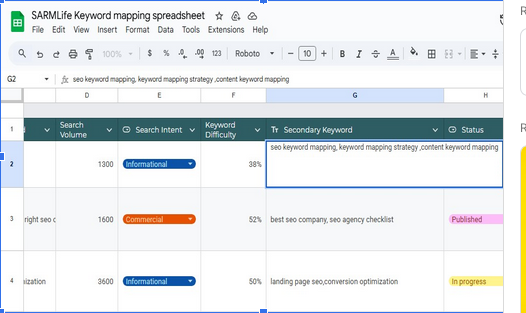
A good keyword map considers the main keyword, secondary keywords, the intent behind the search, the type of page, keyword difficulty and search volume. Every page gets a job and every keyword a home.
Why is keyword mapping important in SEO?
Creating a detailed keyword map helps to keep track of important details including keyword volume, difficulty and more. So, why not just write it down on a piece of paper instead of mapping?
Google ranks pages that match what people are really looking for. Not all keywords represent the same intent. Where some users want information, others want comparisons while some are ready to convert.
Keyword mapping allows you to evaluate:
Informational intent (guides, explanations)
Transactional intent (service or product pages)
Commercial intent (comparisons, benefits)
Assigning every page to one clear primary keyword helps ensure that the content on a page directly matches what a user is looking for.
Prevent keyword cannibalization
The last thing you want is for your content to compete against itself. Keyword cannibalization occurs when multiple pages on your site compete against each other for the same keywords.
Here are some of the results of keyword cannibalization:
Search engines struggle to determine which page is most relevant
Link equity is split across competing URLs
Rankings fluctuate
A solid keyword map keeps each keyword tied to a single page ensuring that each page supports, rather than competes so Google knows exactly where to send traffic.
Strengthen internal linking strategy
Keyword mapping for SEO naturally supports a structured internal linking system. When keywords are mapped correctly:
Supporting pages link to core pages using descriptive anchor text.
Search engines understand content relationships.
Authority flows through topic clusters.
A page targeting keyword mapping benefits can internally link to related topics such as content clusters and search intent which reinforces topical authority.
Identify and fill content gaps
Keyword mapping for SEO turns content creation into a strategic process. As you cluster keywords and assign them to URLs, you’ll not only spot the topics you haven’t covered yet, but also:
Avoid duplicate topics
Prioritize pages with the highest SEO value
Those are ready-made opportunities for new content that can pull in traffic you’re missing today. This is important especially for growing websites, e-commerce platforms and blogs.
Keyword mapping isn’t just restricted to organic SEO, it also helps align ads with the right landing pages, improve your quality score and structure ad groups around search intent.
Paid and organic campaigns work better together when they’re built on the same keyword strategy.
Mapping can also lead to higher visibility in relevant SERPs, as long as the content is high quality.
Keyword mapping may take time initially but provides long-term, time-saving benefits, like preventing the need to re-optimize pages later to the point of needing a redirection.
Keyword mapping for SEO is essential for all websites, including small websites and must be updated on a regular basis usually every few months or when you add new content.
How is keyword mapping different from keyword research?
Research finds opportunities while mapping assigns them to pages.
Let me break it down:
Keyword research uncovers high-value terms, checking the competition, volumes and intent. It’s all about discovery, finding the words that can bring the right audience to your site and learning the intent behind those searches.
Keyword mapping however, is assigning specific target keywords to individual website pages, keeps your content organized, avoids keyword cannibalization, and shows search engines a clear roadmap of your site.
After building your list of keywords through research, mapping is the next step is to decide exactly which page each keyword belongs to.
Where research uncovers the opportunities, mapping turns them into a smart content plan.
Although both are necessary because without mapping, keyword research isn’t complete. By using them together you’ll attract the right traffic and give every page a good shot at ranking.
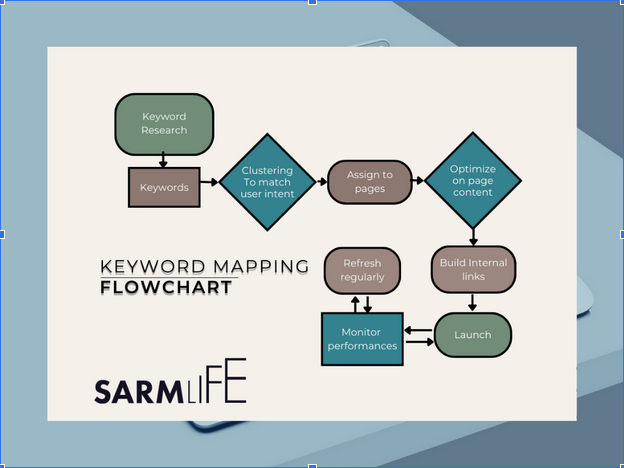
Here’s a detailed step by step guide to keyword mapping for SEO:
Start with Keyword Research
Begin by searching for the keywords you would like to target, including seed terms, long-tail keywords, primary and secondary keywords. You’ll need to create three keyword lists:
Pillar page keywords are keywords which describe your site’s main topics. You’ll assign them to your site’s pillar page while cluster topic keywords represent subtopics of your pillar page.
Keyword variations/semantic keywords are words or phrases which have similar meanings to the original keywords.
Check search volume so you know what people actually type into Google, look at keyword difficulty to know which keywords have the most competition and pay attention to what the user looks for when searching such keywords (user intent) and match what readers want.
This step sets the foundation for everything that follows.
Group and Cluster the Keywords
A topic cluster is a group of related pages interconnected by internal links that includes a pillar page (the main page) and related subpages focused on subtopics.
Pillar pages are in-depth articles or ultimate guides. Cluster posts are subtopics that support a pillar page. Linking a group of pillar and cluster posts to each other creates a “topic cluster” that can boost your site’s topical authority.
Search intent is key when clustering because, if the intent doesn’t match the page, your rankings will struggle.
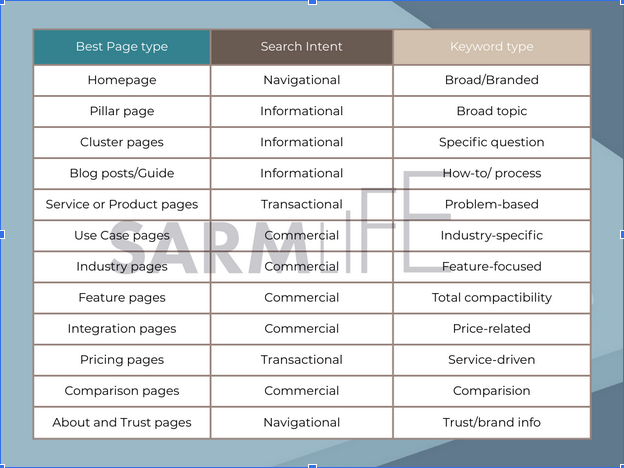
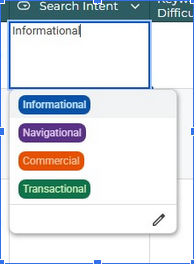
The types of search intent we have are:
Informational: The searcher wants to find information about a topic. These belong on blog posts, guides or FAQs. e.g. “what is keyword mapping”.
Navigational: The searcher is looking for a specific website. These point directly to branded pages. e.g.“SARMLife blog”.
Transactional: The searcher wants to make a purchase. These belong on product or landing pages. e.g.“buy SEO software”.
Commercial: The searcher is checking out products and services. These fit comparison pages or reviews. e.g.“best keyword mapping tools”.
What Pages Types Should Keywords Be Mapped To in SEO?
Once you’ve grouped and clustered your keywords based on search intent and topic, the next step is to decide where those keywords should be on your site.
Search engines and users expect specific page types to serve different intents as I’ve said earlier and mapping keywords according to these types helps you prevent overlap, satisfy intent and improve rankings.
Here’s how each page works within your keyword map:
Homepage:
The homepage sets the broadest context for your site. This is the starting point for search engines and users to understand your brand and lead users on where to go next.
Targets broad, branded and high-level keywords.
Represents the overall value proposition of the site.
Should not target long-tail keywords
Supports other pages through internal links not competition.
Example:
Primary keyword: SEO Agency in Jacksonville.
Pillar page (Core topic pages)
This page acts as the foundation of your topical authority.
Target broad, high- volume keywords around a main topic.
Link out to all related subtopic pages.
Serve as the central hub for cluster content.
Example:
Primary keyword: keyword mapping
Cluster pages (Supporting content)
Cluster pages support pillar pages by talking about specific subtopics.
Target long-tail, specific keyword variations
Support a pillar page through internal linking
Focus on one subtopic or question
Example:
Primary keyword: how to create a keyword map
Blog posts/Guide
These pages basically satisfy informational intent.
Target informational intent
Meant to answer questions, explain processes and educate users
Often form cluster content but can also stand alone.
Example:
Primary keyword: keyword mapping for SEO
Service or Product pages
These pages are built to convert.
Target transactional keywords
Created to convert visitors into customers or leads
This should be mapped out carefully to avoid overlap
Example:
Primary keyword: SEO writing services
Use Case pages
They show how a product or service solves specific problems.
Target problem-solution keywords.
Assists users self-identify with a scenario
Sits between informational and transactional intent.
Example:
Primary keyword: keyword mapping results for ecommerce websites.
Industry pages
Industry pages tailor your offering to specific sectors
Target industry-specific search terms
Increase relevance for niche audiences
Common in agencies and SaaS businesses
Example:
Primary keyword: SEO writing for SaaS companies
Pricing pages
These pages address conversion-ready users.
Target pricing,cost and plan related keywords.
Reduce friction in the user’s decision stage
Should be clearly mapped and internally supported
Example:
Primary keyword: SEO writing service pricing
Comparison pages
Comparison pages help users evaluate options.
Target keywords like “best”, “vs” “tools” and “reviews”
Capture mid-funnel traffic
Often linked to pricing and product pages.
Example:
Primary keyword: seo writing vs. blog writing
About and Trust pages
These pages support navigational intent and credibility
Target branded and trust based keywords
Strengthen E-E-A-T signals
Rarely compete for non-branded keywords
Example:
Primary keyword: about SARMLife
Download our Free Keyword Mapping Template
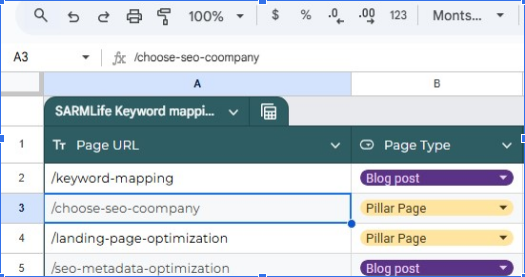
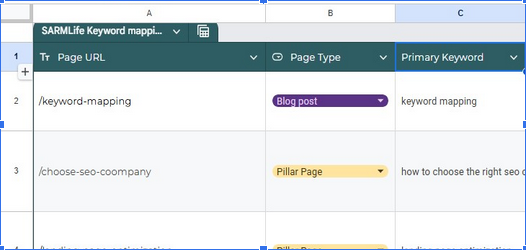
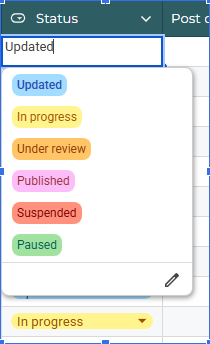
Now you’re ready to create your keyword map.Download our Free Keyword mapping template. Once you’ve downloaded the template, rename it in the upper left.
These are the data included in our keyword mapping template:
Page title
What is the page working title?
Page URL / Slug
The actual URL of the page you’re mapping keywords to.
Once the clusters are ready, match them to specific URLs on your site. This keeps pages from competing with each other and makes it obvious to search engines which page should rank for which query.
Make sure each page follows a strong on-page SEO process so they perform well on SERPs.
Optimize Your Content
Work those keywords naturally.
Place the main keyword in the title, meta description, sub-headings, and opening paragraph. Sprinkle related phrases through the body of the content, where they fit.
Build Internal Linking and Site Structure
Support your content hierarchy with structured internal linking by linking related pages with keyword-rich anchor text and make sure your site structure mirrors those keyword clusters.
This helps readers navigate and makes life easier for search engines.
Monitor Performance
As you refine your map, run an SEO audit process to ensure keywords aren’t duplicated.
Check how each mapped page is doing with Google Analytics, Search Console, or a rank tracker.
Keep an eye on impressions, click-through rates, and keyword positions so you know what’s working and what needs an update.
Refresh the map regularly
Search trends change, competitors publish new content.
Keywords that worked six months ago may be stale today so revisit your keyword map every few months to update clusters, adjust content.
Staying current keeps your site sharp, helps you spot new opportunities and keep rankings steady.
Common FAQs when it comes to keyword mapping for SEO.
Here are some commonly asked questions when it comes to keyword mapping for SEO:
How should you organize your keyword map for SEO?
An effective keyword map isn’t just a list of keywords. It’s a decision-making system which helps you decide what to create, what to optimize and what to fix.
The aim is to balance search volume, difficulty, and intent.
When organizing your keyword map, focus on impact rather than just volume.
You’ll want to:
Not chasing only high-volume keywords. Mix them with long-tails that show clearer user intent.
Give priority to keywords that directly solve your audience’s problems or answer common questions.
Prioritize keywords that align with your core services, products or content pillars.
Revisit your keyword map at least twice a year to catch shifts in search behavior.
Should you update existing content or create new pages?
One of the most important decisions in keyword mapping is whether a keyword should be assigned to an existing page or a new page.
Update an existing page when:
The page ranks between positions 5-30
The search intent matches the page’s purpose
The keyword is closely related to the current topic
The page has backlinks
Updating existing content helps you to consolidate authority and avoids keyword cannibalization.
Create a new page when:
The keyword represents a distinct subtopic
Expanding an existing page would weaken its focus
No existing page fully satisfies the search intent
The keyword has commercial or transactional intent which merits its own URL
Keyword mapping is about optimization before expansion. So keep in mind that publishing more pages is not always the best move.
What You Should Do When Multiple Pages Target the Same Keyword
Keyword cannibalization as we’ve earlier discussed is a huge problem in SEO. When this occurs make sure to:
Identify the primary page
Merge overlapping pages and redirect the weaker URL.
Assign secondary keywords to supporting pages if needed.
Update internal links to point consistently to the primary page.
Adjust title, subtopics and anchor text to reinforce intent.
Monitor performance
How Should You Review and Update Your Keyword Map?
Monitoring performance helps to track rankings, using Google Search Console or a rank-tracking tool. Watch organic traffic changes on pages tied to high-priority keywords, flag pages that slide in rankings for quick fixes.
You can also refresh the keyword map regularly by re-evaluating keywords every quarter or at least twice a year.
Add new terms, drop stale ones, and check if intent has shifted and re-optimize old content where needed. Remember that search behavior changes and your keyword map should change with it.
What are the best tools for Keyword Mapping?
So far, we’ve been able to properly talk about keyword mapping. Here are some tools we recommend and when to use them:
Google Keyword Planner
Google Keyword Planner is a free, data-rich tool straight from the source – Google itself. It’s perfect for beginners and pros who want accurate search-volume stats and keyword ideas.
Why it’s worth using
Shows keyword search volume, competition, and bid ranges.
Suggests related keywords so you can spot topic clusters.
Lets you export keyword lists directly for mapping.
Pricing
Free with a Google Ads account.
Ahrefs
Ahrefs is known for its massive keyword database and excellent competitor analysis. If you’re serious about SEO, it’s one of the best all-in-one platforms.
Why it’s worth using
Keyword Explorer shows search volume, keyword difficulty, and click-through data.
Site Explorer reveals which pages your competitors rank for so you can map gaps.
The Content Gap tool helps you find keywords you’ve missed.
Pricing
Plans start at about $99/month.
SEMrush
SEMrush is a powerhouse for keyword discovery and tracking. It’s great for marketers who need a detailed look at what’s working across different domains.
Why it’s worth using
Keyword Magic Tool gives endless variations and long-tail ideas.
Position Tracking monitors how your mapped keywords climb in SERPs.
Competitor research helps you see where to out-rank rivals.
Pricing
Plans begin around $129.95/month.
Moz Keyword Explorer
Moz offers a clean interface and reliable metrics, making keyword research less of a headache.
Why it’s worth using
Shows search volume, difficulty, and organic CTR.
Generates keyword suggestions and SERP analysis.
Easy to integrate into a simple keyword map.
Pricing
Free for up to 10 queries/month; paid plans start at $99/month.
SpyFu
SpyFu is a favorite for competitive research and PPC insight. It’s handy when you want to see how others are bidding on or ranking for your target terms.
Why it’s worth using
Exposes competitors’ paid and organic keywords.
Tracks ranking history so you can map keywords by performance trends.
Provides cost-per-click estimates for PPC planning.
Pricing
Plans start at $39/month.
BuzzSumo
BuzzSumo shines for content research and trend discovery, which helps you align keyword mapping with viral topics.
Why it’s worth using
Identifies high-performing content by keyword.
Shows trending topics and popular questions around your niche.
Useful for brainstorming keyword clusters that attract backlinks and shares.
Pricing
Free limited plan; paid plans start at $119/month.
These tools cover everything from raw keyword discovery to competitor spying and trend tracking. Choose one or two based on your budget and how deep you need to dig, and you’ll have everything required to create a sharp, well-structured keyword map.
Final Thoughts
Creating a keyword map involves more than dropping a few phrases into a spreadsheet. It’s about researching the right terms, grouping them by intent, matching them to specific pages, and revisiting the plan as your content grows.
This process keeps your site organized and signals to search engines exactly which page deserves to rank for each topic.
In case you’re not sure where to start, we’ve shared a detailed free keyword mapping template you can copy right now.
It’s built to easily guide you step by step through keyword mapping for your website and by pairing it with recommended tools like Google Keyword Planner, Ahrefs, SEMrush, Moz, BuzzSumo, and SpyFu to help you uncover the best keywords and track performances while avoiding some of the common mistakes.
If you’re new to SEO and want professionals to turn your keyword mapping into a broader strategy, SARMLife can help.
Our SEO services cover everything from detailed keyword research to on-page optimization and content planning, to enable you to focus on growing your brand while we handle the technical side.
With this solid map and our expertise, your site is set up for progressive, steady and long-term growth.
FAQs on keyword mapping for SEO
What is keyword mapping?
Keyword mapping is the process of assigning a main keyword plus a few related terms to each page on your site so every page targets a specific search query.
Why is keyword mapping important in SEO?
Keyword mapping is important in SEO because it keeps each page focused on the right search intent, prevents keyword cannibalization, and reveals content gaps you can fill for more traffic.
How do you create a keyword map?
You create a keyword map by researching keywords, grouping them by topic or intent, and assigning one primary keyword to each URL. Keep everything in a spreadsheet or SEO tool so updates are easy.
How often should I update my keyword map?
You should update your keyword map every few months or whenever you add new pages, refresh content, or notice ranking changes.
What’s the best way to organize my keyword map?
The best way to organize your keyword map is with a simple spreadsheet that includes columns for page URL, main keyword, supporting keywords, search intent, and notes.
How is keyword mapping different from keyword research?
Keyword mapping is different from keyword research because research finds the search terms, while mapping assigns those terms to specific pages so your content strategy is clear.
How do I know if my site is suffering from keyword cannibalization?
You know your site is suffering from keyword cannibalization if multiple pages rank for the same keyword and keep swapping positions in search results.
Can I use the same keyword on multiple pages without hurting SEO?
You can mention related terms across pages, but you should not target the exact same primary keyword on multiple URLs.
What’s the difference between keyword mapping and content planning?
The difference is that keyword mapping assigns keywords to pages, while content planning sets the schedule and format for publishing new material.
Do I need a keyword map even if I have only a small website?
You need a keyword map even with a small site so every page has a defined purpose and no two pages compete.
Is keyword mapping helpful for PPC campaigns too?
Keyword mapping is helpful for PPC campaigns because it shows which pages fit specific search terms, making ad groups and landing pages more precise.
Can keyword mapping improve my site’s internal linking strategy?
Keyword mapping can improve your internal linking strategy because it shows which page owns each keyword and helps you create smart internal links.
Imagine giving out the wrong address of your house for an important delivery? This is how important URL optimization in SEO is!
Having an SEO-friendly URL is such a huge part of SEO on-page optimization that it can directly affect your blog post ranking. Just like the delivery can be misplaced because of the wrong address, your SEO efforts can also be misplaced because your URL is not properly optimized.
This guide will uncover the best practices for creating an SEO friendly URL.
By the end of this post, you’ll understand the importance of URL optimization and be equipped with actionable strategies to ensure your website’s URLs are on the path to SEO success.
What is a URL?
A URL is an acronym that stands for Uniform Resource Locator.
The unique address identifies a specific resource on the Internet, such as a web page, image, document, or file.
You can think of your URL as a street address for your website, guiding users to the exact location of each online content you want them to access.
Here’s a breakdown of how URLs work when it comes to blogging and SEO:
Each blog post has its unique URL.
This allows readers to link directly to specific posts on your website, share them on social media, and bookmark them for later reference.
URLs help organize your blog content.
URLs create a clear structure and hierarchy for your website, making it easier for search engines and users to navigate and find the necessary information.
URLs play a role in search engine optimization (SEO).
Search engines use URLs in part to understand the content and even the context of your web pages. Well-structured, optimized, and descriptive URLs can improve your blog’s visibility in search results.
The first part of the URL, usually “http://” or “https://,” indicates the protocol used to access the resource (HTTP or HTTPS—which is a secure version). If your website still has an HTTP protocol, it is time to change it.
This is the name or address of your website, such as “[www.sarmlife.com](https://www.sarmlife.com).” In this example, ‘sarmlife’ is the domain name.
Path
This part of your URL specifies the location of the resource within your website’s directory structure, like folders and subfolders. For example, the “/blog/my-first-post” path might indicate a specific blog post within a “blog” folder.
File name
The final part of the URL often includes the name of the actual file, such as “index.html” for a web page or “image.jpg” for an image.
URL optimization is the process of refining or optimizing your website’s URLs to make them more user-friendly, search engine-friendly, and effective for SEO purposes.
It involves creating URLs that are clear, concise, descriptive, and relevant to the content of your pages.
Imagine your URLs as signposts leading search engines to your content. Optimized URLs, rich with relevant keywords and clear structure, act like bright, informative signs, making it easier for search engines to understand and rank your pages.
Also, well-optimized URLs are essential for increased user experience on your website. The URLs are easy to remember and track by users.
This results in higher visibility in search results, pushing your content closer to eager readers.
First impressions matter online, and usually, URLs are the first glimpse users get of your content.
Think of them as headlines on tiny billboards.
Descriptive, keyword-rich URLs pique curiosity and tell users exactly what they’ll find inside. This encourages clicks, leads more readers to your content, and boosts website traffic.
Keyword Relevance
Keywords are an essential aspect of your content. Using them strategically in your URLs helps to give context to your content and connect your web pages with relevant searches.
This targeted approach tells search engines you speak the language users are searching for, further boosting your ranking potential.
Efficient Indexing
Search engines constantly crawl the web, indexing pages to create its searchable library.
Optimized URLs with clear paths and file names act as helpful maps, guiding these crawlers directly to specific content on your website.
Also, when your URLs are well-structured, they help create a logical hierarchy for your website, making it easier for users and search engines to understand its organization.
This faster and more efficient indexing ensures your pages are promptly indexed and shown in search results.
Canonicalization
Sometimes, the same content may be accessible through multiple URLs, confusing search engines and leaving them unsure which version to prioritize and rank.
Canonicalization is an aspect of URL optimization that designates the preferred version of these similar URLs and helps search engines eliminate confusion.
This process prevents duplicate content penalties and ensures your SEO efforts are focused on the right page(s).
Best practices for URL optimization
Here are some of the best practices you need if you want to have an optimized URL structure on your website:
1. Use keywords
As I stated, keywords are vital to your website content, and your URL is not excluded.
To optimize your URL through the use of keywords, here are some points to note:
Strategically include relevant keywords.
Include keywords that accurately reflect the content of the page within the URL. This helps search engines understand the page’s topic and match it to relevant searches.
Place keywords early in the URL.
Position the most important keywords toward the beginning of the URL, as search engines tend to give more weight to words that appear earlier.
Avoid keyword stuffing.
Use keywords naturally and avoid excessive repetition. Stuffing too many keywords into the URL can appear spammy and may hurt your rankings.
2. Keep it short
One of the significant rules of URL optimization is to keep it short, readable, and memorable.
Here’s how you can do these three:
Aim for conciseness.
Strive for URLs that are around 50-60 characters long. Shorter URLs are easier to read, remember, and share for users and search engines.
Focus on essential words.
Include only the most important keywords and remove unnecessary words or phrases.
Prioritize clarity over brevity.
While keeping URLs short is essential, don’t sacrifice clarity for length. Ensure the URL still accurately conveys the page’s content.
3. Use hyphens
When creating your URL, you need to separate the words so that they make sense to the person seeing it. Hence, using hyphens to separate the words is essential, making it more readable and easier for search engines to parse.
A mistake bloggers make when trying to separate words in their URLs is using an underscore. While underscores (_) are technically allowed, hyphens are generally preferred for readability and search engine optimization.
4. Avoid special characters
Special characters have no place in your optimized URL.
Here are some rules to follow regarding these special characters:
Stick to letters, numbers, and hyphens.
Use only letters, numbers, and hyphens in your URLs. Avoid special characters like spaces, ampersands (&), question marks (?), exclamation points (!), or other symbols.
Ensure compatibility.
Special characters can cause problems with encoding and compatibility across different browsers and systems.
Use lowercase letters.
Use lowercase letters for all URLs to maintain consistency and avoid potential errors.
5. Choose static over dynamic URLs when possible
Dynamic URLs contain variable parameters (e.g., “?id=123”) after a question mark. These URL structures are best when you have constantly changing content and are appropriate for e-commerce websites, forums, personalized content, etc.
These URLs can be less readable and more challenging to remember, so it is essential to use static URLs whenever possible.
Also, static URLs are fixed and unchanging and generally preferred for SEO purposes.
If your website currently uses dynamic URLs, consider restructuring them to create static URLs.
6. Set up URL Canonicalization
Nothing spoils SEO efforts faster than duplicate content, so it is crucial to set up URL canonicalization.
Here are some quick tips for this:
Address duplicate content ASAP.
If the same content is accessible through multiple URLs (e.g., with or without trailing slashes, with different parameters), use canonical tags to indicate the preferred version to search engines.
Redirect old URLs.
If you change the structure of your URLs, set up 301 redirects to guide users and search engines to the new locations, preserving link equity and avoiding broken links.
7. Secure with HTTPS
Ensure your URL uses secure HTTPS.
Having an HTTPS protocol in your URL shows you have a secure site, which is essential for SEO because it has been known that search engines and even users prefer secured websites.
To carry out a URL optimization of your website’s links, ensure you:
Switch to HTTPS.
Migrate your website from HTTP to HTTPS to ensure secure server and browser communication. This protects sensitive information, builds user trust, and is a ranking signal for search engines like Google.
Obtain an SSL/TLS certificate.
Obtain a valid SSL/TLS certificate from a trusted certificate authority (CA) to enable HTTPS for your website.
Configure your server.
Set up your web server to use the certificate and redirect all HTTP traffic to HTTPS.
8. Reflect logical structure
Your URL structure must logically reflect your website’s architecture and hierarchy. Organize your URLs in a logical, hierarchical structure that reflects the website’s content and makes sense to the users.
If your URL is optimized correctly, a user should be able to tell the subdirectories on your website and trace specific directories using the URL.
9. Maintain consistency
Choose a consistent URL format and stick to it throughout your website.
For example, if you want your URLs in lowercase—which is best for SEO—all your website’s URLs must be lowercase.
Also, if you want to give your sub-directories a specific name, make it uniform across all URLs under that sub-directory.
10. Use breadcrumbs
Breadcrumbs are like trails that tell users where they are on your website and how to get back to where they came from.
Imagine looking at a page about running shoes on a sports website. The breadcrumbs might look like this:
Home > Products > Shoes > Running Shoes
This tells you that you’re currently on the Running Shoes page, located in the Shoes section, a part of the Products section, which can be found on the main Home page.
Implement breadcrumbs to improve navigation and provide additional context within the URL structure.
11. Test and monitor
Constantly check for broken links and 404 errors using tools like Google Search Console.
You can also track the performance of your URLs in search results and user engagement metrics.
Based on the data and insights you will gather, you can make informed decisions and necessary adjustments to your website’s URL structure.
Short answer: Yes, but not for the reason most people think.
There was a time when stuffing exact-match keywords into URLs was seen as a ranking tactic. In 2026, search engines are far more sophisticated. Keywords in URLs are now a clarity signal, not a ranking lever.
Here’s what you should know:
Keywords in your URL does not directly impact your rankings. Search engines primarily rely on:
Page content
Internal linking
Backlinks
Search intent alignment
Overall site structure
to rank your content. Adding keywords to your URL is only a minor relevance signal. For example, If two pages are equal in quality and authority, a clean, descriptive URL may slightly reinforce topical relevance, but it will not outrank stronger content on its own.
So Why Include Keywords at All?
Because URLs are not just for search engines, they’re for humans.
Including a keyword:
Improves clarity when users copy or share the link
Reinforces context when seen in search results
Increases trust and readability
Makes internal linking more intuitive
Compare:
❌ yourdomain.com/p=123?id=456
❌ yourdomain.com/blog/article-09-final-v3
✅ yourdomain.com/url-optimization-best-practices
The third version instantly communicates relevance even before clicking. That clarity improves user experience, which indirectly supports SEO performance.
When Changing URLs Helps vs Hurts SEO
Scenario
Changing the URL Helps
Changing the URL Hurts
Site migration or domain change
Necessary during HTTPS migration, domain change, or major structural overhaul. With proper 301 redirects, it can improve clarity and hierarchy.
Failing to implement correct redirects can cause ranking drops and traffic loss.
Fixing messy or dynamic URLs
Replacing technical URLs like /index.php?id=782 with clean, readable slugs improves usability and structure.
Changing URLs without mapping old versions properly can break internal links and backlinks.
Improving site structure
Restructuring categories to create logical topic clusters can strengthen SEO architecture.
Changing URLs on already ranking pages just to “optimize” wording can cause unnecessary volatility.
Adding keywords to an existing URL
Helpful only if the page is new or not yet ranking and the keyword improves clarity.
Risky if the page already has authority — the ranking benefit is often minimal compared to the risk.
Can temporarily reduce rankings, weaken link equity consolidation, and disrupt performance.
Redirect execution
Clean 301 redirects preserve link equity and guide search engines to the new URL.
Redirect chains, 302s instead of 301s, or missing redirects can severely impact SEO.
Quick Decision Table Before Changing a URL
Question
If Yes
If No
Is the page already ranking well?
Avoid changing it unless structurally necessary.
Safe to optimize if clarity improves.
Does the new URL significantly improve structure or readability?
Consider changing with proper redirects.
Leave it unchanged.
Can you implement clean 301 redirects without chains?
Proceed carefully.
Do not change until technical setup is correct.
Is this part of a larger migration strategy?
Optimize strategically during the process.
Avoid making isolated cosmetic changes.
Conclusion
Remember, in the world of SEO, even the seemingly small details matter. By implementing the best practices for URL optimization in SEO that we’ve discussed, you’ll be on your way to creating search engine-friendly URLs and providing a seamless and user-friendly experience.
So, optimize those URLs, and watch your website climb the ranks of search engine results! Your journey to SEO success starts with these simple yet powerful changes.
Composing a blog entry is one thing; editing it is a whole different battle. As great as hitting “publish” might feel in its own right, here’s a hard truth: Your first draft is never your greatest draft.
As every successful blogger and content marketer knows, what gives a piece its real power is not so much in composition as in revising, cutting, and refining it until it gleams.
Are you wondering how to edit a blog post yourself instead of hiring a professional editor? You are not alone. Most bloggers, small business owners, and creatives struggle with blog post editing because there is so much to consider, and they fear over-editing.
In this guide, we’ll walk you through how to edit your blog posts, common mistakes to avoid, and an easy step-by-step process for blog post editing that ensures your content is clear, professional, and SEO-ready.
Whether you are a newcomer or a veteran blogger, mastering blog post editing skills enables you to produce better-structured posts with greater on-the-spot effects for readers.
Here is a step-by-step method you can apply when confidently editing blog posts.
Step Away Before Editing
The first rule for editors: do not edit directly after you’ve written. Give your brain a break so you can read it with a fresh perspective. Even a 2–3 hour delay (or better yet, a night’s sleep) makes all the difference.
Read for Structure First
Before you jump into grammar or spelling, try out the simple structure:
Does the introduction hook its reader?
Are subheadings logically organized?
Does one sentence flow naturally into another?
Does it conclude everything nicely with a precise CTA?
Editing the structure first helps you avoid spending a lot of time repairing sentences that may later be eliminated.
Verify Clarity & Brevity
Make every sentence count. If it is a repeat or ambiguous sentence, eliminate it. Here is a quick test: if a reader does not understand your sentence on a first read, rewrite it.
For instance:
Wrong: “As a general rule, if you’d like to make your content better, you’d better edit it.”
Correct: “To improve your content, edit it.”
Refine Your Headings & Subheadings
Your subheadings are SEO goldmines. They enable Google to understand what you are communicating and direct your reader’s attention.
Include keywords organically where appropriate.
Most keywords should be specific, not general.
Separate longer passages of text with distinctive subheadings.
Edit for Readability
Excellent blog posts are written at a 7-8 grade reading level (conversational). Write at this level so everyone can read and understand it.
Use shorter sentences.
Shorten long paragraphs into 2–3 lines.
Use bullet points and numbered lists. This feature will help with scannability.
Tools like the Hemingway App can help identify sentences that are difficult to read.
Check Grammar & Spelling
A single typo may damage credibility. Utilize software such as Grammarly or ProWritingAid, but use it in conjunction with a manual read-over at least once.
Optimize for SEO
As blog post editing is not only about grammar, check your post for:
When in doubt, read what you wrote for your blog aloud. If you stutter over a sentence, it probably needs a rewrite. It helps you identify awkward sentence phrasing and long-winding sentence constructions.
Add Formatting for Skimmability
Most people skim before they read. Use:
Bold for emphasis
Bullet points for readability
Short paragraphs (about 2–4 sentences)
Pull quotes for key insights
Check Links
Ensure all links are active, relevant, and add value. Incorporate internal links and external links to high-value sources.
Test Your Call-to-Action (CTA)
Ask yourself: Does my CTA come across as natural or forced? All blogs should direct readers towards the next step—registration, download, contacting you, or reading another piece.
Do a Final Proofread
Now, you are not rewriting but scanning for tiny errors, consistency, and formatting problems.
Editing may not be the coolest part of writing, but it is a very effective blogging skill you can acquire. Through these steps, you’ll not only create better blog posts, but you’ll also create posts that attract readers, rank high, and convert.
Here at SARMLife, we understand the frustration that comes with consistently writing, editing, and posting. As a result, our SEO service for writing includes a FREE blog posting edit for each post we write for you.
We don’t just write, but edit, optimize, and structure your piece so it can perform at its best. If you are serious about writing high-quality, SEO-friendly content, SARMLife can help you.
FAQs for How to Edit a Blog Post
1. How do I edit an already posted post?
Head over to your blog’s backend, go to posts, select the desired post, click edit, make any necessary corrections, and republish. However, if editing affects your original URL, ensure to redirect.
2. How long does it take to edit a blog post?
Between 30 minutes to 2 hours, depending on the extent of the edit. Extended posts may take a bit longer if you’re checking for SEO and formatting.
3. Can a published article be edited?
Yes! In fact, updating and republishing older content is a common practice in SEO. It tells Google that your blog is fresh and relevant today.
4. How to edit a blog post in WordPress?
From your dashboard, go to Posts → All Posts → Choose the post → Select “Edit.” After making your edits, click “Publish.”
Do you want to elevate your blogging game?
Allow SARMLife to handle your blog post editing and SEO writing, so you can focus on managing your company. Start using our SEO writing service right now, and with each article we produce, get FREE blog post editing.
Some people may think learning how to write meta descriptions for SEO is a useless and time-wasting task because Google often replaces manually written meta descriptions with automated ones generated from your content when presenting search results to users.
So, why do you need to learn how to write meta descriptions?
Well, there is no such thing as too much SEO.
If you’re trying to build your online presence on search engines, you should be willing to exploit all avenues to increase your ranking on search engine results pages (SERPs) and direct more traffic to your website.
There have been constant updates in Google’s search technology, including how meta descriptions appear in different search queries; what happens when Google goes with your meta description instead of one generated from your content? You’re left with no meta description, significantly reducing your chances of searchers going to your website for answers to their queries.
If you are still interested in learning how to craft attractive meta descriptions for your website, this is your cue to stay and read on.
What Are Meta Descriptions?
Meta descriptions are summaries or snippets that provide insight into a web page’s content.
They typically appear in search engine results pages (SERPs) beneath the page’s title and URL. These meta descriptions give users a preview of what they can expect to find on the linked page and play a crucial role in attracting clicks from search engine users.
Do you still need clarification?
See those tiny body of texts under the URL and title? Those are meta descriptions!
There are different benefits of having a meta description for your posts. Here are some reasons you need to learn how to write meta descriptions:
a. Improved search engine visibility
An engaging and relevant meta description can entice users to click on your link, increasing your click-through rate (CTR). Meta descriptions can include keywords related to your content.
Search engines often highlight these keywords in the search results, making your listing more attractive to users searching for specific terms.
Think of your meta descriptions as the welcome sign to your website, almost like a shop’s front door; people see them first on search engines, so make them catchy!
b. Increased click-through rate (CTR)
Click-through rate is one of the most important metrics to monitor, and an increase in this leads to more traffic for your website, which is the goal of any website. Meta descriptions are a great way to raise your click-through rate by grabbing your reader’s attention on SERPs.
Meta descriptions help readers quickly assess whether your page has the information they want, improving the overall user experience. When users find your content relevant to their search query through an eye-catching meta description, they are more likely to stay on your page, reducing the bounce rate (the percentage of users who leave your site immediately after arriving).
What Makes a Great Meta Description?
Before the nitty gritties of learning how to write meta descriptions, let’s take a look at why they are so important.
a. Length and character limit
Like many other search engines, Google typically displays meta-descriptions between 150 and 160 characters, including spaces in search results. However, it’s important to note that search engines may truncate longer descriptions, so it’s best to aim for 155 characters.
b. Keyword placement
Include relevant keywords that users are likely to search for. Place important keywords toward the beginning of the meta-description, but avoid keyword stuffing, as it can negatively affect your SEO. Doing keyword research on platforms such as Ubersuggest may help when trying to put keywords into your meta descriptions.
c. Clarity and relevance
An excellent meta description is concise. It should provide a clear and brief summary of what the page is about, allowing users to understand its content quickly.
Avoid using technical jargon or industry-specific terms that might confuse users. Use language that the average person can easily comprehend.
Also, ensure the meta-description aligns with the user’s search intent. Your description should hint at informative content if a user seeks information. If they seek a product, emphasize its features and benefits.
Great meta descriptions strike a balance between clarity and relevance. Clarity ensures that users understand what the page is about, while relevance ensures they find the information or solutions they want.
d. Call to action (CTA)
A CTA provides clear instructions to the user on what to do next. It can guide them toward the desired action, whether clicking on the link, signing up, making a purchase, or any other action you want them to take on your website.
A well-crafted CTA can make your meta description more engaging and persuasive. It encourages users to interact with your content, increasing the likelihood of a click-through. Using words like “Now,” “Today,” or “Limited time offer” in your CTA can create a sense of urgency, motivating users to take immediate action.
Ensure your CTA is directly related to the content and purpose of the page. Misleading CTAs can lead to high bounce rates and damage your website’s credibility.
How to write meta descriptions for SEO in 2026
Here are my top tips on how to write meta descriptions in 2026:
a. Research your keyword.
Keyword research is the backbone of any SEO strategy. Researching what your readers are most likely to type in a search engine’s search bar using tools such as Ubersuggest, Google Trends, Google Search Console, AnswerThePublic, etc., is crucial to forming a good and attractive meta description.
Knowing what your readers will most likely want and putting it front and center for them to see in your meta description will increase your website’s traffic for that particular query.
However, it can be highly detrimental to include keywords unrelated to a potential user search query as they may interpret it as you do not have content on your website relevant to what they want.
b. Use action-oriented language (use active voice).
Using action-oriented language in an active voice is an excellent approach for meta descriptions. It can make your meta descriptions more interactive and encourage users to take whatever action your website wants them to.
When creating action-oriented meta descriptions in an active voice, focus on verbs and phrases that drive users to take specific actions.
Ensure the language aligns with the content and purpose of the linked page, and keep the descriptions concise within the character limit to maximize their impact on search engine results.
c. Evoke curiosity.
Although your meta description gives a brief insight into your website’s description, don’t forget that the primary goal of a meta description is to get the searcher to click on your URL and consume your content. Curiosity plays a role here.
Eliciting curiosity in your meta descriptions is a powerful strategy to entice users to click on your search results. When users are curious about what lies behind the link, they are more likely to click through to your page.
Here are some tips for crafting meta descriptions that evoke curiosity:
I. Make it a question format.
For example, “How do you write a meta description?” Or “Do you want to know the secret to financial success?”
ii. Give a hint of what the page entails.
Let your readers know what your page is about. For example, “Find out the simple hack to increase your website traffic” or “Discover the trick that will elevate your productivity.”
iii. Use captivating language.
Use descriptive and intriguing language that makes your readers want to know more. For example, “Explore the amazing world of ancient civilizations.”
iv. Emphasize the unusual or unique.
Try to capitalize on unexpected and unique things about your content. What makes your content stand out? Why should your readers click on your content and stay glued to it?
It’s important to avoid using clickbait tactics in your meta-descriptions. Clickbait may initially attract clicks, but it often leads to a poor user experience and can damage your website’s credibility.
Here are some guidelines on how to write meta descriptions without using clickbait:
i. Be accurate and honest.
Ensure your meta description accurately represents the content of the linked page. Don’t promise something the page doesn’t deliver.
ii. Avoid exaggeration.
Refrain from using exaggerated or hyperbolic language that misrepresents the content. Maintain a realistic tone.
iii. Don’t mislead.
Avoid misleading users with false claims or sensational statements. Honesty is vital to building trust with your audience.
e. Do A/B testing for your meta descriptions.
A/B testing, or split testing, is an effective way to optimize your meta descriptions for improved click-through rates (CTR) and user engagement.
A/B testing for meta descriptions can help you adjust your messaging to better resonate with your target audience. It allows you to make data-driven decisions to improve user engagement and ultimately drive better results for your website.
A/B testing for meta-descriptions involves creating two or more variations of a meta-description for a specific web page and comparing their performance to determine which one is more effective regarding click-through rates (CTR) and other relevant metrics.
Good vs Bad Meta Descriptions (Example Table)
One of the fastest ways to understand how to write meta descritions for SEO is to compare strong meta descriptions with weak ones.
Here are clear examples:
Good vs Bad Meta Description Examples
Scenario
Bad Meta Description
Why It Fails
Good Meta Description
Why It Works
Blog post about SEO tips
SEO tips for your website. Learn more here.
Too vague, no value, no hook
Learn practical SEO tips that improve rankings, traffic, and click-through rate in 2026.
Clear benefit, time relevance, keyword-rich
Product page
Buy shoes online at the best price.
Generic, no differentiation
Shop lightweight running shoes with free delivery and 30-day returns.
Specific, benefit-driven, persuasive
How-to guide
Learn how to write meta descriptions.
Doesn’t explain why or who it’s for
Learn how to write meta descriptions for SEO that improve rankings and increase clicks.
Matches search intent and target keyword
Service page
We offer digital marketing services.
No USP, no CTA
Get data-driven digital marketing services that grow traffic, leads, and revenue.
Clear value proposition
Local business
Best restaurant in Lagos.
Keyword stuffing, no context
Enjoy freshly prepared local and continental dishes in Lagos, available for dine-in and delivery.
Natural language + local relevance
Meta Description Templates
Below are proven meta description templates you can adapt based on user intent and page type:
– Informational Intent (Learning / How-To)
How-To Template Learn how to [action] using [method] to achieve [result]. Step-by-step guide for beginners.
Educational Template Discover what [topic] means, why it matters for SEO, and how to apply it effectively in 2026.
Beginner-Friendly Template New to [topic]? Learn the basics, best practices, and common mistakes to avoid.
– Commercial Intent (Considering Options)
Comparison Template Compare the best [tools/services] for [goal], including features, pricing, and use cases.
Solution-Oriented Template Looking for a better way to [solve problem]? Learn proven strategies that deliver results.
Benefit-Driven Template Improve your [metric] with [solution] designed to increase performance and efficiency.
– Navigational / Brand Intent
Brand Authority Template Explore expert insights from [brand] on [topic], backed by real-world experience.
Trust-Building Template Trusted by professionals, learn how [brand] helps users achieve [result].
– Transactional Intent (Ready to Act)
Conversion-Focused Template Get [specific product or service] designed to help you [primary benefit]. Start today.
Urgency Template Upgrade your [process] with tools built for speed, accuracy, and growth.
– Local & Niche Intent
Local SEO Template Discover [service] in [location] with flexible options, transparent pricing, and expert support.
Niche Audience Template Designed for [specific audience], learn how to [goal] without wasting time or resources.
You can edit and swap the above examples as needed for your website SEO, but remember to stick to the guidelines above.
Common Mistakes When Writing Meta Descriptions
a. Stuffing keywords
Website or blog managers stuff many relevant keywords into their meta description to appear relevant to the searchers’ query. The downside is that it may make your website seem spammy. Instead, use keywords naturally and create a meaningful description that entices users to click.
b. Duplicating meta descriptions
Each page on your website should have a unique meta-description. Using the same description for multiple pages can confuse search engines and users.
c. Ignoring character limits
Search engines typically display meta descriptions in search results with a specific character limit (usually around 150-160 characters).
If your meta description exceeds this limit, it will be trimmed, and users will see an incomplete or disjointed description, making your website appear unprofessional and less trustworthy.
On mobile devices, character limits are even more critical because screen space is limited. Ignoring character limits can lead to severe truncation issues on smaller screens, affecting the mobile user experience.
It’s crucial to adhere to character limits to ensure your meta descriptions are compelling and provide a positive user experience.
Keeping your descriptions concise, within the recommended limit, and well-structured will help you convey the most relevant information to users and improve your website’s performance in search engine results.
FINAL THOUGHTS
Writing compelling and eye-catching meta-descriptions is vital for anyone looking to boost their website’s visibility in search engine results and attract more organic traffic.
By avoiding common pitfalls such as stuffing keywords, duplicating meta descriptions, and ignoring character limits, you can create meta descriptions that entice searchers, improve your site’s click-through rates, and reduce bounce rates.
Remember that meta-descriptions are a technical SEO element and your virtual elevator pitch to potential visitors. Each click and visitor could turn into a customer or a client, so ensure you go all in with it.
And there’s no such thing as too much SEO, so go ahead and revisit your website’s meta descriptions, make the necessary improvements, and watch your click-through rates rise.
The power to boost your site’s visibility is in your hands. Seize the opportunity and make every meta description count!
How often do you optimize your meta descriptions for SEO?
A few years ago, local SEO for small businesses was simple. If your business ranked on Google, that was enough. Customers clicked your website, called your number, or walked straight into your store.
Today, that journey looks very different. Customers don’t scroll anymore; they ask.
Let’s think like a real customer for a moment.
You have an important event to attend and urgently need a hairdresser. Past experiences have taught you to be careful, so finding someone reputable is non-negotiable.
Instead of browsing websites, you open Google Maps or use voice search and ask, “Who is the best hairdresser in Jacksonville?”
Within seconds, Google responds with a short list, map results, reviews, business profiles, and an AI-generated answer. In many cases, the decision is made right there.
Local SEO for small businesses is no longer just about ranking; it’s about being selected by AI answers. Google Maps, AI Overviews, and local pack results now decide which businesses are seen, trusted, and chosen, often before a website visit ever happens.
Local search behavior has evolved rapidly. In fact, according to BrightLocal’s most recent local consumer survey, 78% use the Internet to find information about local businesses in their area more than once a week, and 21% search locally every day. More than half of these local searches now result in zero clicks, with users getting directions, phone numbers, reviews, and recommendations directly from Google Maps and AI snapshots.
The strategy for local SEO for small businesses in 2026 is not what it used to be, and this is where many small businesses get stuck.
Today, businesses with well-optimized Google Business Profiles, consistent local data, and strong trust indicators are significantly more likely to surface in AI-driven local answers than those relying on outdated SEO tactics.
This guide is built for service-based businesses, physical storefronts, and hybrid brands that want to win local visibility in 2026, not just on traditional search results, but inside AI-generated answers, local map packs, and zero-click experiences.
Let’s get right into local SEO for small businesses in 2026.
Local SEO is the process of optimizing a business’s online presence so it appears prominently in location-based search results, especially in Google’s Map Pack, Google Business Profiles, and AI-generated local answers.
For example, when someone searches for “dentist in Jacksonville,” “best Italian restaurant,” or “shoemaker in FUNAAB,” Google immediately understands that the searcher is looking for a nearby service—even if a specific location isn’t mentioned. This is known as local intent.
When Google detects this local intent, it automatically shifts how results are displayed. Instead of showing ten blue links, it prioritizes Map Pack listings, Google Business Profiles, AI Overviews that summarize local options, reviews, proximity, and business hours.
Practicing local SEO for small businesses increases your business’s potential to appear in searches within your geographic region, often at the exact moment they are ready to take action. Unlike informational searches, local searches signal high purchase intent, which is why they convert so well. In fact, studies show that nearly 80% of local mobile searches result in a conversion, such as a call, visit, or booking.
In short, a strong strategy for local SEO for small businesses helps your business show up where it matters most: in front of nearby customers who are ready to buy, not just browse.
LOCAL SEO VS. ORGANIC SEO
At first glance, local SEO and traditional SEO may seem similar. Both aim to improve visibility on search engines, both rely on keywords, and both require quality content and technical optimization.
However, as complementary as these strategies are, they are different in their focus and objectives.
Local SEO for small businesses focuses on ranking a business for local searches using local keywords and directory listings. In contrast, organic SEO is focused on the global visibility of a business in online searches, establishing the trust, authority, and expertise of a business.
Local SEO for small businesses also focuses on searchers within a specific region, which is usually the best and most effective option for small businesses because you avoid the competition for generic keywords and get traffic to your site through specific and streamlined keywords. In contrast, organic SEO targets users regardless of location.
LOCAL SEO VS. ORGANIC SEO COMPARISON TABLE
Factors
Local SEO
Organic SEO
Focus
Local search results
Organic search results
Target audience
People who are searching for businesses in a specific location
People who are searching for products or services, regardless of their location
Urgency
Active
Passive
Keyword
Local keywords, such as “coffee shops near me”
Broader keywords, such as “coffee shops”
Search intent
The search intent is usually transactional
The search intent varies based on the searcher.
Content
Content that is relevant to the local area
Content that is relevant to the products or services you offer
Website clicks, phone calls, online purchases, and on-site purchases
Website clicks, online purchases
Conversion rate
As high as your visibility rate and proximity to the searcher.
High for only the top-ranking results
The best way to improve your website’s ranking in the SERPs is to combine local SEO and organic SEO. By optimizing your website for both local and organic search, you can reach a wider audience and attract more customers.
LOCAL SEO FOR SMALL BUSINESSES
Local SEO for small businesses is no longer a “nice to have.” In many cases, it is the primary driver of growth. When people perform local searches, they are rarely browsing out of curiosity; they are looking to act quickly.
8 in 10 US customers say they search for a local business online at least once a week. Local search connects businesses directly with customers who already have strong buying intent.
What makes local SEO for small businesses especially powerful is that its benefits go far beyond simple visibility. A strong local presence improves your reputation, strengthens trust, and directly impacts revenue.
When your business consistently appears in local results, complete with accurate information, reviews, and proximity signals, customers are far more likely to choose you over competitors they know less about. This applies equally to small neighborhood businesses and larger brands with a local focus.
A growing percentage of local searches now result in zero clicks, meaning users get what they need (such as phone numbers, reviews, directions, and operating hours) directly from Google Maps or AI-generated summaries without ever visiting a website.
Google Maps and AI Overviews have effectively become decision engines, shaping choices before users even consider clicking through.
For small businesses, this reality has direct benefits.
IMPORTANCE OF LOCAL SEO FOR SMALL BUSINESSES
Boosts your online visibility
Local SEO for small businesses boosts visibility by helping your business appear in local search results when potential customers are looking for products or services in your area. With the right local SEO strategies, you can even get your business featured in the Google Map Pack and appear prominently in search results.
Enhances credibility and trust
Practicing local SEO for small businesses can lead to more online reviews and ratings, which will significantly impact the decisions of your potential customers.
Positive reviews build trust and credibility, encouraging more people to choose your business over your competitors.
Attracts more targeted traffic
When you implement specific strategies for local SEO for small businesses, your website/business page will receive more relevant and focused traffic if optimized for local terms and phrases. People who use local phrases are specifically and actively looking for what you have to offer, which increases the possibility that they will convert.
Cost-effectiveness and Measurable Results
Local SEO for small businesses is more cost-effective than traditional advertising and other digital marketing strategies. It reduces wasted spending by targeting a defined audience within a specific geographic area.
Results are measurable through tools that track calls, directions, impressions, and conversions, making it easier to refine strategies over time.
Improves conversion rates:
Local searches have been known to have higher conversion rates than generic searches because most local searchers are active, and the search intent is usually transactional.
With local SEO for small businesses, you increase the chances of conversion because you focus on active searchers.
Reduces ad costs:
Over time, a strong strategy for local SEO for small businesses can even reduce reliance on paid advertising. When your business consistently appears in organic local results, the need for constant ad spending decreases.
However, with local SEO for small businesses focused on local searches, results are swift, and there will be little to no need to create a budget for ads in your marketing campaign.
Increases localized backlinks
Local SEO for small businesses strategies require targeting more localized keywords and increasing your relevance and prominence in your local community. This increases your chances of getting more localized backlinks, especially when you create blog content that targets these keywords.
HOW LOCAL SEO WORKS
Local SEO for small businesses isn’t something that only happens behind the scenes. You see it in action every single day, often without even realizing it. The way people discover businesses has quietly shifted from browsing websites to being guided by search engines, maps, and AI-driven answers that narrow choices instantly.
Today, customers don’t “research” the way they used to. They ask a question, scan a short list, and make a decision. Local SEO is what determines whether your business is part of that list or completely invisible.
Here’s how local SEO for small businesses shows up in real-world search behavior.
1. GOOGLE’S MAP PACK/LOCAL PACK
I can’t talk about local SEO for small businesses without mentioning Google Map Pack because this is the goal of local SEO.
What Is Google’s Map Pack?
The Google Map Pack, or the Google Local Pack, is a prominent feature in Google’s search engine results pages (SERPs) that shows local business listings and a map in response to location-based search queries.
When a user performs a search with local intent, such as “restaurants near me” or “plumbers in [city],” Google will present the Local Map Pack, displaying the top three local businesses that match the search criteria.
The Map Pack usually appears near the top of the search engine results page. It is displayed alongside the Google Map, making it easy for the searcher to locate and engage with local businesses.
This is why optimizing for the google Map Pack is an important part of local SEO for small businesses.
The Map Pack is highly valuable for businesses targeting local customers because it provides an excellent opportunity for increased visibility and easy customer engagement.
Businesses being featured in the Map Pack see93% more actions (phone calls, direction requests, and website visits), which, when played right, can lead to increased conversions and revenue for your local business.
For businesses aiming to improve their presence in the Map Pack, optimizing your local SEO, having an accurate and well-maintained Google Business Profile, and receiving positive customer reviews are crucial strategies to improve your chances of being listed in this section of Google’s search results.
The Map Pack shows three local business listings that match the search query. These listings provide essential details like the business name, address, phone number, and website link.
Google Map
Right next to the listings, you’ll see a map with markers indicating the locations of the businesses. This is what a searcher uses to determine the distance of your business from their location.
Top-of-Page Placement
The Map Pack appears at the top of Google’s search results page. It’s one of the first things a searcher sees when they search for local keywords, local businesses, or local services.
Local Intent
The Map Pack shows up when you search with local intent, like “coffee shops near me” or “dentists in [your city].” The purpose of the Map Pack is to help searchers see what’s closest to them.
Customer Reviews
Each business listing often includes customer reviews and ratings. They help customers see what others think of your business.
Quick Contact Options
Customers can easily contact businesses since their phone numbers are usually listed. You can even include a “call” button for one-tap dialing.
Business Photos
Many listings also feature photos of the business, which is advantageous and allows your customers to get a glimpse of what to expect from your business.
How Google Map Pack Works
Google Map Pack is the top result for local searches. Appearing in Google’s Map Pack is like appearing in the featured snippets for organic searches.
Relevance refers to how well a local business listing matches a user’s search query.
Google assesses whether your products, services, or content are closely related to what the user is searching for.
To improve your business’s relevance for niche-specific keywords and local searches, you should use accurate and descriptive information in your Google Business Profile, formerly Google My Business (GMB), including relevant keywords in your business name, description, categories, and other attributes.
For example, if a user searches for “Italian restaurants,” Google will prioritize local restaurant listings identified as Italian restaurants in their GMB profiles.
Prominence:
“Prominence” refers to the popularity, reputation, and visibility of a local business, both online and offline. It considers customer reviews, ratings, citations, backlinks, and online presence.
Businesses with positive reviews and high ratings are often seen as more prominent and trustworthy. The number of online mentions and links to a business also contributes to its prominence.
Google considers how well-known a business is in its local community and industry. Prominence helps Google determine how likely the business is to provide a positive user experience.
For example, a local restaurant with numerous positive reviews, several local news articles mentioning it, and a solid social media presence is more likely to have high prominence and be among the top results for a local search.
Proximity:
Proximity, also known as distance, refers to how close a business’s physical location is to the user performing the search.
Google aims to show businesses that are closest to the user’s location.
When a user searches for a product or service, Google considers the distance between the user’s and the business’s locations to provide the most convenient options.
Users searching for “restaurants near me” or “gas stations nearby” will see results based on location.
For businesses targeting local customers, proximity is vital. Businesses in a specific area have a better chance of appearing in the Local Map Pack for relevant searches.
It means the search engine result for a local search with the same search phrase in the same country can vary based on the searcher’s city, town, or current location.
2. AI OVERVIEWS/SUMMARY
Local SEO for small businesses has gone beyond traditional searches. When someone asks a question like, “HVAC company near me?” or “Which dentist in Jacksonville has the best reviews?”
Google no longer responds the way it used to. Instead of showing a long list of blue links, it often delivers an AI-generated overview that summarizes the “best” local options in just a few lines.
These AI Overviews act like instant recommendations. Rather than encouraging users to compare multiple websites, Google presents a short list of businesses it believes are most relevant, trustworthy, and locally appropriate.
What determines which businesses appear in these AI summaries is fundamentally different from traditional SEO.
AI Overviews rely heavily on real-world local trust signals. Review quality, review volume, and review consistency play a major role, as do accurate business details across directories, proximity to the searcher, and consistent brand information across the web.
This is why keyword-heavy pages alone no longer guarantee visibility. A business with fewer backlinks but stronger local signals can be selected ahead of a higher-authority website that lacks consistency or credibility at the local level.
In many cases, users never click through to a website at all. They read the AI summary, check reviews, tap a call button, and move on.
If your business is not optimized for local signals, it will not appear in these AI Overviews, even if your website technically ranks in organic search.
3. LOCAL ORGANIC RESULTS
Below AI Overviews, Google still displays traditional organic search results.
These results are no longer purely based on overall website authority. When a search carries local intent, Google reshapes organic rankings to prioritize geographic relevance over global competition.
Local intent doesn’t always require a city name. Searches like “emergency plumber,” “wedding photographer,” or “family lawyer” are automatically treated as local queries.
Google uses location data, search behavior, and contextual signals to determine that the user wants nearby solutions, then filters results accordingly.
This is why local organic results often feature service pages, city-specific landing pages, and businesses that clearly communicate where they operate.
Pages that include local context, service areas, location references, and relevant internal linking are far more likely to appear than generic pages designed for a national audience.
Local SEO for small businesses ensures that your website sends clear, unambiguous signals about your geographic relevance. It tells Google exactly which locations you serve, what services you offer in those areas, and why your business deserves to be trusted locally.
In practice, this means a smaller local business with strong location-focused optimization can outrank a larger competitor that lacks local specificity.
Local organic visibility is no longer about who has the biggest website; it’s about who is most relevant to the searcher’s location at that moment.
LOCAL SEO TIPS FOR SMALL BUSINESSES IN JACKSONVILLE
Local SEO is the bridge between how your business exists in the real world and how search engines understand and recommend businesses digitally.
For small businesses, success in local SEO doesn’t come from one strategy alone but from a combination of components that reinforce relevance, trust, and proximity.
These core components work together to help Google, Maps, and AI local answers confidently choose your business, thus boosting your local search ranking.
Below are some tips for local SEO in Jacksonville:
GOOGLE BUSINESS PROFILE OPTIMIZATION
Google Business Profile optimization is the foundation of local SEO. for small businesses. For most businesses, it is the primary way customers discover, evaluate, and contact them, even without ever visiting a website.
Your Google Business Profile is the listing that appears in Google Maps, the Local Map Pack, and inside AI-generated local summaries. When someone searches for a service nearby, this profile becomes your first impression and your strongest conversion asset.
What makes Google Business Profile so powerful is its ability to drive immediate action. Searchers can call your business, request directions, read reviews, check hours, and view photos directly from the search results.
This is why businesses with well-optimized, complete and consistent profiles see more phone calls, foot traffic, and qualified leads than those that rely on their website alone.
Your business name, address, and phone number (NAP) must be accurate and match your website and all other listings exactly. Even small inconsistencies can weaken Google’s confidence in your data and reduce your visibility in local results.
Select the Right Primary and Secondary Categories
Your primary category is one of the strongest ranking factors in local SEO. Choose the category that best represents your core service, not just what sounds appealing. Secondary categories should support your main offering without diluting relevance.
Write a Clear, Locally Relevant Business Description
Your description should explain what you do, who you serve, and where you operate in natural language. Keep the description between 100-200 words and avoid keyword stuffing.
Optimize Service Areas and Business Attributes
Service-area businesses should clearly define the locations they serve. Physical locations should select accurate attributes such as accessibility, payment options, and amenities. These details help your profile appear in filtered and AI-driven searches.
Actively Collect and Respond to Reviews
Review quantity, quality, recency, and freshness strongly influence both rankings and conversions. Beyond just building trust, reviews directly impact local SEO performance.
Encourage satisfied customers to leave reviews and respond to every review professionally (even the bad ones). Google sees active engagement as a trust signal, and AI systems factor review sentiment into recommendations.
Upload High-Quality, Recent Photos and Videos
Businesses with regular photo updates tend to receive more clicks, calls, and direction requests. Visual content of your team, offerings, and space also helps Google validate your physical presence and service authenticity.
Publish Regular Google Business Profile Updates
Posting updates, offers, events, or announcements signals that your business is active. These posts can appear in branded searches and contribute to stronger engagement metrics.
Add Services, Products, and FAQs Thoughtfully
Listing services and products with clear and simple descriptions reinforces relevance for service-specific searches. Using FAQs allows you to answer common customer questions directly inside your profile, improving both usability and AI comprehension.
Monitor Insights and Adjust Strategically
Google Business Profile insights reveal how users find and interact with your listing. Tracking calls, direction requests, and search terms helps monitor and evaluate your optimization and identify growth opportunities.
If you are trying to leverage local SEO for small businesses, local keyword research is the foundation. It’s not just about finding keywords with search volume; it’s about identifying how real customers search when they are ready to take action in a specific location.
Unlike traditional SEO keywords, local keywords carry immediate commercial intent. When someone searches for “emergency plumber,” “best hair salon near me,” or “HVAC repair Jacksonville,” they are not researching; they are looking to hire.
Local intent keywords are built around service + location + urgency or problem. They often include city names, neighborhoods, ZIP codes, landmarks, or phrases like “near me,” “open now,” or “same day.”
Even when a location is not typed, Google infers it from the searcher’s device, behavior, and history.
For example, someone in Jacksonville searching for “roof repair” will see completely different results than someone searching the same term in Orlando. Google automatically localizes the query, meaning businesses must send clear geographic signals to be eligible for those results.
Effective local keyword research focuses on:
Core service keywords are tied to specific locations; for example, a salon owner in Jacksonville benefits from keywords like “hair salon in Jacksonville,” “Jacksonville nail salon,” or “barber shop Jacksonville FL.
Problem-based queries that reflect urgent needs, e.g., phrases like “AC not cooling Jacksonville,” “emergency plumber near me,” “dentist open now for toothache,” or “locked out of car Jacksonville.”
Transactional phrases that indicate readiness to convert include, for example, “book massage therapist Jacksonville,” “same-day HVAC repair Jacksonville,” “best lawyer near me,” or “affordable wedding photographer Jacksonville.”
Long-tail variation keywords are more specific and often less competitive, making them ideal for small businesses. Instead of targeting “dentist Jacksonville,” a practice might rank faster for “family dentist in Southside Jacksonville.”
Local keyword research also plays a critical role in AI Overviews and voice search. AI systems prefer precise, unambiguous answers. Pages that clearly associate a service with a location are far more likely to be referenced in AI-generated summaries than vague, broadly optimized pages.
Without proper local keyword research, businesses often make costly mistakes, targeting cities they don’t actually serve, competing for overly broad terms, or creating thin location pages that never gain traction.
How to Conduct Local Keyword Research for Small Businesses
Local keyword research helps you understand how real people in your area search for your services, what words or language they use, and what signals and keywords Google relies on to connect those searches with your business.
Unlike traditional SEO, the aim of local keyword research is not to chase massive traffic numbers. It focuses on visibility at the exact moment someone is ready to call, visit, book, or buy.
Here is a step-by-step process that shows how to properly conduct local SEO research
Define your core services
The first mistake most people make when starting local SEO for small businesses is purchasing SEO tools immediately instead of having a clear definition of main services first.
Before researching keywords, you must write down the services you offer, how customers are likely to describe those services, and problems customers complain about or emergency services you handle.
To do this, you must think like your customer. Avoid the use of technical language.
For example, a dentist may think of “oral prophylaxis,” but customers search for “teeth cleaning,” “dentist in Jacksonville,” or “tooth decay.”
Use Google as Your First Research Tool
Google is the most powerful local keyword research tool that shows real searches in real time.
Google Autocomplete: This tool reflects actual user behavior. It reveals how people frame their needs, which is far more valuable than theoretical keyword ideas.
When you start typing a service into Google, the suggestions that appear are based on popular searches, local trends, recent user behavior, and geographic relevance.
Type your services slowly into the Google search box and note variations.
E.g., 1 Dentist in…
E.g., 2 Emergency dentist…
“People Also Ask” boxes: Local searches often come with questions, especially for service-based businesses.
The “People Also Ask” section shows concerns customers have, pricing questions, trust-related questions, or urgency-based concerns.
By including answers to these questions, you increase your chances of appearing in AI-generated local summaries and featured results.
“People Also Search for Boxes”: Found at the bottom of the page, these can uncover location-specific modifiers or alternative services.
Identify long-tail keywords with low competition
Long-tail keywords are longer, more specific phrases that match typical customer searches. They face less competition, match voice searches, and attract high-quality leads.
These keywords typically have low search volume; however, they often outperform broad terms because the intent is crystal clear.
For small businesses, long-tail keywords are often the fastest way to ranking and conversions.
Study Competitors That Already Rank Locally
Local keyword research is not about reinventing the wheel but rather leveraging what has already been done. Your competitors are already doing some work for you.
Search your target services and observe businesses in the Map Pack and Top organic local pages.
Pay attention to repeated keywords in the headings, services emphasized, etc.
If multiple competitors use the same phrasing, Google has already validated that language.
Validate keywords using tools:
Keyword research tools help to confirm ideas but they should not dictate the strategy.
These tools will help you check search volume, search intent, identify variations, compare competitions, etc.
Do not ignore any keyword simply because volume looks low. A keyword with low monthly searches but high local intent can generate real revenue.
Local SEO rewards relevance, proximity, and trust, not raw numbers.
ON-PAGE LOCAL SEO FOR SMALL BUSINESSES
On-page local optimization is integral to ensuring small businesses rank for Local SEO. It is the process of making your website very clear about where you serve, who you serve, and what your services cover through several on-page signals.
Google and AI search systems rely on these on-page signals to confirm the accuracy of your local business data, validate relevance, and decide whether your website is consistent with what appears on your Google Business Profile, map listings, and citations.
In 2026, strong on-page local SEO for small businesses is no longer optional to ensure your website is a trusted confirmation layer.
Local on-page optimization steps for increased local rankings
Create localized landing pages
Localized landing pages are dedicated pages designed to target one service in one geographic area. Their primary purpose is to help search engines, AI systems, and users clearly understand where your business operates and who you serve.
In 2026, these pages are important because local searches often happen without users typing a city name. Google, Maps, and AI Overviews rely on explicit location signals from your website to decide which businesses to show or recommend.
A strong location page is not a generic service page with a city name added. It is a page that speaks directly to customers in that area, addresses local needs, and builds/strengthens trust through relevance.
For example: “Emergency Plumbing Services in Jacksonville” performs far better than a generic “Plumbing Services” page.
A strong localized page includes:
Clear mention of the location in the URL, title, and headings
Services offered in that area
Local customer problems and solutions
Testimonials or reviews from that location
Embedded map or service area reference
Local landmarks or neighborhoods
A strong local call-to-action
Structured Data Markup
Google has stated that when a searcher searches for a business on Google Maps or Google Search, it can display a knowledge panel that showcases specific details about the business, like the business hours, different departments, reviews, and more.
If you are wondering what structured data is, it is simply a code that categorizes your content. It provides search engines with machine-readable information about your business.
Using structured data markup in your local SEO strategy will not directly affect search rankings. However, it can increase the clickthrough rate (CTR) because Google could use your structured data markup to create a rich result.
An increase in your CTR has been shown to increase your ranking over time potentially.
There are different properties or schema categories from which you can select. It is best to choose the schema category that is most relevant to businesses.
To avoid complicated coding concerning your structured data, you can use Google’s Structured Data Markup Helper. Local businesses should prioritize business. schema, organization schema, service schema, review and rating markup, geo coordinates, and opening hours.
It will take you to the page, and you can start tagging the elements you want to mark up; when you are done, it will automatically create your markup code.
Local Content: Local SEO performs best when tour content reflects real local context. Consistently create local content that is relevant to your business. This is important to establish your local authority and also as a way to create opportunities for backlinks.
This includes content around local events, weather-related services, community partnerships, and neighborhood-specific challenges. As you create this localized content, include your main keyword and location organically.
You can write content on local events and tag the businesses involved to build links. You can also join local volunteers, get featured in local posts, write on topics relevant to your local community, or create a page on your website that references other businesses in the community.
As you utilize several local SEO strategies, it is important you maintain consistent business information across all platforms.
Having different NAPs (name, address, and phone number) for your business on other platforms is similar to having duplicate content. The problem is that you will compete with yourself for a position in search results because Google might see your businesses as different.
NAP information should appear on the contact page, in the footer, on location pages, in schema markup etc.
Your website should act as the single source of truth for your business information.
Local Reviews Embedded on Pages
Displaying reviews directly on your website strengthens trust and local relevance. They reinforce geographic relevance, real-world credibility and alignment with your Google Business Profile.
The number of positive reviews across different platforms, primarily from GBP, is an important ranking signal for Google for local searches.
Google believes that having many positive reviews reflects how good your business is and its relevance to customers in that niche.
This means if you have 500 positive reviews on your profile, Google will likely rank you above someone with only 100 positive reviews.
Also, Google and AI systems often cross-reference reviews when getting summaries.
Google considers the fact that it’s easy to buy reviews by paying someone or using several accounts to drop reviews on a profile. The countermeasure to this type of spammy review is to evaluate the quality of your reviews.
Here are some factors Google uses to determine if your reviews are of high quality:
Niche keywords in your review
The authenticity of the review
Name of city in reviews
Internal Linking
Internal linking plays a major role in helping Google and AI systems understand which pages matter most for local relevance. It connects your content into a structured local ecosystem rather than isolated pages competing with each other.
For local SEO, internal links should intentionally pass authority from high-level pages, such as your homepage or core service pages, to location-specific landing pages. This signals priority and strengthens the visibility of your local pages in search results.
Well-structured internal linking also improves user experience. Visitors can easily navigate from general services to specific locations, increasing engagement and conversion rates.
Anchor text matters here. Instead of generic phrases like “click here,” descriptive anchors such as “plumbing services in Texas” or “Florida digital marketing services” help clarify geographic relevance.
When done correctly, internal linking:
Consolidates local authority across your site
Prevents keyword cannibalization between location pages
Helps AI systems identify your most important local services
Off-page local optimization focuses on everything that happens outside your website that influences how search engines and AI systems perceive your business.
Strong off-page local optimization reinforces your authority, improves visibility in map packs and AI Overviews, and increases your chances of being selected rather than just indexed.
Here are some actionable off-page optimization steps that will help to increase your local rankings:
LOCAL CITATIONS AND BUSINESS LISTINGS
Local citations are online mentions of your business’s name, address, and phone number (NAP) across directories, platforms, and local websites. These citations act as digital references that help search engines verify your business information.
What matters most today is accuracy and consistency, not volume. Conflicting addresses, outdated phone numbers, or multiple business names weaken trust and reduce your eligibility for local rankings and AI-generated answers.
High-quality citation sources include Google Business Profile, Apple Maps, Bing Places, Yelp, Facebook, industry-specific directories, and reputable local business platforms. When your business details match perfectly across these sources, Google gains confidence in your legitimacy and location.
For AI systems, consistent citations reduce ambiguity. When data aligns across the web, AI can safely feature your business in summaries without risk of misinformation.
BING PLACES FOR SMALL BUSINESSES
Bing Places for Business is just like the Google Business Profile, with the significant difference being that they are available on different platforms. GBP is on Google, while Bing Places is on Bing.
It is a platform developed by Microsoft that allows local business owners to create and manage their businesses’ listings on the Bing search engine. The platform aims to enhance their businesses’ online visibility in local search results.
Listing your business on Bing is free, and you can complete your listing in just three steps:
Claim your listing:
Bing believes it already has a listing for your business, so it gives you the option of claiming an existing listing or creating a new one.
Using the bulk upload tool, you can also create a listing for all your business locations (if you have more than one).
Complete your listing profile:
All you need to do to complete your listing profile is fill in the necessary and accurate information about your business. You can include high-quality pictures of your business, your business logo, and any other pictures that are relevant to your niche.
You should also include your services, hours of operation, and how customers can reach your business (phone number, address, website, and social media).
Verify your listing:
Verifying your listing is crucial for you to be able to protect it from unverified changes.
You will receive a PIN to verify your listing at your business address, email, or phone number. You must also input a valid address if you list your business on Bing Places for Business. And you can choose to hide your address from search results.
ONLINE DIRECTORIES FOR SMALL BUSINESSES
Online directories are online platforms that list/showcase businesses, organizations, and individuals. For example, you can have an online directory that lists ‘Lawyers in a City’ or ‘Local Restaurants.’ You can also find listings of charity organizations, NGOs, etc.
These directories are used to find businesses or professionals and contact information, such as addresses, phone numbers, and email addresses.
You can also use them to find websites, product information, and reviews.
Note: Most directories list businesses or professionals in a specific niche. So, you need to find the widely used directories in your niche.
Types of online directories to list your business
There are different online directories where you can list your business. However, you need to list your business in well-known and relevant directories for your niche.
Niche-specific directories are more beneficial than generic directories because customers using a niche-specific directory are more likely to pay for your service.
Nevertheless, widely known and used directories also offer similar benefits. Here are my online directories to list your business.
Apple Maps
Apple Maps is a map service by Apple, first released in 2012 as a replacement for the previous Maps app.
At first, it had inaccurate maps and poor navigation, but it has since been improved and offers new features such as street view, transit directions, and flyover modes.
And now, with Apple Business Connect, you can also add your business to Apple Maps, which allows Apple users to find your business on Maps, Apple Wallet, Siri, etc.
Apple Business Connect supports both small businesses and large enterprises. It also has showcases and actions that can help you deliver timely information, share offers, and encourage customer engagement by ordering food, getting tickets, or booking reservations.
You can also use the Business Chat feature to communicate with your customers directly on Apple Maps.
The Apple Business Connect User Guide is a detailed guide showing you how to create a listing for your business using the Apple Business Connect Platform.
The Real Yellow Pages
The Real Yellow Pages is a widely known business directory that lists businesses and organizations by category.
Currently, Yellow Pages has over 250 different subcategories, with categories such as
Home Services
Medical Services
Auto Services
Legal Services
Pet Services
Insurance
Restaurants and Catering
Beauty and Personal Care
Arts and Entertainment
Travel and Recreation
Financial Services
Clothing and Accessories
Shopping
Community and Government
Listed businesses on the Yellow Pages have their name, phone number, address, operating hours, business photo, website link, and ratings displayed during searches.
You can also add your years of experience and a concise business bio, which will be displayed alongside your business in the result pages.
People can search for businesses based on category, location, and the exact services offered, making it an excellent choice of online directory listing for any business owner.
Foursquare is a popular tool/social media site that uses the user’s geographic location to discover places of interest closest to the user.
The selling point of this platform could be its ability to give personalized recommendations based on the user’s browsing and check-in history.
You can list your business on the Foursquare City Guide platform and allow yourself to be found by over one million users.
When a user searches for a business on Foursquare, it shows a large map view, the rankings of each business, and basic information about the business.
TOOLS FOR LOCAL SEO FOR SMALL BUSINESSES
There are different uses for local SEO tools, ranging from tracking your performance, conducting competitor research, finding local keywords that you can use for your content, and automating your rank tracking.
Here are some tools that are great to have for your local SEO strategy:
Ahrefs
Ahrefs is an all-in-one SEO toolset that offers a range of features to help you with your on-page, off-page, and technical SEO strategies.
When it comes to local SEO, Ahrefs’ Site Explorer helps you analyze your local competitors’ websites and see what keywords they are ranking for, which can help you identify new keywords you can target.
You can also use Ahrefs to discover keywords based on location, which is excellent for localized keywords. You can track online brand mentions or niche-specific topics on which you can create content.
Ahrefs has four (4) different pricing options:
Lite: $99/month.
Standard: $199/month.
Advanced: $399/month.
Enterprise: $999/month.
If you pay annually, you get two free months, and a paid version of Ahrefs gets you access to their core tools, including:
SEO Dashboard
Site Explorer
Keywords Explorer
SERP Comparison
Site Audit
Rank Tracker
Alerts
BuzzStream
BuzzStream is a link-building and outreach tool, which is excellent if you want to build the quality and quantity of your inbound links.
This tool allows you to manage your email outreaches from one place and helps you automate many processes, saving you time and increasing your productivity.
The starter plan includes contact info discovery, email templates, email scheduling, automated follow-ups, Chrome extension, link monitoring, and email performance reports.
You can try out the first three plans for free and reach out to the company if you want a solution customized to your company’s needs.
Whitespark Local Citation Finder
Whitespark offers a way to build new and relevant citations by showing you relevant places by country.
It analyzes your competitors and helps you discover new opportunities based on the results. You can find and track all your online citations and identify new citation sites to submit your business.
There is a free version, and like all free versions, it has limited search results and offers only one campaign and three (3) searches per day.
The paid plans come with four different prices:
Small Business: $33/month.
Specialist: $41/month.
Agency: $49/month.
Enterprise: $124/month.
If you opt for a yearly plan, you can save up to 20%.
Birdseye
Birdeye is a platform that focuses on helping businesses reach their customers, optimize customer experience, and increase conversion rates.
With Birdeye, you can manage your listings in major directories from a single dashboard, send automated requests to customers to review your business, and use this to increase trust in your business.
Birdeye also allows you to create new listings on over 50+ platforms, determine the accuracy of existing business listings, and synchronize them across the platforms.
Birdeye pricing is based on the number of business locations and needs, and you can schedule a pricing appointment instead of going for the prices you get.
Here is the standard pricing for a single location:
Standard is priced at $299/month and covers listings, reviews, and campaigns.
Professional, priced at $399/month, has everything in standard plus interactions.
Premium is a custom quote plan covering surveys, ticketing, insights, and benchmarking.
Moz Local Search Tool
Moz Local can check your citations across several platforms, including Google, Google Maps, Facebook, Bing, and other local search engines and directories.
Moz alerts you when there is missing or inaccurate data so you can fix it.
Other cool features of Moz Local include syncing and managing your listings, profile optimization, automatic duplicate deletion, and alerts and notifications.
Moz Local Search Tool can help you with your local SEO strategy by helping you track your existing citations. All you need to do is enter your business’s name in the tool, and you will see a list of complete, incomplete, inconsistent, and duplicate mentions of your business online.
After this, you can proceed to fix these issues manually.
However, Moz allows you to pay annually and save up to 25%.
AI and Local SEO
Leveraging AI is important in today’s digital market.
Using AI for local SEO for small businesses is also an important part of your overall strategy because it helps you save time by automating several tasks. You can automate repetitive tasks, track performance, review responses, and even create chatbots for customers to inquire, get answers, and enhance customer experience easily.
You can use AI-powered tools such as Birdeye that automate responses to clients and allow you to send bulk messages. Several AI-powered SEO tools can be used to automate some SEO processes.
This is where artificial intelligence has made most of its mark. With tools like Google Bard and ChatGPT, content creation has become easier.
You need to optimize your prompts for maximum output because these intelligence tools work with the data fed to produce an output.
This means that, to a considerable extent, what you get from these tools is based on what you input.
When implemention local SEO for small businesses, you can use AI to create optimized content in a certain tone for your audience. You can create email templates for direct outreach, outlines for your blog posts, FAQs, and other content types.
Keyword Tracking
There are several AI-integrated tracking tools and software today. In fact, most SEO tools have some form of artificial intelligence integrated into them.
Tools like SE Ranking, Rank Tracker, SEMrush, and Ahrefs can help you track competitor keywords, keywords you want to rank for, and those you already have on your website.
This allows you to know what keywords to include in your content campaign, the difficulty level of some keywords, and the average position of your keywords in SERPsas you do local SEO for small businesses.
With any of these tools, you get alerted whenever your brand is mentioned online.
This allows you to manage how your brand appears on any platform. Suppose your brand is mentioned with a wrong name, incorrect NAP, or other irregularities. In that case, you will get an alert. You will simply message whoever uploaded the information to make the necessary corrections.
You can also contact them if they posted an outdated link or if you have a better alternative for the offer, link, or brand product.
Predictive Analysis
You can use AI tools to predict search trends and customer behavior. For example, with Google Analytics 4, you can see predictive insights on your customer behavior that will show you their future preferences.
You can then create effective marketing campaigns based on these insights.
FAQs on Local SEO for small businesses
Is local SEO important for a small local business website?
Yes. Local SEO is essential for small businesses because it helps them appear in Google Maps, local search results, and AI-generated local answers when nearby customers are ready to take action.
Why are local SEO services important for small businesses?
Local SEO services are important because they connect businesses with nearby customers who havehigh purchase intent at the exact moment they are ready to act.
How do I optimize my Google Business Profile to boost local search rankings?
Optimization requires providingcomplete and accurate NAP data (Name, Address, Phone) that matches your website, selecting the correct primary and secondary categories, use of high-quality photos and proper online review management.
What is the best tool for managing local SEO performance?
There is no single best tool, but popular options include Google Business Profile Insights, Google Analytics 4, Google Search Console, Whitespark, Moz Local, and Ahrefs for tracking rankings, citations, and visibility.
Do I need to have a physical store to implement local SEO for my small business?
No, you do not need a physical store to implement local SEO. You can always start with having a Google Business Profile and optimizing it for your target keyword.
Where can I find an affordable local SEO consultant?
SARMLife offers affordable local SEO services that covers tasks like GBP creation, optimization, local SEO research, loacl schema markup, review management, among others.
Which online directories and platforms should my small business be listed on?
This depends on the directories peculiar to your type of business. However, you can always list your business on popular directories like Yelp.
For years, people have focused on other SEO strategies like keywords, backlinks, or site speed while barely paying attention to one of the most crucial factors: how to write SEO headlines. But here’s a shocking truth: 6 out of 10 people share an article after just glancing at the headline, while less than half read the post.
This is because from the title, they are able to determine if the content will match their search purpose, and most times, they do. This is why writing an optimized headline is crucial for SEO.
If this post had been written last year, I might have ended this introduction right around here. However, search has changed and while headlines are still an important aspect to ranking, the game has changed.
A great headline no longer guarantees traffic, clicks or shares. Your page can appear on page one, show up in AI Overviews, and still record zero clicks.
And it’s not because the headline or content is bad.
Search has changed. AI now summarizes answers directly on the results page regardless of your title. In fact, the only place your title will appear (if you are being cited by AI overviews) is when a searcher decides to check the web pages that are being cited.
This means that users often decide whether to click after they’ve already seen the explanation.
“In this search era, your headline isn’t just competing with other blue links, it’s competing with AI-generated summaries”.
The question now is: “how to write SEO headlines that ranks and brings clicks even after the user already got an answer to their queries”
The answer is simple and is the difference between being visible and being chosen.
Structure your headlines in a way that signals relevance to search engines, set expectations for readers, and most importantly, create the gap that makes someone choose your page over an AI summary.
I will be showing you exactly how to write SEO headlines that rank and attract clicks in this blog post.
SEO headlines are titles shown to searchers when a page appears on the search engine results page (SERP). A well-crafted SEO headline can be optimized with important keywords to rank higher in search results, increasing visibility and the chances of clicks (organic traffic).
SEO headlines help search engines understand what a page is about and determine the likelihood of a searcher visiting it.
Why Headlines Matter for SEO
An SEO-friendly headline has a significant function: drawing in users and search engines to your blog. More than just a title, a compelling headline is your first chance to engage readers, improve search engine visibility, and drive traffic by highlighting the importance of your content.
Here’s why you need to learn how to write SEO headlines:
Google uses various characteristics, such as headlines, to determine a page’s position in the search results list.
A well-optimized headline improves rankings and helps search engines understand your content. When your headline aligns with the user’s intent, your chances of ranking on the first page of the search results are higher.
Impact on click-through rate (CTR)
Learning how to write SEO headlines and implementing strategic keyword placement is more than getting search engines to recognize your content; it’s about connecting with users actively searching for specific information.
When users find their search term in a headline, they are compelled to click, knowing that the content meets their needs and intent. This increases the organic click-through rate, a metric used to measure how often people click on a search result.
A compelling headline ensures your content is listed naturally in search engines, leading to greater visibility, more clicks, and, ultimately, higher rankings.
Relevance to search queries
One of the most essential factors for visibility is ensuring your content aligns with what users are searching for. A well-written headline that directly matches user queries improves the chances of ranking higher on search engines. Search engines prioritize content that best aligns with user intent, and they know this by how users react to the content.
A relevant headline also signals to users that your content matches their needs, increasing engagement, reducing bounce rates, and improving dwell time.
Headlines impact a brand’s first impression and perception
Headlines communicate what a brand is about in a few words. A vague and non-factual headline will create a negative first impression and can turn users away instantly.
First impressions matter, and a compelling headline establishes credibility and trust by setting the tone for the content that follows.
Beyond engagement, headlines contribute to a brand’s overall reputation. Users subconsciously associate a headline’s clarity and relevance with the content’s authority and the brand behind it.
A well-structured, informative headline builds trust, strengthens brand identity, and ensures your content is perceived as valuable and reliable.
Writing great headlines isn’t about coming up with something you perceive to be “catchy.” It requires an accurate understanding of your audience and the strategic use of proven headline techniques that have consistently grabbed readers’ attention over the years.
The hardest part of crafting a good headline is ensuring it appeals to humans and search engines.
When you think of great SEO titles, think of something clear, not ambiguous, emotional, punchy, concise, and compelling.
Let’s break down what makes a headline click-worthy.
Clarity and accuracy
Headlines are meant to convey a clear message to readers. However, too much creativity can sometimes make the message unclear.
For example, using metaphors or figures of speech that are hard to decipher can be a significant turnoff for users who are quickly skimming through search results.
A headline like “Cracking the SEO Code: The Secret Sauce to Google’s Heart” might sound intriguing, but it’s vague and doesn’t immediately tell users what to expect. Someone looking for SEO strategies might not associate “cracking the code” or “secret sauce” with practical, actionable tips.
In an attempt to be clever, some people resort to exaggerated or misleading claims. For example, “5 Proven Ways to Increase Sales by 1074% in Just Three Days.”
This is an exciting and enticing headline. However, if the content doesn’t deliver on that promise, it destroys credibility.
Always back up your claims with proper research and ensure your title reflects the actual value of your content.
Keyword optimization
Keywords are important in telling search engines whether content matches the user’s intent. Including the target keyword in your SEO headline helps users determine whether your content meets their needs.
The SEO title should contain a primary keyword. However, using unrelated keywords or stuffing your headline with too many keywords can appear to be spamming and can be penalized by search engines.
For example, a title like “Best Weight Loss Tips: Weight Loss Diet for Fast Weight Loss and Weight Loss Exercises” is an obvious case of keyword stuffing.
The phrase “weight loss” is overused unnaturally, making the headline look forced rather than helpful.
A well-optimized title would be “Effective Weight Loss Tips: Best Diet and Exercise for Fast Results.”
This way, the keyword is included strategically without making the title look spammy.
To get the best results:
Ensure the keyword accurately reflects the page’s content
Place the keyword strategically within the title.
Search intent
Depending on your keyword and how your headline is structured, the search intent can move from informational to commercial.
For example, if your keyword is chocolate cake, and your headline is structured as “How to prepare the best chocolate cake without sugar”; the search intent is mostly informational.
Your content should reflect that intent and really teach how that kind of chocolate cake can be made, rather than focusing on the ingredients and where they can be purchased.
Learning how to write an SEO title goes beyond the title itself, and considers other elements of your content. This is because search engines evaluate content based on how users interact with it, so every piece of content (headlines included) must align with user search intent.
Every SEO headline should reflect the intent behind a search query. A headline that doesn’t match what users seek can lead to higher bounce and lower click-through rates (CTR).
Also, your SEO title should be tailored to attract the specific audience you want to reach. Two people using the same search query may have different needs or interests.
One of the things I mention when teaching students how to write SEO titles that get clicks is emotional appeal.
A great headline should evoke an emotional response. Humans are psychological beings who act based on emotions, so your headline must compel users to click.
The use of power words and numbers can help you achieve this. Power words trigger a response in searchers that can drive click-through rates and boost conversion. They are persuasive words that push users to take action, either to buy your products, click your headline, join your email list, etc.
Using numbers also clearly shows users what to anticipate. They help to break up a long title. A SearchPilot SEO experiment revealed that deleting a title’s number resulted in a 16% drop in website traffic.
Length and formatting
Did you know your SEO title has limited space on the SERPs? You can be cut off when your headline appears too long. The character count for your headlines should be between 55 and 60 to avoid being truncated in SERPs.
Practical Tips on How to Write SEO Headlines that get clicks
Here are some of my top SEO title best practices:
1. Conduct keyword research.
Creating an SEO-friendly headline starts with solid keyword research.
Whether your content idea comes from your list of content buckets or tools like AnswerThePublic, the next step is analyzing the Search Engine Results Page (SERP) to see what’s already ranking for the same topic.
Here’s how to do it effectively:
Insert your idea in the Google search box.
Search for articles covering the same concept and carefully analyze the first to third page of Google results.
Identify recurring keywords or commonly used phrases in top-ranking headlines.
Pick at least three potential keywords and analyze them using tools like Semrush or Ubersuggest to check for:
search volume (How many people are searching for it?)
SEO difficulty (How hard is it to rank for this keyword?)
paid difficulty (How competitive is it for paid ads?)
Pro Tip: If your brand has little domain authority, avoid keywords with an SEO difficulty score of 50+. Ranking with them is difficult.
2. Analyze SERPs and match search intent.
Now that you have your focus keyword, the next step is to analyze the SERP to understand what’s already ranking and what users expect when they search for this term.
To do this:
Search your focus keyword on Google and study the content of the top-ranking pages.
Check the content structure. Is it a guide, how-to post, listicle, or educational post?
Check the headline styles of the top results. What kinds of titles are attracting clicks? What words do they use?
Identify content gaps. What’s missing from existing articles that you can cover better?
Define your target audience. Beginners or advanced users? What do they already know about the topic?
This process gives you a head start on understanding the search intent of the query or term. You can also use the Keyword Overview tool in Semrush or Ubersuggest to gain deeper insights into search intent and audience behavior.
The aim is to create a headline that stands out from the competitors and corresponds with user intent. Users may not respond to a question-based headline if they anticipate a “how-to” guide. Matching search intent gives you a better chance of ranking and attracting visitors.
3. Add power words.
We already have a foundation for the keyword and a draft for the headline. Experiment with different power words to evoke emotions at this stage and ensure that your title gets the most user clicks.
4. Add numbers.
Consider adding a number if it won’t make the title useless. Numbers and statistics tend to improve SEO.
In cases where adding a number is ineffective or does not match your research on search intent, consider adding the year the content was written.
Ensure that the headline matches the content of the article. Your goal isn’t to write a clickbait headline that doesn’t pay off for the reader. Your goal is to deliver what you promise in the headline.
5. Analyze headlines.
Use tools like Sharethrough Headline Analyzer to check your headline’s relevance, clarity, catchiness, context, and emotional impact.
Opt for a percentage that is equal to or higher than 80%.
6. Optimize character count.
Optimize the length of the headline to be between 55 and 60 characters.
Come up with different ideas or tweak the initial headline to ensure it does not exceed the character count.
7. Test headlines.
You don’t have to settle for your initial headline; test different variations by evaluating their performance on social media engagement, analyzing their click-through rate (CTR), and comparing their impact on search rankings.
Refining headlines is a process, and testing ensures you’re using the best version possible.
How AI Overviews Are Changing SEO Headline Writing
AI Overviews have quietly changed how people interact with search results and headlines are feeling the heat.
In the past, a strong SEO headline only had to do three things:
Rank well
Describe your content
Get clicks
Today, that’s no longer enough.
With AI Overviews, users are often shown a summarized answer before they ever see your page. By the time they scroll to organic results, the basic question has already been answered. Even when you are being cited by AI overviews, the result is still the same.
This means your headline is no longer competing only with other blog posts. It’s competing with AI-generated summaries.
As a result, learning how to write SEO headlines has shifted from describing content to positioning value.
How to write SEO headlines that compete with AI summaries
AI Overviews haven’t made SEO headlines less important instead, they’ve made them more strategic. Here’s how you can leverage AI sumaries and write SEO titles that earn you clicks regardless.
Understand that rankings no longer guarantee clicks
Ranking on page one or even being referenced in AI Overviews does not automatically lead to traffic. When a headline simply repeats what the AI has already explained, users have no reason to click.
Avoid headlines that fully resolve the query
Clear but complete headlines often lose in AI-led SERPs. If the answer feels finished in the search results, curiosity disappears.
Create a reason to go deeper
AI Overviews are good at explaining what something is, but they struggle with:
Why something isn’t working
What people are getting wrong
How strategies change in real situations
What to do next Headlines should signal that your content fills this gap.
Signal value beyond accuracy
Instead of focusing only on being correct, headlines should hint at:
Depth
Perspective
Application
Consequences
Balance clarity for AI with curiosity for users
AI systems favor clear, relevant phrasing. Users click when something feels unresolved. High-performing headlines satisfy both by being understandable and intriguing.
Write headlines that position insight, not summaries
Headlines that only explain tend to get absorbed by AI. Headlines that suggest analysis, outcomes, or interpretation are more likely to earn the click.
Focus on headline intent, not headline length
In AI-driven search, the key question isn’t how long your headline is, but what it’s trying to accomplish. Effective headlines:
Acknowledge the underlying problem
Reflect modern search behavior
Signal usefulness beyond the AI summary
Lean into results, mistakes, and strategic shifts
Headlines that reference outcomes, errors, or changing strategies consistently outperform purely instructional ones in AI-heavy SERPs.
Headline Patterns That Improve CTR (With Examples).
Here are some headline patterns you can use to consistently improve CTR, especially for pages that already rank but struggle to attract clicks.
The “Why it’s not working” pattern:
Why Your SEO Headlines Are Ranking but Still Getting Ignored
Your Marketing Strategy Looks Right — So Why Isn’t It Working?
Why Following the Rules Still Isn’t Getting Results
The “Hidden cost” pattern
Poor SEO Headlines in 2026 are costing you clicks
The Real Cost of Ignoring Customer Feedback
What Poor Onboarding Is Actually Costing Your Business
The “Assumption breaker” pattern
Why Great SEO Headlines won’t get you clicks in 2026
Why More Traffic Doesn’t Always Mean More Sales
Productivity Isn’t the Problem — Focus Is
The “Before you do this” pattern
How to Evaluate SEO Headlines Before You Publish
Read This Before Launching Your Next Campaign
What to Fix Before Scaling Your Business
The “Clarity gap” pattern
Why SEO Headlines Don’t Perform the Way You Expect
Why This Strategy Sounds Good but Fails in Practice
What Most People Miss When Planning Long-Term Growth
The “Comparison” pattern
SEO Headlines vs Click Headlines: What’s the Real Difference?
Manual vs Automated Reporting: Which One Actually Works?
Short-Term Wins vs Long-Term Strategy: What Matters More?
What Real Progress Looks Like (And Why It Takes Longer Than You Think)
Why Fast Results Are Rare — and What to Aim for Instead
The “AI-aware” pattern
How AI Overviews Are Changing SEO Headline Writing
Making Decisions in a World of AI Summaries
How AI Is Changing the Way People Evaluate Information
The “Problem first” pattern
Your SEO Headlines Look Fine — So Why Isn’t Anyone Clicking?
When Effort Isn’t the Issue: Identifying the Real Blocker
Why Doing More Isn’t Fixing the Problem
The “Framework signal” pattern
A Practical Framework for Writing High-CTR SEO Headlines
A Simple Framework for Making Better Decisions
How to Evaluate What’s Working Without Guesswork
FAQs on How To Write SEO Headlines in 2026 That Get You Clicks
Do SEO headlines still matter if AI Overviews answer the query?
Yes. SEO headlines determine whether users click after seeing an AI summary.
Why do my SEO headlines rank but get no clicks?
This usually happens when the headline repeats what the AI Overview or featured result already explains. If the answer feels complete in the SERP, users have no reason to click.
Should SEO headlines focus on keywords or clicks?
Both, but keywords first before clicks. Keywords help search engines understand relevance, while click-driven framing helps users choose your page. A headline needs both clarity for AI and curiosity for humans.
How are AI Overviews changing headline writing?
AI Overviews summarize definitions and basics, which means headlines must now signal depth, insight, application, or outcomes instead of just explaining what something is.
What makes an SEO headline competitive in AI-driven search?
Competitive headlines acknowledge the problem behind the query and clearly signal that the page offers value beyond the AI summary.
What does it mean to utilize search engine optimization (SEO) when writing a headline?
To utilize search engine optimization (SEO) when writing a headline means crafting the headline so that search engines can clearly understand what the page is about, while still making it compelling enough for people to click.
Final Thoughts
Learning how to write SEO headlines is no longer about inserting keywords and hoping for traffic. It’s about balancing search intent, clarity, and curiosity in a way that gives users a reason to click after the answer is already visible.
The goal now is strategic headline writing: using keywords with intention, structuring headlines for clarity, and signaling depth, insight, or application rather than summarizing the page.
Apply strategic keyword placement, proper formatting, emotional triggers through power words, optimizing for second click intent and so on, to create a headline that generates clicks, shares, and engagement.
When done right, your headline becomes the bridge between AI summaries and meaningful engagement.
Share additional tips you know on how to write an SEO titlein the comments.