A few years ago, local SEO for small businesses was simple. If your business ranked on Google, that was enough. Customers clicked your website, called your number, or walked straight into your store.
Today, that journey looks very different. Customers don’t scroll anymore; they ask.
Let’s think like a real customer for a moment.
You have an important event to attend and urgently need a hairdresser. Past experiences have taught you to be careful, so finding someone reputable is non-negotiable.
Instead of browsing websites, you open Google Maps or use voice search and ask, “Who is the best hairdresser in Jacksonville?”
Within seconds, Google responds with a short list, map results, reviews, business profiles, and an AI-generated answer. In many cases, the decision is made right there.
Studies now show that 58.5% of all Google searches in the US now end without any click. This rise in zero-click search is largely driven by Google’s AI overviews and enhanced map results.
This shift changes everything.
Local SEO for small businesses is no longer just about ranking; it’s about being selected by AI answers. Google Maps, AI Overviews, and local pack results now decide which businesses are seen, trusted, and chosen, often before a website visit ever happens.
Local search behavior has evolved rapidly. In fact, according to BrightLocal’s most recent local consumer survey, 78% use the Internet to find information about local businesses in their area more than once a week, and 21% search locally every day. More than half of these local searches now result in zero clicks, with users getting directions, phone numbers, reviews, and recommendations directly from Google Maps and AI snapshots.
The strategy for local SEO for small businesses in 2026 is not what it used to be, and this is where many small businesses get stuck.
Today, businesses with well-optimized Google Business Profiles, consistent local data, and strong trust indicators are significantly more likely to surface in AI-driven local answers than those relying on outdated SEO tactics.
This guide is built for service-based businesses, physical storefronts, and hybrid brands that want to win local visibility in 2026, not just on traditional search results, but inside AI-generated answers, local map packs, and zero-click experiences.
Let’s get right into local SEO for small businesses in 2026.
WHAT IS LOCAL SEO?
Local SEO is the process of optimizing a business’s online presence so it appears prominently in location-based search results, especially in Google’s Map Pack, Google Business Profiles, and AI-generated local answers.
For example, when someone searches for “dentist in Jacksonville,” “best Italian restaurant,” or “shoemaker in FUNAAB,” Google immediately understands that the searcher is looking for a nearby service—even if a specific location isn’t mentioned. This is known as local intent.
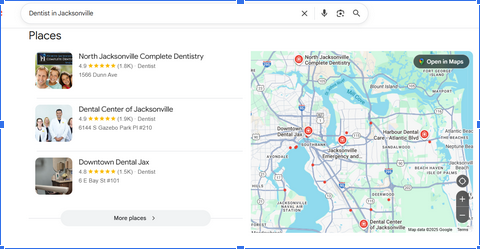
When Google detects this local intent, it automatically shifts how results are displayed. Instead of showing ten blue links, it prioritizes Map Pack listings, Google Business Profiles, AI Overviews that summarize local options, reviews, proximity, and business hours.
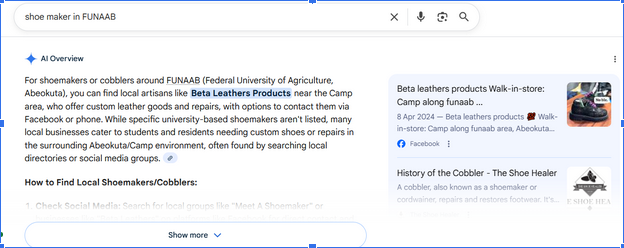
Practicing local SEO for small businesses increases your business’s potential to appear in searches within your geographic region, often at the exact moment they are ready to take action. Unlike informational searches, local searches signal high purchase intent, which is why they convert so well. In fact, studies show that nearly 80% of local mobile searches result in a conversion, such as a call, visit, or booking.
In short, a strong strategy for local SEO for small businesses helps your business show up where it matters most: in front of nearby customers who are ready to buy, not just browse.
LOCAL SEO VS. ORGANIC SEO
At first glance, local SEO and traditional SEO may seem similar. Both aim to improve visibility on search engines, both rely on keywords, and both require quality content and technical optimization.
However, as complementary as these strategies are, they are different in their focus and objectives.
Local SEO for small businesses focuses on ranking a business for local searches using local keywords and directory listings. In contrast, organic SEO is focused on the global visibility of a business in online searches, establishing the trust, authority, and expertise of a business.
Local SEO for small businesses also focuses on searchers within a specific region, which is usually the best and most effective option for small businesses because you avoid the competition for generic keywords and get traffic to your site through specific and streamlined keywords. In contrast, organic SEO targets users regardless of location.
LOCAL SEO VS. ORGANIC SEO COMPARISON TABLE
| Factors | Local SEO | Organic SEO |
| Focus | Local search results | Organic search results |
| Target audience | People who are searching for businesses in a specific location | People who are searching for products or services, regardless of their location |
| Urgency | Active | Passive |
| Keyword | Local keywords, such as “coffee shops near me” | Broader keywords, such as “coffee shops” |
| Search intent | The search intent is usually transactional | The search intent varies based on the searcher. |
| Content | Content that is relevant to the local area | Content that is relevant to the products or services you offer |
| Backlinks | Backlinks from local websites and citations | Backlinks from high-quality websites |
| Goal | The goal is to get into local listing packs | The goal is to appear at the top of SERPs |
| Devices | Mostly from mobile devices | Mobile devices and Desktops |
| Conversion | Website clicks, phone calls, online purchases, and on-site purchases | Website clicks, online purchases |
| Conversion rate | As high as your visibility rate and proximity to the searcher. | High for only the top-ranking results |
The best way to improve your website’s ranking in the SERPs is to combine local SEO and organic SEO. By optimizing your website for both local and organic search, you can reach a wider audience and attract more customers.
LOCAL SEO FOR SMALL BUSINESSES
Local SEO for small businesses is no longer a “nice to have.” In many cases, it is the primary driver of growth. When people perform local searches, they are rarely browsing out of curiosity; they are looking to act quickly.
8 in 10 US customers say they search for a local business online at least once a week. Local search connects businesses directly with customers who already have strong buying intent.
What makes local SEO for small businesses especially powerful is that its benefits go far beyond simple visibility. A strong local presence improves your reputation, strengthens trust, and directly impacts revenue.
When your business consistently appears in local results, complete with accurate information, reviews, and proximity signals, customers are far more likely to choose you over competitors they know less about. This applies equally to small neighborhood businesses and larger brands with a local focus.
A growing percentage of local searches now result in zero clicks, meaning users get what they need (such as phone numbers, reviews, directions, and operating hours) directly from Google Maps or AI-generated summaries without ever visiting a website.
Google Maps and AI Overviews have effectively become decision engines, shaping choices before users even consider clicking through.
For small businesses, this reality has direct benefits.
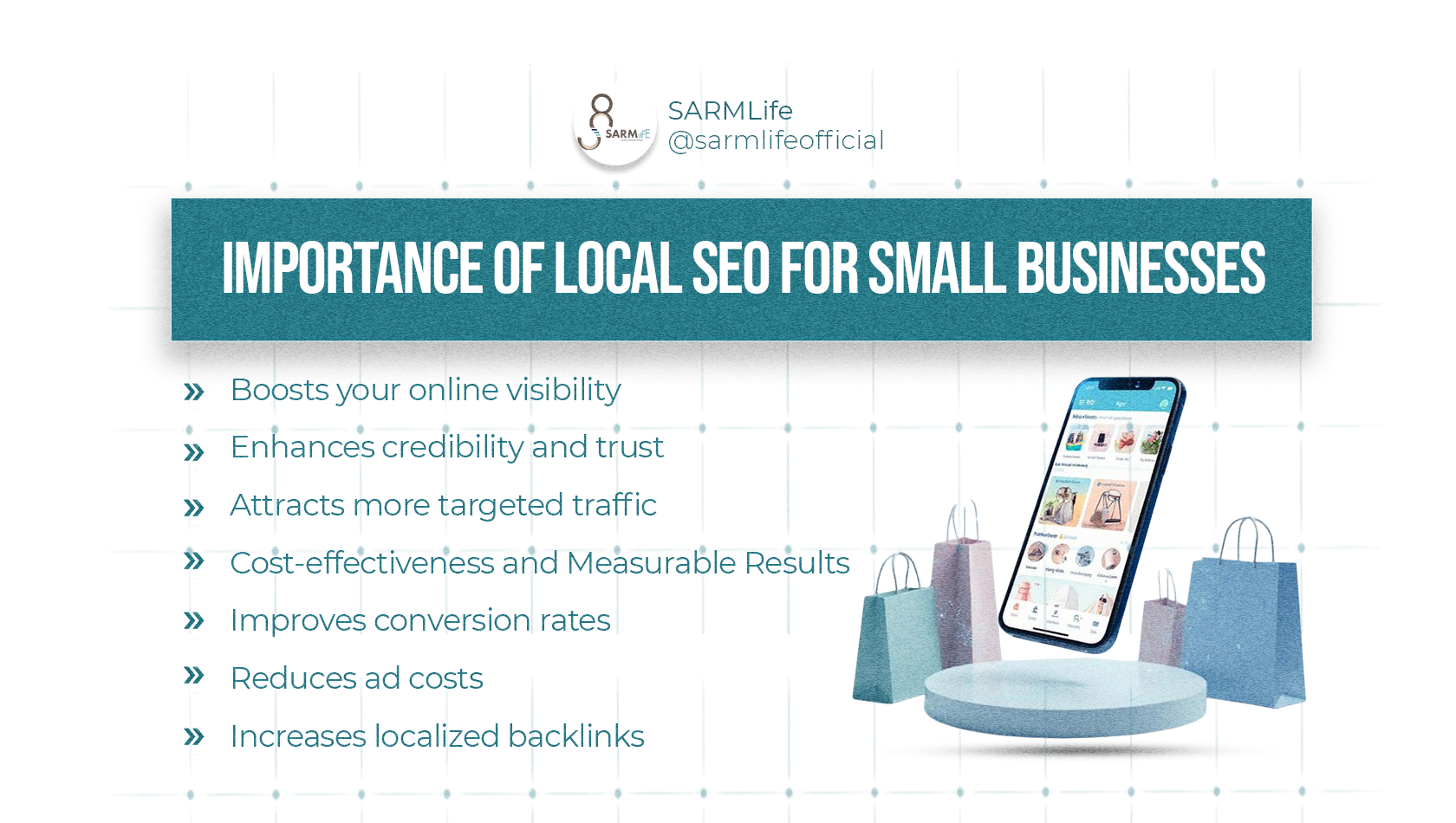
IMPORTANCE OF LOCAL SEO FOR SMALL BUSINESSES
Boosts your online visibility
Local SEO for small businesses boosts visibility by helping your business appear in local search results when potential customers are looking for products or services in your area. With the right local SEO strategies, you can even get your business featured in the Google Map Pack and appear prominently in search results.
Enhances credibility and trust
Practicing local SEO for small businesses can lead to more online reviews and ratings, which will significantly impact the decisions of your potential customers.
Positive reviews build trust and credibility, encouraging more people to choose your business over your competitors.
Attracts more targeted traffic
When you implement specific strategies for local SEO for small businesses, your website/business page will receive more relevant and focused traffic if optimized for local terms and phrases. People who use local phrases are specifically and actively looking for what you have to offer, which increases the possibility that they will convert.
Cost-effectiveness and Measurable Results
Local SEO for small businesses is more cost-effective than traditional advertising and other digital marketing strategies. It reduces wasted spending by targeting a defined audience within a specific geographic area.
Results are measurable through tools that track calls, directions, impressions, and conversions, making it easier to refine strategies over time.
Improves conversion rates:
Local searches have been known to have higher conversion rates than generic searches because most local searchers are active, and the search intent is usually transactional.
With local SEO for small businesses, you increase the chances of conversion because you focus on active searchers.
Reduces ad costs:
Over time, a strong strategy for local SEO for small businesses can even reduce reliance on paid advertising. When your business consistently appears in organic local results, the need for constant ad spending decreases.
However, with local SEO for small businesses focused on local searches, results are swift, and there will be little to no need to create a budget for ads in your marketing campaign.
Increases localized backlinks
Local SEO for small businesses strategies require targeting more localized keywords and increasing your relevance and prominence in your local community. This increases your chances of getting more localized backlinks, especially when you create blog content that targets these keywords.
HOW LOCAL SEO WORKS
Local SEO for small businesses isn’t something that only happens behind the scenes. You see it in action every single day, often without even realizing it. The way people discover businesses has quietly shifted from browsing websites to being guided by search engines, maps, and AI-driven answers that narrow choices instantly.
Today, customers don’t “research” the way they used to. They ask a question, scan a short list, and make a decision. Local SEO is what determines whether your business is part of that list or completely invisible.
Here’s how local SEO for small businesses shows up in real-world search behavior.
1. GOOGLE’S MAP PACK/LOCAL PACK
I can’t talk about local SEO for small businesses without mentioning Google Map Pack because this is the goal of local SEO.
What Is Google’s Map Pack?
The Google Map Pack, or the Google Local Pack, is a prominent feature in Google’s search engine results pages (SERPs) that shows local business listings and a map in response to location-based search queries.
When a user performs a search with local intent, such as “restaurants near me” or “plumbers in [city],” Google will present the Local Map Pack, displaying the top three local businesses that match the search criteria.
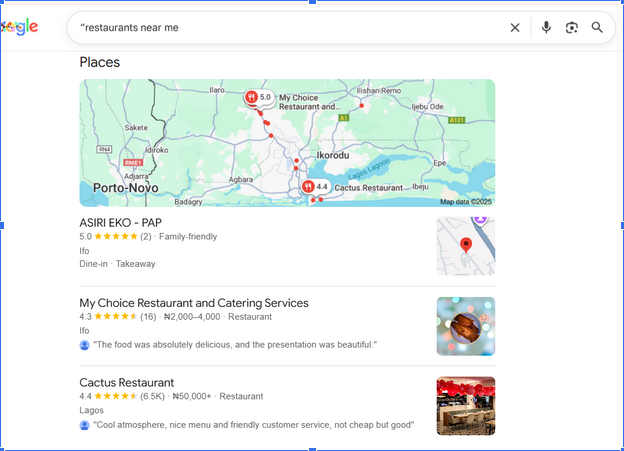
The Map Pack usually appears near the top of the search engine results page. It is displayed alongside the Google Map, making it easy for the searcher to locate and engage with local businesses.
This is why optimizing for the google Map Pack is an important part of local SEO for small businesses.
The Map Pack is highly valuable for businesses targeting local customers because it provides an excellent opportunity for increased visibility and easy customer engagement.
Businesses being featured in the Map Pack see93% more actions (phone calls, direction requests, and website visits), which, when played right, can lead to increased conversions and revenue for your local business.
For businesses aiming to improve their presence in the Map Pack, optimizing your local SEO, having an accurate and well-maintained Google Business Profile, and receiving positive customer reviews are crucial strategies to improve your chances of being listed in this section of Google’s search results.
Features of Google Map Pack
Here are some of the most important features of Google’s Map Pack:
- Local Business Listings
The Map Pack shows three local business listings that match the search query. These listings provide essential details like the business name, address, phone number, and website link.
- Google Map
Right next to the listings, you’ll see a map with markers indicating the locations of the businesses. This is what a searcher uses to determine the distance of your business from their location.
- Top-of-Page Placement
The Map Pack appears at the top of Google’s search results page. It’s one of the first things a searcher sees when they search for local keywords, local businesses, or local services.
- Local Intent
The Map Pack shows up when you search with local intent, like “coffee shops near me” or “dentists in [your city].” The purpose of the Map Pack is to help searchers see what’s closest to them.
- Customer Reviews
Each business listing often includes customer reviews and ratings. They help customers see what others think of your business.
- Quick Contact Options
Customers can easily contact businesses since their phone numbers are usually listed. You can even include a “call” button for one-tap dialing.
- Business Photos
Many listings also feature photos of the business, which is advantageous and allows your customers to get a glimpse of what to expect from your business.
How Google Map Pack Works
Google Map Pack is the top result for local searches. Appearing in Google’s Map Pack is like appearing in the featured snippets for organic searches.
How does this happen?
Google considers three crucial factors to rank a local business in the Map Pack:
- Relevance:
Relevance refers to how well a local business listing matches a user’s search query.
Google assesses whether your products, services, or content are closely related to what the user is searching for.
To improve your business’s relevance for niche-specific keywords and local searches, you should use accurate and descriptive information in your Google Business Profile, formerly Google My Business (GMB), including relevant keywords in your business name, description, categories, and other attributes.
For example, if a user searches for “Italian restaurants,” Google will prioritize local restaurant listings identified as Italian restaurants in their GMB profiles.
- Prominence:
“Prominence” refers to the popularity, reputation, and visibility of a local business, both online and offline. It considers customer reviews, ratings, citations, backlinks, and online presence.
Businesses with positive reviews and high ratings are often seen as more prominent and trustworthy. The number of online mentions and links to a business also contributes to its prominence.
Google considers how well-known a business is in its local community and industry. Prominence helps Google determine how likely the business is to provide a positive user experience.
For example, a local restaurant with numerous positive reviews, several local news articles mentioning it, and a solid social media presence is more likely to have high prominence and be among the top results for a local search.
- Proximity:
Proximity, also known as distance, refers to how close a business’s physical location is to the user performing the search.
Google aims to show businesses that are closest to the user’s location.
When a user searches for a product or service, Google considers the distance between the user’s and the business’s locations to provide the most convenient options.
Users searching for “restaurants near me” or “gas stations nearby” will see results based on location.
For businesses targeting local customers, proximity is vital. Businesses in a specific area have a better chance of appearing in the Local Map Pack for relevant searches.
It means the search engine result for a local search with the same search phrase in the same country can vary based on the searcher’s city, town, or current location.
2. AI OVERVIEWS/SUMMARY
Local SEO for small businesses has gone beyond traditional searches. When someone asks a question like, “HVAC company near me?” or “Which dentist in Jacksonville has the best reviews?”
Google no longer responds the way it used to. Instead of showing a long list of blue links, it often delivers an AI-generated overview that summarizes the “best” local options in just a few lines.
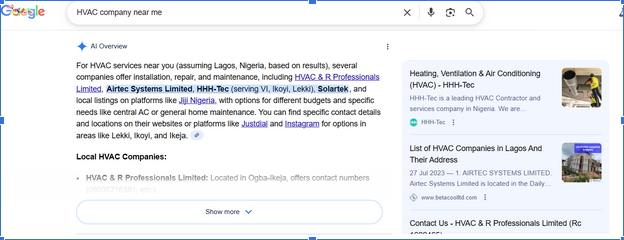
These AI Overviews act like instant recommendations. Rather than encouraging users to compare multiple websites, Google presents a short list of businesses it believes are most relevant, trustworthy, and locally appropriate.
What determines which businesses appear in these AI summaries is fundamentally different from traditional SEO.
AI Overviews rely heavily on real-world local trust signals. Review quality, review volume, and review consistency play a major role, as do accurate business details across directories, proximity to the searcher, and consistent brand information across the web.
This is why keyword-heavy pages alone no longer guarantee visibility. A business with fewer backlinks but stronger local signals can be selected ahead of a higher-authority website that lacks consistency or credibility at the local level.
In many cases, users never click through to a website at all. They read the AI summary, check reviews, tap a call button, and move on.
If your business is not optimized for local signals, it will not appear in these AI Overviews, even if your website technically ranks in organic search.
3. LOCAL ORGANIC RESULTS
Below AI Overviews, Google still displays traditional organic search results.
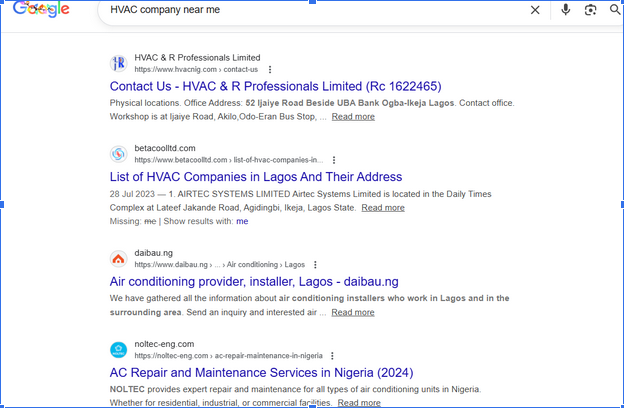
These results are no longer purely based on overall website authority. When a search carries local intent, Google reshapes organic rankings to prioritize geographic relevance over global competition.
Local intent doesn’t always require a city name. Searches like “emergency plumber,” “wedding photographer,” or “family lawyer” are automatically treated as local queries.
Google uses location data, search behavior, and contextual signals to determine that the user wants nearby solutions, then filters results accordingly.
This is why local organic results often feature service pages, city-specific landing pages, and businesses that clearly communicate where they operate.
Pages that include local context, service areas, location references, and relevant internal linking are far more likely to appear than generic pages designed for a national audience.
Local SEO for small businesses ensures that your website sends clear, unambiguous signals about your geographic relevance. It tells Google exactly which locations you serve, what services you offer in those areas, and why your business deserves to be trusted locally.
In practice, this means a smaller local business with strong location-focused optimization can outrank a larger competitor that lacks local specificity.
Local organic visibility is no longer about who has the biggest website; it’s about who is most relevant to the searcher’s location at that moment.
LOCAL SEO TIPS FOR SMALL BUSINESSES IN JACKSONVILLE
Local SEO is the bridge between how your business exists in the real world and how search engines understand and recommend businesses digitally.
For small businesses, success in local SEO doesn’t come from one strategy alone but from a combination of components that reinforce relevance, trust, and proximity.
These core components work together to help Google, Maps, and AI local answers confidently choose your business, thus boosting your local search ranking.
Below are some tips for local SEO in Jacksonville:
GOOGLE BUSINESS PROFILE OPTIMIZATION
Google Business Profile optimization is the foundation of local SEO. for small businesses. For most businesses, it is the primary way customers discover, evaluate, and contact them, even without ever visiting a website.
Your Google Business Profile is the listing that appears in Google Maps, the Local Map Pack, and inside AI-generated local summaries. When someone searches for a service nearby, this profile becomes your first impression and your strongest conversion asset.
What makes Google Business Profile so powerful is its ability to drive immediate action. Searchers can call your business, request directions, read reviews, check hours, and view photos directly from the search results.
This is why businesses with well-optimized, complete and consistent profiles see more phone calls, foot traffic, and qualified leads than those that rely on their website alone.
Follow the step-by-step guide to create your Google Business Profile
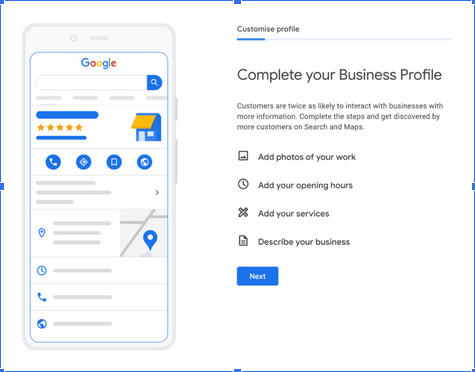
How to Optimize Your Google Business Profile
- Ensure Complete and Accurate Business Information
Your business name, address, and phone number (NAP) must be accurate and match your website and all other listings exactly. Even small inconsistencies can weaken Google’s confidence in your data and reduce your visibility in local results.
- Select the Right Primary and Secondary Categories
Your primary category is one of the strongest ranking factors in local SEO. Choose the category that best represents your core service, not just what sounds appealing. Secondary categories should support your main offering without diluting relevance.
- Write a Clear, Locally Relevant Business Description
Your description should explain what you do, who you serve, and where you operate in natural language. Keep the description between 100-200 words and avoid keyword stuffing.
- Optimize Service Areas and Business Attributes
Service-area businesses should clearly define the locations they serve. Physical locations should select accurate attributes such as accessibility, payment options, and amenities. These details help your profile appear in filtered and AI-driven searches.
- Actively Collect and Respond to Reviews
Review quantity, quality, recency, and freshness strongly influence both rankings and conversions. Beyond just building trust, reviews directly impact local SEO performance.
Encourage satisfied customers to leave reviews and respond to every review professionally (even the bad ones). Google sees active engagement as a trust signal, and AI systems factor review sentiment into recommendations.
- Upload High-Quality, Recent Photos and Videos
Businesses with regular photo updates tend to receive more clicks, calls, and direction requests. Visual content of your team, offerings, and space also helps Google validate your physical presence and service authenticity.
- Publish Regular Google Business Profile Updates
Posting updates, offers, events, or announcements signals that your business is active. These posts can appear in branded searches and contribute to stronger engagement metrics.
- Add Services, Products, and FAQs Thoughtfully
Listing services and products with clear and simple descriptions reinforces relevance for service-specific searches. Using FAQs allows you to answer common customer questions directly inside your profile, improving both usability and AI comprehension.
- Monitor Insights and Adjust Strategically
Google Business Profile insights reveal how users find and interact with your listing. Tracking calls, direction requests, and search terms helps monitor and evaluate your optimization and identify growth opportunities.
LOCAL KEYWORD RESEARCH

Photo by Markus Winkler on Unsplash
If you are trying to leverage local SEO for small businesses, local keyword research is the foundation. It’s not just about finding keywords with search volume; it’s about identifying how real customers search when they are ready to take action in a specific location.
Unlike traditional SEO keywords, local keywords carry immediate commercial intent. When someone searches for “emergency plumber,” “best hair salon near me,” or “HVAC repair Jacksonville,” they are not researching; they are looking to hire.
Local intent keywords are built around service + location + urgency or problem. They often include city names, neighborhoods, ZIP codes, landmarks, or phrases like “near me,” “open now,” or “same day.”
Even when a location is not typed, Google infers it from the searcher’s device, behavior, and history.
For example, someone in Jacksonville searching for “roof repair” will see completely different results than someone searching the same term in Orlando. Google automatically localizes the query, meaning businesses must send clear geographic signals to be eligible for those results.
Effective local keyword research focuses on:
- Core service keywords are tied to specific locations; for example, a salon owner in Jacksonville benefits from keywords like “hair salon in Jacksonville,” “Jacksonville nail salon,” or “barber shop Jacksonville FL.
- Problem-based queries that reflect urgent needs, e.g., phrases like “AC not cooling Jacksonville,” “emergency plumber near me,” “dentist open now for toothache,” or “locked out of car Jacksonville.”
- Transactional phrases that indicate readiness to convert include, for example, “book massage therapist Jacksonville,” “same-day HVAC repair Jacksonville,” “best lawyer near me,” or “affordable wedding photographer Jacksonville.”
- Long-tail variation keywords are more specific and often less competitive, making them ideal for small businesses. Instead of targeting “dentist Jacksonville,” a practice might rank faster for “family dentist in Southside Jacksonville.”
Local keyword research also plays a critical role in AI Overviews and voice search. AI systems prefer precise, unambiguous answers. Pages that clearly associate a service with a location are far more likely to be referenced in AI-generated summaries than vague, broadly optimized pages.
Without proper local keyword research, businesses often make costly mistakes, targeting cities they don’t actually serve, competing for overly broad terms, or creating thin location pages that never gain traction.
READ MORE: KEYWORD OPTIMIZATION IN SEO: 6 UNIQUE WAYS TO RANK HIGH – SARMLif
How to Conduct Local Keyword Research for Small Businesses
Local keyword research helps you understand how real people in your area search for your services, what words or language they use, and what signals and keywords Google relies on to connect those searches with your business.
Unlike traditional SEO, the aim of local keyword research is not to chase massive traffic numbers. It focuses on visibility at the exact moment someone is ready to call, visit, book, or buy.
Here is a step-by-step process that shows how to properly conduct local SEO research
- Define your core services
The first mistake most people make when starting local SEO for small businesses is purchasing SEO tools immediately instead of having a clear definition of main services first.
Before researching keywords, you must write down the services you offer, how customers are likely to describe those services, and problems customers complain about or emergency services you handle.
To do this, you must think like your customer. Avoid the use of technical language.
For example, a dentist may think of “oral prophylaxis,” but customers search for “teeth cleaning,” “dentist in Jacksonville,” or “tooth decay.”
- Use Google as Your First Research Tool
Google is the most powerful local keyword research tool that shows real searches in real time.
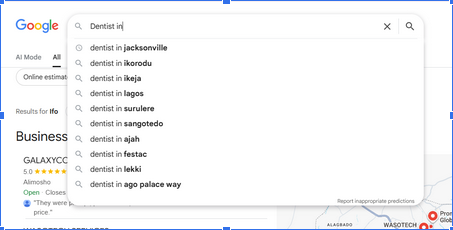
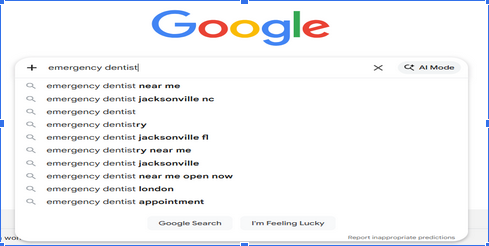
- Google Autocomplete: This tool reflects actual user behavior. It reveals how people frame their needs, which is far more valuable than theoretical keyword ideas.
When you start typing a service into Google, the suggestions that appear are based on popular searches, local trends, recent user behavior, and geographic relevance.
Type your services slowly into the Google search box and note variations.
E.g., 1 Dentist in…
E.g., 2 Emergency dentist…
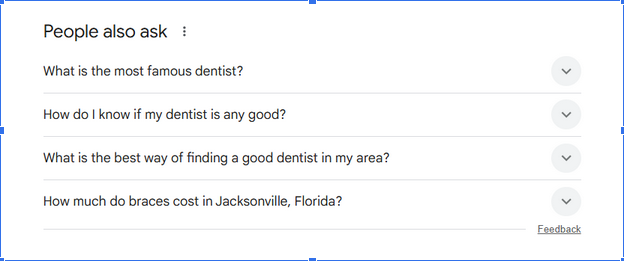
- “People Also Ask” boxes: Local searches often come with questions, especially for service-based businesses.
The “People Also Ask” section shows concerns customers have, pricing questions, trust-related questions, or urgency-based concerns.
By including answers to these questions, you increase your chances of appearing in AI-generated local summaries and featured results.
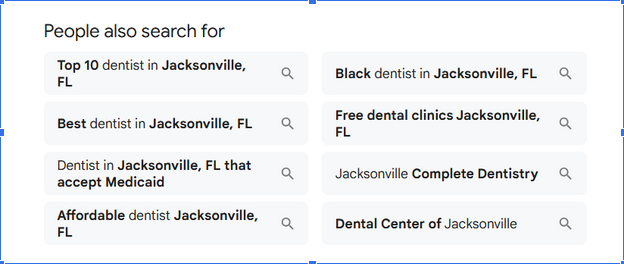
- “People Also Search for Boxes”: Found at the bottom of the page, these can uncover location-specific modifiers or alternative services.
- Identify long-tail keywords with low competition
Long-tail keywords are longer, more specific phrases that match typical customer searches. They face less competition, match voice searches, and attract high-quality leads.
These keywords typically have low search volume; however, they often outperform broad terms because the intent is crystal clear.
For small businesses, long-tail keywords are often the fastest way to ranking and conversions.
- Study Competitors That Already Rank Locally
Local keyword research is not about reinventing the wheel but rather leveraging what has already been done. Your competitors are already doing some work for you.
Search your target services and observe businesses in the Map Pack and Top organic local pages.
Pay attention to repeated keywords in the headings, services emphasized, etc.
If multiple competitors use the same phrasing, Google has already validated that language.
- Validate keywords using tools:
Keyword research tools help to confirm ideas but they should not dictate the strategy.
These tools will help you check search volume, search intent, identify variations, compare competitions, etc.
Do not ignore any keyword simply because volume looks low. A keyword with low monthly searches but high local intent can generate real revenue.
Local SEO rewards relevance, proximity, and trust, not raw numbers.
ON-PAGE LOCAL SEO FOR SMALL BUSINESSES
On-page local optimization is integral to ensuring small businesses rank for Local SEO. It is the process of making your website very clear about where you serve, who you serve, and what your services cover through several on-page signals.
Google and AI search systems rely on these on-page signals to confirm the accuracy of your local business data, validate relevance, and decide whether your website is consistent with what appears on your Google Business Profile, map listings, and citations.
In 2026, strong on-page local SEO for small businesses is no longer optional to ensure your website is a trusted confirmation layer.
Local on-page optimization steps for increased local rankings
- Create localized landing pages
Localized landing pages are dedicated pages designed to target one service in one geographic area. Their primary purpose is to help search engines, AI systems, and users clearly understand where your business operates and who you serve.
In 2026, these pages are important because local searches often happen without users typing a city name. Google, Maps, and AI Overviews rely on explicit location signals from your website to decide which businesses to show or recommend.
A strong location page is not a generic service page with a city name added. It is a page that speaks directly to customers in that area, addresses local needs, and builds/strengthens trust through relevance.
For example: “Emergency Plumbing Services in Jacksonville” performs far better than a generic “Plumbing Services” page.
A strong localized page includes:
- Clear mention of the location in the URL, title, and headings
- Services offered in that area
- Local customer problems and solutions
- Testimonials or reviews from that location
- Embedded map or service area reference
- Local landmarks or neighborhoods
- A strong local call-to-action
- Structured Data Markup
Google has stated that when a searcher searches for a business on Google Maps or Google Search, it can display a knowledge panel that showcases specific details about the business, like the business hours, different departments, reviews, and more.
If you are wondering what structured data is, it is simply a code that categorizes your content. It provides search engines with machine-readable information about your business.
Using structured data markup in your local SEO strategy will not directly affect search rankings. However, it can increase the clickthrough rate (CTR) because Google could use your structured data markup to create a rich result.
An increase in your CTR has been shown to increase your ranking over time potentially.
There are different properties or schema categories from which you can select. It is best to choose the schema category that is most relevant to businesses.
To avoid complicated coding concerning your structured data, you can use Google’s Structured Data Markup Helper. Local businesses should prioritize business. schema, organization schema, service schema, review and rating markup, geo coordinates, and opening hours.
It will take you to the page, and you can start tagging the elements you want to mark up; when you are done, it will automatically create your markup code.
- Local Content:
Local SEO performs best when tour content reflects real local context. Consistently create local content that is relevant to your business. This is important to establish your local authority and also as a way to create opportunities for backlinks.
This includes content around local events, weather-related services, community partnerships, and neighborhood-specific challenges. As you create this localized content, include your main keyword and location organically.
You can write content on local events and tag the businesses involved to build links. You can also join local volunteers, get featured in local posts, write on topics relevant to your local community, or create a page on your website that references other businesses in the community.
READ MORE: THE ULTIMATE PRO GUIDE TO SEO CONTENT WRITING – SARMLife – Best SEO Company | Jacksonville, Florida
- NAP Consistency on Website Pages
As you utilize several local SEO strategies, it is important you maintain consistent business information across all platforms.
Having different NAPs (name, address, and phone number) for your business on other platforms is similar to having duplicate content. The problem is that you will compete with yourself for a position in search results because Google might see your businesses as different.
NAP information should appear on the contact page, in the footer, on location pages, in schema markup etc.
Your website should act as the single source of truth for your business information.
- Local Reviews Embedded on Pages
Displaying reviews directly on your website strengthens trust and local relevance. They reinforce geographic relevance, real-world credibility and alignment with your Google Business Profile.
The number of positive reviews across different platforms, primarily from GBP, is an important ranking signal for Google for local searches.
Google believes that having many positive reviews reflects how good your business is and its relevance to customers in that niche.
This means if you have 500 positive reviews on your profile, Google will likely rank you above someone with only 100 positive reviews.
Also, Google and AI systems often cross-reference reviews when getting summaries.
Google considers the fact that it’s easy to buy reviews by paying someone or using several accounts to drop reviews on a profile. The countermeasure to this type of spammy review is to evaluate the quality of your reviews.
Here are some factors Google uses to determine if your reviews are of high quality:
- Niche keywords in your review
- The authenticity of the review
- Name of city in reviews
- Internal Linking
Internal linking plays a major role in helping Google and AI systems understand which pages matter most for local relevance. It connects your content into a structured local ecosystem rather than isolated pages competing with each other.
For local SEO, internal links should intentionally pass authority from high-level pages, such as your homepage or core service pages, to location-specific landing pages. This signals priority and strengthens the visibility of your local pages in search results.
Well-structured internal linking also improves user experience. Visitors can easily navigate from general services to specific locations, increasing engagement and conversion rates.
Anchor text matters here. Instead of generic phrases like “click here,” descriptive anchors such as “plumbing services in Texas” or “Florida digital marketing services” help clarify geographic relevance.
When done correctly, internal linking:
- Consolidates local authority across your site
- Prevents keyword cannibalization between location pages
- Helps AI systems identify your most important local services
- Improves crawlability and indexation
READ MORE: INTERNAL LINKING FOR SEO – 9 BEST PRACTICES AND TIPS – SARMLife
OFF-PAGE LOCAL SEO FOR SMALL BUSINESSES
Off-page local optimization focuses on everything that happens outside your website that influences how search engines and AI systems perceive your business.
Strong off-page local optimization reinforces your authority, improves visibility in map packs and AI Overviews, and increases your chances of being selected rather than just indexed.
Here are some actionable off-page optimization steps that will help to increase your local rankings:
LOCAL CITATIONS AND BUSINESS LISTINGS
Local citations are online mentions of your business’s name, address, and phone number (NAP) across directories, platforms, and local websites. These citations act as digital references that help search engines verify your business information.
What matters most today is accuracy and consistency, not volume. Conflicting addresses, outdated phone numbers, or multiple business names weaken trust and reduce your eligibility for local rankings and AI-generated answers.
High-quality citation sources include Google Business Profile, Apple Maps, Bing Places, Yelp, Facebook, industry-specific directories, and reputable local business platforms. When your business details match perfectly across these sources, Google gains confidence in your legitimacy and location.
For AI systems, consistent citations reduce ambiguity. When data aligns across the web, AI can safely feature your business in summaries without risk of misinformation.
BING PLACES FOR SMALL BUSINESSES
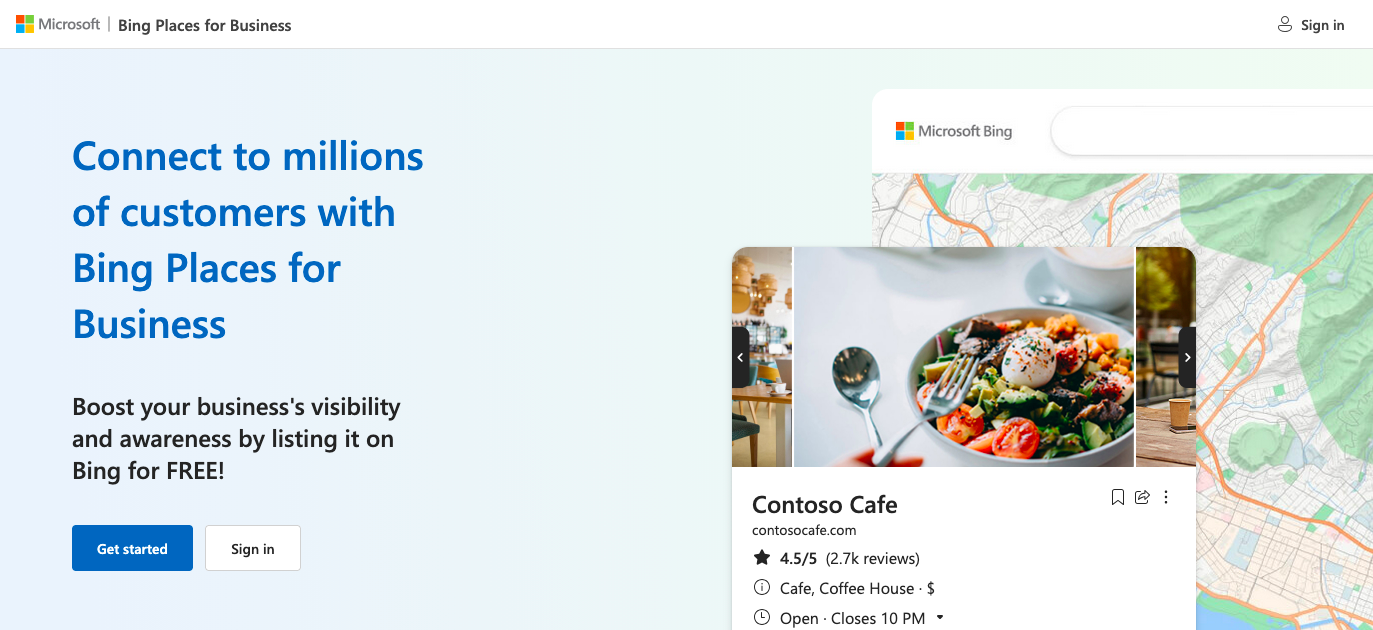
Bing Places for Business is just like the Google Business Profile, with the significant difference being that they are available on different platforms. GBP is on Google, while Bing Places is on Bing.
It is a platform developed by Microsoft that allows local business owners to create and manage their businesses’ listings on the Bing search engine. The platform aims to enhance their businesses’ online visibility in local search results.
Listing your business on Bing is free, and you can complete your listing in just three steps:
- Claim your listing:
Bing believes it already has a listing for your business, so it gives you the option of claiming an existing listing or creating a new one.
Using the bulk upload tool, you can also create a listing for all your business locations (if you have more than one).
- Complete your listing profile:
All you need to do to complete your listing profile is fill in the necessary and accurate information about your business. You can include high-quality pictures of your business, your business logo, and any other pictures that are relevant to your niche.
You should also include your services, hours of operation, and how customers can reach your business (phone number, address, website, and social media).
- Verify your listing:
Verifying your listing is crucial for you to be able to protect it from unverified changes.
You will receive a PIN to verify your listing at your business address, email, or phone number. You must also input a valid address if you list your business on Bing Places for Business. And you can choose to hide your address from search results.
ONLINE DIRECTORIES FOR SMALL BUSINESSES
Online directories are online platforms that list/showcase businesses, organizations, and individuals. For example, you can have an online directory that lists ‘Lawyers in a City’ or ‘Local Restaurants.’ You can also find listings of charity organizations, NGOs, etc.
These directories are used to find businesses or professionals and contact information, such as addresses, phone numbers, and email addresses.
You can also use them to find websites, product information, and reviews.
Note: Most directories list businesses or professionals in a specific niche. So, you need to find the widely used directories in your niche.
Types of online directories to list your business
There are different online directories where you can list your business. However, you need to list your business in well-known and relevant directories for your niche.
Niche-specific directories are more beneficial than generic directories because customers using a niche-specific directory are more likely to pay for your service.
Nevertheless, widely known and used directories also offer similar benefits. Here are my online directories to list your business.
- Apple Maps
Apple Maps is a map service by Apple, first released in 2012 as a replacement for the previous Maps app.
At first, it had inaccurate maps and poor navigation, but it has since been improved and offers new features such as street view, transit directions, and flyover modes.
And now, with Apple Business Connect, you can also add your business to Apple Maps, which allows Apple users to find your business on Maps, Apple Wallet, Siri, etc.
Apple Business Connect supports both small businesses and large enterprises. It also has showcases and actions that can help you deliver timely information, share offers, and encourage customer engagement by ordering food, getting tickets, or booking reservations.
You can also use the Business Chat feature to communicate with your customers directly on Apple Maps.
The Apple Business Connect User Guide is a detailed guide showing you how to create a listing for your business using the Apple Business Connect Platform.
- The Real Yellow Pages
The Real Yellow Pages is a widely known business directory that lists businesses and organizations by category.
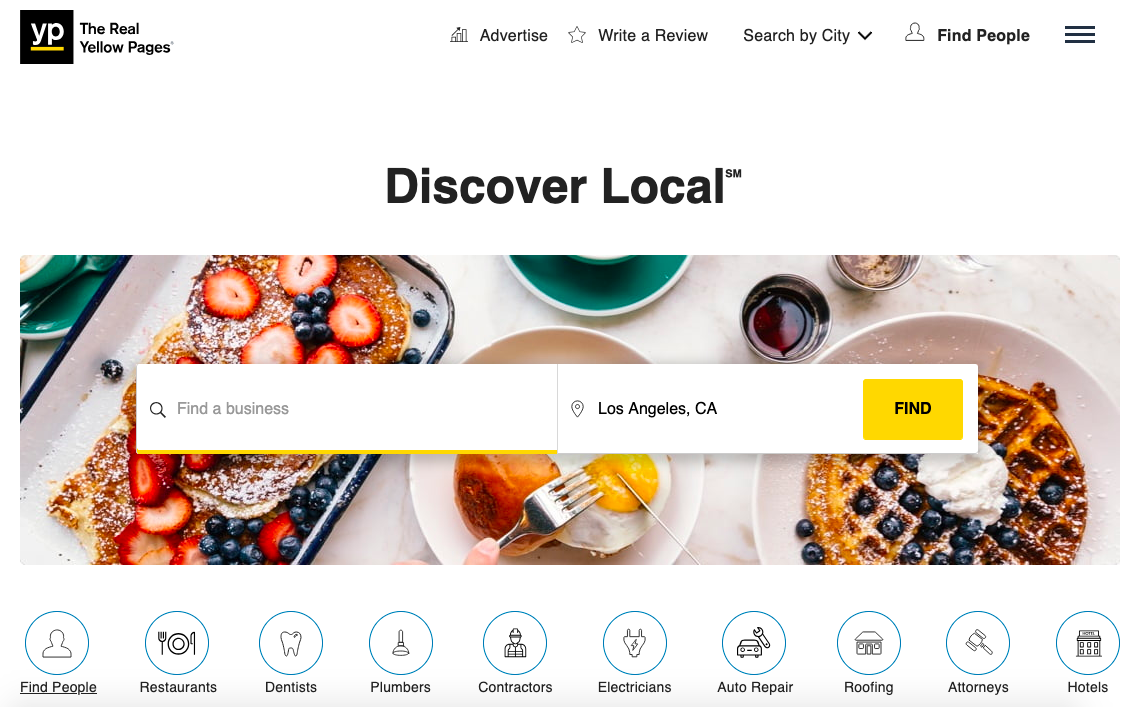
Currently, Yellow Pages has over 250 different subcategories, with categories such as
- Home Services
- Medical Services
- Auto Services
- Legal Services
- Pet Services
- Insurance
- Restaurants and Catering
- Beauty and Personal Care
- Arts and Entertainment
- Travel and Recreation
- Financial Services
- Clothing and Accessories
- Shopping
- Community and Government
Listed businesses on the Yellow Pages have their name, phone number, address, operating hours, business photo, website link, and ratings displayed during searches.
You can also add your years of experience and a concise business bio, which will be displayed alongside your business in the result pages.
People can search for businesses based on category, location, and the exact services offered, making it an excellent choice of online directory listing for any business owner.
To list your business on the Real Yellow Pages, get started via this link: Claim Your Yellow Pages Business Listing
- Foursquare
Foursquare is a popular tool/social media site that uses the user’s geographic location to discover places of interest closest to the user.
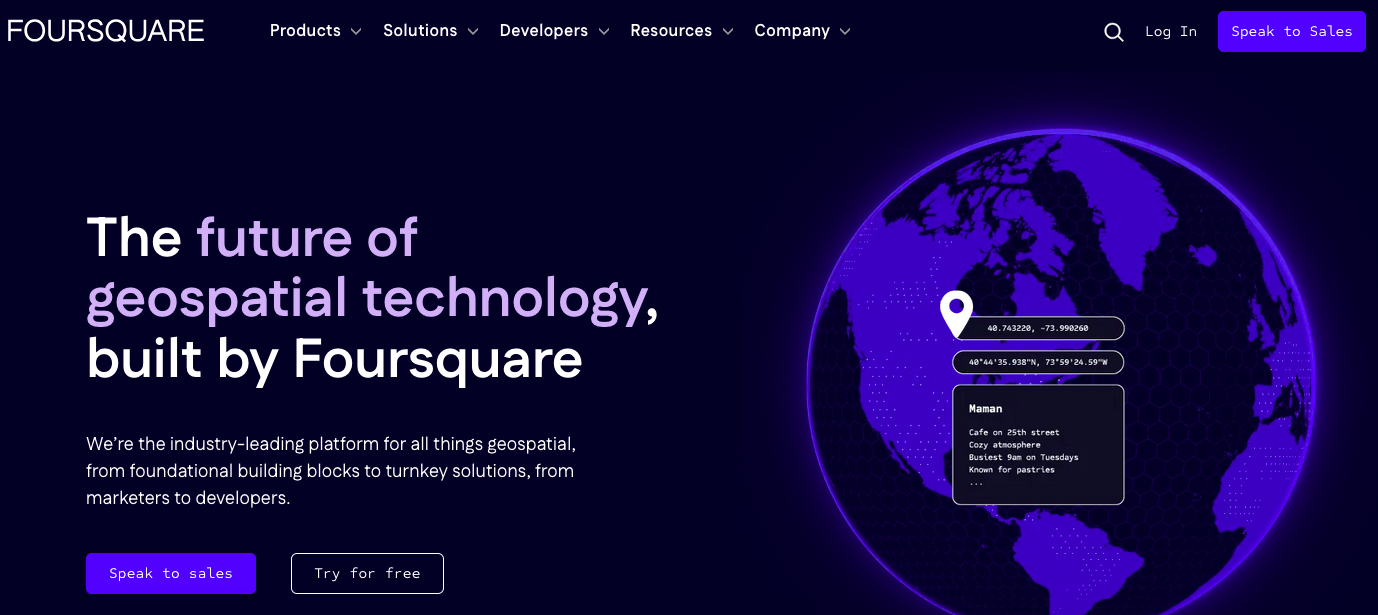
The selling point of this platform could be its ability to give personalized recommendations based on the user’s browsing and check-in history.
You can list your business on the Foursquare City Guide platform and allow yourself to be found by over one million users.
When a user searches for a business on Foursquare, it shows a large map view, the rankings of each business, and basic information about the business.
TOOLS FOR LOCAL SEO FOR SMALL BUSINESSES
There are different uses for local SEO tools, ranging from tracking your performance, conducting competitor research, finding local keywords that you can use for your content, and automating your rank tracking.
Here are some tools that are great to have for your local SEO strategy:
Ahrefs
Ahrefs is an all-in-one SEO toolset that offers a range of features to help you with your on-page, off-page, and technical SEO strategies.

When it comes to local SEO, Ahrefs’ Site Explorer helps you analyze your local competitors’ websites and see what keywords they are ranking for, which can help you identify new keywords you can target.
You can also use Ahrefs to discover keywords based on location, which is excellent for localized keywords. You can track online brand mentions or niche-specific topics on which you can create content.
Ahrefs has four (4) different pricing options:
- Lite: $99/month.
- Standard: $199/month.
- Advanced: $399/month.
- Enterprise: $999/month.
If you pay annually, you get two free months, and a paid version of Ahrefs gets you access to their core tools, including:
- SEO Dashboard
- Site Explorer
- Keywords Explorer
- SERP Comparison
- Site Audit
- Rank Tracker
- Alerts
BuzzStream
BuzzStream is a link-building and outreach tool, which is excellent if you want to build the quality and quantity of your inbound links.
This tool allows you to manage your email outreaches from one place and helps you automate many processes, saving you time and increasing your productivity.
It can automate processes such as:
- Researching prospects
- Discovering email addresses
- Sending follow-up emails
- Tracking your reply rates
BuzzStream has four pricing plans:
- Starter: $24/month.
- Group: $99/month.
- Professional: $299/month.
- Custom: $999/month.
The starter plan includes contact info discovery, email templates, email scheduling, automated follow-ups, Chrome extension, link monitoring, and email performance reports.
You can try out the first three plans for free and reach out to the company if you want a solution customized to your company’s needs.
Whitespark Local Citation Finder
Whitespark offers a way to build new and relevant citations by showing you relevant places by country.
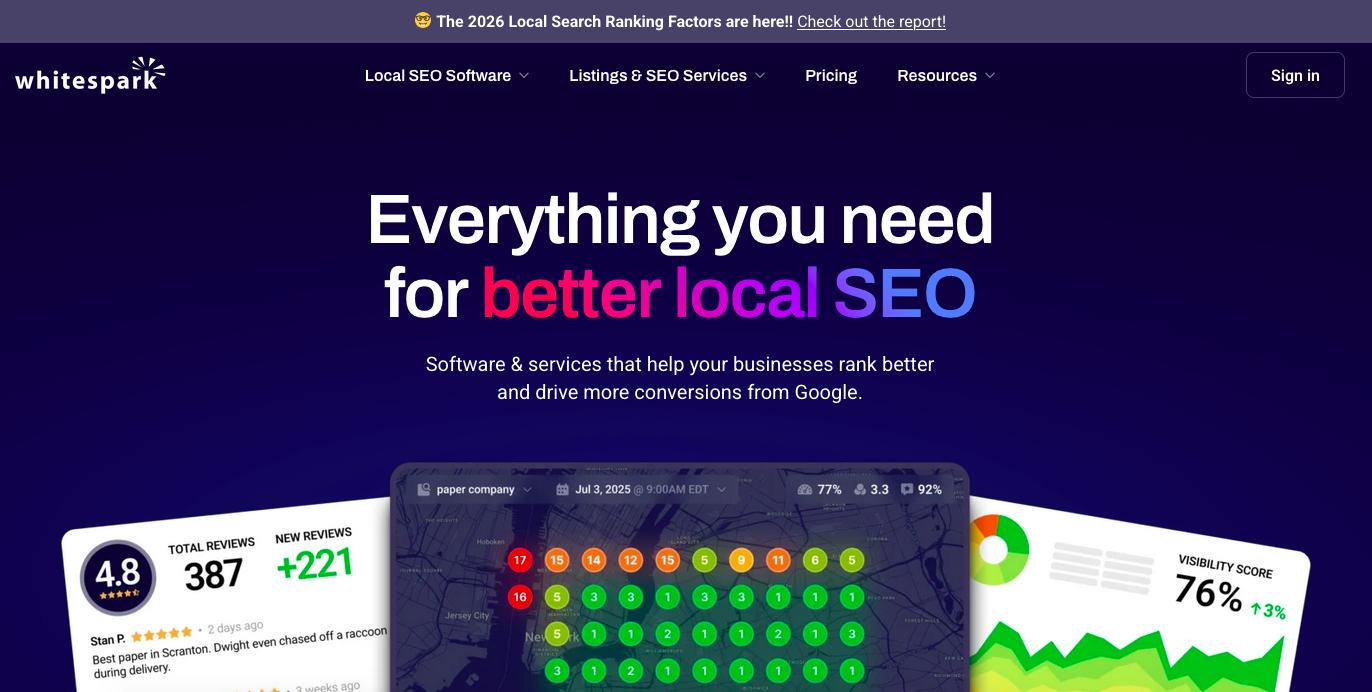
It analyzes your competitors and helps you discover new opportunities based on the results. You can find and track all your online citations and identify new citation sites to submit your business.
There is a free version, and like all free versions, it has limited search results and offers only one campaign and three (3) searches per day.
The paid plans come with four different prices:
- Small Business: $33/month.
- Specialist: $41/month.
- Agency: $49/month.
- Enterprise: $124/month.
If you opt for a yearly plan, you can save up to 20%.
Birdseye
Birdeye is a platform that focuses on helping businesses reach their customers, optimize customer experience, and increase conversion rates.
With Birdeye, you can manage your listings in major directories from a single dashboard, send automated requests to customers to review your business, and use this to increase trust in your business.
Birdeye also allows you to create new listings on over 50+ platforms, determine the accuracy of existing business listings, and synchronize them across the platforms.
Birdeye pricing is based on the number of business locations and needs, and you can schedule a pricing appointment instead of going for the prices you get.
Here is the standard pricing for a single location:
- Standard is priced at $299/month and covers listings, reviews, and campaigns.
- Professional, priced at $399/month, has everything in standard plus interactions.
- Premium is a custom quote plan covering surveys, ticketing, insights, and benchmarking.
Moz Local Search Tool
Moz Local can check your citations across several platforms, including Google, Google Maps, Facebook, Bing, and other local search engines and directories.
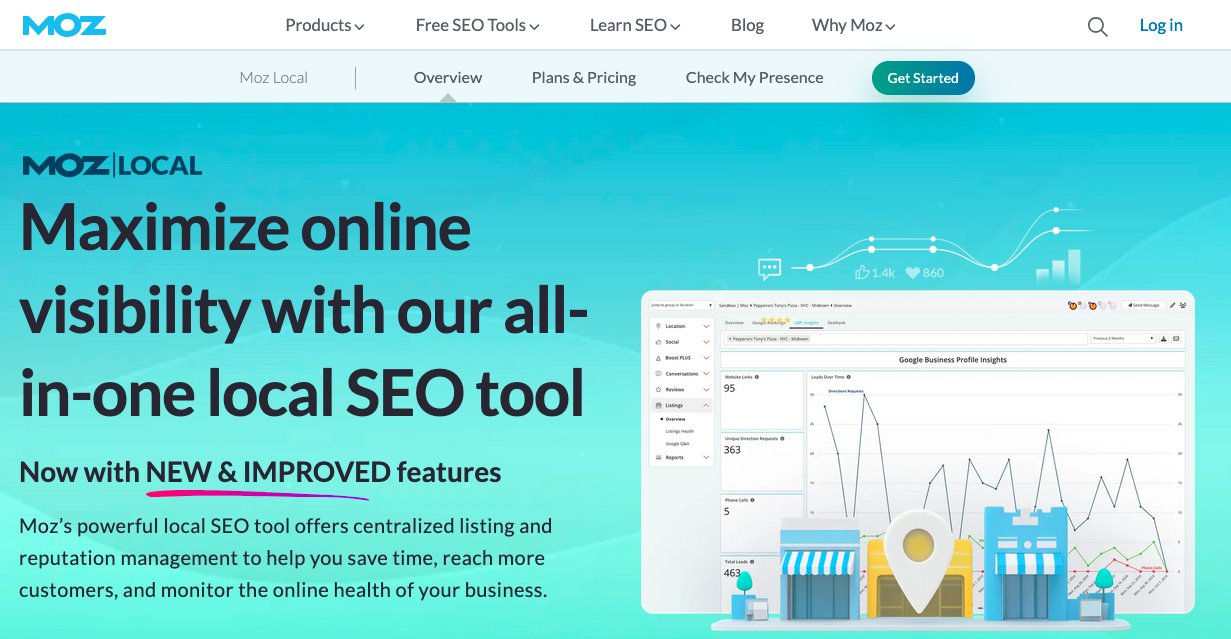
Moz alerts you when there is missing or inaccurate data so you can fix it.
Other cool features of Moz Local include syncing and managing your listings, profile optimization, automatic duplicate deletion, and alerts and notifications.
Moz Local Search Tool can help you with your local SEO strategy by helping you track your existing citations. All you need to do is enter your business’s name in the tool, and you will see a list of complete, incomplete, inconsistent, and duplicate mentions of your business online.
After this, you can proceed to fix these issues manually.
There are three pricing options for Moz Local:
- Lite: $14/month.
- Preferred: $20/month.
- Elite: $33/month.
However, Moz allows you to pay annually and save up to 25%.
AI and Local SEO
Leveraging AI is important in today’s digital market.
Using AI for local SEO for small businesses is also an important part of your overall strategy because it helps you save time by automating several tasks. You can automate repetitive tasks, track performance, review responses, and even create chatbots for customers to inquire, get answers, and enhance customer experience easily.
You can use AI-powered tools such as Birdeye that automate responses to clients and allow you to send bulk messages. Several AI-powered SEO tools can be used to automate some SEO processes.

Photo by Solen Feyissa on Unsplash
- Content Creation
This is where artificial intelligence has made most of its mark. With tools like Google Bard and ChatGPT, content creation has become easier.
You need to optimize your prompts for maximum output because these intelligence tools work with the data fed to produce an output.
This means that, to a considerable extent, what you get from these tools is based on what you input.
When implemention local SEO for small businesses, you can use AI to create optimized content in a certain tone for your audience. You can create email templates for direct outreach, outlines for your blog posts, FAQs, and other content types.
- Keyword Tracking
There are several AI-integrated tracking tools and software today. In fact, most SEO tools have some form of artificial intelligence integrated into them.
Tools like SE Ranking, Rank Tracker, SEMrush, and Ahrefs can help you track competitor keywords, keywords you want to rank for, and those you already have on your website.
This allows you to know what keywords to include in your content campaign, the difficulty level of some keywords, and the average position of your keywords in SERPsas you do local SEO for small businesses.
- Brand Mentions
You can use several SEO tools like Locobuzz, Brand24, Sprout Social, and BrandMentions to set up brand tracking when doing local SEO for small businesses.
With any of these tools, you get alerted whenever your brand is mentioned online.
This allows you to manage how your brand appears on any platform. Suppose your brand is mentioned with a wrong name, incorrect NAP, or other irregularities. In that case, you will get an alert. You will simply message whoever uploaded the information to make the necessary corrections.
You can also contact them if they posted an outdated link or if you have a better alternative for the offer, link, or brand product.
- Predictive Analysis
You can use AI tools to predict search trends and customer behavior. For example, with Google Analytics 4, you can see predictive insights on your customer behavior that will show you their future preferences.
You can then create effective marketing campaigns based on these insights.
FAQs on Local SEO for small businesses
Is local SEO important for a small local business website?
Yes. Local SEO is essential for small businesses because it helps them appear in Google Maps, local search results, and AI-generated local answers when nearby customers are ready to take action.
Why are local SEO services important for small businesses?
Local SEO services are important because they connect businesses with nearby customers who havehigh purchase intent at the exact moment they are ready to act.
How do I optimize my Google Business Profile to boost local search rankings?
Optimization requires providingcomplete and accurate NAP data (Name, Address, Phone) that matches your website, selecting the correct primary and secondary categories, use of high-quality photos and proper online review management.
What is the best tool for managing local SEO performance?
There is no single best tool, but popular options include Google Business Profile Insights, Google Analytics 4, Google Search Console, Whitespark, Moz Local, and Ahrefs for tracking rankings, citations, and visibility.
Do I need to have a physical store to implement local SEO for my small business?
No, you do not need a physical store to implement local SEO. You can always start with having a Google Business Profile and optimizing it for your target keyword.
Where can I find an affordable local SEO consultant?
SARMLife offers affordable local SEO services that covers tasks like GBP creation, optimization, local SEO research, loacl schema markup, review management, among others.
Which online directories and platforms should my small business be listed on?
This depends on the directories peculiar to your type of business. However, you can always list your business on popular directories like Yelp.