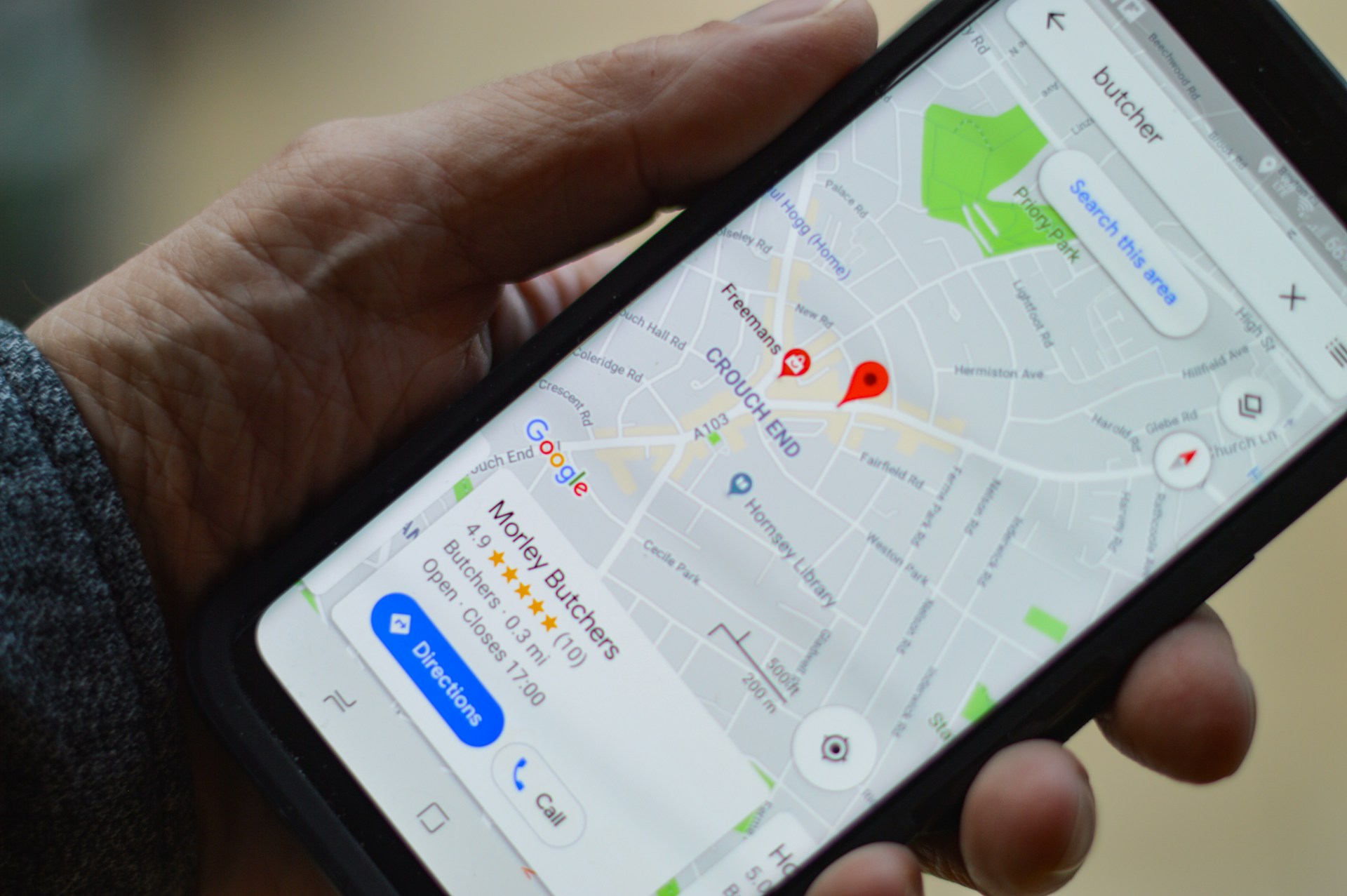
Your customers are already searching for businesses like yours. The real question is: “are they finding you, or your competitors?”
Learning how to set up a Google business profile successfully is one of the most powerful ways to capture that demand. A well-optimized profile places your business directly in front of high-intent users on Google Search and Maps right at the moment they are ready to take action.
But here’s where most businesses get it wrong: They treat their profile as a simple listing instead of what it actually is: a local SEO engine built for visibility, trust, and conversions.
With nearly half of all Google searches tied to local intent, your ability to show up in the Local Pack can determine whether your business gets the click, the call, or gets ignored entirely.
Google Business Profile is a free online tool provided by Google that business owners use to manage their online presence across search.
The tool displays key information about their business, including business hours and available stock to active searchers.
This helps customers find and interact with the business.
Your Google Business Profile listing can be accessed by searchers when:
Users search for your business on Google
Users search for queries related to your business on Google
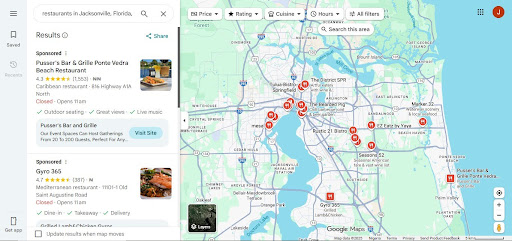
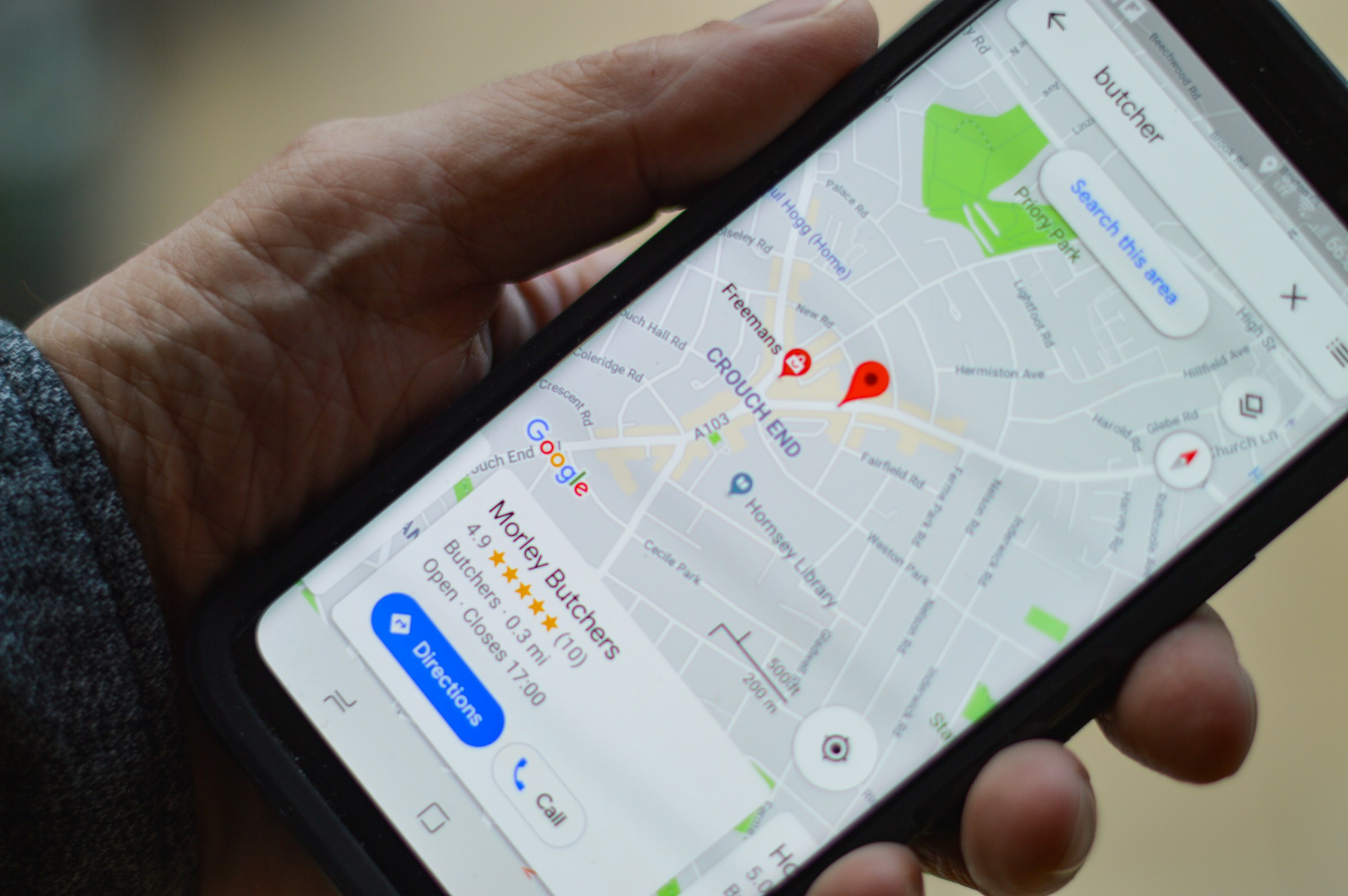
When customers look on Google Maps
Photo by SARMLife
Why Google Business Profile matters for local search and customers
To set up a Google business profile goes beyond just being an online business card, but it is also a lead generator tool that helps your business increase visibility, trust, and engagement with your customers.
This visibility, trust and engagement can be exchanged for leads and sales.
1. Visibility
Google Search and Maps are the most commonly used tools for local search with more than 50% of consumers searching for information about local businesses.
The problem with this however, is that local search behavior is heavily skewed toward immediacy – searchers are in a state of urgency.
So, when users search for services “near me” or within a specific location, Google prioritizes highly relevant, optimized business profiles in the Local Pack (the top 3 listings shown before organic results) which is the first thing a user would see when searching for a business online.
If you are able to optimize your business and content to show up in this local pack results, this will grant you:
Prime position on search results pages
Visibility above traditional website rankings
Direct exposure on both Google Search and Google Maps
2. Trust
Once users see your business, the next filter is trust, and this is where your profile comes in.
Your Google Business Profile builds credibility through:
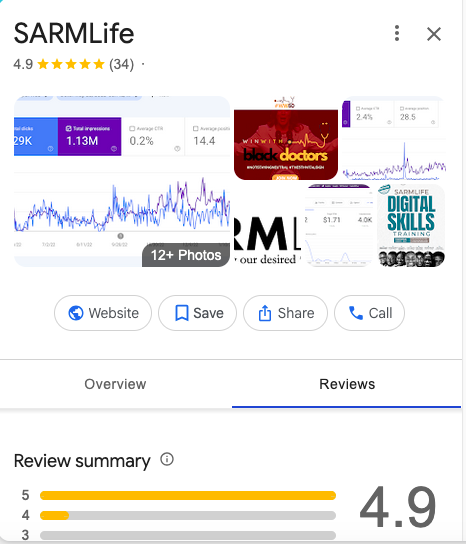
Customer reviews and star ratings (social proof)
Real photos and videos (visual validation)
Accurate, consistent business information (reliability signals)
These elements act as micro-conversion triggers that can influence the purchasing decision of the searcher.
Before a user visits your website, they’ve already formed an opinion:
“This business looks active.”
“People trust them.”
“They seem legit.”
Or the opposite:
“No reviews?”
“Outdated info?”
“No real photos?”
At that point, the decision is already made.
Photo by SARMLife
3. Customer Engagement
Your profile can also increase search engagement with your business because it acts as a mini-website that comes with built-in conversion features, allowing users to:
Call your business instantly
Get directions in one tap
Visit your website
Book appointments
Send messages
Ask and read questions through Q&A
This removes friction from the customer journey.
Instead of:
Search → Click website → Browse → Decide
Users now:
Search → Trust → Action
How to set up a Google Business Profile
Here is a breakdown of the steps to set up a Google business profile successfully:
Step 1 – Find or claim your listing
Checking if a listing already exists before creating a new one is the best way to avoid a “Suspended” or “Duplicate” status from Google.
Here is how you can claim your listing:
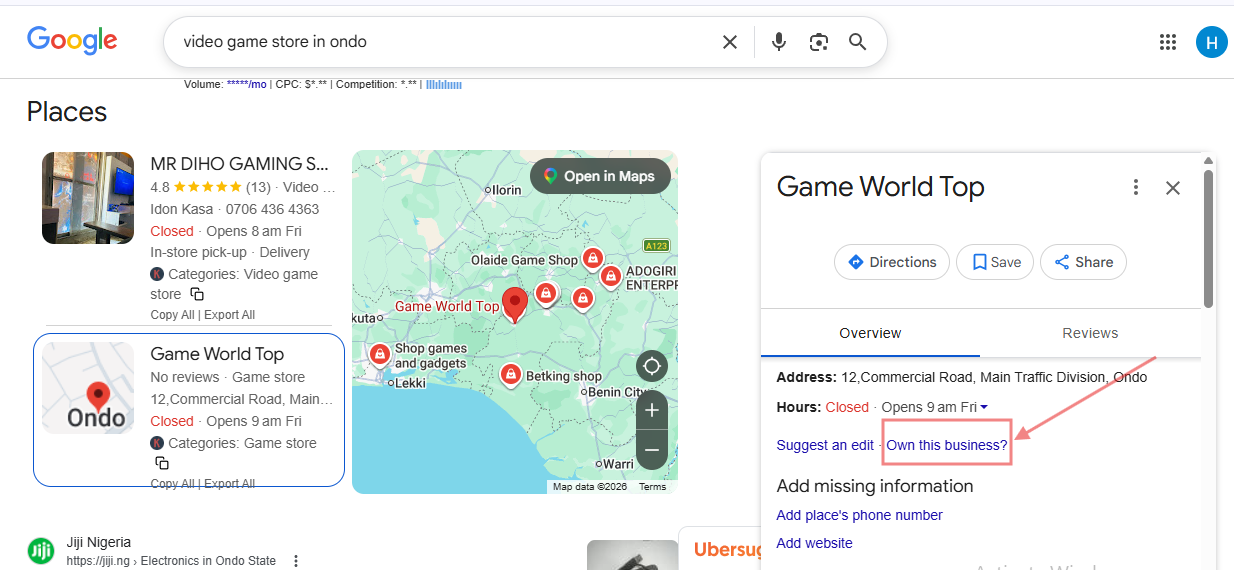
Search Google and Google Maps for your exact business name + city.
If a profile exists, click “Own this business?” or “Claim this profile” and request ownership
If you don’t find this you might already be the owner.
Duplicates kill your ranking and fragment reviews. Always check and claim first before you create.
Step 2 – Create your profile
Photo by SARMLife
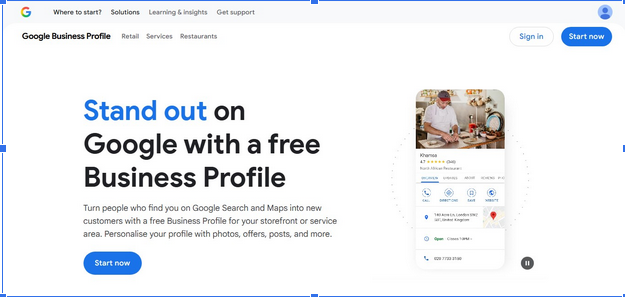
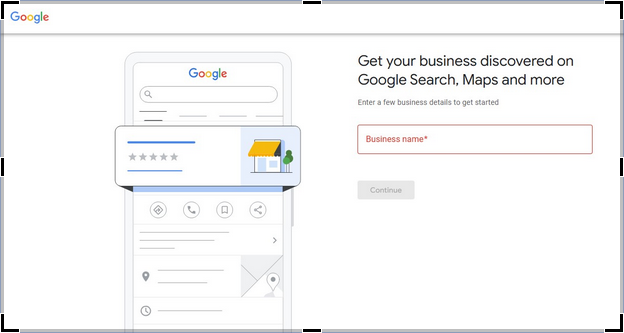
Go to business.google.com and sign in with a Google account dedicated to the business. (Don’t use a personal shared account.)
Enter business name and business type: Your business name should match the exact name you use offline and on your website. This should also match business signage and invoices.
Ensure consistency
Step 3 – Pick categories carefully
Photo by SARMLife
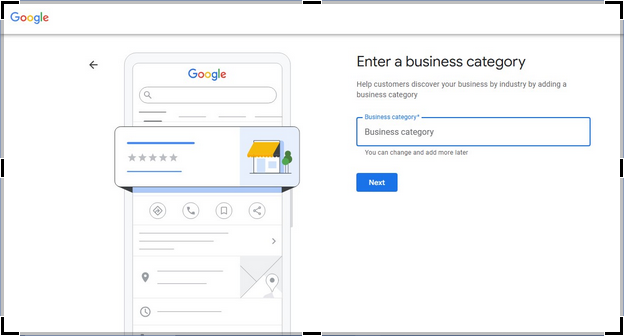
Choosing the right Google business profile category is one of the most important decisions to make when you want to set up a Google business profile.
Categories are critical for local search ranking because they signal to Google what queries your business should appear for.
Picking the wrong category can prevent you from showing up in the Map Pack or local results, even if your listing is complete.
Types of Categories
Primary Category
This is the main category that best describes your business and only one primary category is allowed.
Example:
Business: Coffee Shop
Primary Category: “Coffee Shop”
Secondary Category:
These are optional categories that describe additional services your business provides, but you can only add them if they truly apply.
Example:
Business: Coffee Shop:
Secondary Category: “Bakery” (If you sell baked goods)
Tips for Choosing the Right Category
Be specific
Always pick the category that most accurately describes your main business activity. Generic or broad categories can hurt ranking
Only add relevant services to avoid diluting your profile’s relevance.
Think like a customer
What would they search for? The answer to this should guide your primary category.
Step 4 – Add Business Address
Photo by SARMLife
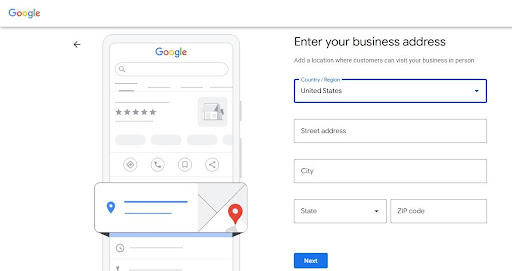
For local businesses, an address is needed for ranking. Your physical address lets search engines know when to showcase your business to searchers.
Service-based businesses use service area addresses instead of a specific physical location. This service area is an area where they can provide services.
Step 5 – Set Business hours & special hours
When you want to set up a Google business profile, you have to include normal business hours and special hours.
Special hours like appointment-only or seasonal hours provide clarity to searchers and can showcase your business in a positive light.
Add regular hours and add special/holiday schedule
If you offer appointment-only hours, add them.
Don’t wait until the holiday is live.
You can add phrases like “Closed on Sundays, Appointment-Only Services” to your profile.
Step 6 – Add your Business description
Your business description is an essential part of your profile. It highlights what you do, your target audience, and your unique selling points.
The business description is about 750 characters long, but you want to make sure that the first quarter of the description already summarizes your major strengths.
Step 7 – Upload images & logo
Photo by SARMLife
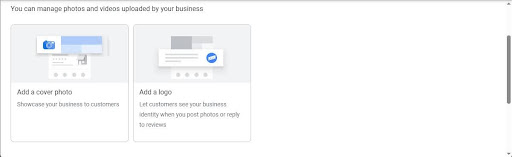
Visuals not only increase engagement, but also help you gain trust from searchers.
Your logo can help searchers recognize your brand instantly across search and maps; real photos (not stock images) can also significantly increase engagement and conversion.
Short videos can also do wonders in showcasing the atmosphere of your business, helping you connect emotionally to searchers. Showing the behind-the-scenes can also make searchers feel like a part of your business, leading to conversion.
NOTE: All photos should be in PNG or JPG formats while videos should be in MOV or MP4 formats.
Here are some important notes for visual uploads when you want to set up a Google business profile:
Keep images between 10 KB – 5MB and 720 x 720 pixels.
Keep videos at around 30 seconds, 75 MB and at 720p minimum resolution.
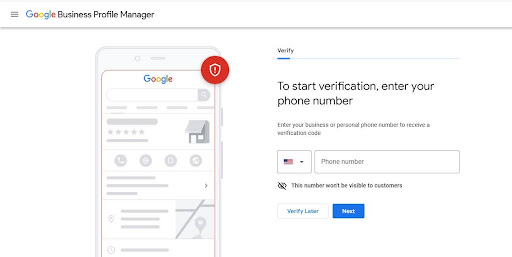
Step 8 – Verify your profile
Photo by SARMLife
Google’s verification process is stricter than it used to be, and this is done to prevent spammy profiles.
There are different verification methods, and Google automatically assigns one to you based on the type of services you offer.
However, if you have initially verified your business website through Google Search Console using the same Google account, you may be able to qualify for “instant verification”
NOTE:
Do not edit your business information while waiting for verification.
Do not skip verification as unverified profiles have limited features and poor visibility
Postcards typically arrive in 5–14 business days.
If the postcard doesn’t arrive after 14 days, request another and double-check the address. If still failing, try to switch to phone/email if offered.
Do I need a physical address to set up a Google business profile?
No, you do not need a physical address to open a Google Business Profile. However, if you serve customers at a physical location, you need a real, verifiable address. If you’re a service-based business, you can list a service area instead.
Is Google Business Profile free?
Yes, Google Business Profile is 100% free.
How do I verify my business?
You can Verify your business usually through postcard, phone, video recording, or live video call. However, Google chooses the method, not you.
How long does verification take?
Verification usually takes anywhere from a few minutes to 14 business days depending on the verification method.
Can I manage multiple business locations under one Google account?
Yes, you can manage multiple business locations under one Google account as one dashboard can handle multiple locations.
Can I change my business name or category after setup?
Yes, you can change your business name or category after setup but avoid doing it too often because frequent changes may trigger re-verification or ranking drops.
Final thoughts
When you want to set up a Google Business Profile is not the goal, but building it into a high-performing conversion machine.
When done correctly, your profile becomes more than a listing.
Every detail matters. From your category selection to your images, your description, and your verification process. This information determines whether your business shows up or gets left behind.
Most businesses lose visibility because their foundation is incomplete, inconsistent, or poorly optimized. And without a strong foundation, no amount of marketing can compensate.
This is exactly where SARMLife comes in.
We don’t just help businesses set up a Google business profile, we also build fully optimized local search systems designed to rank, attract, and convert. From profile optimization to content alignment and review management, we focus on what actually drives long-term growth.
If your goal is not just to exist on Google, but to compete and win in local search, then your Google Business Profile needs to be treated like the growth channel it truly is.
Get our Local SEO Service and watch your business get to the top of local listings on traditional and AI-powered search
This shows that Google business profile optimization is one of the highest-impact marketing activities any local business can invest in as it’s the main way businesses can get featured on the local map pack.
If your Google business profile optimization is not standard, you are not just missing traffic, but handing customers directly to competitors.
Most business owners claim their Google business profile and then treat it like a “set it and forget it” asset. As if the profile would work on its own without the need for continuous input.
That approach no longer works.
To rank businesses higher, Google now evaluates real-world engagement, activity, freshness, and trust signals to decide which businesses deserve visibility.
This means your profile’s performance is tied directly to how often you update it, how customers interact with it, and how clearly Google understands your relevance and authority in your local market.
Google Business Profile optimization is the process of fine-tuning your Google business profile so that Google shows it to more people and those people are more likely to choose you over a competitor.
The goal of Google business profile optimization is to make your profile as complete, accurate and engaging as possible.
You do this by filling every field thoughtfully, using relevant keywords naturally, posting fresh content, managing reviews, tracking results, and fixing anything that confuses Google or people.
In short, make your profile useful to humans and clear to Google.
Your Google Business Profile isn’t completely optimized when there are incomplete information/missing fields, lack of keywords in your content, and unmaintained data (e.g. unanswered reviews, no GBP posts, dead photos, etc.)
What most Google Business Profile Guides Don’t Tell You
Most articles on Google business profile optimization give you checklists, basic steps and screenshots.
Although helpful, they quietly leave out the parts that actually determine whether your profile wins or disappears.
Here’s what they don’t spell out about Google business profile optimization:
1. Google business profile optimization is not optional, it’s a ranking filter
Most guides frame Google business profile optimization as “best practice”. However, the reality is that Google uses engagement and activity as a legitimacy test.
If your profile looks inactive, thin or abandoned, Google slowly removes its trust in your listing.
What that causes:
You lose your local pack position
Competitors with weaker websites outrank you
Your impressions collapse without any alert
This is why businesses say: “My Google business profile optimization was working, then it just stopped”.
What most articles don’t explain is that prominence is largely behavioural. Google takes note of:
Photo views
Reviews activity
Post engagement
Response speed
Direction requests
Call clicks
Message behavior
If users ignore your profile, Google assumes others would and they should too. Your profile/business ranking is not just about the information shared, but also how people react to that information.
3. Inactivity is a ranking penalty without a warning label
Inactivity is commonly a product of a neglected Google business profile optimization. Your Profile is inactive when it shows:
No recent posts
No new photos in months
Unanswered reviews
Outdated services
Google doesn’t punish you outright, it simply stops prioritizing you. Your profile will keep moving down the ranks and if Google deems your account as abandoned, it quietly disables the account.
A disabled account will no longer be accessible to the owner for editing and may require a reinstatement appeal to recover.
4. Most guides ignore the systems that keep you ranking
Most Google business profile optimization guides would rather have you tailored to short-term fixes like:
Upload photos
Write a description
Get reviews
Although all of this is good advice and can actually increase your rankings, they are often short-lived. To survive long term, your business needs sustainable solutions, or as I like to call them – systems.
Control systems that work for GBP:
Review request workflow
Review management strategies
Photo update schedule
GBP Post calender
Competitor monitoring routine
Without systems, your Google business profile optimization becomes a random effort or a task done when remembered.
5. Your GBP is now feeding AI search engines
This is where the Google business profile optimization game quietly changed. Search is no longer just blue links, it is now AI-generated answers and local search are not excluded.
When people ask:
“Best emergency dentist near me”
“Where can I repair my laptop today”
“Best SEO agency to hire”
AI systems compile reality from trusted sources across the internet including websites, review platforms, directories, social media pages, and so on.
Photo by SARMLife
Your Google business profile is one of such sources used by AI models to determine the authenticity of your business.
This is because your GBP contains:
Verified business identity
Real-world location data
Customer behavior signals
Review activity
Service and category data
Operating hours and availability
Continuous engagement patterns
AI treats this as ground truth.
Because of the information available on your GBP and the emerging trend of AI search enquiries, your GBP signals now influence:
AI Overviews
Voice assistants
Conversational search results
Zero-click recommendations
If your Google business profile optimization is thin or inactive, AI systems avoid recommending your business entirely.
This is no longer just about rankings, it is about whether AI believes your business is real, active and worth suggesting.
Poor GBP optimization is now visibility risk
Before, SEO failure meant lower rankings in searches. However, in the age of AI searches and integration, failure means total exclusion in AI answers.
This means:
No mention
No recommendation
No discovery
Your competitors become the default business in AI’s mind. That perception sticks and I don’t have to spell out what it does to your business.
Google Business Profile Optimization Steps
Here are some of the best curated Google business profile optimization steps you will see on the internet.
These steps have proven to be effective over the years, and when you want to implement them, do these in order (first week: 1–6, then keep cycling the rest regularly).
1. Review Generation and Response
Businesses in the top three local search results have nearly 250 reviews on average, far more than businesses ranking lower.
Google itself notes that both review count and quality (as part of “prominence”) are important ranking signals.
Review generation means proactively encouraging satisfied customers to leave feedback on your Google Business Profile (GBP), while review response means replying to both positive and negative reviews.
How to generate and manage reviews correctly?
An average business needs about 10-20 reviews (at minimum) to start earning trust and an active business typically gains 2-5 reviews each month.
It’s best to ask immediately after a successful service or sale. Appreciate the customer for their purchase and invite them to leave a review.
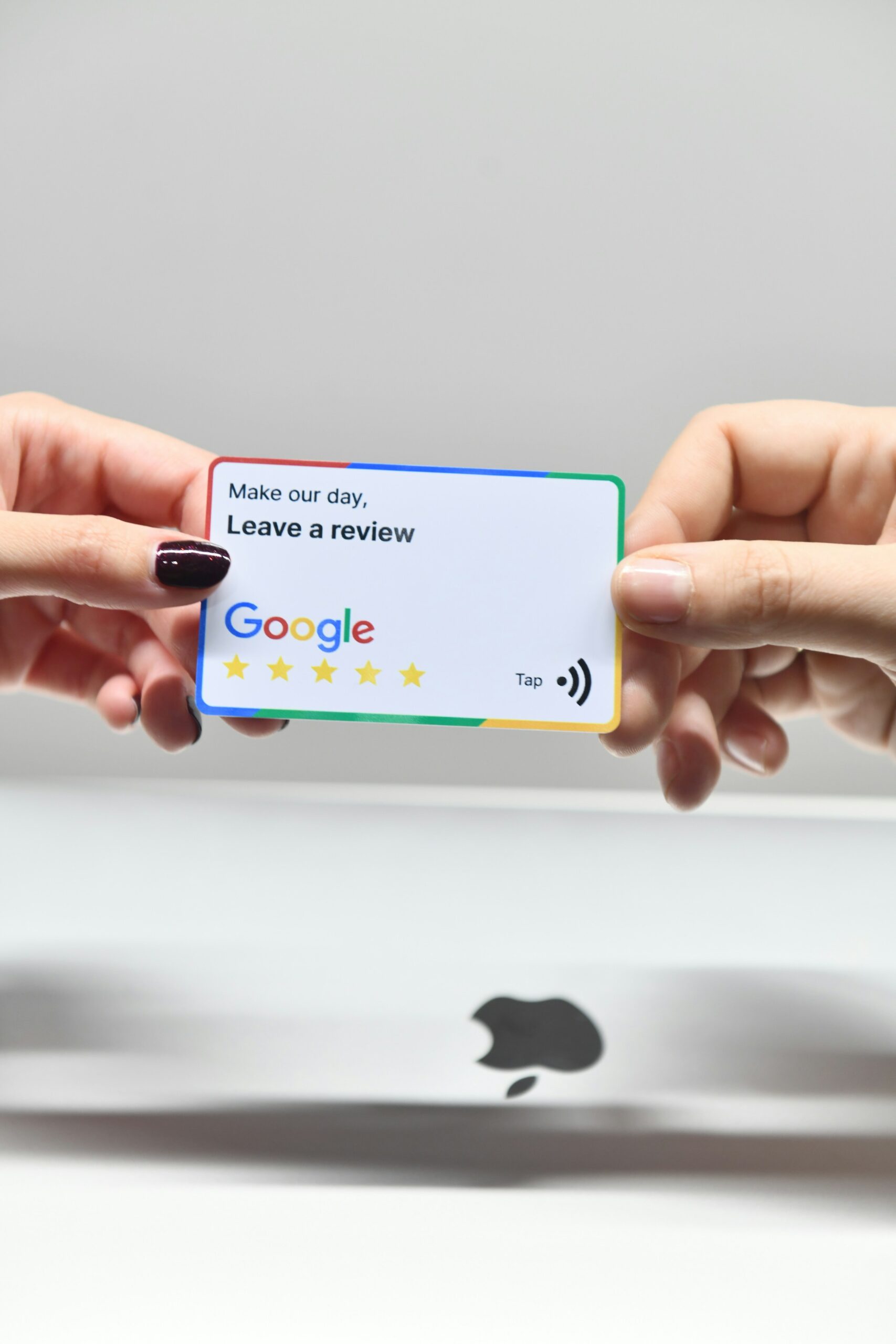
For example, email them the link or hand them a business card with a QR code to your GBP.
NOTE: Focus on genuine feedback.
Make it easy and personal
Now you have their attention, send a friendly follow-up message (via text or email). Avoid generic mass requests.
For example, personalize it (“Hello [Name], thanks for visiting us!)
Train staff
Ensure every team member mentions reviews during in-person or phone interactions.
A simple line like “If you enjoyed our service, we’d appreciate your review on Google” works.
Prompt, Sincere response
Make sure to monitor your profile (turn on email notification or use the mobile app) and reply to every review promptly (especially within a day).
Here you should:
Thank 5-star reviewers enthusiastically
Address 1-2 star reviews with empathy and willingness to fix the issue.
For example:
For a bad review , you can reply with “We’re sorry to hear about your experience. Please call us at [phone] so we can resolve the issue”.
Handling negative reviews well impresses customers.
2. Weekly Photo Uploads
Photo by SARMLife
Google profiles with photos earn 45% direction calls than those without and having 10+ photos can double your engagement (calls, messages).
I recommend regularly updating photos weekly, but if this feels too frequent, schedule a monthly photo session.
Uploading photos regularly also shows Google your listing is active – a factor that improves local pack rankings, increases visibility, shapes first impressions, and builds trust with both users and Google’s algorithms.
How to maintain an updated and acceptable gallery?
Specifically uploading good photos increases photo views, which correlates with better visibility.
Here’s how to maintain an updated and acceptable gallery:
High quality images
Use a good camera or smartphone to take your images.
Ensure photos are clear and accurately represent your business. Google accepts JPG or PNG formats for images.
Aim for at least 720 * 720 pixels or larger. Avoid blurry or over-edited images and keep file size reasonable (under 10 MB)
Include exterior shots so customers can recognize your building from outside, inside shots to show ambiance, products/service shots, key offerings or menu items ,and team shots of friendly staff.
Google specifically recommends at least 5 interior/exterior, 5 product/service and 3 staff photos.
Follow guidelines
Don’t upload logos or marketing images as photos.
Avoid group shots with unrelated people, focus on your business. Each photo should follow Google’s policies like no nudity, violence, etc.
Geotag and captions
This is optional but necessary for SEO.
When uploading, use clear filenames (e.g. “Min’s bakery interior.jpg”).You may also add simple descriptions to include relevant keywords.
This helps Google understand the image context and purpose.
Encourage user photos
User-generated photos (under your profile) also boost authenticity. So, encourage customers to share their own pictures with incentives.
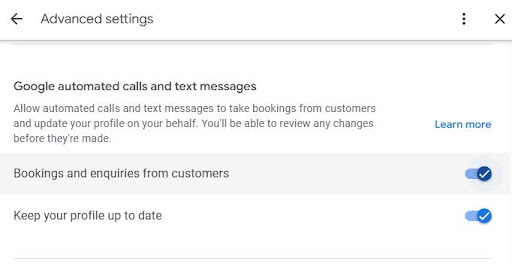
Messaging lets customers send text questions to your business via Google. Bookings allow customers to schedule appointments via integrated booking providers right from your profile.
Activating these features turn your GBP into a mini-contact center. Although these features don’t directly improve SEO ranking, it greatly improves user experience and can increase foot traffic or appointments from your GBP
How do I enable messaging and set up bookings?
Here’s how you enable messaging and set up bookings:
Enable Messaging
In your Google Business Profile dashboard under “Messages”, turn on the toggle.
Set up the welcome message and notification.
Google will assign you a private number to receive texts. Make sure you or a team member responds quickly. Aim for a high response rate (80%+) and under 1-hour response time.
Set up Bookings
If your business takes appointments (salon, classes, clinics, etc) sign up with a Google-approved booking partner. Then connect that account in the “Bookings” section of GBP.
Once enabled, a “Book” button with your schedule appears on your profile.
Train staff
During business hours, have a designated person who handles messages if you don’t have the time. Make sure they promptly reply during business hours.
Google automatically sends the welcome message once the customer starts a conversation after business hours.
Monitor performances
Check the “Messages” and “Bookings” tabs in Insight.
Track how many messages you get and how quickly responses are sent. Optimize when need be by adjusting your staffing or auto-replies.
For bookings, watch to see if customers use it and if you need to expand available slots.
4. Monitor Insights
Photo by SARMLife
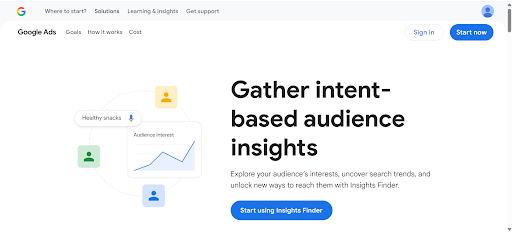
Google’s Insights for GBP is a free analytics tool that shows how customers find and interact with your profile.
It reports data like number of views and customer actions (calls, website clicks, direction requests, message/ bookings) on your profile. It also shows what search queries triggered your profile.
Continual monitoring of Google business profile optimization metrics (search, views, actions) is part of improving “prominence” in Google’s algorithm.
In contrast to Google Analytics (which tracks your website) or Search Console (which shows Google search data), GBP Insights is focused solely on your profile’s user engagement.
How to effectively use Google Insights?
While Google’s algorithmic formula is private, active management of GBP (which Insights quantifies) correlates with better local visibility.
Here’s how to do it effectively:
Accessing Insights
In the new Google Business Profile manager or mobile app, click the “Performance” tab.
You can view up to 6 months of data (or bulk-download for multiple locations via Google’s interface).
Review key metrics
Regularly check monthly views on Search vs Maps and how many actions.
Analyze search queries
Look at the list of queries that show your profile.
If you see important items missing, it signals a need to improve your description or website SEO for those keywords.
Track trends
Compare month-to-month and plan for necessary action.
For example, if phone calls spike in spring, you might ramp up staff readiness then. If certain posts or promotions coincide with lifts, note that success and plan more.
On average, Google Business Profile posts achieve a 1-3% engagement rate and posts about events or special offers get double that engagement.
GBP allows you to share news, offers, events and updates directly on your profile. These function like mini-social media updates on your GBP.
Strong GBP posts can help you get noticed. While the direct SEO impact is debated, GBP posts keep your profile fresh, give customers timely information and boost engagement.
How to create a Google Business Profile Post
With a well-maintained post strategy showing Google that you’re active and can capture searchers’ attention, you can see an increase in engagement.
Here’s how to create a GBP post the right way:
Consistency and timing
Publish a new post at least once a week. Also post for events or offers when they arise. Treat your GBP like a mini blog.
Choose the right content
Use posts to announce promotions like “10% off” sales, special events like “Live music Friday”, new products “Just arrived:[ Product]” or helpful tips.
Make it relevant to your audience.
Avoid only posting generic information that customers can find elsewhere on your site
Add images and CTAs
Each post should include a high-quality image or video that illustrates the message.
Always add a call-to-action button if available.
For example: “Call now”, “Book” or “Learn more” to increase the post’s impact and drive actions.
Watch the expiration
Posts on GBP typically show for 7 days. Keep track and update old posts. You can pin your best posts using the pin icon in the GBP admin.
Use keywords naturally
While writing your post, use terms that customers might search for. Relevant keywords in your GBP content help it match user queries.
6. Keep citations consistent and earn local backlinks
Local citations are online listings of your business’s name, address and phone number (NAP) on third-party websites like Yelp, Yellow Pages, local directories or social profiles.
Surveys of local SEO experts confirm citations remain one of the top-five local ranking factors.
After setting up your GBP, maintaining consistent citations is critical.
Citation monitoring for Google business profile optimization means regularly checking that your NAP is accurate across the web. For customers, correct citations mean they find you easily and can call or visit without obstacles thus directing customers along the path to purchase.
Reliable citations encourage people to click or call.
How to create and monitor your citations efficiently?
When NAP information is uniform across sources, Google confidently shows it in maps and search.
Even for service-based businesses, although your service area setting won’t appear publicly, you should focus on any directories that would list your contact number or website as the principle of consistency still applies.
This is the efficient way to create and monitor your citations:
Identify all directories and reviews sites where you are listed like Facebook, Yelp, Bing, Apple Maps, etc, and also consider popular local directories or industry-specific sites.
Fix inconsistencies
For each listing, ensure the exact same name, address and phone numbers are used. For example,if your URL changed, update it everywhere.
All differences should be standardized.
Remove duplicates
If you find duplicate entries on major platforms, remove the inactive one or merge them (Google and Yelp allow suggestions or claims).
Use authoritative sources first
Start with high-impact citation sites: Google itself, Facebook, Yelp, Apple Maps, Bing, Foursquare, etc.
Ensure these are 100% correct, then move on to relevant industry directories or local sites.
Keep directories updated
Whenever your business information changes like a new address, new phone number or updated hours, update it on all listings immediately.
Ideally, update Google first then push changes to others.
Monitor periodically
Set a quarterly reminder to re-audit citations.
7. Competitor and Geo-Performance Tracking
This is another important aspect of Google business profile optimization.
Competitor tracking involves monitoring how your Google Business Profile performs relative to your local competitors.
By analyzing competitors’ GBP entries and your own “rank” across areas, you can identify opportunities to improve your presence.
Competitor analysis is crucial for local SEO success. It lets you observe the competition: If a rival is ranking higher, see what they’re doing differently on their GBP.
Actively tracking performance and rivals sharpens your local SEO strategy and can directly improve your rankings.
Geo-performance tracking helps you find “blind spots”. You could be visible downtown but not on the city’s outskirts. This helps you to know which areas to target to expand your reach.
How to perform proper Competitor and Geo-performance tracking?
Here’s how to perform proper competitor and Geo-performance tracking:
For example: “lawn care [Your city] using incognito Google search (with location on)” and you may be surprised at the businesses listed.
Track local ranking (geo-grid)
Use relevant tools like Local Falcon (or similar rank-tracking software) to map your GBP’s rank across a city grid.
This shows where you appear in local pack for each neighborhood. For example, you might rank #1 downtown but #5 in the suburbs.
Compare profiles
Look at competitors’ GBP pages side-by-side.
What categories do they list? Do they have more photos or reviews? Do they post often?
For instance, if a competitor ranks above you and you notice they selected an extra relevant category (like “Green Lawn Service”), consider adding that category on your profile.
Benchmark performance
Every quarter, check how many reviews and what rating your competitors have vs. you.
If they have significantly more positive reviews, it’s a sign you should ramp up review generation as previously discussed.
Adjust strategy
Based on findings, optimize, target keywords where you’re weak, run localized ads or posts in underperforming areas and improve your profile according to what’s working.
Google’s Questions & Answers feature lets anyone (customers or owners) ask and answer questions about your business directly on Maps and Search.
Q&A is often overlooked, but it can take up a lot of prime space on your profile.
Managing this section means monitoring incoming questions and providing accurate answers promptly.
How do I manage my Q&A properly
Since Q&A appears prominently in the Local Pack and knowledge panel, good Q&A management can improve your GBP’s usefulness and attractiveness to both users and Google.
Enable notifications
In your GBP settings, turn on email or mobile alerts for Q&A, go to “Settings” > ”Notifications” and ensure “Questions & answers” emails are enabled.
Answer promptly and accurately
When you see a question, answer it as soon as possible. Be polite and informative.
Even if the answer seems obvious on your profile, state it clearly.
For example “Yes, our store hours are 8am-5pm, Monday- Friday”. Make sure to answer each question accurately.
Use the owner account
Make sure you are signed into your Google profile that is the GBP owner or manager. Then your answer will show as from the business (with “Owner” tag), not a random user.
This is helpful when a customer gets an incorrect answer from a random person as Google shows owners answers first using the owner account.
You can also flag the incorrect answer for removal.
Ask and answer your own FAQs
You as an owner can plant useful questions and answer them.
For example:
“Question: What are your holiday hours?”
“Answer: We’re open 9am -1pm during holidays”
This pre-fills the Q&A with key information.
Keep answers evergreen
If answers change, for example, menu prices, hours, policies, etc. Update that as outdated answers confuse people.
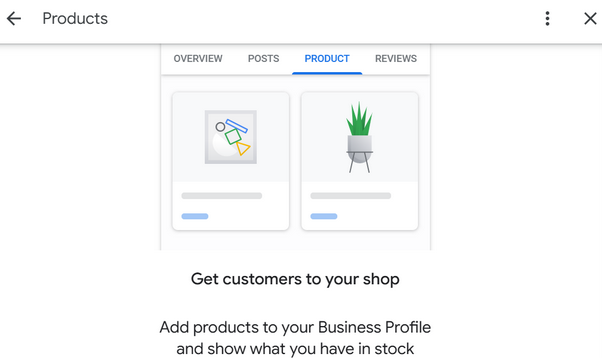
9. Add Products/Services with clear descriptions and prices
Your Products & Services section on your Google Business Profile lets you display what you sell, what it costs, and why people should choose you, directly on Search and Maps.
It’s one of the highest-impact Google business profile optimization strategies, and yet many businesses leave it empty. This section acts as your visual menu, price list, mini sales page on Google.
When optimized, it answers buyer questions before they even click your website.
How do I manage my Products & Services properly?
Here’s how you properly manage your products and services section properly:
Separate & Map Your Offerings
Go to your GBP dashboard:
Edit Profile > Business Information > Products / Services.
List every major product and service individually
Write Ranking-Driven Descriptions
Each description must answer:
What it is
Who is it for?
What problem does it solve?
And include keywords naturally.
Example:
Service: SEO Optimization: Description: Improve your website’s ranking on Google through keyword research, technical fixes, and content optimization to increase traffic, leads, and sales.
Add Transparent Pricing
Use real numbers and make sure never leave it blank. Make sure to choose the format based on the nature of your product or services.
Pricing formats are:
“Fixed Pricing”
Use for standard products or services with consistent cost.
“Starting At”
Use for scalable or variable services to anchor expectations without overpromising.
“Price Ranges”
Best for services where cost varies based on intensity, size or customization.
FAQs on Google Business Profile Optimization
How long before I see results after optimizing GBP?
Usually 2–8 weeks for local visibility improvements; bigger changes can take 2–3 months. Consistency matters more than speed.
Do GBP posts directly affect ranking?
No, but posts signal activity and improve engagement, which indirectly helps local visibility and clicks.
How many photos should I have?
Aim for 8–12 at minimum and refresh often. More is better (real, quality photos).
How often should I respond to reviews?
Within 48 hours if possible. Fast, calm replies build trust.
Do I need a website to rank for local searches?
A website helps. GBP + a good local landing page = best results.
How do I report fake reviews?
Flag in the GBP dashboard and follow Google’s removal process. Document everything and don’t engage publicly beyond a calm reply.
Who should have access to GBP?
Limit owners; give managers task-specific access. Use a shared business account with 2FA and document who has control.
Can I recover a suspended profile?
Yes, submit a reinstatement request and provide proof (license, utility bill, photos of storefront). Follow the appeals process
Final thoughts
At this point, one thing should be clear, Google business profile optimization is not a one-time task, it’s an ongoing system.
The businesses that win in local search are not necessarily the biggest, but the most consistent. They treat Google business profile optimization as a continuous process, refining their profile, maintaining activity, and aligning every detail with how customers search and make decisions.
From reviews and photos to posts, messaging, and insights, each element plays a role in how Google evaluates your business and how customers respond to it. Ignore it, and your visibility fades.
Execute it properly, and your profile becomes a reliable source of traffic, leads, and sales.
If your goal is long-term growth, then your Google Business Profile should not be managed casually, it should be strategically optimized, monitored, and improved over time.
At SARMLife, we turn proven strategies into results through our professional local SEO services.
We design complete optimization systems, implement ongoing management, monitor performance, and continually improve your local visibility so you can focus on running your business while your profile attracts customers every day.
If your goal is sustainable local dominance, our team is built to help you achieve it.
Local SEO ranking factors are the signals search engines use to decide which businesses appear in local search results, the Local Map Pack, and AI-generated answers for local searches.
In simple terms, these factors help the algorithm decide whether your business is trustworthy, relevant to the search, and close enough to serve the customer. It’s like the grading system for businesses.
The most important local SEO ranking factors include:
Google Business Profile optimization
Reviews and reputation signals
Citation consistency
Local backlinks
On-page and content relevance
User engagement and behavioral signals
Business proximity to the searcher
When the signal from these factors are strong and consistent, your business becomes far more likely to appear when people search for similar services in your area.
The question now is: “how can you make certain that your business appears in front of these 80% of customers?”
Ranking for local searches is no longer based only on keywords or directories alone. They still play significant roles, but implementing them alone will not get you far in this new era.
Modern search algorithms now evaluate your business activities, interactions with customers and context before recommending your business.
This means local SEO is now less about simply being listed online and more about proving that your business is the best available option at the exact moment someone searches.
Every day, millions of searches include local intent; phrases like near me, city names, or service-based queries. These searches often lead to immediate actions such as calls, bookings, or store visits.
Businesses that understand and optimize the right ranking signals consistently capture these high-intent customers before competitors do.
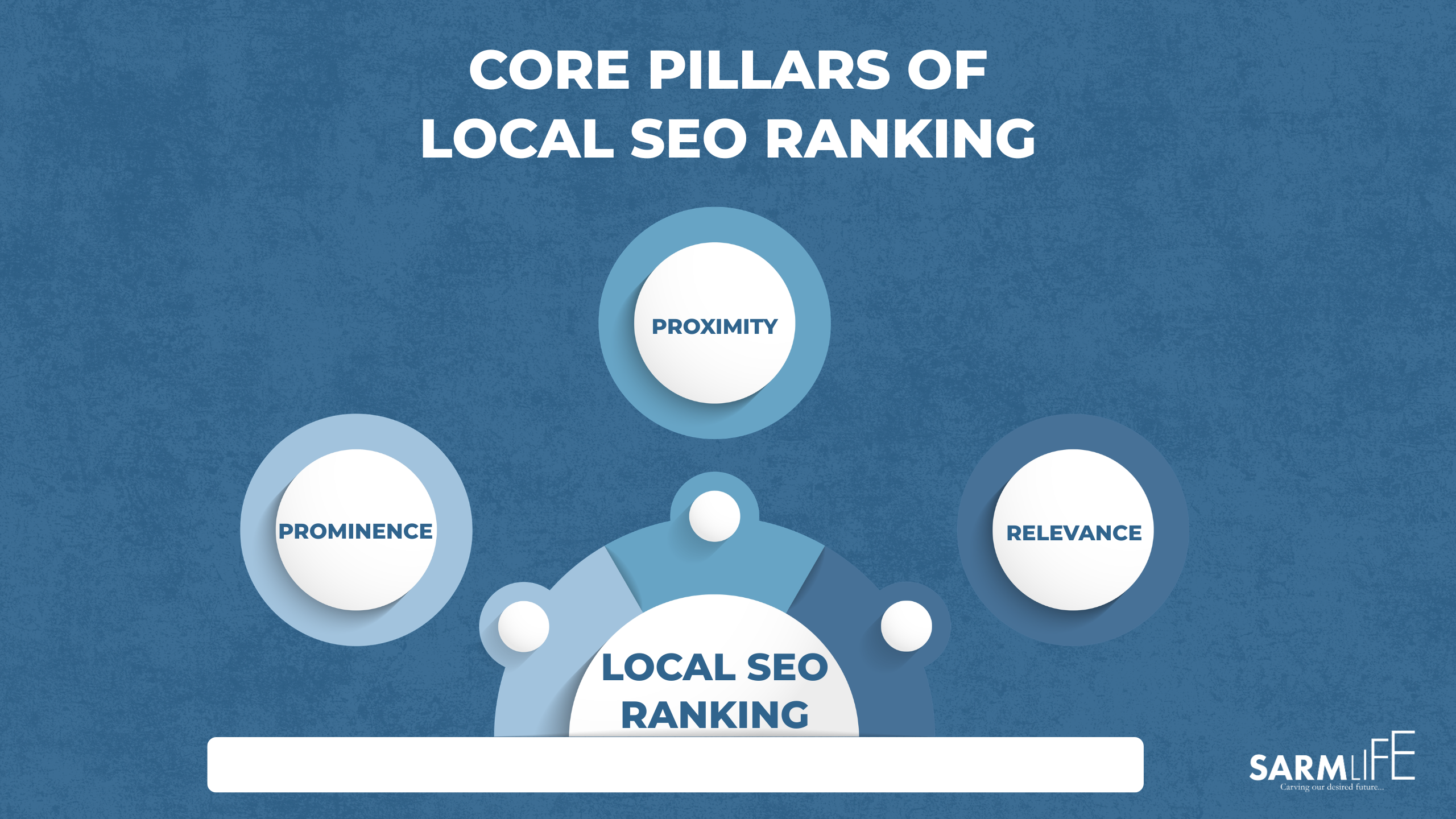
The local SEO ranking factors that will be discussed in this post includes the signals that affect prominence, relevance, and proximity which are the three core systems that shape local rankings.
You will also learn how AI-driven search, voice queries, and zero-click results are changing how businesses are discovered locally.
Local SEO (local search engine optimization) is the process of optimizing your business’s online presence to become the best match for relevant, location-based queries from an active searcher.
This means that you have been able to optimize your business’s online profile to build trust, relevance and real-world credibility.
Local SEO tells Google three things about your business:
You are real and trustworthy
You offer exactly what the person is searching for
You are close enough to serve them
Local SEO in 2026
Local SEO in 2026 is no longer about ranking pages and being on Google Business Profile alone; it is about local entity building in regards to SEO.
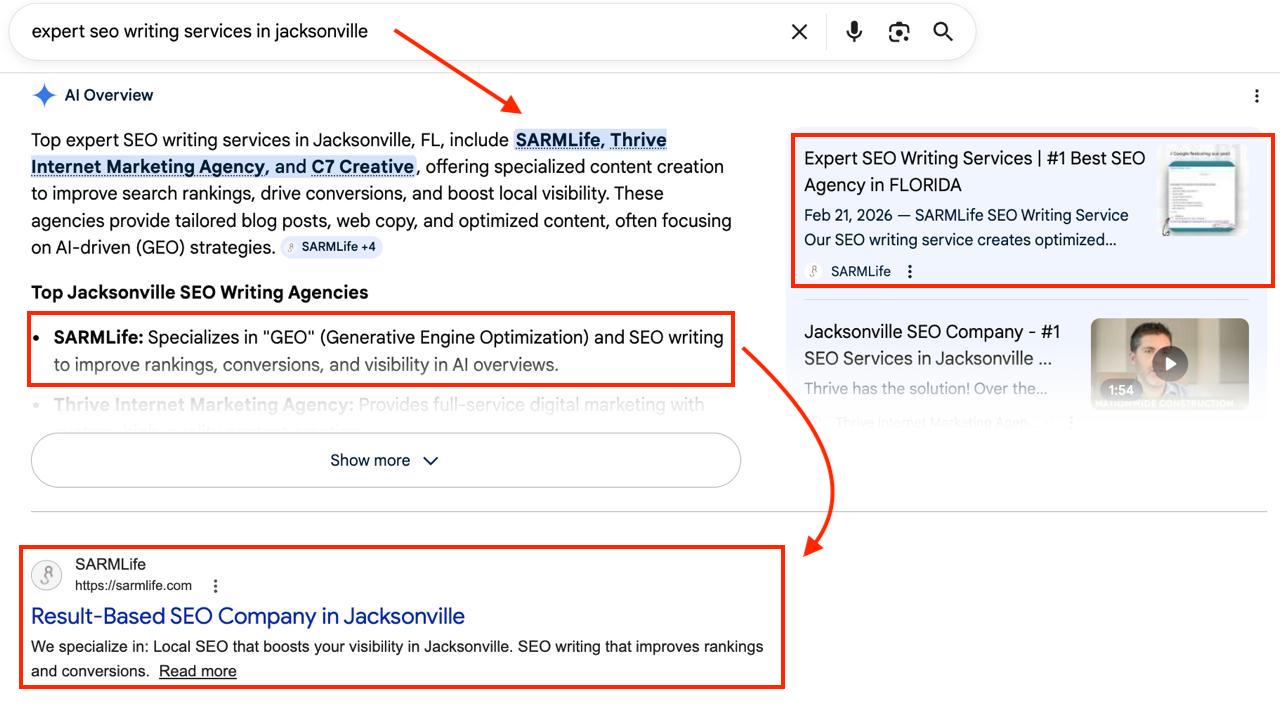
A few years back, local SEO wins looked like being listed in the top 3 Google Map Pack results or appearing in the search engine result page for your optimized keyword.
For example: “Plumbing services in Jacksonville”.
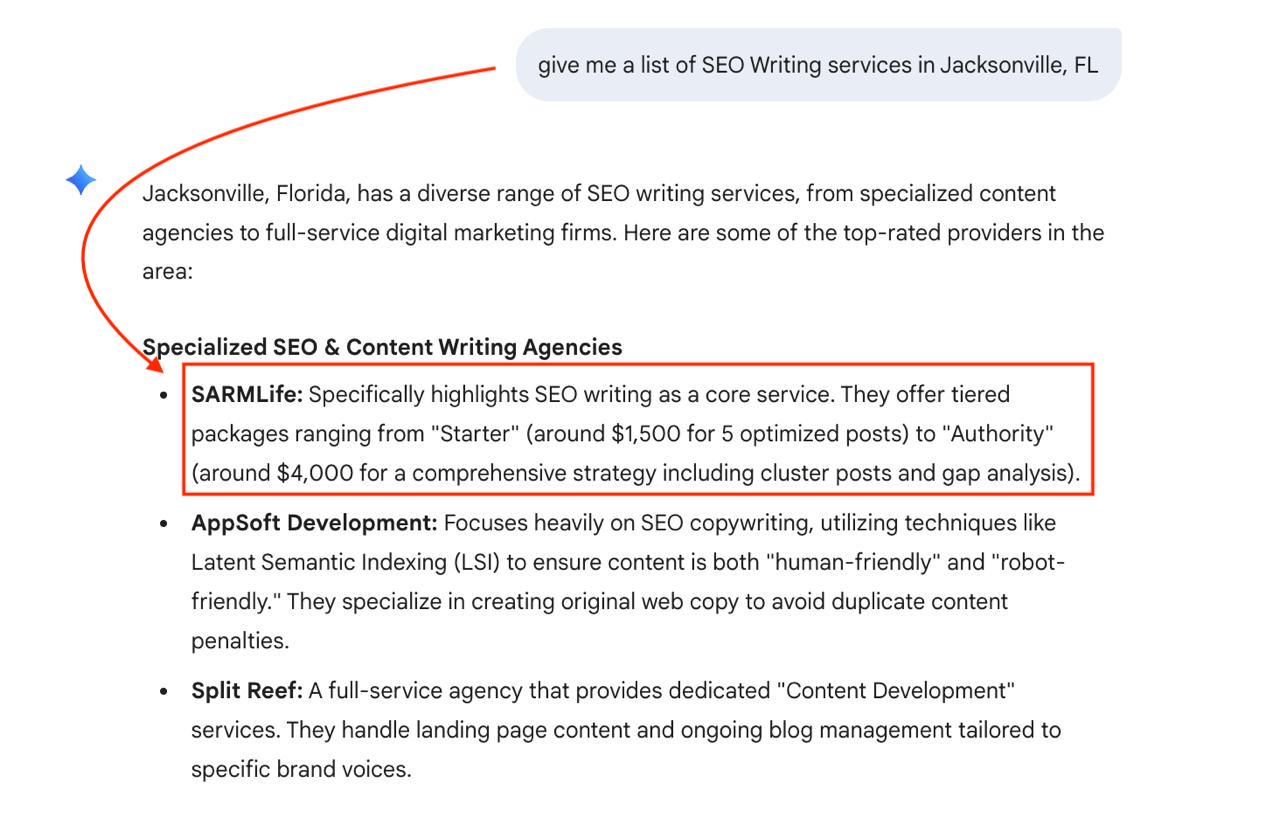
However, in 2026, local SEO wins look like this:
Becoming recognized by AI models as a trusted business to the point where it recommends you to its users.
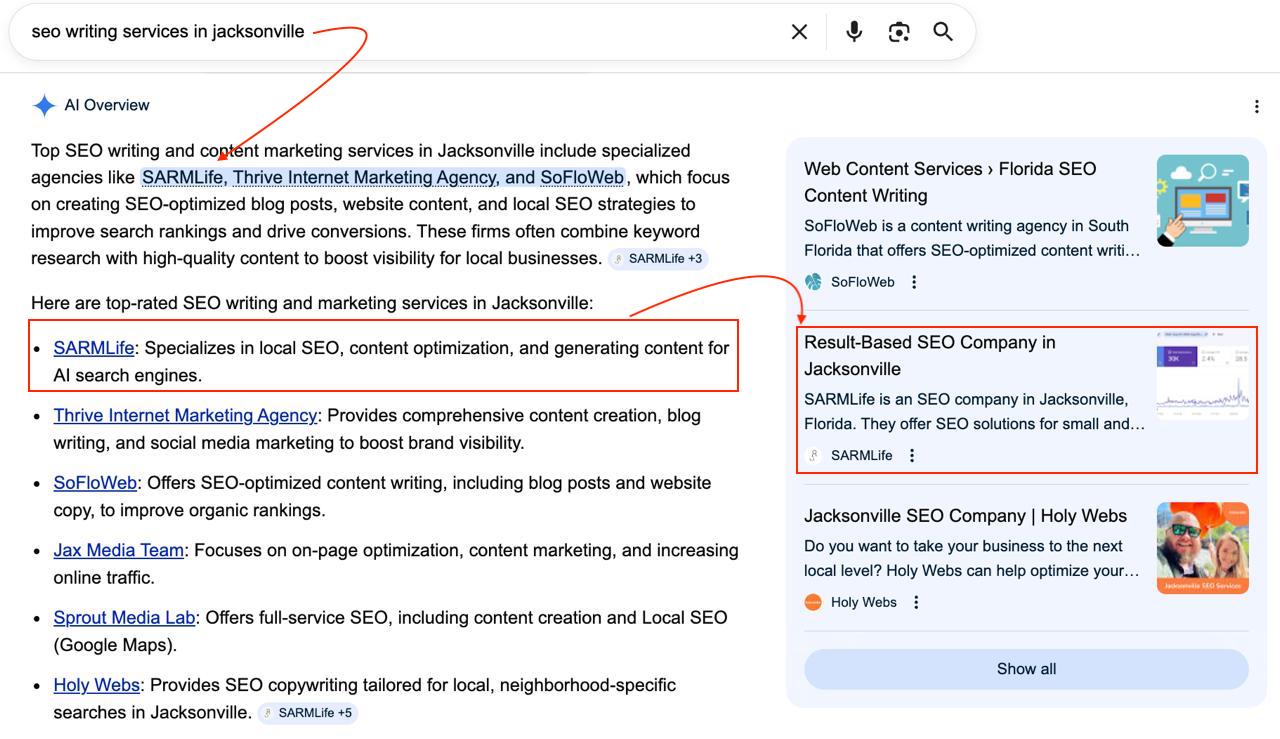
For example: asking Gemini for ‘a list of SEO writing services in Jacksonville’ and your business gets recommended.
How do AI models do this?
AI models conduct a full analysis of your business using data from your website, your Google business profile, reviews, directories, media mentions, user behavior, and real-time activity.
When this information is consistent and reliable, they will recommend your business in search results, maps, Chatbots and AI Overviews.
In short, Local SEO in 2026 is the process of shaping how AI models understand, trust, and recommend your business to location-based searches.
Local SEO Before vs. Now
Feature
BEFORE
NOW
Core Focus
Keywords & Links: Matching exact text to search queries.
Entities & Meaning: Defining a unique, verifiable identity.
Strategy
Citation building: Relying on directories (Yelp, Yellow Pages) for NAP.
Schema Markup: Using code to explain what your business “is.”
Metric
Star Ratings: Getting high star ratings regardless of context.
Context, Sentiment & Authority: Getting attributes (specific services and features) to your reviews to help AI understand the context and sentiment behind it.
Linking Strategy
Backlinks: Acquiring links to pass PageRank.
Co-occurrence: Being mentioned alongside related local landmarks/topics.
Trust Signal
NAP Consistency: Having the same address everywhere.
Entity Confidence: How sure Google is that your data is factual.
Search Intent
Explicit: Responds to “Pizza near me.”
Implicit/Predictive: Responds to “Quiet dinner spots with a view.”
AI Compatibility
Low: LLMs struggle to verify facts from keywords alone.
High: Designed for AI to understand and summarize your brand.
Scope
Geographic: Restricted to specific town/city keywords.
Topical: Establishes you as an authority in your niche globally + locally.
Longevity
Fragile: Rankings can drop if keywords change or lose volume.
Durable: Once an entity is verified, the identity remains stable.
NOTE: Local SEO now doesn’t abolish how it was done before, but it combines the old strategies with the new ones.
Businesses that invested in good local SEO practices years back are now being rewarded as they see results faster than businesses that didn’t.
Every optimization you make; reviews, citations, content, or backlinks either strengthens or weakens one of these signals.
If you notice your business move up in local search results, it usually means one of these pillars improved compared to your competitors.
PROMINENCE (Authority & Trust)
Prominence is Google’s measure of trust, popularity, authority, and real-world importance.
Prominence reflects how well-known and credible your business appears online. Among all local SEO ranking factors, this is where authority signals play the biggest role.
Search engines evaluate prominence using signals such as:
Review quantity, quality, and consistency
Backlinks from trusted websites
Brand mentions across the web
Local directory citations
Overall online reputation
Businesses with stronger authority signals are more likely to appear in both the Local map pack and AI-generated search results.
RELEVANCE (Intent Match)
Relevance determines how closely your business aligns with what the user is searching for. In simple terms, it is based on the question: “Is this business actually what the searcher wants?”
This is one of the most controllable local SEO ranking factors because it depends largely on how clearly you communicate your services.
This core pillar of local SEO ranking is influenced by:
Google Business Profile categories
Service and product descriptions
Website content and service pages
Local keywords and topical coverage
Structured data and business information
The clearer your business positioning, the easier it is for search systems to understand when to show you.
PROXIMITY (Distance to the Searcher)
Proximity refers to how physically close your business is to the person performing the search.
This is one of the most influential local SEO ranking factors, especially for searches with strong local intent such as “near me” queries.
If multiple businesses have similar relevance and prominence signals, the one closest to the searcher’s location is more likely to rank higher.
Because proximity cannot always be changed, successful local SEO strategies focus on strengthening relevance and prominence to compete effectively across a wider geographic area.
23 Local SEO Ranking Factors
PROMINENCE
1. Google Business Profile (GBP) Completeness & Activity
Your Google Business Profile is the strongest prominence signal you should have. Google reads it to decide:
what your business is
whether it’s legitimate
whether users value it
whether it deserves front-page visibility.
Complete, accurate, verified profiles that post updates, upload high-quality photos, and respond quickly to reviews and messages signal a live, active and trustworthy business.
However, incomplete, outdated, or inconsistent profiles lack trust and lose competitive visibility.
2. GBP Verification
It is not enough for you to just create and optimize your profile, you need to verify your GBP listing.
To verify your Google Business Profile (GBP) listing, you need to confirm to Google that you own or manage the business. The available verification methods can vary depending on the business type, location, and history of the listing.
How to Verify a Google Business Profile Listing:
Sign in and Claim the Business
Go to your Google Business Profile manager.
Search for your business name.
Select the correct listing.
Click Claim this business or Get verified.
Choose a Verification Method: Google will show the methods available for your listing. Common options include:
Video Verification (Most common now)
Phone or SMS Verification
Email Verification
Postcard Verification
Live Video Call
Enter the Verification Code
Once you receive the code and enter it, your listing becomes verified once approved.
Verified listings are trusted and visible in competitive areas while unverified ones are often excluded from the Local Pack and AI summaries. Hence verification is a non-negotiable anchor point.
3. Reviews
Reviews are public proof of legitimacy and popularity. Google evaluates:
Number of reviews
Average rating
Recency and velocity of the reviews
Semantic content in review text
Attributes of the review – To understand the context and sentiment of the review.
Post-review behaviour.
Rich, positive, and fresh reviews increase prominence and AI matching whereas sparse, outdated, or negative reviews suppress prominence.
NOTE: Online review management isn’t just about positive reviews, but also how you respond to the negative ones.
4. Backlinks
Backlinks remain one of the strongest authority-based local SEO ranking factors. They are authority endorsements from other websites pointing to your business.
When trusted local organizations, industry websites, blogs, or media outlets link to your site, search engines interpret it as a signal that your business is credible and relevant within its field.
These links help Google understand that your business is recognized beyond your own website.
Strong backlinks often come from:
Local organizations or chambers of commerce
Industry-related websites
Media mentions or press coverage
Partnerships with local businesses
The stronger the sources linking to your website, the more your business gains authority, which can help you outrank competitors even when they are closer to the searcher.
5. Local Citations
Local citations are mentions of your business name, address, and phone number across different platforms online (like Yelp, Yellow Pages, Clutch, etc.).
They are important local SEO ranking factors because they help search engines verify that your business information is accurate and consistent everywhere it appears online..
Common places where citations appear include:
Business directories
Industry listing platforms
Review platforms
Local databases
When your business information matches across multiple trusted platforms, it increases Google’s confidence that your business is legitimate and active.
However, inconsistent citations can create confusion and weaken trust signals, which may reduce your visibility in local search results and AI-generated recommendations.
6. Content & Engagement Signals
Search engines pay attention to how people interact with your content and brand online to determine whether your business is valuable to users.
This makes content signals one of the behavioral local SEO ranking factors that influence prominence. They show whether your business actively provides helpful information related to your services and location.
Content signals include:
Helpful blog posts or guides
Service pages explaining what you offer
Blog posts about local topics
Location-based content
Updates or announcements on your Google Business Profile
At the same time, engagement signals show how users respond to that content.These signals include:
Click-throughs from search results
Calls made via click-to-call buttons
Direction requests from Google Maps
Booking or appointment submissions
Time spent on pages (dwell time)
Return visits or repeat engagement
Interactions with photos or videos on GBP or social media
When users interact with your content frequently, it tells Google that your business is valuable and relevant, which strengthens your overall prominence.
7. Social Signals
Social signals are indirect indicators of brand awareness and public engagement.
While social media activity itself is not one of the direct local SEO ranking factors, it plays an important role in building recognition and trust around your business.
These signals include:
Increased brand searches
More website visits
Additional reviews
Natural backlinks and citations
Brand mentions or tags
Content shares
User-generated posts about your business
Check-ins or location tags
Active social engagement often leads to more brand searches, additional reviews, and natural citations across the web.
Over time, these signals reinforce your brand presence, which contributes to stronger prominence in local search.
8. User Behavioral Signals
User behavior acts as real-world feedback that search engines use to evaluate how useful your business is to searchers.
Search engines analyze how people interact with your listing and website after they discover your business.
Important signals include:
Click-through rate
Calls from search results
Direction requests
Website dwell time
Repeat visits
When users consistently choose your business and stay engaged with your content, it signals satisfaction and relevance.
Strong behavioral engagement tells Google that your business is meeting user expectations, which helps improve local rankings over time.
This is why behavioural signals are part of the local SEO ranking factors that affect the prominence of your business online.
9. Media Coverage & PR
Media coverage can significantly increase your prominence.
Among modern local SEO ranking factors, press mentions are powerful because they build both credibility and visibility at the same time.
Examples include:
Local news coverage
Featured interviews
Press releases picked up by media outlets
Industry publications mentioning your brand
These mentions often generate high-quality backlinks and brand recognition, simultaneously. accelerating your authority signals.
This is because search engines trust established media sources, coverage from these platforms can quickly increase your prominence compared to competitors.
Your website plays a central role in strengthening many local SEO ranking factors.
Search engines evaluate the technical quality and authority of your domain to determine how trustworthy your business appears online.
Key elements include:
Mobile usability
Technical SEO health
Secure browsing (HTTPS)
Site performance and stability
Since many local searches happen on mobile devices, a responsive and fast-loading site is especially important.
When your website maintains strong authority and technical health, it helps boost the visibility of your local pages and strengthens your prominence overall.
11. Photos, Video & Visual Engagement
Visual content improves engagement and trust, which indirectly strengthens local SEO ranking factors.
Businesses that regularly upload high-quality images and videos often attract more user interaction.
This may include:
Photos of your business location
Team or service photos
Short videos showcasing your services
Customer-generated images
These visuals improve trust and encourage more clicks, calls, and direction requests.
As engagement increases, it sends positive signals to search engines that users are interested in your business, which can improve prominence.
RELEVANCE
12. GBP Categories & Attributes
Your business categories help search engines understand exactly what your business does.This makes it one of the most important local SEO ranking factors.
Selecting the correct primary category is one of the strongest relevance signals in local SEO. It helps search engines understand when your business should appear in search results.
Your primary category defines your core service, while secondary categories and attributes provide additional context about:
Services offered
Amenities
Accessibility features
Service options
Examples:
Primary category: “Bakery”
Secondary categories: “Coffee,” “Cakes”
Attributes:
Accessibility: “Wheelchair accessible,” “Braille menu available”
Amenities: “Outdoor seating,” “Wi-Fi available,” “Parking on site”
When categories are accurate and specific, search engines can match your business with the right search queries more effectively.
13. Website On-Page Signals
On-page optimization helps search engines interpret your website and connect it to local searches.
These local SEO ranking factors clarify:
What services you provide
Where you operate
Who your services are for
Important elements include:
Optimized title tags
Clear headings
Structured service pages
Internal linking between related content
When your pages clearly communicate what your business offers and where you operate, it becomes easier for search engines to match your site with the right local queries.
14. Schema Markup
Schema markup helps search engines understand your business using structured data.
Although it is not always a direct ranking factor, it strengthens many local SEO ranking factors by improving how your information is interpreted.
Schema markup is especially important with AEO and GEO because it provides machine-readable information about your company, such as:
Business type
Services offered
Location details
Reviews and ratings
Opening hours
When search engines clearly understand your business details, they can match your business to search queries more accurately and include it in rich results or AI-generated answers.
15. Localized Landing Pages
Localized landing pages help businesses rank in multiple geographic areas effectively.
They are important local SEO ranking factors because they connect your services with specific cities, neighborhoods, or regions..
Examples include:
Service pages for different locations
Area-specific testimonials
Local FAQs or service details
When done correctly, localized pages expand the number of relevant searches your business can appear for without creating duplicate or thin content.
16. Services & Product Listings
Clear service and product information helps search engines understand exactly what your business offers.
These details improve relevance, which is a key group of local SEO ranking factors.
Important elements include:
Service descriptions
Pricing information
Booking or appointment details
Service duration
The clearer your offerings are, the easier it becomes for search systems to match your business with high-intent searches.
17. Content Optimization & Page Speed
Local search users often need quick answers and immediate action. Because of this, website performance plays an important role in maintaining visibility.
Page experience strongly influences how users interact with your website.
Optimizing for this includes:
Fast-loading pages
Mobile-friendly design
Clear navigation and calls to action
Structured content layout
When your website loads quickly and is easy to navigate, users stay longer and interact more with your content. Search engines interpret it as a strong relevance signal.
18. AI & Voice Search Signals
AI-powered search systems now evaluate context, language patterns, and conversational signals. Simply put, it evaluates how naturally your business information appears across the web.
This makes them one of the newer local SEO ranking factors shaping search visibility in 2026.
Search engines analyze:
Natural language in reviews and content
Consistency of your business information
Context around services and reputation
Businesses that provide clear, conversational, and well-structured information are more likely to appear in AI-generated answers and voice search results.
Operational accuracy plays a bigger role than many businesses realize.
Accurate business hours help search engines determine whether your business is currently available to serve customers.
Updated business information is one of the overlooked local SEO ranking factors that influence trust and visibility.
Important freshness signals include:
Accurate business hours
Holiday updates
Recent posts or profile activity
Keeping your information current shows search engines that your business is active and ready to serve customers.
23. Competition & Engagement Density
Local rankings are also influenced by how competitive your area is.
In areas with many similar businesses, search engines compare multiple local SEO ranking factors at once to determine which business should appear first, including:
Review strength
Engagement levels
Content relevance
Overall authority
In highly competitive markets, businesses with stronger combined signals across prominence, relevance, and engagement are more likely to outrank others.
FAQs on local SEO ranking factors
What are local SEO ranking factors?
Local SEO ranking factors are the signals Google uses to determine which business is the best match for a searcher, including prominence, relevance, and proximity, as well as reviews, citations, content, and user engagement.
How does local SEO differ from traditional SEO?
Traditional SEO focuses on broad visibility for anyone searching anywhere, while local SEO targets nearby users and emphasizes Google Business Profile, reviews, citations, and real-world trust signals.
Why does local SEO matter for my business?
Local SEO matters because over 80% of consumers search for local businesses weekly, and nearly 76% of “near me” searches result in an in-person visit, making visibility, trust, and operational readiness critical.
How does Google determine local ranking positions?
Google ranks local businesses based on prominence, relevance, and proximity, evaluating signals like GBP completeness, reviews, citations, content engagement, behavioral data, and real-time operational activity.
What is the role of Google Business Profile in local rankings?
Your Google Business Profile is the strongest prominence signal; complete, accurate, verified, and active profiles signal trustworthiness and improve visibility in the Local Map Pack and AI summaries.
Do reviews affect local search rankings?
Yes, Google considers the number, recency, rating, and semantic content of reviews, as well as user interactions, to evaluate prominence and credibility in local search results.
How important are backlinks and citations for local SEO?
Backlinks from reputable local or industry sites act as authority endorsements, while consistent citations of your business name, address, and phone number validate legitimacy and boost prominence.
What user behaviors influence local SEO rankings?
Google monitors clicks, calls, direction requests, dwell time, and return visits; strong behavioral engagement signals relevance, authority, and satisfaction, strengthening prominence.
How does page relevance affect local SEO?
Relevance shows how closely your business matches a search query, influenced by GBP categories, attributes, website content, on-page SEO, schema markup, and localized landing pages.
How does proximity affect local search rankings?
Proximity measures how physically close your business is to the searcher, with closer locations generally ranking higher, though strong relevance and prominence can offset distance.
Will voice search influence local SEO results?
Yes, AI-driven voice search evaluates natural language, conversational context, structured business information, and entity trust to determine which businesses can meet user needs in real time.
How can I optimize my website for local SEO?
Optimize your site with fast loading pages, mobile-first layouts, clear headings, structured content, internal linking, localized landing pages, and schema markup to support Google’s AI matching.
Do business hours and responsiveness affect local ranking?
Yes, accurate hours, timely updates, and fast response times signal operational readiness and real-time trust, helping your business rank higher in local search and AI summaries.
Does schema markup help local SEO visibility?
Schema markup helps Google understand your business type, services, location, ratings, and hours, improving query matching, rich results, voice search responses, and AI recommendations.
Final Thoughts
Local search has become a real-time evaluation of how trustworthy, relevant, and active your business appears online.
Search engines are no longer looking at just one signal; they are analyzing multiple local SEO ranking factors together before deciding which businesses deserve visibility.
What this means is simple.
Businesses that keep their profiles complete, earn consistent reviews, publish helpful content, maintain accurate information, and stay active online naturally build stronger authority over time.
Those signals help search engines understand not only what your business offers, but also why customers choose you.
These local SEO ranking factors also show how modern local search works today.
Prominence builds trust, relevance helps search engines match your services to the right searches, and proximity ensures your business is considered when customers nearby are ready to take action.
When these signals are combined, strong and consistent, your business becomes easier for search engines and AI systems to recommend.
That is ultimately the goal of local SEO today.
Not just ranking higher, but becoming the most reliable option when someone searches for a service in your area.
CTA: Get our affordable local SEO service. We have a plan for your budget.