MUST-KNOW METHODS TO REDIRECT A URL TO ANOTHER URL

5 MUST-KNOW METHODS TO REDIRECT A URL TO ANOTHER URL 

Redesigning a website, changing a page URL or restructuring content shouldn’t mean losing traffic or rankings. Whatever the reason, one thing remains constant: if you don’t redirect a URL correctly all your hand work disappears into dust.

Redirects act like digital forwarding addresses. It manages your website structure and helps users plus search engine navigate from an old link to a new one without confusion, dead ends or “page no longer exists” errors.

A proper redirect tells your site:

“Hello, this page moved – send visitors here instead” 

Understanding redirects is essential for SEO, user experience and long term site stability. 

Whether you’re updating a single permalink or restructuring an entire website implementing the correct type of redirect isn’t optional.

This guide outlines the correct types, up to date methods, when to use them, the mistakes to avoid and best practices for redirecting URLs. 

Ensuring you’ll be able to redirect a URL confidently and correctly without harming your rankings.

What are redirects?

Redirects are response instructions which tell browsers and search engines to forward traffic from one URL to a different one.

It ensures that when your old page is moved, updated or deleted, users and search engines don’t face the “404 page”.

404 error page

Photo by Erik Mclean on Unsplash 

RELATED POSTS

Importance of redirection for SEO

Redirects are more than fixing broken links. They help preserve your site structure, rankings and authority in a bid to improve SEO.

So here’s why you need to learn how to redirect a URL:

1. Preserves link juice 

Redirects ensure the new URL continues to benefit from links and authority the previous page earned.

2. Preserves search rankings

Removing or changing URLs can harm your ranking position but redirection helps to preserve your search rankings.

3. Improves user experience

Visitors don’t get to experience errors or the annoying  “page no longer exists” as they land where they intended and avoid irrelevant content.

4. Helps search engines understand your site’s architecture

Search engines depend on proper URL redirection during site restructuring or migration.

5. Prevents duplicate content issues

During HTTPS migrations, domain restructuring or content consolidation is especially helpful. Google prefers the HTTPS version of your webpage also.

Types of redirects

1. Server- Side Redirects (Recommended for SEO)

These redirects are processed by the server before the page loads and send an HTTP status code to browsers and search engines.

The common HTTPs status codes are:

  • 301 – Moved Permanently
  • 302 – Found (Temporary)
  • 303 – See Other
  • 304 – Not Modified
  • 307 – Temporary Redirect
  • 308 – Permanent Redirect

These are the only redirects that reliably pass SEO value.

2. Client side redirects

Client-side redirects are executed by the browser after the page loads, not on the server. Because of that, they are less reliable for SEO and should only be used when the server-side is unavailable   

Includes:

i. Meta-refresh redirect

A meta-refresh redirect is a small piece of HTML placed inside the  <head> of a page that instructs the browser to automatically reload the page to a new URL after a defined number of seconds.

ii. Javascript redirect

A JavaScript redirect changes the browser’s current location using script execution.It is the most flexible redirect method but also the most expensive in terms of performance and reliability.

Javascript Programming

Photo by Ilya Pavlov on Unsplash 

When to use a Redirect?

Not all moments require you to redirect a URL. In fact, over-using them can lead to slower page speeds and crawl budget issues with search engines. 

However, a redirection becomes necessary when the original path to your content no longer exists or needs to be temporarily bypassed.

Here are some common situations that call for a redirection: 

1. When changing domain name

You should use a redirect a URL when moving from /oldbrand.com to /newbrand.com to keep existing traffic.

By doing this, anyone using old bookmarks or incoming links will still reach the current content, and you don’t lose the SEO value linked to the old URLs.

It also helps search engines understand that the site has permanently moved.

2. When deleting a webpage

You should redirect a URL when you’ve deleted a page and you need to send visitors to a newer, similar page, a redirect ensures they don’t hit a “404 Not Found”.

3. When changing content management systems

When changing platforms, keep in mind that URLs on the new platform may differ from the old ones. Without redirects, old links, bookmarks, backlinks and search engine entries break.

Implementing redirects helps preserve usability and SEO value – so the change doesn’t tank your site traffic. 

4. When moving to a different country code domain

You should redirect a URL if you switch from a global domain to a region-specific one (or vice-versa), redirects ensure that visitors and search engine bots using the old domain are smoothly taken to the new one. 

This transition is vital to avoid broken links and support SEO continuity, signaling to search engines that your authority has simply moved to a new home.

5. When switching to HTTPS

When moving from an insecure HTTP version of your site to the secure HTTPS version, you should redirect all old HTTP URLs to the new HTTPS versions. 

This ensures users automatically use a secure connection and helps search engines treat the HTTPS version as canonical. 

This move not only improves security for your users but also preserves the SEO value you have worked hard to build.
HTTP

Photo by Miguel Ángel Padriñán Alba on Unsplash 

6. When changing URLs

Whether you are changing URL paths, renaming specific pages, or restructuring entire folders and categories, your old URLs must redirect to the new ones. 

Without these pointers, both users and search engines will hit dead ends. 

By using redirects here, you preserve all inbound traffic and SEO value tied to those old paths, ensuring you don’t lose the digital footprint you’ve already established. 

Redirect Status Codes & Use Cases

GoalHTTP CodeBest Use CaseSEO/Browser Impact
Permanent Move301 or 308Domain changes, URL restructuring, switching to HTTPS, or platform migrations.Transfers ranking power to the new URL; replaces the old link in search results.
Temporary Move302 or 307Maintenance windows, short-term marketing campaigns, or temporary downtime.Tells search engines to keep the original URL in the index.
Post-Form Submission303Redirecting a user after a POST request (like a form) to a “Thank You” page.Forces a fresh GET request to prevent “Double Submit” errors on refresh.
Cache Validation304When the browser asks if a resource has changed since the last visit.Saves bandwidth; tells the browser to use its cached version.

Methods to redirect a URL to another URL

1. Edge & CDN Redirects (Fastest and Most Scalable)

These redirects happen before your website server is even touched and hence, is one of the best ways to redirect a URL.

Platforms like Cloudflare execute redirects at the network edge, meaning the user is redirected from the closest global server, not your origin server.

Modern CDNs like Cloudflare support bulk and single redirect rules that operate at the network edge. These can return any 3xx status (301, 302, 307, 308) directly from the edge without touching your server.

Why this matters:

  • Faster response time
  • Lower server load
  • Better performance at scale

Best for:

  • Large website migrations
  • Redirecting thousands of URLs
  • Geo-based routing (e.g., country-specific pages)

Cons:

  • This requires CDN access/configuration.
  • Highly complex logic may require additional edge functions.

Example: 

/old-home / 301/blog/* https://www.example.com/blog/:splat 308

What most people miss:
Edge redirects are not just faster, they reduce the number of steps between the user and the final page, which improves both Core Web Vitals and crawl efficiency.

Redirect a URL

Photo by Jonathan Kemper on Unsplash 

2. Server-Level Redirects (Best for SEO and Control)

This is the gold standard when you want to redirect a URL and should be your default redirection method for SEO critical pages.

Server-level redirects happen directly on your hosting server (e.g., Apache, Nginx), meaning they are:

  • Immediate
  • Clean, and
  • Fully understood by search engines.

Why this works best:
Search engines trust server responses more than anything else. There’s no delay, no interpretation, no guesswork.

Best for:

  • URL restructuring
  • Domain migrations
  • HTTP → HTTPS redirects
  • API endpoint redirects.

Cons

  • Nginx requires server access
  • Regex mistakes can break multiple pages for Apache
  • Apache can be error-prone for complex rules
  • IIS (web.config) requires Windows server access

Example Apache (.htaccess):

  • Standard:

Redirect 301 /old-page https://example.com/new-page

  • Permanent (308) preserving POST:

Redirect 308 /old-page https://example.com/new-page

  • Temporary (307) preserving METHOD:

Redirect 307 /promo https://example.com/lightning-sale

Example (Nginx):

  • Standard:

return 308 https://example.com$request_uri;

  • Permanent (308) preserving POST:

server {

    listen 80;

    server_name old.example.com;

    return 308 https://new.example.com$request_uri;

}

  • Temporary (307) preserving METHOD:

location /maintenance {

    return 307 https://example.com/maintenance;

}

Example IIS (web.config):

  • 301 permanent redirect:

<system.webServer>

  <rewrite>

    <rules>

      <rule name=”Redirect old”>

        <match url=”^old-page$” />

        <action type=”Redirect” url=”https://example.com/new-page” redirectType=”Permanent”/>

      </rule>

    </rules>

  </rewrite>

</system.webServer>

3. Application-Level Redirects (When Logic is Required)

An application-level redirect is a redirection instruction triggered by the software’s source code (e.g., PHP, Node.js, Python) after a request has already reached the web application.

Unlike server-level redirects (like Nginx or Apache), which happen at the “front door,” application-level redirects allow for complex logic and decision-making before the user is sent to a new URL.

Because these redirects are part of your code, they are ideal for dynamic conditions. You use them to check specific criteria before deciding where a user should go:

  • Is the user logged in? If not, redirect to /login
  • Did they submit a form? Redirect to /thank-you using a 303 status
  • Are they coming from a specific page?

Best for:

  • Checkout flows
  • Login systems
  • Dynamic user behavior

Cons:
Slightly slower than server-level redirects because the application must process the request first.

Example (PHP):

header(“Location: https://example.com/new-page”, true, 301);

exit();

Example (Node.js):

res.redirect(303, ‘/thank-you’);

Programming codes

Photo by Krishna Pandey on Unsplash 

4. CMS-Based Redirects (Simple but Limited)

CMS-based redirects are redirection rules managed directly through a Content Management System’s (CMS) administrative interface, such as WordPress, Shopify, or Drupal. 

Unlike server-level redirects that require editing configuration files like .htaccess, these are typically handled via built-in tools or third-party plugins, making them accessible to non-technical users. 

Best for:

  • Non-technical users
  • Managing small sets of redirects

Con:

  • Not ideal for large-scale or enterprise migrations.

What to understand:
These often rely on application-level logic behind the scenes, which means:

  • More flexibility
  • Slight performance trade-offs

5. Client-Side Redirects (Last Resort Only)

Client-side redirects are instructions executed directly within the user’s web browser rather than on the web server after the page has already started loading. 

When a browser loads a page containing these instructions, it is told to immediately navigate to a different URL. 

There are two primary ways to trigger a redirect on the client side: 

  • JavaScript Redirect:

The most common method, using the window.location object.

<script>

window.location.href = “https://example.com/new-page”;

</script>

  • Meta Refresh:

A tag in the <head> of an HTML document telling the browser to redirect after a given time.

<meta http-equiv=”refresh” content=”0;url=https://example.com/new-page”>

Cons:

  • Slower (page loads first, then redirects)
  • Less reliable for SEO
  • Can confuse search engines

Best for when:

  • You have no server access
  • You need a temporary workaround

Best practices for HTML Meta Refresh: 

  • Set delay to 0 second so its instant
  • Make sure the new URL is in the sitemap, update canonical links to the new URL.

Final Thoughts

Redirects are one of those invisible but powerful SEO components that protect rankings, site traffic and user experience. 

They ensure nothing valuable isn’t lost when your site grows, changes structure or evolves.

When using any of the methods to redirect a URL, make sure to:

  • Use server side redirects for pages that matter the most (site migrations, Domain changes or major Category re-structure).
  • Use plugin/ hosting redirect tools for more routine redirects (old campaign URLs, small structural tweaks) if you’re on the side of ease.
  • Avoid relying on JavaScript redirects in critical SEO paths unless it’s absolutely necessary.
  • Meta Refresh or Javascript should be last resort; if you use it, keep delay = 0

Regardless of method, keep a redirect map (old URL ~ new URL), update internal links, update site map, monitor traffic and indexing status.

At SARMLife, we offer comprehensive site audit and website re-optimization services that cover identifying and resolving redirection issues.

We ensure that all your webpages are redirected appropriately without losing your SEO score for the affected pages.

Get our Website optimization Cleanup Plan and watch your website grow beautifully.

READ MORE: URL OPTIMIZATION | 11 BEST PRACTICES FOR AN SEO-FRIENDLY URL
9-BEST-BENEFITS-OF-STRUCTURED-DATA-FOR-SEO-How-to-Use

9 BEST BENEFITS OF STRUCTURED DATA FOR SEO [+ How to Use]

There’s a quiet shift happening in search and most websites are missing it.

Search engines are no longer just scanning pages for keywords. They’re trying to understand content the way a human would. 

Context matters, relationships between ideas matter, and more importantly, clarity matters.

That’s where structured data for SEO starts becoming a competitive advantage.

Think about it this way: you could write the most valuable, well-researched content in your niche, but if search engines struggle to interpret what your page is actually about, you’re leaving visibility (and traffic) on the table. 

Structured data for SEO fixes that gap; it translates your content into a language search engines instantly understand.

And the impact goes beyond just rankings.

Structured data for SEO influences how your content appears in search. In this new era of search constantly driven by AI summaries, featured snippets, and zero-click results, that visibility layer is everything.

When it comes to generative engine optimization, structured data provides the winning edge for most businesses. If there is anything AI models love, it’s structured data.

For businesses and SEO teams trying to stay ahead, this isn’t about chasing another tactic. It’s about aligning with how search actually works now and where it’s going next.

RELATED BLOG POSTS:

What is Structured Data Markup?

Structured data for SEO is a standardized format used to classify and organize website content in a way that search engines can easily understand. 

It’s a way of adding extra information to your website’s code that helps search engines understand the content of your web pages more clearly. It helps search engines recognize key information on your website, such as business details, articles, products, events, and more.

This not only boosts visibility but it also improves how users engage with your website by presenting your content more clearly in search results.

Structured data for SEO
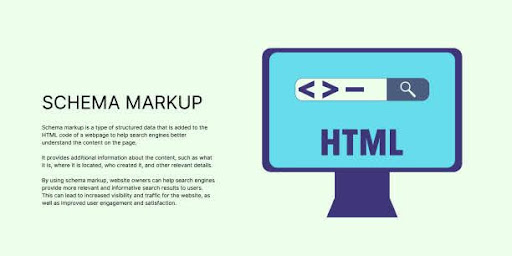
Schema Markup Banner on Light Background. Stylish SEO Banner with Black Text and Monitor Icon for Business and Marketing

Photo credits: Ayaz on iStock 

Is Structured Data Markup the same as Schema Markup?

No, structured data markup is not the same as schema markup, although often used interchangeably, they are closely related. 

Schema markup is a specific type of structured data, using the standardized vocabulary from Schema.org to help search engines properly understand and categorize content and context.

Structured data is the broader concept, referring to any code that organizes information for search engines, which schema markup is the most common implementation of. 

How Structured Data for SEO Works

Here’s a breakdown of how structured data for SEO works:

1. Choosing the Right Schema Type

First begin by identifying the type of content you have (e.g., a recipe, a product, a service, an event).

Schema.org provides a wide number of schema types, each with identical properties relevant to that content. 

For example, a recipe might have properties for ingredients, cooking time, and calorie count.

2. Adding the Markup

After identifying the schema type, you embed the structured data directly into your webpage’s HTML code.

The most common formats for this are JSON-LD (JavaScript Object Notation for Linked Data) and Microdata. JSON-LD is generally recommended as it’s easier to implement and maintain.

3. Search Engine Processing

When search engines crawl your website, they encounter this structured data and then process it to gain a deeper understanding of your content.

4. Enabling Rich Results

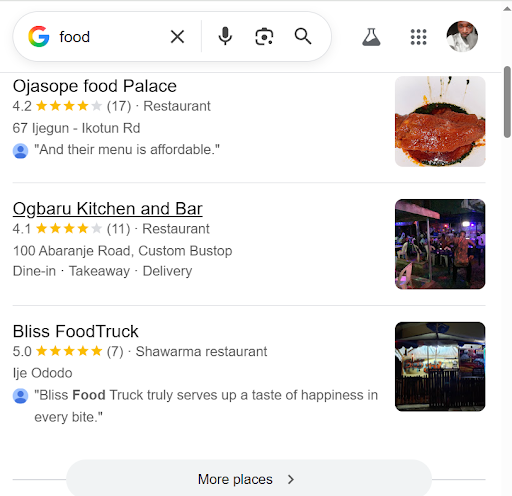
This allows search engines to display your content in more informative and visually appealing ways in search results, known as “Rich results” or “Rich snippets.”

Examples include: star ratings for reviews, images for recipes or products, event dates, and more. 

These rich results can significantly improve the visibility and click-through rate of your pages in search.

Local-rich-result-page

Photo by SARMLife

Importance of structured data for SEO

Here are some of the key benefits or importance of Structured Data in SEO:

1. Improved search engine understanding

Structured data acts as a translator, helping search engine crawlers clearly understand the context and meaning of your content.

Without it, crawlers rely heavily on assumptions, trying to interpret headings, keywords, and page structure to figure out what your content actually means. With structured data markup (like Schema.org), you remove that guesswork completely.

You’re no longer just saying, “this is a product page” or “this is an article.” You’re explicitly defining elements like product name, price, author, FAQs, events, and more. 

This clarity strengthens semantic SEO by helping search engines connect entities, relationships, and intent behind your content.

The result? 

Better indexing, more accurate categorization, and stronger alignment with search intent. Instead of hoping Google understands your page, you’re creating a structure where Google and AI models have no choice but to understand your page.

2. Improved search visibility

Visibility today goes beyond ranking on page one, it’s about how you appear. 

Structured data for SEO helps your website appear in more prominent and creative ways in search results like rich results, knowledge panels, and AI Overviews. This increases the number of touchpoints users have with your brand.

This means your content can take up more real estate on the SERP (Search Engine Results Page), pushing competitors further down. 

search-visibility

Photo by Arkan Perdana on Unsplash

3. Rich snippets and results

One of the most immediate benefits of structured data for SEO is eligibility for rich snippets. These are enhanced listings that go beyond the basic title, URL, and meta description.

Think star ratings, product prices, availability status, event dates, recipe cook times, or even FAQ dropdowns directly in search results. These additional elements give users more information before they even click.

4. Increased click-through rates (CTR)

When your presence in search results looks more informative and engaging, users are naturally more inclined to click. 

That’s where structured data for SEO directly influences user behavior.

Rich snippets create a stronger first impression. A listing with reviews, pricing, or quick answers feels more trustworthy and complete compared to a plain blue link. It reduces uncertainty and answers key questions upfront.

This leads to higher click-through rates (CTR), even if your ranking position stays the same. Over time, improved CTR sends positive engagement signals to search engines, reinforcing the relevance of your page and increasing rankings.

5. Better performance in voice and AI search

Search is evolving rapidly toward conversational queries and AI-generated responses. Structured data for SEO plays a critical role in this shift.

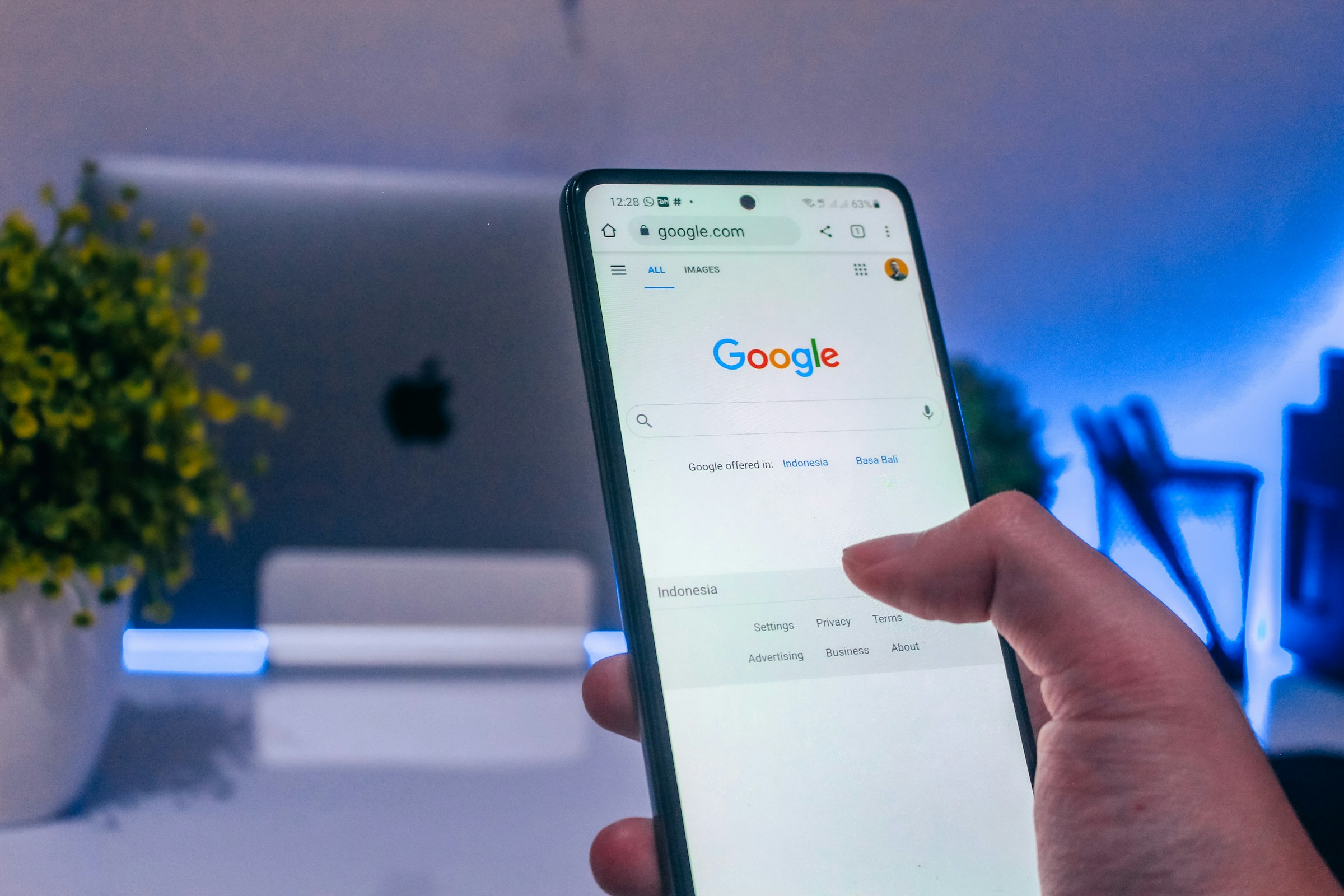
Voice-search-on-Google

Photo by sarah b on Unsplash

Voice assistants and AI-driven search systems rely heavily on structured, machine-readable data to deliver accurate answers. When your content is clearly marked up, it becomes easier for these systems to extract precise information and present it in voice results, featured snippets, or AI summaries.

It enables them to understand your content’s context, which is crucial for voice search queries and for AI-driven search features that rely on deep semantic understanding.

In other words, structured data positions your content not just for traditional search, but for the future of search, where context and semantic understanding drive visibility.

6. Potential for higher rankings

While structured data for SEO is not a direct ranking factor, the visibility and CTR benefits from structured data can indirectly lead to higher rankings when search engines see your content as more relevant and useful.

Better visibility leads to more impressions. Rich snippets lead to higher CTR. Higher CTR and engagement signal relevance and usefulness to search engines. 

Over time, these factors can contribute to improved rankings.

It’s a compounding effect. 

7. Accurate local and brand information

Structured data helps search engines build a clearer, more reliable understanding of your brand.

By defining key details like business name, location, operating hours, services, and contact information, you contribute to a more accurate knowledge graph.

With structured data for SEO, your business is more likely to appear with consistent and correct information across search features like knowledge panels and local search results.

This is especially critical for local SEO.

8. Enhanced Crawl Efficiency

Search engines allocate a limited crawl budget to every website. The easier it is for them to understand your content, the more efficiently they can crawl and index your pages.

Structured data for SEO streamlines this process by clearly defining what each page is about. Instead of spending time interpreting ambiguous content, crawlers can quickly process and categorize your pages.

This improved efficiency can be especially beneficial for larger websites, where faster indexing and better prioritization can directly impact visibility and performance.

9. An Edge Over Competitors

Despite its impact, many websites still underutilize structured data. That gap creates an opportunity.

By implementing structured data for SEO, you position your content to outperform competitors who rely solely on traditional optimization. Your listings become more engaging, more informative, and more aligned with how modern search works.

In competitive niches, small advantages compound quickly. Better visibility leads to more clicks. More clicks lead to stronger signals. Stronger signals lead to better performance.

And while others are still catching up, you’re already ahead.

website-codes

Photo by Nathana Rebouças on Unsplash

How to add Structured Data to your Website

There are different ways you can add structured data to your website depending on your technical level, CMS, and how much control you have over your site.

1. Add JSON-LD Markup (JavaScript Object Notation for Linked Data)

This is the most recommended method for adding structured data to your website. It allows you to add structured data as a script in your page’s <head> or body without interfering with visible content.

It’s clean, flexible, and preferred by search engines because it separates structured data from your HTML design. 

You can define key elements like articles, products, FAQs, events, and more clearly telling search engines what each page represents.

2. Use CMS Plugins and Built-In Tools

This is the easiest way to include structured data on your website and pages. 

If your website runs on a CMS like WordPress, you don’t need to manually write code to benefit from structured data for SEO.

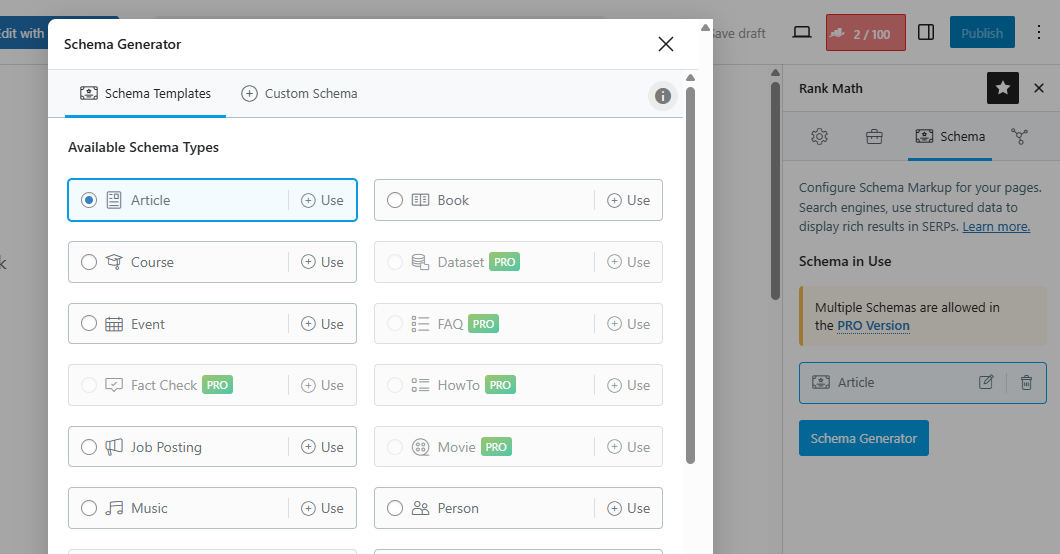
Plugins like Yoast SEO, Rank Math, or Schema Pro allow you to automatically generate structured data for different page types.

These tools simplify the process by letting you select schema types (like articles, products, or FAQs) and fill in fields through a user-friendly interface. It’s the fastest way to implement structured data without technical complexity.

Rank-Math-Schema-Generator

Photo by SARMLife

3. Use Google’s Structured Data Markup Helper

For beginners, Google Structured Data Markup Helper offers a guided way to generate structured data.

You simply paste your page URL, highlight elements (like titles, images, prices), and the tool generates the corresponding markup for you. While it’s not as scalable as other methods, it’s a great starting point to understand how structured data for SEO works in practice.

4. Implement Schema Directly in HTML (Microdata)

Another method is adding structured data directly into your HTML using microdata. This involves embedding tags within your existing content to define specific elements.

While this approach works, it can get messy especially for larger websites because it mixes structured data with your front-end code. Compared to JSON-LD, it’s less flexible and harder to maintain.

That’s why most modern SEO strategies prioritize cleaner implementations.

5. Validate and Test Your Structured Data

Adding structured data is only half the job, validation is what ensures it actually works.

Tools like Google Rich Results Test and Schema Markup Validator help you check for errors, confirm eligibility for rich results, and ensure your markup is properly implemented.

This step is critical. 

Even small errors can prevent your structured data from being recognized, which means you miss out on the full SEO benefits.

Backend-codes
Developer or Programmer’s text editor showing SQL Structured Query Language code on computer monitors with Database and server room background. Computer courses, Training, Learning, Database Backup.

Photo credits: islander11 on iStock 

Final Thoughts

Although not a direct Google ranking factor yet, structured data for SEO is one of the most effective and proven ways to boost your website’s visibility and SEO performance.

Whether it’s a product, article, recipe, business, event, or review, through organized, easy-to-read information to your site’s HTML, you help search engines clearly understand your content.

This allows Google to display your pages as rich results, such as star ratings, FAQs, images, product details, and more, which naturally improves your search visibility and click-through rates.

Schema markup, the most popular form of structured data, uses Schema.org vocabularies to label your content accurately.

When used correctly (usually with JSON-LD), it enhances indexing, supports voice and AI search, boosts local SEO, strengthens brand knowledge panels, and gives you a competitive edge since many websites still don’t use it.

Overall, the importance of structured data for SEO depends greatly on how it can improve search engine understanding, make crawling efficient, and make your content more engaging in search results.

With the right schema type, proper formatting, and careful testing, structured data markup can significantly improve how users find and interact with your website.

Get our AI SEO service that captures the benefits of structured data for SEO and offers Basic schema & structured data setup, content structure optimization for AI summaries, and so on.


READ MORE: CRAWLABILITY OF A WEBSITE: 7 CRITICAL ISSUES THAT BLOCK BOTS – SARMLife – Best SEO Company | Jacksonville, Florida 

CRAWLABILITY OF A WEBSITE

CRAWLABILITY OF A WEBSITE: 7 CRITICAL ISSUES THAT BLOCK BOTS

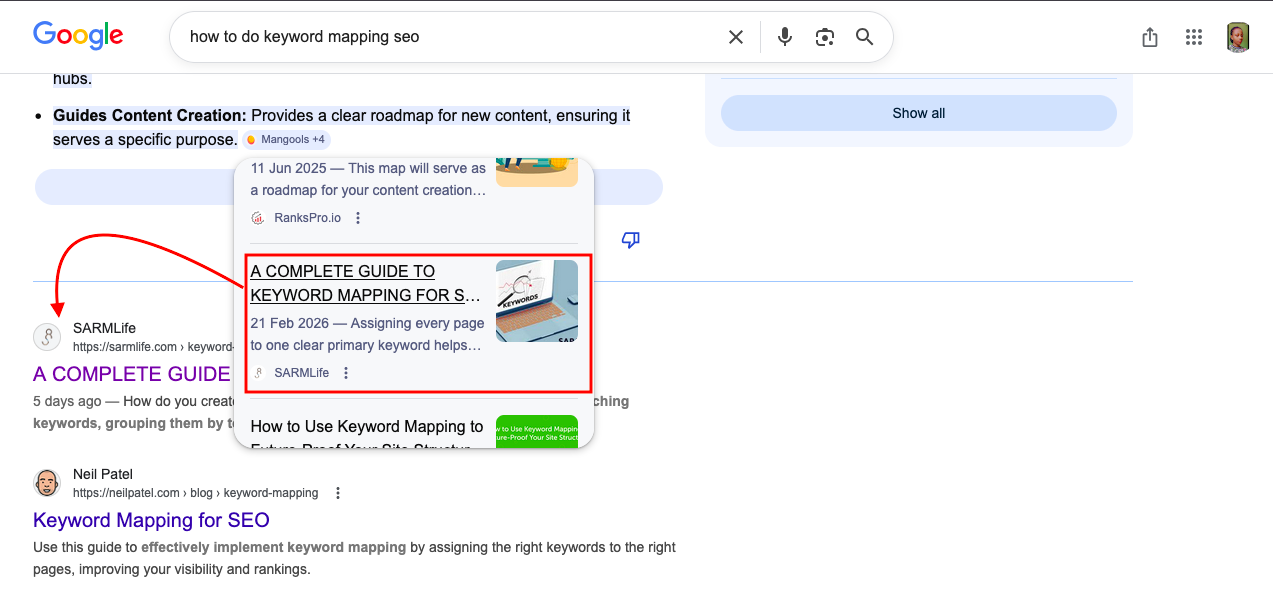
A few weeks ago, I published an optimized blog post that I was confident would perform well in search results. The content was solid, the on-page SEO was properly structured, and everything looked ready to rank. But after a few days, I searched for the post and realized something was wrong. I couldn’t find the page anywhere on the SERPs.

When I checked the indexing report in Google Search Console, I discovered that the URL was not on Google, which meant the page had not been crawled or indexed yet.

I submitted the URL manually for crawling and indexing, and within five days, the page started gaining visibility. It appeared on page one, was cited in AI Overviews, and even showed up in Google Images.

SARMLife-Keyword-Mapping-post-in-AI-Overview-after-5-days

That experience reinforced something many website owners overlook. No matter how well a page is optimized, it cannot rank if search engines cannot properly access it. This is where the crawlability of a website becomes critical.

The crawlability of a website determines how easily search engines can discover, access, and understand the pages on your site.

Search engines like Google rely on automated bots called crawlers to scan websites and index their content. If those crawlers struggle to navigate your pages, important content may never appear in search results.

When technical issues block crawlers or make navigation difficult, search engines may miss valuable pages. This can limit your visibility even if your content is high quality.

Improving the crawlability of a website ensures that search engines can properly explore your content, understand your site structure, and include your pages in relevant search results.

At SARMLife, improving crawlability is often one of the first steps in our technical SEO audits because even the best content strategies struggle to perform.

What Is the Crawlability of a Website?

The crawlability of a website refers to how easily search engine crawlers can discover and access the pages on a site.

Search engines like Google use automated bots to scan websites and follow links between pages. If those crawlers encounter blocked pages, broken links, slow loading speeds, or confusing site structures, they may struggle to explore the site properly.

When crawlability is strong, search engines can efficiently navigate the website, understand its content, and index important pages.

When crawlability is weak, some pages may never appear in search results even if the content is valuable.

RELATED BLOG POSTS

Why Crawlability Matters for SEO

The crawlability of a website directly affects how well search engines can index and rank your pages.

If crawlers cannot access important content, that content cannot appear in search results.

Good crawlability helps search engines:

  • Discover new pages faster
  • Understand website structure
  • Update search indexes efficiently
  • Allocate crawl budget effectively

For this reason, improving crawlability is a core part of technical SEO optimization.

crawlability of a website

Photo by Growtika on Unsplash

How the Crawlability of a Website Works

Before a page appears in search results, it usually goes through three key stages: crawling, indexing, and ranking.

The process begins when a search engine crawler discovers a page. This discovery often happens through:

  • Internal links
  • Backlinks from other websites
  • Submitted XML sitemaps

Once a crawler lands on a page, it scans the content and follows the links it finds. In doing so, it gradually builds a map of your website’s structure.

However, crawlers also follow specific instructions provided by the website. Files like robots.txt, meta directives, and canonical tags help search engines understand which pages they should crawl and which ones they should ignore.

If the crawlability of a website is strong, search engines can easily navigate through the entire site and index important pages. But when technical barriers exist, crawlers may stop exploring early or fail to reach deeper pages.

This is why improving crawlability is a critical part of technical SEO services and website optimization strategies.

7 Factors That Can Affect the Crawlability of a Website

Several technical and structural issues can interfere with how search engines crawl your site. 

Understanding these factors helps you identify and fix problems before they affect your search visibility.

Here are some common factors that can affect the crawlability of your website:

1. Broken Links (404 Errors)

Broken links act like dead ends for search engine crawlers.

When a crawler follows a link that leads to a 404 error page, the exploration path stops there. If many broken links exist across a website, crawlers may struggle to discover deeper pages.

Broken links are often caused by:

  • deleted pages
  • incorrect URL formatting
  • outdated content
  • website migrations
  • typing errors in internal links

Over time, a large number of broken links can weaken the crawlability of a website and reduce overall SEO performance.

Regular site audits help identify and fix these errors before they accumulate.

404-error-code

Photo by visuals on Unsplash

2. Incorrect Robots.txt Rules

The robots.txt file acts as a guide for search engine crawlers. It tells them which sections of a website they are allowed to access and which ones they should avoid.

When configured properly, robots.txt helps search engines focus on important content. However, incorrect settings can accidentally block valuable pages from being crawled.

For example, a misconfigured rule could prevent search engines from accessing:

  • blog posts
  • product pages
  • category pages
  • service pages

When this happens, the crawlability of a website suffers because search engines cannot properly explore the site.

3. Poor Site Structure

Poor website structure can affect how easily crawlers navigate your pages.

If your website has too many layers or confusing navigation paths, crawlers may struggle to find important content.

Ideally, pages should be organized within a clear hierarchical structure, allowing both users and search engines to move logically from one section to another.

A well-structured website usually includes:

  • logical navigation menus
  • organized categories
  • strong internal linking
  • shallow click depth

Improving site architecture not only strengthens the crawlability of a website but also improves user experience and SEO performance.

This is why site structure optimization is a core part of SARMLife’s technical SEO and website design/optimization services.

4. Server Errors

Server errors occur when a website fails to properly respond to a crawler’s request.

These errors usually appear as 5xx status codes, which indicate that something went wrong on the server side.

Common causes include:

  • server overload
  • hosting configuration problems
  • maintenance issues
  • software conflicts

If server errors occur frequently, crawlers may temporarily stop visiting the website. This prevents pages from being crawled or updated in search indexes.

Stable hosting infrastructure and regular monitoring are essential for maintaining the crawlability of a website.

5. Redirect Chains and Redirect Loops

Redirects are useful when moving or updating pages, but they can cause problems when overused.

A redirect chain occurs when a URL redirects to another URL, which then redirects again to another page.

A redirect loop happens when pages redirect endlessly between each other.

Both issues confuse crawlers and waste crawl resources. Instead of reaching the final page quickly, crawlers must follow multiple steps, which reduces efficiency.

To protect the crawlability of a website, redirects should be minimized and always point directly to the final destination.

6. Slow Page Load Speed

Page speed is important not only for users but also for search engines.

Search engine crawlers have a limited amount of time and resources when scanning websites. This is often referred to as the crawl budget.

When pages load slowly, crawlers spend more time processing each page. As a result, fewer pages are crawled during each visit.

Improving site speed helps search engines crawl more content and improves the crawlability of a website overall.

Performance improvements may include:

slow-page-load-speed

Photo by Myriam Jessier on Unsplash

7. Duplicate and Thin Content

Duplicate content occurs when the same or very similar information appears on multiple pages.

When this happens, search engines struggle to determine which version of the page should be indexed and ranked. This confusion can weaken link equity and reduce crawl efficiency.

Thin content presents a different challenge. Pages with very little useful information provide limited value, so search engines may crawl them less frequently.

Maintaining high-quality, unique content across your website improves both search visibility and the crawlability of a website.

How to Improve the Crawlability of a Website

Improving the crawlability of a website usually involves a combination of technical optimization and structural improvements.

Some effective strategies include:

  • Submitting an optimized XML sitemap
  • Strengthening internal linking
  • Fixing broken links and redirect chains
  • Improving site speed and performance
  • Configuring robots.txt correctly
  • Optimizing for mobile-first indexing
  • Implementing structured data
  • Performing regular technical SEO audits

Many of these improvements are typically handled during a technical SEO audit, which evaluates how search engines interact with your website.

Final Thoughts

The crawlability of a website plays a foundational role in SEO because search engines cannot rank pages they cannot properly access.

Issues like broken links, server errors, redirect loops, poor site structure, and slow page speed can all prevent crawlers from discovering important content.

By fixing technical errors, improving site architecture, and monitoring crawl performance regularly, you make it easier for search engines to explore your website and index the pages that matter most.

Over time, strengthening the crawlability of a website leads to better visibility, faster indexing, and stronger overall search performance.

If you want to identify crawlability issues on your site, the team at SARMLife can perform a technical SEO audit to uncover hidden problems and help ensure search engines can fully access and understand your website.

Frequently Asked Questions

  1. What is the difference between crawlability and indexability?

    The crawlability of a website refers to how easily search engines can access and explore its pages. Indexability refers to whether those pages are allowed to be stored in a search engine’s index.
    A page must first be crawled before it can be indexed.

  2. How do I check the crawlability of a website?

    You can evaluate the crawlability of a website using tools such as:
    Google Search Console
    Screaming Frog SEO Spider
    Ahrefs Site Audit
    Semrush Site Audit
    These tools identify crawl errors, broken links, blocked pages, and technical issues that may prevent search engines from accessing your content.

  3. What blocks search engine crawlers from accessing a website?

    Several technical issues can prevent crawlers from accessing pages, including:
    – Incorrect robots.txt rules
    – Broken internal links
    – Redirect loops
    – Server errors
    – Slow page loading speed
    – Poorly structured navigation
    Fixing these issues helps improve the crawlability of a website and increases the likelihood of pages being indexed.

  4. Does page speed affect crawlability?

    Yes. Slow pages can reduce the crawl budget search engines allocate to your website.
    If pages take too long to load, crawlers may scan fewer pages during each visit, which can delay indexing.

READ MORE: INTERNAL LINKING FOR SEO – 9 BEST PRACTICES AND TIPS – SARMLife 

HOW-TO-REDUCE-YOUR-BOUNCE-RATE

HOW TO REDUCE YOUR BOUNCE RATE: 9 PROVEN FIXES IN 2026 

Understanding how to reduce your bounce rate has become one of the most important skills for website owners and marketers today.

Bounce rate is no longer just a metric sitting inside an analytics dashboard. It reflects something much deeper. It shows whether your website loads quickly, communicates value clearly, satisfies the visitor’s intent, and encourages them to continue exploring your content.

When bounce rate decreases, engagement improves. Visitors stay longer, interact with more pages, and are far more likely to convert into leads or customers.

Search engines are also paying closer attention to user behavior. Platforms like Google increasingly evaluate how people interact with pages after clicking a result. If users leave immediately, it can signal that the page did not meet their expectations.

That is why learning how to reduce your bounce rate is closely connected to improving search visibility, increasing conversions, and building a website that truly serves your audience.

RELATED POSTS

What is Bounce Rate?

Bounce rate refers to the percentage of visitors who land on a page and leave without taking another action.

This means they do not:

  • Click to another page
  • Scroll deeply
  • Fill out a form
  • Watch a video
  • Interact with any element on the page

Essentially, they arrive and then exit.

For example, if 100 visitors land on a page and 60 leave without interacting further, the bounce rate would be 60%.

In modern analytics tools like Google Analytics 4, bounce rate is closely tied to engagement rate, which measures whether a session lasts longer than 10 seconds, includes multiple page views, or triggers a meaningful interaction.

Because of this shift, understanding how to reduce your bounce rate is no longer about forcing users to click randomly. It is about creating content and experiences that naturally keep them engaged.

What is a Good Bounce rate?

Bounce rate varies depending on the type of website, industry, and user intent.

For example, a blog post answering a quick question may naturally have a higher bounce rate because the visitor finds the answer and leaves.

However, transactional pages or service pages usually aim for deeper engagement.

Bounce RateInterpretation
25–40%Excellent engagement
40–55%Average for many websites
55–70%Needs improvement
70%+Potential usability or content issues

Instead of focusing on the number alone, it is more useful to analyze why visitors leave.

Once you understand the reasons, you can apply targeted strategies on how to reduce your bounce rate and keep visitors exploring your site longer.

How is your bounce rate measured in 2026?

Google Analytics (GA4) completely redefined bounce rate. Instead of counting a “bounce” simply as a single-page visit, GA4 calculates bounce rate as the inverse of Engagement Rate.

This means a session is considered engaged if it lasts longer than 10 seconds, includes a conversion event, or records at least two page views.

As a result, understanding how to reduce your bounce rate now focuses more on improving user engagement rather than just forcing additional page clicks.

Why do visitors bounce your website?

Before discussing how to reduce your bounce rate, it is important to understand the common reasons users leave quickly.

Some of the most common causes include:

Slow Page Load Speed 

In 2026, 53% of mobile users abandon a website if it takes longer than three seconds to load. Even a one-second delay can reduce customer satisfaction and trigger instant distrust and frustration.

Increasing the page speed of your website can directly impact the bounce rate significantly.

SARMLife - Best SEO Company | Jacksonville, Florida

Photo by Mike van den Bos on Unsplash

Poor Mobile Experience

About 60% of all web searches now happen on phones. Sites that have tiny buttons which are hard to tap or text that forces horizontal scrolling are not optimized for mobile devices.

This will put users off, and no matter how valuable your website/content is, they will likely not stay and move on to other websites.

Irrelevant or Misleading Content 

If someone searches for “best local bakery” and lands on a page selling wholesale flour, they leave instantly. This is a search intent mismatch.

When creating content for your pages, it is important for you to do an intent research to help you understand the primary and secondary intent of the keyword, and optimize based on it.

When the intent is satisfied, engagement increases but if not, bounce rates spike and visibility falls.

Confusing Navigation / Poor UX Design 

About 61% of users abandon websites with confusing navigation. If completing a task requires too many steps, 67% of users leave.

People don’t want to think about where to go, they want the site to guide them.

Messy menus, hidden links, or unclear paths are going to keep people away from your website.

Intrusive Pop-Ups / Ads 

Here is the truth: if your Ads or pop-ups are going to affect a user’s interaction with your content, take them off!

Aggressive monetization destroys the reading flow.

Users don’t separate ‘content’ from ‘ads’, they judge the experience as one thing. If that experience feels hostile, they will close the tab.

pop-up-ads

Photo by Julian Hochgesang on Unsplash

Low-Quality or Unengaging Content

Readability is the foundation of trust. Thin copy, generic stock text, or dull visuals signal low value, and visitors won’t stay to read.

Technical Errors (404s, broken links, etc.)

We’ve all experienced it; you try to tap a button, then an ad loads, the page jumps, it led you to a different page, and you end up leaving the site. 

Broken pages, missing images, and server errors instantly destroy trust and drive people away from your site.

If your website has any of these issues, get it fixed as soon as possible. Remember, a single broken page can undo months of optimization.

9 Proven Ways to Reduce your Bounce Rate

Now, let’s explore the strategies that consistently help websites improve engagement and reduce bounce.

1. Improve Page Load Speed

One of the fastest ways to increase bounce rate is to increase page loading speed.

Research shows that users expect websites to load within a few seconds. When pages take too long, many visitors leave before the content even appears.

Improving speed is therefore one of the most effective ways to reduce your bounce rate.

Some simple improvements include:

  • Compressing large images
  • Using quality image formats ike AVIF
  • Enabling browser caching
  • Reducing unnecessary CSS and JavaScript
  • Using a reliable hosting provider
  • Activating lazy loading for lower pages
  • Implementing a content delivery network (CDN)

Faster pages reduce frustration and allow visitors to immediately engage with your content.

user-generated-content

Photo by Walls.io on Unsplash

2. Match Your Content with Search Intent

Many websites experience high bounce rates because the content does not match what users expected when they clicked the search result.

For example, if a user searches for “how to reduce your bounce rate” but lands on a page that only explains what bounce rate is, they may leave quickly.

To reduce bounce rate, your content must clearly satisfy the intent behind the search query.

This means:

  • Answering the main question early
  • Structuring content logically
  • Delivering the value promised in the headline

When visitors feel that the page immediately solves their problem, they are more likely to continue reading and exploring.

3. Improve Readability and Content Structure

Even valuable information can cause visitors to bounce if the page is difficult to read. Large blocks of text create friction and make it harder for users to quickly scan the content.

Improving readability is an important step when learning how to reduce your bounce rate.

Best practices include:

  • Short paragraphs
  • Clear subheadings
  • Bullet points
  • Visual spacing
  • Relevant images or illustrations

These elements make content easier to navigate and encourage visitors to stay longer.

4. Optimize for Mobile Users

Mobile traffic now represents the majority of web visits globally. If a website is difficult to use on smaller screens, visitors often leave within seconds.

Optimizing for mobile is therefore essential when improving bounce rate. Important mobile improvements include:

  • Responsive design
  • Easy-to-tap buttons
  • Readable text sizes
  • Fast mobile loading speeds
  • Minimal intrusive pop-ups

When users can navigate your site comfortably on any device, engagement naturally increases.

5. Improve Site Navigation & Page Structure

Visitors often leave when they feel lost or unsure where to go next. 

A clear page structure helps guide users through your website and encourages them to explore more content. 

When navigation is simple and logical, visitors can easily find related information, which naturally helps reduce your bounce rate and improve engagement.

SARMLife - Best SEO Company | Jacksonville, Florida

Photo by NEW DATA SERVICES on Unsplash

How to Improve your Page Structure and Navigation:

  • Simplify your menus so key pages are easy to find
  • Add breadcrumbs to help users understand where they are on your site
  • Show related content to encourage further reading
  • Group similar articles into topic clusters
  • Ensure important pages are reachable within two clicks

6. Use Clear Calls-to-Action

Another reason why visitors bounce websites is because they are unsure what to do next. Clear calls-to-action (CTAs) guide them toward the next step in their journey.

A strong CTA could invite visitors to:

  • Read another related article
  • Download a resource
  • Contact your team
  • Explore a service page

You can use action-focused wording and micro CTAs. When used correctly, CTAs help reduce bounce rate by turning passive readers into active participants.

They also help reinforce the purpose of your content and move visitors closer to conversion.

7. Reduce Annoying Pop-Ups & Improve Readability

Intrusive pop-ups and cluttered layouts can quickly push visitors away, especially on mobile devices. 

When users land on a page and immediately face interruptions, they are more likely to leave instead of engaging with the content.

If you are looking for how to reduce your bounce rate, creating a smooth reading experience is essential. 

Pages should load cleanly, remain visually stable, and allow visitors to focus on the content without distractions. 

How to Improve Readability and Reduce Annoying Pop-Ups

  • Replace aggressive pop-ups with inline calls-to-action
  • Use exit-intent pop-ups sparingly
  • Improve typography, contrast, and spacing for easier reading
  • Minimize layout shifts to keep the page visually stable

8. Improve Visual Engagement

Visual elements help capture attention and break up long sections of text. Pages that rely entirely on text can feel overwhelming and cause users to leave quickly.

Adding visuals such as:

  • Infographics
  • Charts
  • Screenshots
  • Videos
  • Illustrations

can significantly increase engagement.

When visuals support the content rather than distract from it, they make information easier to understand and keep visitors interacting with the page longer.

9. Enhance Internal Linking

Internal linking helps visitors move naturally from one page to the next instead of hitting a dead end. Your internal links guide them towards the next piece of relevant content.

Without them, visitors may finish reading a section and leave simply because they do not know where to go next.

Strategic internal linking helps reduce bounce rate by extending the visitor’s journey.

For example, a blog post about how to reduce your bounce rate could naturally link to related topics such as:

  • Page speed optimization
  • Landing page optimization
  • Content engagement strategies

Each link creates another opportunity for deeper engagement.

How do you Enhance Internal linking and Use Analytics:

how-to-reduce-your-bounce-rate

Photo by ChatGPT

Final Thoughts

Learning how to reduce your bounce rate is not about manipulating analytics metrics. It is about building a website experience that genuinely keeps visitors interested.

When your pages load quickly, answer the right questions, guide visitors through clear navigation, and present information in a readable way, people naturally stay longer.

Reducing bounce rate ultimately comes down to removing friction. The easier it is for visitors to find value, the more likely they are to explore additional pages, interact with your content, and trust your brand.

Over time, these improvements compound. Engagement grows, conversions increase, and your website becomes the kind of resource both users and search engines are more likely to recommend.

Need hands-on help? SARMLife offers personalized packages to take your site from high-bounce to high-engagement.

Check out SARMLife’s services here.

FAQS on how to reduce your bounce rate

Can I reduce bounce rate without a full redesign?

Yes, you can reduce bounce rate without a full redesign. Changes to site speed, content structure, CTAs, and Ads reduce bounce rate significantly without the need to redesign.

Does bounce rate directly affect SEO rankings?

Bounce rates indirectly affect SEO rankings as Search engines use engagement signals and bounce rates as reflectors of user experience which is crucial to rankings.

Which pages need the most attention for bounce rate optimization?

The pages that need the most attention are your high-traffic and conversion pages. For example, your landing pages, blog posts and product pages (for eCommerce websites).

What tool should I use to track bounce and user behavior?

The tools you can use to track bounce rates and user behavior are Google Analytics 4 and complementary tools with heatmap analysis like Hotjar, Microsoft Clarity, etc.

READ MORE: HOW TO QUICKLY IMPROVE PAGE SPEED FOR YOUR WEBSITE